Complex analytical queries that involve multi-table joins, subqueries, aggregations, and sorting take a long time on the PostgreSQL row store: three of the 22 queries in this TPC-H SF100 test (Q9, Q17, and Q20) time out on the row store. The columnstore index (syntax name csi, also known as IMCI) is designed for such queries. This topic uses the data tables of TPC-H SF100 (100 GB) and 22 standard SQL queries as an example to describe the complete and reproducible procedure from data preparation and columnstore index creation to query execution and result comparison. In the test, the columnstore indexes take 14.784 seconds in total, whereas the PostgreSQL row store with default parameters takes more than 2006 seconds. The speedup calculated based on the total execution time is greater than 135x, and the speedup of a single query ranges from 7x to 1168x.
Test content and data volume
TPC-H is a widely used industry-standard performance benchmark developed and published by the TPC to evaluate the analytical capabilities of databases. The columnstore index query test uses 8 data tables and executes 22 complex SQL queries, covering single-table statistics, multi-table joins, subqueries, aggregations, and sorting. The test data volume is TPC-H SF100 (100 GB of data).
The TPC-H implementation in this topic is based on TPC-H benchmarking. These test results cannot be compared with published TPC-H benchmark results because the tests do not fully meet all TPC-H requirements.
Test environment
The test environment is configured as follows:
-
PolarDB for PostgreSQL cluster:
-
Database engine: PostgreSQL 14.
-
Product edition: Enterprise Edition, dedicated specifications.
-
Node specification: 32 cores, 256 GB.
-
Environment preparation
Before you start the test, make sure that the following requirements are met. Generating the test data takes approximately 30 minutes, and creating the columnstore indexes in a single-threaded serial manner takes approximately 39 minutes. Reserve the test time accordingly.
-
The ECS instance and the PolarDB cluster reside in the same VPC.
-
On the PolarDB for PostgreSQL cluster, a privileged account (create a privileged account) and the test database (create the test database)
tpchdbhave been created. -
You have logged on to the ECS instance.
-
The TPCH tool dbgen.tar.gz has been downloaded and uploaded to the ECS instance.
Data preparation
Data preparation includes compiling the TPCH tool, generating the test data, and importing the data into the test database tpchdb. Perform the following steps in order:
-
Decompress and compile the dbgen tool.
# Decompress tar -zxvf dbgen.tar.gz # Compile cd./dbgen make -f makefile.suite -
Use the TPCH tool to generate 100 GB of test data. The expected execution time is approximately 30 minutes.
# Change to the dbgen directory ./dbgen -s 100 -f -
Make sure that you are in the
dbgendirectory.pwdshould return/<installation_path>/dbgen.# Confirm the current directory pwd -
On the ECS instance, use the database connection tool provided by PolarDB (PolarDB-Tools) to connect to your cluster from the command line. The target database is
tpchdb./u01/polardb_pg_tools/bin/psql -h <cluster_endpoint> -p <port_for_cluster_endpoint> -U <privileged_account> -d tpchdb -
Import the test data.
\i./dss.ddl \copy part from./part.tbl with delimiter as '|' NULL ''; \copy region from./region.tbl with delimiter as '|' NULL ''; \copy nation from./nation.tbl with delimiter as '|' NULL ''; \copy orders from./orders.tbl with delimiter as '|' NULL ''; \copy customer from./customer.tbl with delimiter as '|' NULL ''; \copy lineitem from./lineitem.tbl with delimiter as '|' NULL ''; \copy partsupp from./partsupp.tbl with delimiter as '|' NULL ''; \copy supplier from./supplier.tbl with delimiter as '|' NULL ''; -
Verify the import results of the eight tables. The row count of each table must match the row count listed in the Columnstore index disk space section (866,037,932 rows in total). If a table fails to be imported, re-import the data of that table before you perform the subsequent steps.
Enable and create columnstore indexes
-
Based on your PolarDB for PostgreSQL cluster version, enable the columnstore index feature.
-
Create columnstore indexes for the eight test tables.
-- partsupp table ALTER TABLE PARTSUPP ADD CONSTRAINT partsupp_pkey PRIMARY KEY (PS_PARTKEY, PS_SUPPKEY); CREATE INDEX imps ON partsupp USING csi(ps_partkey, ps_suppkey, ps_availqty, ps_supplycost, ps_comment); -- part table ALTER TABLE PART ADD CONSTRAINT part_kpey PRIMARY KEY (P_PARTKEY); CREATE INDEX im_p ON part USING csi(p_partkey, p_name, p_mfgr, p_brand, p_type, p_size, p_container, p_retailprice, p_comment); -- supplier table ALTER TABLE SUPPLIER ADD CONSTRAINT supplier_pkey PRIMARY KEY (S_SUPPKEY); CREATE INDEX im_s ON supplier USING csi(s_suppkey, s_name, s_address, s_nationkey, s_phone, s_acctbal, s_comment); -- customer table ALTER TABLE CUSTOMER ADD CONSTRAINT customer_pkey PRIMARY KEY (C_CUSTKEY); CREATE INDEX im_c ON customer USING csi(c_custkey, c_name, c_address, c_nationkey, c_phone, c_acctbal, c_mktsegment, c_comment); -- orders table ALTER TABLE ORDERS ADD CONSTRAINT orders_pkey PRIMARY KEY (O_ORDERKEY); CREATE INDEX im_o ON orders USING csi(o_orderkey, o_custkey, o_orderstatus, o_totalprice, o_orderdate, o_orderpriority, o_clerk, o_shippriority, o_comment); -- lineitem table ALTER TABLE LINEITEM ADD CONSTRAINT lineitem_pkey PRIMARY KEY (L_ORDERKEY, L_LINENUMBER); CREATE INDEX im_l ON lineitem USING csi(l_orderkey, l_partkey, l_suppkey, l_linenumber, l_quantity, l_extendedprice, l_discount, l_tax, l_returnflag, l_linestatus, l_shipdate, l_commitdate, l_receiptdate, l_shipinstruct, l_shipmode, l_comment); -- nation table ALTER TABLE NATION ADD CONSTRAINT nation_pkey PRIMARY KEY (N_NATIONKEY); CREATE INDEX im_n ON nation USING csi(n_nationkey, n_name, n_regionkey, n_comment); -- region table ALTER TABLE REGION ADD CONSTRAINT region_pkey PRIMARY KEY (R_REGIONKEY); CREATE INDEX im_r ON region USING csi(r_regionkey, r_name, r_comment); -
Make sure that the columnstore indexes of all the eight test tables are created before you execute the subsequent queries.
-
Configure the columnstore index parameters for the subsequent queries. First, in the cluster parameter settings of the console, set
polar_csi.max_parallel_workersto 32 and make the configuration take effect as prompted by the console. Then run the following commands in the session. For the values and take-effect methods of the parameters, see Columnstore index parameters.SET polar_csi.enable_query TO ON; SET polar_csi.cost_threshold TO 0;Note-
polar_csi.memory_limitis a SIGHUP parameter. After it is modified, you must reload the configuration for the modification to take effect. You cannot modify it by usingSETin the current session. To adjust the memory limit for the test, configure it in the console before you create the columnstore indexes and start the test, and complete the parameter reload or the restart of the related workers as prompted by the console. -
polar_csi.max_parallel_workerswas namedpolar_csi.exec_parallelin early engine versions. For older engine versions that do not supportpolar_csi.max_parallel_workers, usepolar_csi.exec_parallel.PostgreSQL 14:
For version 2.0.14.20.42.0 and earlier, use
polar_csi.exec_parallel.For version 2.0.14.20.43.0 and later, use
polar_csi.max_parallel_workers.
PostgreSQL 16:
For version 2.0.16.11.15.0 and earlier, use
polar_csi.exec_parallel.For version 2.0.16.13.16.0 and later, use
polar_csi.max_parallel_workers.
-
Execute SQL queries
In the PolarDB for PostgreSQL cluster, execute the 22 complex SQL queries in sequence and collect the execution time.
-
Enable timing statistics before you execute the queries.
\timingcollects the total execution time of each SQL statement. You must enable it to collect execution time data.\timing -
Execute the 22 queries in sequence. Each query starts with
EXPLAIN ANALYZE, which outputs the execution plan and the Execution Time. The total execution time collected by\timingincludes the client round-trip overhead and differs from the Execution Time. Use a consistent metric when you collect and compare execution times, and do not mix these two metrics.
Test results
Columnstore index creation time
Test conclusion: the columnstore indexes of the eight tables are created in a single-threaded serial manner, and the total time consumption is 39 minutes. This value is the total of all the eight tables. The data volumes of the tables differ significantly (LINEITEM has 600,037,902 rows and REGION has 5 rows). Therefore, the per-table time consumption cannot be extrapolated proportionally based on the number of tables.
Columnstore index disk space
Test conclusion:
-
The PostgreSQL row store (Heap tables) occupies 126 GB.
-
Columnstore index disk space:
-
If the primary key is not included (
polar_csi.enable_pk=false), the total disk space is 25 GB, which is 20% of the PostgreSQL row store Heap tables. This mode is suitable for building columnstore indexes on static data. -
If the primary key is included (
polar_csi.enable_pk=true), the total disk space is 53 GB, which is 42% of the PostgreSQL row store Heap tables. This mode is suitable for columnstore indexes on dynamic data.
Table
Row count
PostgreSQL row store
Columnstore index (without primary key)
Columnstore index (with primary key)
LINEITEM
600,037,902
86 GB
17 GB
36 GB
ORDERS
150,000,000
20 GB
4406 MB
9052 MB
PARTSUPP
80,000,000
13 GB
3452 MB
6689 MB
PART
20,000,000
3204 MB
487 MB
634 MB
CUSTOMER
15,000,000
2808 MB
992 MB
1108 MB
SUPPLIER
1,000,000
176 MB
63 MB
72 MB
NATION
25
8 KB
528 KB
528 KB
REGION
5
8 KB
528 KB
528 KB
Total
866,037,932
126 GB
25 GB
53 GB
The itemized values in the table retain the original units of the test output (GB, MB, and KB) and are rounded. The totals are calculated based on the unrounded original values. Therefore, the sum of the itemized values may differ from the total.
-
Query performance
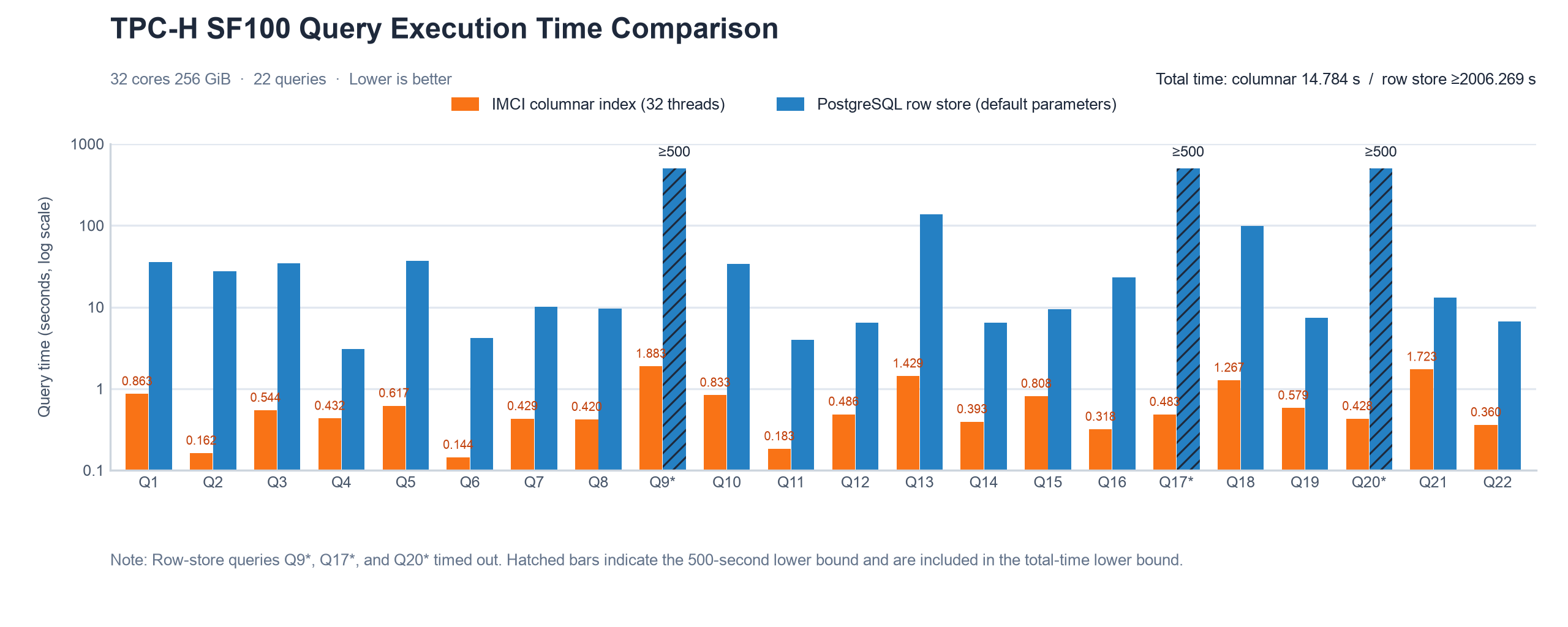
The unit is seconds. The speedup is calculated by dividing the execution time of the PostgreSQL row store with default parameters by that of the columnstore indexes. A value greater than 1 indicates that the columnstore indexes are faster. Three queries (Q9, Q17, and Q20) time out on the row store and are uniformly counted as 500 seconds in the total execution time. Therefore, the row store execution times of these three queries, the corresponding speedups, and the values in the total row are lower bounds, which are marked with ≥ in the table.
-
The parameter settings compared between the two sides are as follows:
-
Columnstore index side:
polar_csi.max_parallel_workersis set to 32 (corresponding to the 32 threads in the table header), andpolar_csi.enable_query=ONandpolar_csi.cost_threshold=0are set in the session. -
PostgreSQL row store side: default parameters, which means that no database parameters are adjusted. The actual value of each parameter is subject to the product default.
-
-
Test conclusion:
-
Total execution time of the columnstore indexes: 14.784 seconds
-
Total execution time of the PostgreSQL row store with default parameters: ≥2006.269 seconds
-
Speedup calculated based on the total execution time: ≥135.7x
Query
Columnstore index (32 threads)
PostgreSQL row store (default parameters)
Speedup
Q1
0.863
35.638
41.30
Q2
0.162
27.512
169.83
Q3
0.544
34.368
63.18
Q4
0.432
3.084
7.14
Q5
0.617
36.919
59.84
Q6
0.144
4.191
29.10
Q7
0.429
10.061
23.45
Q8
0.420
9.587
22.83
Q9
1.883
≥500
≥265.53
Q10
0.833
33.632
40.37
Q11
0.183
3.980
21.75
Q12
0.486
6.395
13.16
Q13
1.429
136.754
95.70
Q14
0.393
6.452
16.42
Q15
0.808
9.364
11.59
Q16
0.318
23.039
72.45
Q17
0.483
≥500
≥1035.19
Q18
1.267
98.083
77.41
Q19
0.579
7.447
12.86
Q20
0.428
≥500
≥1168.22
Q21
1.723
13.109
7.61
Q22
0.360
6.654
18.48
Total
14.784
≥2006.269
≥135.7
The speedups of the 22 queries span two orders of magnitude, and the benefit is directly related to the magnitude of the row store execution time. The eight queries whose row store execution time exceeds 23 seconds (Q1, Q2, Q3, Q5, Q10, Q13, Q16, and Q18) achieve speedups of more than 40x, and Q9, Q17, and Q20 time out on the row store. The 11 queries whose row store execution time is less than 14 seconds achieve speedups between 7.14x and 29.10x. Analytical queries that scan large volumes of data and involve large-scale joins and aggregations benefit the most, whereas queries that the row store can return in about ten seconds benefit relatively less. To evaluate the benefit for your business, check which of the preceding ranges the row store execution time of your business queries falls into.
-
Follow-up steps
After the test, the cluster retains 100 GB of TPC-H test data (the PostgreSQL row store occupies 126 GB) and up to 53 GB of columnstore indexes, and the ECS instance retains the .tbl data files generated by dbgen. These data continuously occupy storage space and incur fees. Clean up the data as needed:
-
Delete the TPC-H data tables and columnstore indexes from the test database
tpchdbto release the storage space occupied by the row store data and the columnstore indexes. -
In the
dbgendirectory on the ECS instance, delete the.tblfiles to release disk space.