Without a structured permission model, granting access in a PolarDB for PostgreSQL cluster quickly becomes inconsistent: users accumulate privileges over time, permission changes require updating every account individually, and cross-project access becomes hard to audit. This topic shows how to design and implement a role-based permission model that scales across projects and teams while enforcing the principle of least privilege.
How it works
PolarDB for PostgreSQL uses a User = Role + Login permissions model. Roles are permission sets — they hold privileges but cannot log in. Users are roles with login permissions attached. When a role's privileges change, all users that inherit that role pick up the change automatically.
This design lets you manage access at the role level rather than per-user, keeping permission changes consistent and reducing administrative overhead.
Permission model
A typical setup for a project or team uses four components:
One privileged account with full cluster permissions, managed exclusively by senior DBAs.
One resource owner account per project, responsible for DDL operations and schema ownership.
Two project roles per project: a read-write role and a read-only role.
Business accounts created by assigning a project role and login permissions.
When a project role's permissions change, all business accounts that inherit it are updated automatically — no additional steps required.
schema public. By default, all PostgreSQL users have CREATE and USAGE permissions on schema public.Permission planning
The following example sets up project-level permission management for a project named polardbpg. The same pattern applies to team-level management.
Setup parameters:
Privileged account:
dbsuperuserProject name:
polardbpgSchemas:
polardbpgandpolardbpg_1
Accounts and roles in this example:
| User/role | Table permissions | Stored procedure permissions |
|---|---|---|
polardbpg_owner (user) — resource owner | DDL: CREATE, DROP, ALTER DQL: SELECT DML: UPDATE, INSERT, DELETE | DDL: CREATE, DROP, ALTER DQL: SELECT and call stored procedures |
polardbpg_role_readwrite (role) | DQL: SELECT DML: UPDATE, INSERT, DELETE | DQL: SELECT and call stored procedures. DDL operations inside stored procedures return a permission error. |
polardbpg_role_readonly (role) | DQL: SELECT only | DQL: SELECT and call stored procedures. DDL or DML operations inside stored procedures return a permission error. |
Business accounts are created from roles:
polardbpg_readwrite=polardbpg_role_readwrite+ login permissionspolardbpg_readonly=polardbpg_role_readonly+ login permissions
Set up account permission management
Prerequisites
Before you begin, ensure that you have:
A PolarDB for PostgreSQL cluster
The privileged account
dbsuperuser(see Create a database account)
Step 1: Create the resource owner account and project roles
Run the following SQL as dbsuperuser:
-- Create the resource owner account for the project
-- Replace the password with a strong password of your own
CREATE USER polardbpg_owner WITH LOGIN PASSWORD 'asdfy181BASDfadasdbfas';

-- Create the read-write and read-only roles
CREATE ROLE polardbpg_role_readwrite;
CREATE ROLE polardbpg_role_readonly;

-- For tables created by polardbpg_owner, grant polardbpg_role_readwrite full DQL and DML permissions
-- ALTER DEFAULT PRIVILEGES applies to objects created in the future by polardbpg_owner
ALTER DEFAULT PRIVILEGES FOR ROLE polardbpg_owner GRANT ALL ON TABLES TO polardbpg_role_readwrite;

-- For sequences created by polardbpg_owner, grant polardbpg_role_readwrite full DQL and DML permissions
ALTER DEFAULT PRIVILEGES FOR ROLE polardbpg_owner GRANT ALL ON SEQUENCES TO polardbpg_role_readwrite;

-- For tables created by polardbpg_owner, grant polardbpg_role_readonly SELECT-only permissions
ALTER DEFAULT PRIVILEGES FOR ROLE polardbpg_owner GRANT SELECT ON TABLES TO polardbpg_role_readonly;
Step 2: Create business accounts
Run the following SQL as dbsuperuser:
-- Create a read-write business account and assign the read-write role
CREATE USER polardbpg_readwrite WITH LOGIN PASSWORD 'dfandfnapSDhf23hbEfabf';
GRANT polardbpg_role_readwrite TO polardbpg_readwrite;

-- Create a read-only business account and assign the read-only role
CREATE USER polardbpg_readonly WITH LOGIN PASSWORD 'F89h912badSHfadsd01zlk';
GRANT polardbpg_role_readonly TO polardbpg_readonly;
Step 3: Create the schema and grant access to project roles
Run the following SQL as dbsuperuser:
-- Create the schema with polardbpg_owner as the owner
CREATE SCHEMA polardbpg AUTHORIZATION polardbpg_owner;

-- Grant USAGE on the schema to both project roles
-- USAGE allows roles to access objects within the schema
GRANT USAGE ON SCHEMA polardbpg TO polardbpg_role_readwrite;
GRANT USAGE ON SCHEMA polardbpg TO polardbpg_role_readonly;polardbpg_readwrite and polardbpg_readonly automatically inherit permission changes from their roles. No additional steps are needed.Complete SQL summary
The following block consolidates all SQL from steps 1–3. Run it in sequence as dbsuperuser:
-- Step 1: Resource owner account and project roles
CREATE USER polardbpg_owner WITH LOGIN PASSWORD 'asdfy181BASDfadasdbfas';
CREATE ROLE polardbpg_role_readwrite;
CREATE ROLE polardbpg_role_readonly;
ALTER DEFAULT PRIVILEGES FOR ROLE polardbpg_owner GRANT ALL ON TABLES TO polardbpg_role_readwrite;
ALTER DEFAULT PRIVILEGES FOR ROLE polardbpg_owner GRANT ALL ON SEQUENCES TO polardbpg_role_readwrite;
ALTER DEFAULT PRIVILEGES FOR ROLE polardbpg_owner GRANT SELECT ON TABLES TO polardbpg_role_readonly;

-- Step 2: Business accounts
CREATE USER polardbpg_readwrite WITH LOGIN PASSWORD 'dfandfnapSDhf23hbEfabf';
GRANT polardbpg_role_readwrite TO polardbpg_readwrite;
CREATE USER polardbpg_readonly WITH LOGIN PASSWORD 'F89h912badSHfadsd01zlk';
GRANT polardbpg_role_readonly TO polardbpg_readonly;

-- Step 3: Schema and access grants
CREATE SCHEMA polardbpg AUTHORIZATION polardbpg_owner;
GRANT USAGE ON SCHEMA polardbpg TO polardbpg_role_readwrite;
GRANT USAGE ON SCHEMA polardbpg TO polardbpg_role_readonly;
Use cases
DDL operations with the resource owner account
Use polardbpg_owner to run DDL operations on schema objects:
CREATE TABLE polardbpg.test(id bigserial primary key, name text);
CREATE INDEX idx_test_name ON polardbpg.test(name);
Business development with least-privilege accounts
Follow the principle of least privilege: use polardbpg_readonly by default and switch to polardbpg_readwrite only when DML operations are required. This also enables read/write splitting at the application layer, avoiding the additional cost and performance overhead of routing through PolarProxy.
Connection routing:
| Account type | JDBC URL targets |
|---|---|
polardbpg_readonly | Cluster read-only endpoint 1, cluster read-only endpoint 2, cluster read/write endpoint |
polardbpg_readwrite | Cluster read/write endpoint |
Read-write account (`polardbpg_readwrite`) — DQL and DML only:
-- DML and DQL operations succeed
INSERT INTO polardbpg.test (name) VALUES('name0'),('name1');
SELECT id, name FROM polardbpg.test LIMIT 1;

-- DDL operations are blocked
CREATE TABLE polardbpg.test2(id int);
-- ERROR:  permission denied for schema polardbpg

DROP TABLE polardbpg.test;
-- ERROR:  must be owner of table test

ALTER TABLE polardbpg.test ADD id2 int;
-- ERROR:  must be owner of table test

CREATE INDEX idx_test_name ON polardbpg.test(name);
-- ERROR:  must be owner of table test
Read-only account (`polardbpg_readonly`) — SELECT only:
-- DML operations are blocked
INSERT INTO polardbpg.test (name) VALUES('name0'),('name1');
-- ERROR:  permission denied for table test

-- SELECT succeeds
SELECT id, name FROM polardbpg.test LIMIT 1;
 id | name
----+-------
  1 | name0
(1 row)
Cross-project authorization
To grant the employee_readwrite account read-only access to the polardbpg project's tables, run the following as dbsuperuser:
-- Grant the polardbpg read-only role to the employee_readwrite account
GRANT polardbpg_role_readonly TO employee_readwrite;employee project follow the same pattern as polardbpg.Adding a new schema to an existing project
To add the polardbpg_1 schema to the polardbpg project, run the following as dbsuperuser:
CREATE SCHEMA polardbpg_1 AUTHORIZATION polardbpg_owner;

-- Grant access on the new schema to both project roles
GRANT USAGE ON SCHEMA polardbpg_1 TO polardbpg_role_readwrite;
GRANT USAGE ON SCHEMA polardbpg_1 TO polardbpg_role_readonly;
All accounts that inherit polardbpg_role_readwrite or polardbpg_role_readonly — including polardbpg_readwrite, polardbpg_readonly, and employee_readwrite — automatically inherit access to the new schema. No additional steps are needed.
Verify account permissions
Use either of the following methods to check the permissions of accounts in your cluster.
Option 1: Use the `\du` command
Connect to the PolarDB cluster using the command line and run \du:
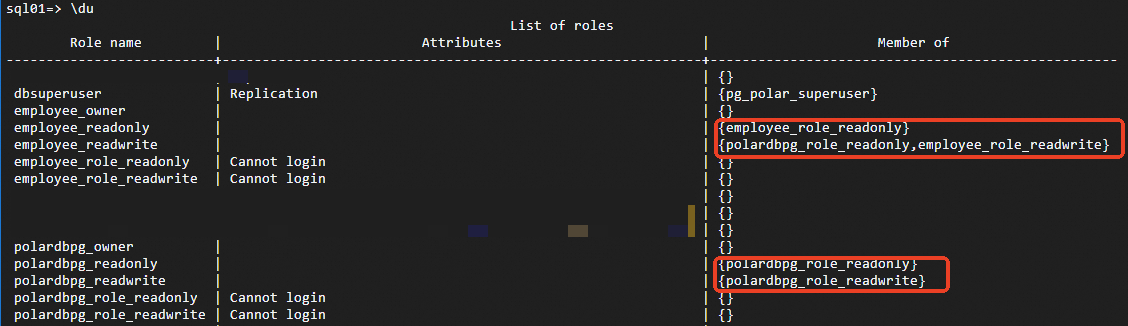
In the Member of column, employee_readwrite shows polardbpg_role_readonly, employee_role_readwrite. This means the account has DQL and DML permissions on employee project tables and DQL permissions on polardbpg project tables.
Option 2: Query system catalog
SELECT r.rolname, r.rolsuper, r.rolinherit,
  r.rolcreaterole, r.rolcreatedb, r.rolcanlogin,
  r.rolconnlimit, r.rolvaliduntil,
  ARRAY(SELECT b.rolname
        FROM pg_catalog.pg_auth_members m
        JOIN pg_catalog.pg_roles b ON (m.roleid = b.oid)
        WHERE m.member = r.oid) AS memberof,
  r.rolreplication,
  r.rolbypassrls
FROM pg_catalog.pg_roles r
WHERE r.rolname !~ '^pg_'
ORDER BY 1;