This topic introduces the real-time heatmap aggregation query and dynamic heatmap tile output capabilities provided by GanosBase based on PolarDB for PostgreSQL. This feature enables real-time delivery of query results to your data exchange structure.
About heatmap tiles
What are heatmap tiles?
Heatmap Tiles (HMT) are based on GanosBase's pioneering real-time heatmap aggregation query technology for large-scale vector/trajectory data. They are used to return query results in a real-time manner to the client, changing the traditional method of heatmap statistical analysis that required pre-coding for aggregation and pre-tiling for display. HMT can aggregate and render data on a scale of millions, tens of millions, and even hundreds of millions in seconds. HMT supports various commonly used aggregation functions and algebraic expressions, allowing customers to choose indicators of interest for their business and dynamically compute and render at different levels as the map zooms in and out. This greatly enhances business efficiency and offers more possibilities for customer products. In Apsara Conference 2022, GanosBase released this capability and demonstrated a case of real-time query aggregation of large-scale transportation trajectories using HMT, helping customers to fully onlineize data products that previously required offline preprocessing. This feature has received significant industry recognition and approval.
Scenarios
The key feature of HMTs is real-time aggregation and rendering of spatial data, primarily applied in business scenarios with massive amounts of vector data requiring real-time statistical analysis, such as:
Transportation: aggregates real-time heatmap data across entire regions based on the historical trajectory lines of transportation tools (cars, ships, etc.), and filters them by conditions such as time (winter, summer), start/end points, and type (freight, passenger) to generate corresponding heatmaps in real-time.
Urban management: aggregates single indicators such as building density, average building height, and total building area across entire regions based on building footprint data, and combines them with land parcel information to calculate composite indicators like the floor area ratio.
Shared mobility: aggregates heatmaps of equipment docking areas across entire regions based on the trajectory points of shared mobility devices, and analyzes shared mobility equipment dispatch and operations strategies based on events (unlocking/locking, boarding/alighting, accidents, damage), flow directions, etc.
Technical advantages
Compared to the pre-coding and aggregation method based on H3 or S2 grids, HMT offers the following advantages:
Extremely efficient, no pre-coding required, and no additional storage costs. HMT's aggregation technology differs from the grid aggregation methods like H3/S2 in technical characteristics and application scenarios. Grid aggregation methods are often used in scenarios where grid coding is needed as a retrieval condition because they require a predetermined precision level. The vector data is then coded at that precision level and aggregated based on the coding. However, HMT does not require pre-coding of data and can aggregate based on the current viewport range. As the viewport zooms in and out, aggregation is performed in real-time. The entire process is equally efficient for various types of geometries, capable of aggregating and rendering data on a scale of hundreds of millions in seconds.
Convenient and easy to use, aggregation results can be directly visualized. HMT offers the capability to quickly tile the aggregation results, allowing direct visualization integration with front-end rendering engines to ensure what you see is what you get. HMT also provides a series of statistical functions to help users quickly and automatically generate the best rendering color tables, ensuring optimal front-end performance.
Tested in real-world scenarios by multiple customers, HMT's aggregation efficiency is extremely high, typically achieving full map aggregation of hundreds of millions of data points in seconds.
Scenario | Data volume | Tile scope | Aggregation time |
Trajectory aggregation |
|
| 372 milliseconds |
Building footprint aggregation | Building footprint: 308 million |
| 17 seconds |
The data represents full aggregation efficiency on a global display scale. The efficiency increases as the map zooms in.
Features
HMT includes a series of SQL functions for generating and calculating heatmap tiles, including:
ST_AsHMT: Converts a set of geometric or trajectory objects into heatmap matrix tiles according to the specified range and resolution.
ST_HMTAsArray: Converts heatmap tiles into an array matrix representation for easy viewing.
ST_HMTStats: Calculates statistical information for heatmap tiles for rendering.
ST_HMTAsRaster: Converts heatmap tiles into Raster objects for viewing and computation.
Usage tips
Improve performance with parallel processing
Improve performance with parallel processing when dealing with large datasets. In practice, you can adjust settings based on the viewport range, such as using 16 parallel processes at higher levels and no parallelism at lower levels. If sufficient CPU resources are available, to ensure that each query can utilize parallel processing, set max_worker_processes and max_parallel_workers to the product of parallelism and concurrency. For more information, see the official PostgreSQL documentation. In the following example, the degree of parallelism is set to 16:
SET max_worker_processes = 300;
SET max_parallel_workers = 260;
SET max_parallel_workers_per_gather = 16;
ALTER TABLE table_name SET (parallel_workers=16);
SET force_parallel_mode = on;
Tile size
In most cases, resample 512×512 tiles to 256×256 tile to avoid aliasing issues. In special cases, such as when data volume is extremely large and each tile calculation is time-consuming, using larger tiles (1024×1024) can reduce the number of tile fetches and improve performance.
Use the && operator for spatial filtering
Bacause ST_AsHMT computation is much faster than ST_Intersects computation, use && instead of ST_Intersects for index filtering.
SELECT ST_AsHMT(column_name, -- Column of the geometry type
    ST_MakeEnvelope(0, 0, 10, 10, 4326), -- Define spatial range
    512,
    512,
    value       -- The value used to generate the reference column for output
)
FROM table_name
WHERE column_name && ST_MakeEnvelope(0, 0, 10, 10, 4326);
Convert spatial reference for query range
When the query range and the geometry object's spatial range are inconsistent, perform spatial reference conversion on the query range before querying. Otherwise, automatic conversion may result in lower performance. After obtaining the tile, convert the image to the specified spatial reference for display.
SELECT ST_AsHMT(column_name, -- Spatial reference system is WGS 84 coordinate system
    ST_Transform(ST_TileEnvelope(6, 48, 32), 4326), -- Define the range of the tile
    512,
    512,
    value       -- The value used to render the tile image
)
FROM table_name
WHERE column_name && ST_Transform(ST_TileEnvelope(6, 48, 32), 4326));
Execute VACUUM FULL and CLUSTER statements on spatial tables
VACUUM FULLoperations reclaim free space and reduce disk file size, reducing I/O operations during queries.VACUUM full table_name; CLUSTER table_name using index_name;CLUSTERoperations align data organization with indexes, storing adjacent spatial data in adjacent data pages, reducing disk access by the database. For detailed usage, see the official PostgreSQL documentation.CLUSTER table_name USING index_name;
Best practices
Configuration on the database.
Import geometric or trajectory data into the database, preferably using the FDW method. For more information, see Quick import of vector grid data. Make sure that all objects share the same spatial reference system. Use the ST_Srid function for confirmation.
Create a spatial index for the geometry or trajectory column.
CREATE INDEX index_name ON table_name USING GIST(column_name);Query heatmap tiles based on spatial range.
NoteIn the following statements, the ST_MakeEnvelope function can use the ST_TileEnvelope function to obtain the tile range.
Aggregate the number of objects within the grid:
SELECT ST_AsHMT(column_name, --geometry type
    ST_MakeEnvelope(0, 0, 10, 10, 4326), -- Extent
    512,        -- Width
    512        -- height
)
FROM table_name
WHERE column_name && ST_MakeEnvelope(0, 0, 10, 10, 4326);
You can aggregate the values within a grid by summing the values in the value column:
SELECT ST_AsHMT(column_name, --geometry type
    ST_MakeEnvelope(0, 0, 10, 10, 4326), -- Extent
    512,        -- Width
    512,        -- height
    value       -- value column
)
FROM table_name
WHERE column_name && ST_MakeEnvelope(0, 0, 10, 10, 4326);
Additional filtering conditions can also be added when you aggregate the values within a grid by summing the values in the value column:
SELECT ST_AsHMT(column_name, --geometry type
    ST_MakeEnvelope(0, 0, 10, 10, 4326), -- Extent
    512,        -- Width
    512,        -- height
    value       -- value column
)
FROM table_name
WHERE column_name && ST_MakeEnvelope(0, 0, 10, 10, 4326);
AND name like 'xxxx%' AND value > 100;
In this example, Node.js is used to write a simple application demonstrating the actual use case of heatmap tiles.
File structure:
└── hmt_server ├── app.js ├── hmt.proto ├── index.html └── package.jsonhmt.protois the proto file introduced in ST_AsHMT. The contents of the other files are provided below.See the following backend package.json and app.js files:
package.json
{
  "name": "hmt_server",
  "version": "1.0.0",
  "main": "app.js",
  "license": "ISC",
  "dependencies": {
    "chroma-js": "^2.4.2",
    "express": "^4.18.2",
    "lru-cache": "^10.1.0",
    "pg": "^8.11.3",
    "protobufjs": "^7.2.5",
    "sharp": "^0.32.6"
  }
}
app.js
const express = require('express');
const { Pool } = require('pg');
const chroma = require('chroma-js');
const sharp = require("sharp");
const protobuf = require('protobufjs');
const { LRUCache } = require('lru-cache');

// Set up database connection
const CONNECTION = {
  user: 'YOUR_USER',
  password: 'YOUR_PWD',
  host: 'YOUR_HOST',
  database: 'YOUR_DB',
  port: YOUR_PORT
};

// Target table name
const TABLE_NAME = 'YOUR_TABLE';

// Target geometry column name
const GEOMETRY_COLUMN = 'YOUR_GEOM_COLUMN';

// Set no data value
const NO_DATA_VALUE = 0;

// Spatial reference of the target geometry column
const SRID = 4326

// Set color map
const COLOR_MAP = [
  ['#536edb', 1],
  ['#5d96a5', 3],
  ['#68be70', 5],
  ['#91d54d', 7],
  ['#cddf37', 9],
  ['#fede28', 11],
  ['#fda938', 13],
  ['#fb7447', 15],
  ['#f75a40', 17],
  ['#f24734', 19],
  ['#e9352a', 21],
  ['#da2723', 23],
  ['#cb181d', 25]
];

// Create a database connection pool, which contains 10 connections by default
const pool = new Pool(CONNECTION);

// Configure color conversion
const [colors, domains] = COLOR_MAP.reduce(([c, d], [colors, domains]) =>
  [[...c, colors], [...d, domains]], [[], []]);
const colorMap = chroma.scale(colors).domain(domains).mode('rgb')

// Load protobuf
const hmtDecoder = protobuf.loadSync('./hmt.proto').lookupType('HMT');

// Create a 1×1 transparent png to return as an empty tile
const emptyPng = Buffer.from('iVBORw0KGgoAAAANSUhEUgAAAAEAAAABCAYAAAAfFcSJAAAACXBIWXMAAA7EAAAOxAGVKw4bAAAADUlEQVQImWP4//8/AwAI/AL+hc2rNAAAAABJRU5ErkJggg==', 'base64');

// For small scale tiles (z<5), where updates are relatively minor, set a 24-hour cache expiration
const globalCache = new LRUCache({ max: 1000, ttl: 1000 * 3600 * 24 });

// For larger scale tiles (z>=5), set a 12-hour cache expiration, which can be modified according to actual conditions
const localCache = new LRUCache({ max: 2000, ttl: 1000 * 3600 * 12 });

// Register Express routes
express()
  // Serve the HTML page
  .get("/", (_, res) => res.sendFile('index.html', { root: __dirname }))
  // Serve the heatmap tile service
  .get('/hmt/:z/:x/:y', async ({ params: { z, x, y } }, res) => {
    const cache = z < 5 ? globalCache : localCache;
    const key = `${z},${x},${y}`
    if (!cache.has(key)) {
      // Set parallelism and call ST_AsHMT function to request a 256x256 heatmap tile for the area
      const parallel = z <= 5 ? 10 : 5;
      const sql = `
  set max_parallel_workers = ${parallel};
  set max_parallel_workers_per_gather = ${parallel};
  WITH _PARAMS(_BORDER) as (VALUES(ST_Transform(ST_TileEnvelope(${key}),${SRID})))
  SELECT ST_AsHMT(${GEOMETRY_COLUMN},_BORDER,256,256) tile
  FROM ${TABLE_NAME},_PARAMS
  WHERE _BORDER && ${GEOMETRY_COLUMN};`
      // Skip set statements and get the result of the ST_AsHMT function
      const { rows: [{ tile }] } = (await pool.query(sql))[2];

      // If there is no data in the area, return an empty tile
      if (!tile) cache.set(key, emptyPng);
      else {
        // Parse protobuf result
        const { type, doubleValues, intValues } = hmtDecoder.decode(tile);
        const { values } = type == 1 ? doubleValues : intValues;

        // Convert values to corresponding colors and remove no data values
        const pixels = values.reduce((_pixels, value) => {
          _pixels.push(...colorMap(value).rgb());
          _pixels.push(value <= NO_DATA_VALUE ? 0 : 255);
          return _pixels;
        }, [])

        // Render as a PNG tile
        const rawConfig = { raw: { width: 256, height: 256, channels: 4 } };
        const renderedPng = await sharp(Uint8Array.from(pixels), rawConfig)
          .png().toBuffer();
        cache.set(key, renderedPng);
      }
    }
    const tile = cache.get(key)
    res.set("Content-Type", "image/png").send(tile);
  })
  // Listen on port 5500
  .listen(5500, () => console.log('HMT server started.'));
In the preceding sample code:
The color map provides a seamless spectrum, supporting various string formats including hexadecimal strings and CSS3 strings. For more information, see the chroma.js document.
If you want a smoother rendering, you can request the 512×512 raw data and downsample it to 256×256. However, this process increases the response time.
Configure the degree of parallelism based on the data volume, database cluster configurations, and the required response time.
NoteIn this example, the degree of parallelism is reduced when
Z<=5.
The front-end code in index.html uses
Mapboxas its map SDK. You can apply for atokenhere.Because the heatmap tiles are finally rendered as PNG format, they are compatible with most other map SDKs.
<!DOCTYPE html>
<html>
<head>
  <meta charset="utf-8">
  <title>HMT Viewer</title>
  <meta name="viewport" content="initial-scale=1,maximum-scale=1,user-scalable=no">
  <link href="https://api.mapbox.com/mapbox-gl-js/v2.14.1/mapbox-gl.css" rel="stylesheet">
  <script src="https://api.mapbox.com/mapbox-gl-js/v2.14.1/mapbox-gl.js"></script>
</head>
<body>
  <div id="map" style="position: absolute;left:0; top: 0; bottom: 0; width: 100%;"></div>
  <script>
    let CENTER = [YOUR_LONGITUDE, YOUR_LATITUDE]
    mapboxgl.accessToken = YOUR_MAPBOX_TOKEN;
    const map = new mapboxgl.Map({
      container: 'map',
      style: "mapbox://styles/mapbox/navigation-night-v1",
      center: CENTER,
      zoom: 5
    })
    map.on("load", () => {
      map.addSource('hmt_source', {
        type: 'raster',
        minzoom: 3,
        tiles: [`${window.location.href}hmt/{z}/{x}/{y}`],
        tileSize: 256,
      });
      map.addLayer({
        id: 'hmt',
        type: 'raster',
        source: 'hmt_source',
      });
    });
  </script>
</body>
</html>
Install dependencies and run the heatmap tile service.
## Navigate to the hmt_server directory
cd ./hmt_server
## Install dependency libraries
npm i
## Run the heatmap tile service
node .
## You can open the browser and log in to http://localhost:5500/ to view the effect
Preview the effect.
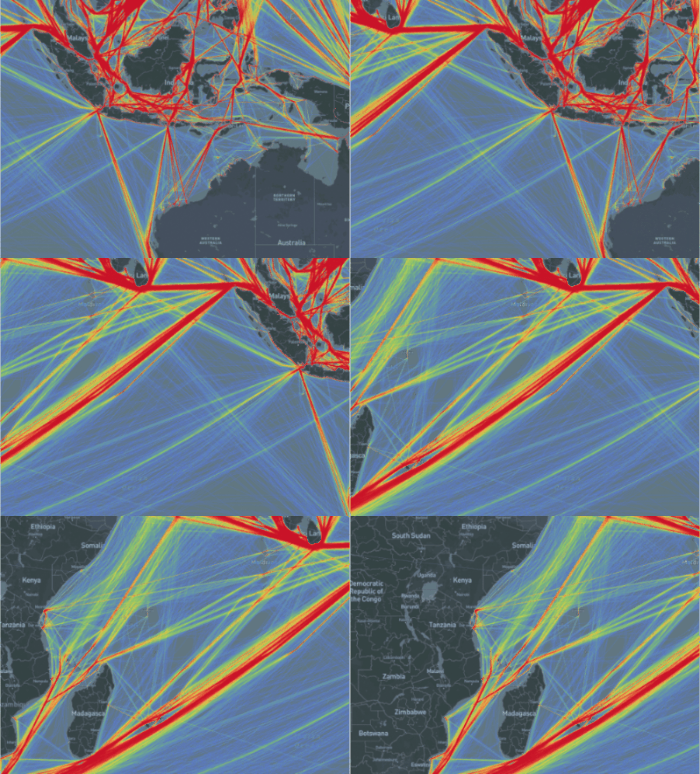
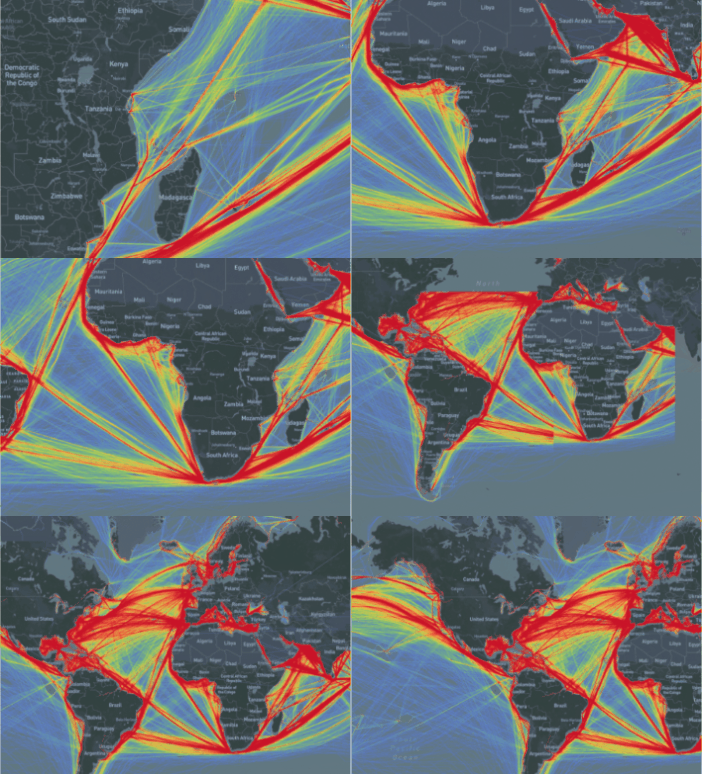
Real-time aggregation of ship trajectory data.
Real-time aggregation of 31,000,000 trajectory points and 450,000 trajectory lines.
Real-time aggregation of building footprints.
Real-time aggregation of 308 million building footprints.

Summary
Currently, GanosBase is supporting thousands of application scenarios across dozens of industries. Stability, cost-effectiveness, high performance, and ease of use have always been the long-term goals of GanosBase. HMT represents the kernel-level core competitiveness of GanosBase in the efficient aggregation and visualization of large-scale spatial data. It provides customers with efficient and easy-to-use solutions for large-scale data analysis and mining, and we welcome all users to experience it.
Free trial
Visit the PolarDB free trial page, select "PolarDB", and explore the HMT real-time heatmap aggregation query feature of GanosBase.