PolarDB supports data backup and redo log backup. A data backup creates a backup set (snapshot) that contains all cluster data at a specific point in time. A redo log backup records incremental data generated after the backup set is created. You can configure policies for data and redo log backups, including the frequency of automatic data backups, the retention period and storage location for data backups, and the retention period for log backups.
Procedure
-
Log in to the PolarDB console。
-
In the upper-left corner, select the region where the cluster is deployed.
-
Find the target cluster and click its ID.
- In the left-side navigation pane, choose .
-
On the Backup Policy Settings tab, click Modify.
-
In the Backup Policy Settings dialog box, configure the policy parameters for Data Backup, Log Backup, and General-purpose, and then click OK.
-
Data Backup
-
If the storage type is standard ESSD, configure the following parameters:
Backup type
Parameter
Description
data backup
Backup Method
Specifies the frequency of automatic backups. You can select Standard Backup (at specified intervals) or High-frequency Backup.
-
Standard Backup (at specified intervals): By default, one automatic backup runs per day. You can configure the Backup Cycle and Backup Start Time Range for automatic data backups.
Note-
For security, Standard Backup (at specified intervals) must run at least twice per week.
-
Backup files cannot be deleted.
-
-
High-frequency Backup: PolarDB provides an enhanced protection feature that shortens backup intervals and increases backup density to improve recovery speed.
Multiple backups can run automatically within 24 hours. You can enable enhanced backups every 2, 3, or 4 hours based on your business needs.
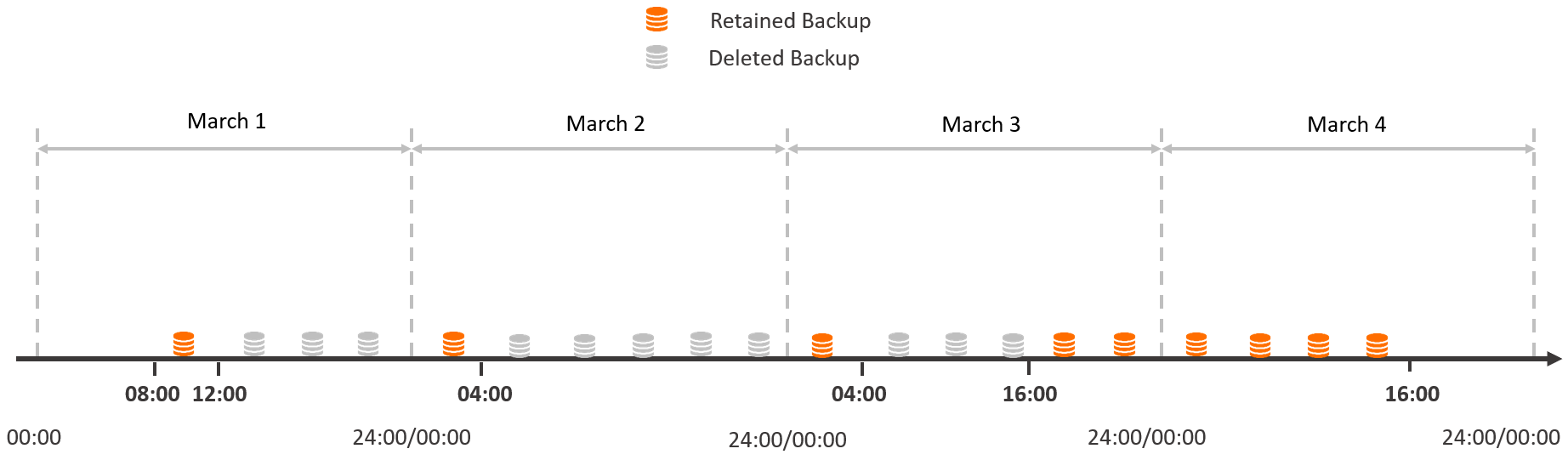
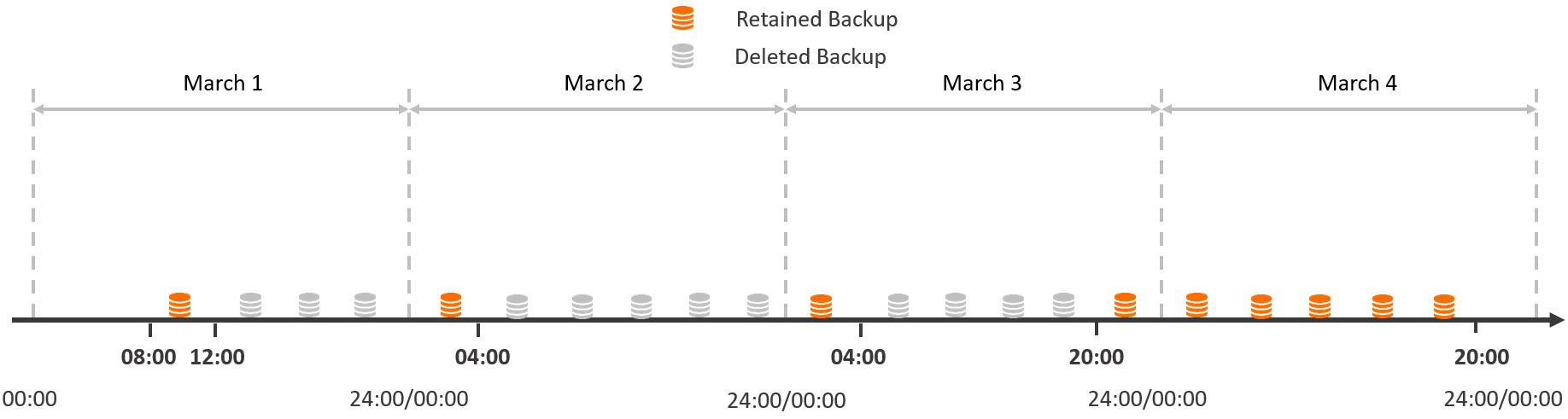
After enhanced protection is enabled, all backups completed within the last 24 hours are retained. For backups older than 24 hours, the system retains only the first backup completed after 00:00 each day. The others are deleted.
For example, if you select Create a backup every 4 hours at 08:00 on March 1, the system completes a backup within 4 hours (from 08:00 to 12:00 on March 1) and continues to create backups every 4 hours.
Assume that the current time is 16:00 on March 4. The system retains the following backups:
-
Backups completed within the last 24 hours (from 16:00 on March 3 to 16:00 on March 4).
-
The backup completed between 00:00 and 04:00 on March 3.
-
The backup completed between 00:00 and 04:00 on March 2.
-
The backup completed between 08:00 and 12:00 on March 1.
Four hours later, at 20:00 on March 4, the system retains the following backups:
-
Backups completed within the last 24 hours (from 20:00 on March 3 to 20:00 on March 4).
-
The backup completed between 00:00 and 04:00 on March 3.
-
The backup completed between 00:00 and 04:00 on March 2.
-
The backup completed between 08:00 and 12:00 on March 1.
-
Backup Cycle
Specify the days on which automatic data backups run.
NoteThis parameter is required only if you select Standard Backup (at specified intervals).
Backup Start Time Range
Specify the time range in which automatic data backups start.
NoteThis parameter is required only if you select Standard Backup (at specified intervals).
Backup Frequency
Specify the backup frequency. Valid values: Last 24 Hours, Every 2 Hours, Last 24 Hours, Every 3 Hours, or Last 24 Hours, Every 4 Hours.
NoteThis parameter is required only if you select High-frequency Backup.
Backup Retention Period
Specify how long backups are retained.
Note-
Data backup is enabled by default, and the default retention period is 7 days.
-
The minimum retention period is 3 days, and the maximum retention period is 730 days.
-
-
If the storage type is Enterprise Edition PSL4 or PSL5, data backups are classified into level-1 and level-2 backups based on storage location. Configure the following parameters:
Backup type
Parameter
Description
level-1 backup
Backup Method
Specifies the frequency of automatic backups. You can select Standard Backup (at specified intervals) or High-frequency Backup.
-
Standard Backup (at specified intervals): By default, one automatic backup runs per day. You can configure the Backup Cycle and Backup Start Time Range for automatic data backups.
Note-
For security, Standard Backup (at specified intervals) must run at least twice per week.
-
Backup files cannot be deleted.
-
High-frequency Backup: PolarDB provides an enhanced protection feature that shortens backup intervals and increases backup density to improve recovery speed.
Multiple backups can run automatically within 24 hours. You can enable enhanced backups every 2, 3, or 4 hours based on your business needs.
After enhanced protection is enabled, all backups completed within the last 24 hours are retained. For backups older than 24 hours, the system retains only the first backup completed after 00:00 each day. The others are deleted.
For example, if you select Create a backup every 4 hours at 08:00 on March 1, the system completes a backup within 4 hours (from 08:00 to 12:00 on March 1) and continues to create backups every 4 hours.
Assume that the current time is 16:00 on March 4. The system retains the following backups:
-
Backups completed within the last 24 hours (from 16:00 on March 3 to 16:00 on March 4).
-
The backup completed between 00:00 and 04:00 on March 3.
-
The backup completed between 00:00 and 04:00 on March 2.
-
The backup completed between 08:00 and 12:00 on March 1.
Four hours later, at 20:00 on March 4, the system retains the following backups:
-
Backups completed within the last 24 hours (from 20:00 on March 3 to 20:00 on March 4).
-
The backup completed between 00:00 and 04:00 on March 3.
-
The backup completed between 00:00 and 04:00 on March 2.
-
The backup completed between 08:00 and 12:00 on March 1.
-
-
Backup Cycle
Specify the days on which automatic data backups run.
NoteThis parameter is required only if you select Standard Backup (at specified intervals).
Backup Start Time Range
Specify the time range in which automatic data backups start.
NoteThis parameter is required only if you select Standard Backup (at specified intervals).
Backup Frequency
Specify the backup frequency. Valid values: Last 24 Hours, Every 2 Hours, Last 24 Hours, Every 3 Hours, or Last 24 Hours, Every 4 Hours.
NoteThis parameter is required only if you select High-frequency Backup.
Backup Retention Period
Specify the retention period for level-1 backups.
Note-
level-1 backup is enabled by default, and the default retention period is 7 days.
-
The minimum retention period is 3 days, and the maximum retention period is 14 days.
-
level-2 backup
Level-2 Backup
Enable or disable level-2 backup.
Notelevel-2 backup is disabled by default. Enabling level-2 backup incurs additional fees. You can delete backup files to reduce costs. For more information about the billing of level-2 backups, see Billing of backup storage that exceeds the free quota.
Backup Method
Select Same-region Backup or Cross-region Backup.
Note-
Same-region Backup is enabled by default.
-
If you enable both same-region and cross-region backup, two copies of backup data are created.
Backup Cycle
Specify the days on which level-2 backups run.
NoteOnly the days selected for level-1 backups are available.
Same-region Backup and Retention
Specify the retention period for same-region backups.
Note-
The minimum retention period is 30 days, and the maximum retention period is 7,300 days.
-
If you want to retain level-2 backups for the long term, select Long-term Retain Backups before Cluster Deletion. After you select this option, you cannot set a retention period.
Destination Backup Region
Select the destination region for cross-region backups.
Cross-region Backup and Retention
Specify the retention period for cross-region backups.
Note-
The minimum retention period is 30 days, and the maximum retention period is 7,300 days.
-
If you want to retain level-2 backups for the long term, select Long-term Retain Backups before Cluster Deletion. After you select this option, you cannot set a retention period.
-
-
-
Log backup policy
The redo log backup policy specifies the retention period for redo logs.
Parameter
Description
Backup Method
Select Same-region Backup or Cross-region Backup.
Note-
Same-region log backup is enabled by default and cannot be disabled.
-
Cross-region Backup is available for log backup only if Cross-region Backup is enabled for level-2 backup.
Same-region Backup and Retention
Specify the retention period for same-region log backups.
Note-
The minimum retention period is 3 days, and the maximum retention period is 7,300 days.
-
If you want to retain log backups for the long term, select Long-term Retain Backups before Cluster Deletion. After you select this option, you cannot set a retention period.
Destination Backup Region
This region is the same as the Destination Backup Region for level-2 backup. No configuration is required.
Cross-region Backup and Retention
Specify the retention period for cross-region log backups.
Note-
The minimum retention period is 3 days, and the maximum retention period is 7,300 days.
-
If you want to retain log backups for the long term, select Long-term Retain Backups before Cluster Deletion. After you select this option, you cannot set a retention period.
-
-
General backup policy
You can also configure the backup retention policy that applies when you delete a cluster.
Parameter
Description
When Cluster Is Deleted
Specify the backup retention policy that applies when you delete a cluster.
-
When the cluster is deleted, the cluster data is automatically backed up, and all backup sets of the cluster are retained for a long period of time: This option retains all backups when the cluster is deleted.
-
When the cluster is deleted, the cluster data is automatically backed up, and the backup set is retained for a long period of time: This option retains only the most recent backup when the cluster is deleted.
-
When the cluster is deleted, all backup sets of the cluster are deleted immediately: This option does not retain any backups when the cluster is deleted.
Note-
If you select When the cluster is released, the cluster data is automatically backed up, and all backup sets of the cluster are retained for a long period of time. or When the cluster is released, the cluster data is automatically backed up, and the latest backup set is retained for a long period of time., the system automatically creates a final backup to save all data before the PolarDB cluster is deleted.
-
After a cluster is deleted, level-1 backups are automatically converted to level-2 backups. You can view all retained backups in the Cluster Recycle Bin. For more information, see Restore a released cluster.
-
If cross-region backup is enabled and you select the When the cluster is deleted, all backup sets of the cluster are deleted immediately policy, all cross-region backup sets are also deleted.
-
-
API reference
|
API |
Description |
|
Queries the backup policies of a PolarDB cluster. |
|
|
Modifies the backup policies of a PolarDB cluster. |