The cluster lock feature protects pay-as-you-go clusters from accidental manual release. Enable it on any cluster you want to protect.
Prerequisites
Before you begin, ensure that you have:
A PolarDB cluster with the pay-as-you-go billing method
Limitations
Cluster lock blocks manual release only. It does not prevent the system from automatically releasing a cluster in the following situations:
Your account has an overdue payment for more than 8 days.
The cluster does not comply with the applicable security compliance policies.
If you plan to switch a cluster's billing method from pay-as-you-go to subscription, disable cluster lock first. Clusters with cluster lock enabled cannot be changed to subscription.
Enable cluster lock
Log on to the PolarDB console.
In the upper-left corner, select the region where the cluster is deployed.
Enable cluster lock using either of the following methods:
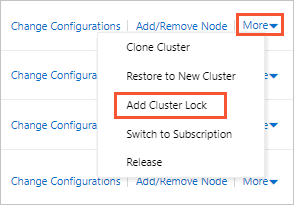
From the Clusters page: Find the cluster, and then choose More > Add Cluster Lock in the Actions column.
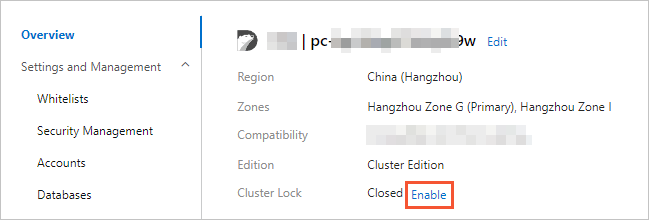
From the Overview page: Click the cluster, and then click Enable next to Cluster Lock.
In the confirmation dialog, click OK.
To enable or disable cluster lock programmatically, use the ModifyDBClusterDeletion API operation.
Disable cluster lock
Log on to the PolarDB console.
In the upper-left corner, select the region where the cluster is deployed.
Disable cluster lock using either of the following methods:
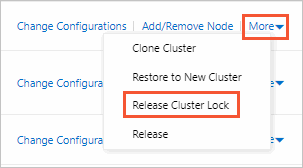
From the Clusters page: Find the cluster, and then choose More > Release Cluster Lock in the Actions column.
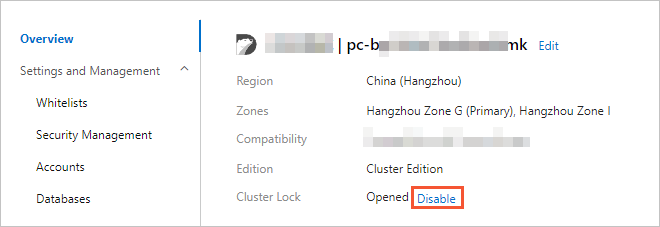
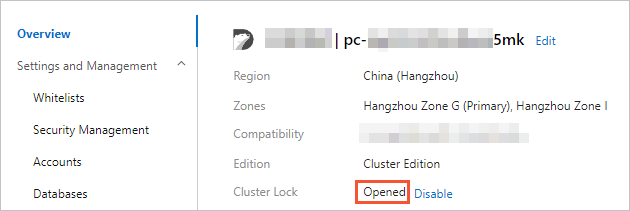
From the Overview page: Click the cluster, and then click Disable next to Cluster Lock.
In the confirmation dialog, click OK.
View cluster lock status
Log on to the PolarDB console.
In the upper-left corner, select the region where the cluster is deployed.
On the Clusters page, click the cluster.
On the Overview page, check the Cluster Lock field.
API reference
| Operation | Description |
|---|---|
| ModifyDBClusterDeletion | Enables or disables the cluster lock feature. |