SQL injection attacks exploit unvalidated input to execute arbitrary SQL. The sql_firewall extension prevents this by building a whitelist of SQL patterns your application actually uses and blocking anything outside that list.
Prerequisites
Before you begin, ensure that you have:
A PolarDB cluster
Access to the PolarDB console to modify cluster parameters
The
polar_superuserrole (required to call reset functions)
sql_firewall requires shared memory allocated at cluster startup. Add sql_firewall to shared_preload_libraries in postgresql.conf and restart the cluster before creating the extension. If the library is not loaded at startup, create extension sql_firewall fails.
shared_preload_libraries = 'sql_firewall'How it works
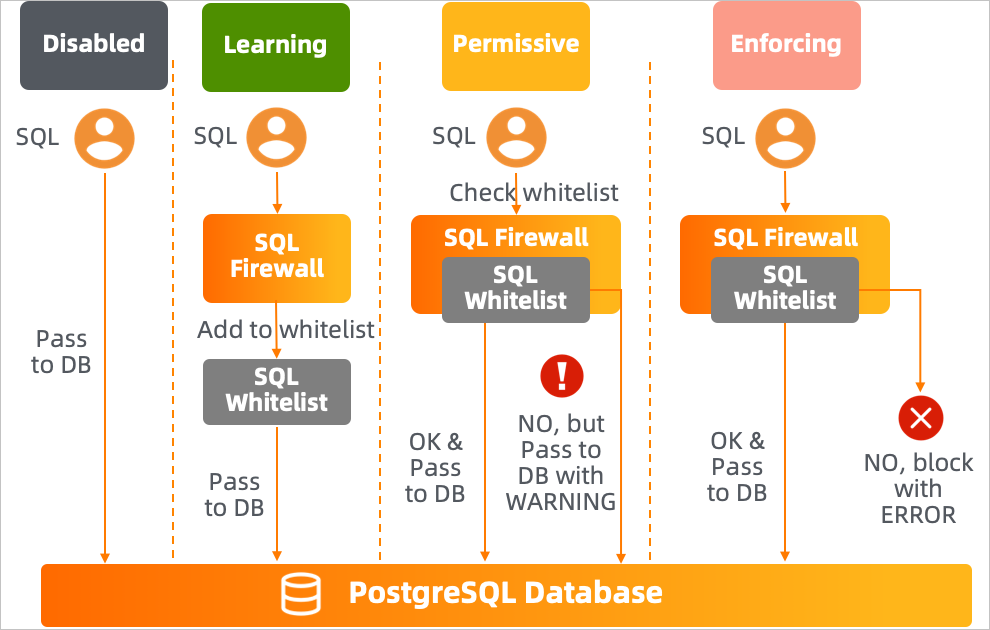
The extension operates in one of three modes. Switch modes by modifying the sql_firewall.firewall parameter in the PolarDB console and restarting the cluster.
| Mode | Whitelist behavior | Non-whitelisted SQL |
|---|---|---|
| Learning | Records every executed SQL statement and adds it to the whitelist | Executes without restriction |
| Permissive | Checks each statement against the whitelist | Executes, but generates a WARNING |
| Enforcing | Checks each statement against the whitelist | Blocked; returns an ERROR |
Set up sql_firewall
Follow this three-phase process to build a reliable whitelist before blocking unauthorized SQL.
Phase 1: Learn your SQL patterns
Set the
sql_firewall.firewallparameter tolearningin the PolarDB console and restart the cluster.Run your application under representative workloads. The extension records every SQL statement and adds it to the whitelist.
Allow enough time to capture the full range of SQL patterns your application executes.
Phase 2: Validate the whitelist
Set
sql_firewall.firewalltopermissiveand restart the cluster.Continue running your application. The extension executes all SQL statements but logs a warning for any statement not in the whitelist.
Review the warnings. For each flagged statement:
If legitimate, switch back to learning mode to add it to the whitelist.
If it looks like a high-risk or unexpected statement, investigate before proceeding.
Repeat until no unexpected warnings appear.
Phase 3: Enforce the whitelist
Set
sql_firewall.firewalltoenforcingand restart the cluster.The extension now blocks any SQL statement not in the whitelist and returns an error to the caller.
Do not switch to enforcing mode without first completing the permissive-mode validation. Enabling enforcing mode with an incomplete whitelist blocks legitimate application queries.
Install and remove the extension
Install:
create extension sql_firewall;Remove:
drop extension sql_firewall;Configure the firewall mode
In the PolarDB console, find and modify the sql_firewall.firewall parameter, then restart the cluster.
| Value | Effect |
|---|---|
disable | Disables sql_firewall |
learning | Enables learning mode |
permissive | Enables permissive mode |
enforcing | Enables enforcing mode |
Reference
GUC parameters
| Parameter | Description | Default |
|---|---|---|
sql_firewall.firewall | Sets the operating mode: disable, learning, permissive, or enforcing | disable |
Functions
| Function | Description | Requirements |
|---|---|---|
sql_firewall_reset() | Clears all entries from the whitelist | Requires polar_superuser role; enforcing mode must be disabled |
sql_firewall_stat_reset() | Resets warning and error statistics | Requires polar_superuser role; enforcing mode must be disabled |
Views
`sql_firewall.sql_firewall_statements`
Returns all SQL statements in the whitelist and the number of times each statement was executed.
select * from sql_firewall.sql_firewall_statements;Example output:
 userid |  queryid   |              query              | calls
--------+------------+---------------------------------+-------
     10 | 3294787656 | select * from k1 where uid = ?; |     4
(1 row)
`sql_firewall.sql_firewall_stat`
Returns the cumulative count of warnings generated in permissive mode (sql_warning) and errors generated in enforcing mode (sql_error).
select * from sql_firewall.sql_firewall_stat;Example output:
 sql_warning | sql_error
-------------+-----------
           2 |         1
(1 row)
Examples
Validate that all application SQL is whitelisted before going live
Before switching to enforcing mode, confirm that your application's SQL patterns are in the whitelist. Run your application in permissive mode, then check for warnings:
select * from sql_firewall.sql_firewall_stat;If sql_warning is greater than zero, review the flagged statements:
select * from sql_firewall.sql_firewall_statements;Switch back to learning mode for any legitimate statements that were flagged, then return to permissive mode and repeat until sql_warning stays at zero.
Permissive mode: SQL injection attempt flagged but not blocked
In permissive mode, non-whitelisted SQL executes but triggers a warning. The query select * from k1 where uid = 3 or 1 = 1 is a classic SQL injection pattern — it is not in the whitelist, so a warning fires but the query still runs.
-- Whitelisted query: executes without warning
select * from k1 where uid = 1;
-- uid |    uname
-- -----+-------------
--   1 | Park Gyu-ri
-- (1 row)

-- Also whitelisted: executes without warning
select * from k1 where uid = 3;
-- uid |   uname
-- -----+-----------
--   3 | Goo Ha-ra
-- (1 row)

-- Not in whitelist: executes, but generates a warning
select * from k1 where uid = 3 or 1 = 1;
-- WARNING:  Prohibited SQL statement
-- uid |     uname
-- -----+----------------
--   1 | Park Gyu-ri
--   2 | Nicole Jung
--   3 | Goo Ha-ra
--   4 | Han Seung-yeon
--   5 | Kang Ji-young
-- (5 rows)
Enforcing mode: SQL injection attempt blocked
In enforcing mode, non-whitelisted SQL is blocked entirely.
-- Whitelisted query: executes normally
select * from k1 where uid = 3;
-- uid |   uname
-- -----+-----------
--   3 | Goo Ha-ra
-- (1 row)

-- Not in whitelist: blocked with an error
select * from k1 where uid = 3 or 1 = 1;
-- ERROR:  Prohibited SQL statement
Usage notes
Enable permissive mode before enforcing. Running enforcing mode without a complete whitelist blocks legitimate application queries.
Both
sql_firewall_reset()andsql_firewall_stat_reset()require enforcing mode to be disabled. Switch todisable,learning, orpermissivemode before calling these functions.