To continue using your database domain name after migrating to the cloud, you can bind it to your cluster via a private domain name.
Use cases
You can bind a private domain name to each private endpoint of a PolarDB cluster. A private domain name takes effect only in the specified VPC in the current region. Private domain names have a higher resolution priority than globally available domain names.
For example, your original database domain name is developer.aliyundoc.com. You migrate the database to a PolarDB cluster whose endpoint is image.developer.aliyundoc.com. To continue using the original domain name, create a CNAME record that maps developer.aliyundoc.com to image.developer.aliyundoc.com. After the binding is complete, requests to developer.aliyundoc.com from within the specified VPC will resolve directly to the PolarDB cluster, as shown in the following figure.

Billing
The PolarDB private domain name feature uses PrivateZone to map a private domain name to the private endpoint of your cluster. Using PrivateZone incurs a small fee. For details, see Pricing.
Bind a private domain name
-
Log on to the PolarDB console. In the left-side navigation pane, click Clusters. Select the region where your cluster is located, and then click the cluster ID to open the cluster details page.
-
On the Basic Information page, in the Database Connections section, click the
 icon in the upper-right corner to switch the view.
 -
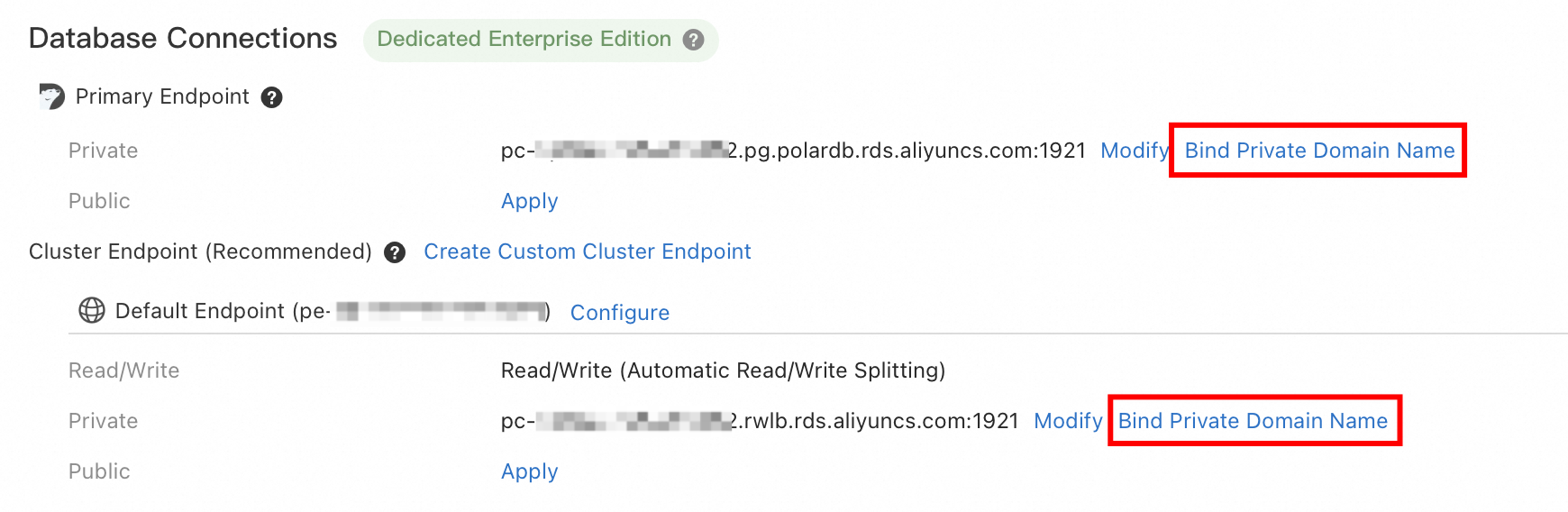
Click Bind Private Domain Name next to the target private endpoint.
On the Database connections page, the Bind private domain name option appears for private endpoints in both the Primary endpoint and Cluster endpoint sections.
-
In the Bind Private Domain Name dialog box, enter a prefix and suffix for the private domain name. The format is
<prefix>.<suffix>. For more information, see the following table:Parameter
Description
private domain name prefix
The prefix must be 6 to 40 characters long, start with a letter, end with a letter or digit, and contain only lowercase letters, digits, and hyphens (-).
private domain name suffix (zone)
You can select an existing zone from the drop-down list or manually enter a new one. For more information about zones, see PrivateZone.
Note-
If the VPC where your PolarDB cluster resides is not associated with the selected zone, the system automatically creates the association.
-
You can view and manage your zones in the PrivateZone console.
NoteWhen you bind a private domain name, the system automatically creates a service-linked role named AliyunServiceRoleForPolarDB. For more information, see Service-linked roles for PolarDB.
-
-
Click OK.
-
In the Bind Private Domain Name dialog box, confirm the domain information and then click OK.
API reference
|
API |
Description |
|
Modifies the endpoints of a PolarDB cluster. This includes the primary endpoint, default cluster endpoint, custom cluster endpoints, and private domain names. |