PolarDB for PostgreSQL (Compatible with Oracle) speeds up queries on large partitioned tables by scanning multiple partitions in parallel. The parallel append feature is enabled by default. The optimizer automatically selects the most cost-efficient execution mode.
How it works
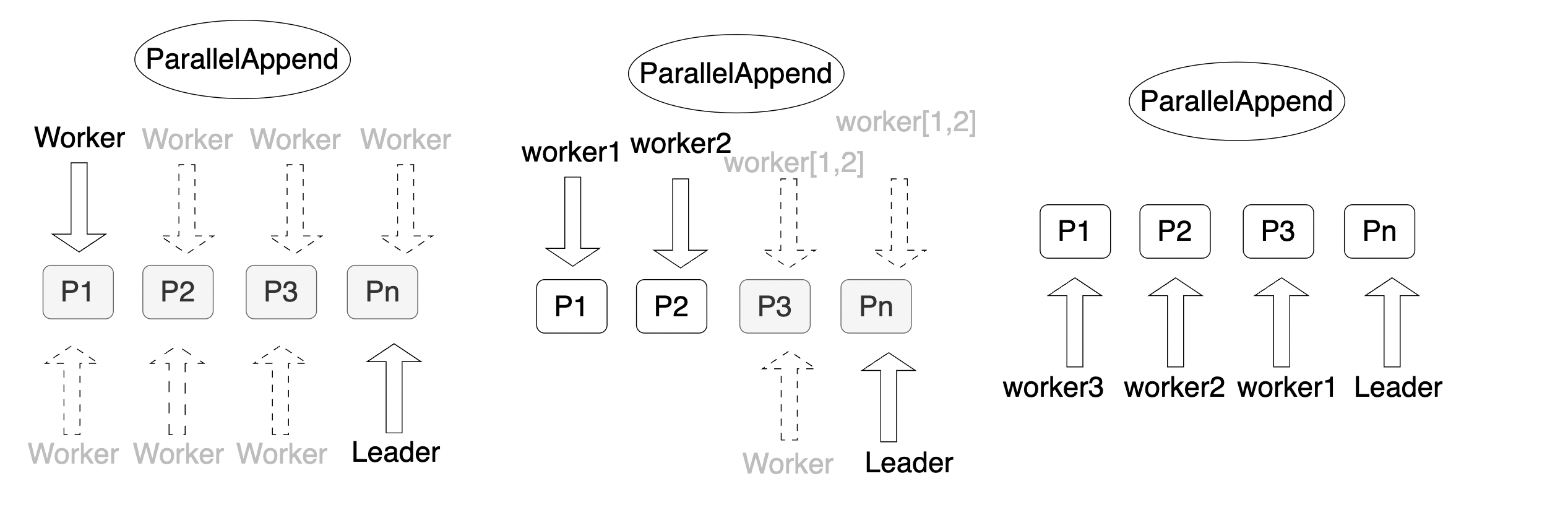
When querying a partitioned table, PolarDB distributes work across parallel workers. Each worker scans one or more partitions, and a Gather node at the top of the query plan collects the results.
PolarDB supports three parallel execution modes:
| Mode | Worker assignment | Key operators in query plan |
|---|---|---|
| Across partitions | One worker per partition | Parallel Append + Seq Scan |
| Within a partition | All workers on one partition at a time | Append + Parallel Seq Scan |
| Hybrid | Workers split across and within partitions | Parallel Append + Parallel Seq Scan |
The optimizer evaluates all three modes using a cost model and picks the least expensive one based on table statistics and system configuration.
Reading the query plan: The operator directly under Gather tells you which mode is active:
Parallel AppendwithSeq Scanchildren — across-partitions modeAppend(notParallel Append) withParallel Seq Scanchildren — within-partition modeParallel AppendwithParallel Seq Scanchildren — hybrid mode
Parallel execution across partitions
Each worker handles exactly one partition, and all workers run concurrently.
The following example uses a partitioned table prt1 with six partitions (prt1_p1 through prt1_p5 and prt1_default). The plan assigns one worker to each partition:
EXPLAIN (COSTS OFF) select * from prt1;
                  QUERY PLAN
-----------------------------------------------
 Gather
   Workers Planned: 6
   ->  Parallel Append
         ->  Seq Scan on prt1_p5
         ->  Seq Scan on prt1_default
         ->  Seq Scan on prt1_p4
         ->  Seq Scan on prt1_p1
         ->  Seq Scan on prt1_p2
         ->  Seq Scan on prt1_p3
(9 rows)
Parallel Append with Seq Scan children confirms this mode. Six workers match the six partitions — one scan per worker.
Parallel execution within a partition
All workers collaborate on a single partition using Parallel Seq Scan, then move together to the next partition. This continues until every partition has been scanned.
EXPLAIN (COSTS OFF) select * from prt1;
                  QUERY PLAN
-----------------------------------------------
 Gather
   Workers Planned: 6
   ->  Append
         ->  Parallel Seq Scan on prt1_p5
         ->  Parallel Seq Scan on prt1_default
         ->  Parallel Seq Scan on prt1_p4
         ->  Parallel Seq Scan on prt1_p1
         ->  Parallel Seq Scan on prt1_p2
         ->  Parallel Seq Scan on prt1_p3
(9 rows)
Append (not Parallel Append) with Parallel Seq Scan children confirms this mode. All six workers process each partition together before advancing to the next.
Hybrid parallel execution
Hybrid mode combines both strategies: workers are distributed across partitions, and some partitions receive multiple workers simultaneously.
EXPLAIN (COSTS OFF) select * from prt1;
                  QUERY PLAN
-----------------------------------------------
 Gather
   Workers Planned: 8
   ->  Parallel Append
         ->  Parallel Seq Scan on prt1_p5
         ->  Parallel Seq Scan on prt1_default
         ->  Parallel Seq Scan on prt1_p4
         ->  Parallel Seq Scan on prt1_p1
         ->  Parallel Seq Scan on prt1_p2
         ->  Parallel Seq Scan on prt1_p3
(9 rows)
Both Parallel Append and Parallel Seq Scan in the same plan confirms hybrid mode. Eight workers are planned for six partitions, so at least some partitions receive more than one worker.