GanosBase real-time heatmap aggregation query: An analysis and best practices
GanosBase's Heatmap Tiles (HMT) aggregates and renders hundreds of millions of spatial data points in seconds — without pre-coding or pre-tiling — and delivers results as PNG tiles directly to your map frontend. GanosBase first released HMT at Apsara Conference 2022, and the feature has since received significant industry recognition across dozens of industries.
How HMT works
Heatmap Tiles (HMT) is a real-time spatial aggregation engine built into GanosBase on PolarDB for PostgreSQL (Compatible with Oracle). Unlike grid-based systems such as H3 or S2, which require pre-coding data at a fixed precision level, HMT aggregates based on the current viewport range on the fly. As the map zooms in and out, HMT recomputes in real time with no additional storage cost.
The pipeline for each map tile request:
Store geometry or trajectory data in a PolarDB table with a GiST spatial index.
For each tile request, call
ST_AsHMTwith the tile's bounding box and resolution.ST_AsHMTaggregates all geometries within the bounding box into a Protocol Buffers (protobuf) matrix tile.Decode the tile on the backend, map values to colors, and render it as a PNG image.
Return the PNG to the map frontend. The tile is compatible with any raster tile source, including Mapbox.
Use cases
HMT is designed for scenarios with millions to hundreds of millions of vector data points that require real-time statistical analysis:
Transportation: Aggregate historical trajectory lines and points of vehicles or ships into regional heatmaps. Filter by time range, origin/destination, or cargo type to generate heatmaps in real time.
Urban management: Aggregate single indicators such as building density, average height, and total floor area across regions using building footprint data. Combine with land parcel data to compute composite indicators like the floor area ratio.
Shared mobility: Aggregate heatmaps of equipment docking areas from trajectory point data. Analyze dispatch and operations strategies based on events such as unlocking, locking, boarding, alighting, accidents, or damage.
Performance benchmarks
HMT achieves full-map aggregation at a global display scale within seconds. Efficiency increases as the map zooms in.
| Scenario | Data volume | Tile scope | Aggregation time |
|---|---|---|---|
| Trajectory aggregation | 450,000 trajectory lines; 31,000,000 trajectory points | Global scale; 512×512 tiles | 372 milliseconds |
| Building footprint aggregation | 308,000,000 building footprints | Global scale; 512×512 tiles | 17 seconds |
SQL functions
HMT provides four SQL functions:
| Function | Description |
|---|---|
| Converts geometry or trajectory objects into a heatmap matrix tile for a given bounding box and resolution. This is the primary function for generating tiles. | |
| Converts a heatmap tile into an array matrix for inspection and debugging. | |
| Calculates statistical information for heatmap tiles for rendering. | |
| Converts a heatmap tile into a Raster object for further analysis or visualization in raster-compatible tools. |
Set up a heatmap tile service
This section walks through a complete end-to-end setup: configure the database, then build a Node.js backend that serves heatmap tiles to a Mapbox frontend.
Prerequisites
Before you begin, make sure that you have:
A PolarDB for PostgreSQL (Compatible with Oracle) instance with GanosBase enabled
Geometry or trajectory data loaded into the database (all objects must share the same spatial reference system — use
ST_Sridto verify)Node.js installed on your server
Step 1: Configure the database
1. Import data
Import geometry or trajectory data into the database. Use the Foreign Data Wrapper (FDW) method for efficient bulk import. For details, see .
2. Create a GiST spatial index
CREATE INDEX index_name ON table_name USING GIST(column_name);3. Query heatmap tiles by spatial range
Use ST_MakeEnvelope to define the bounding box, or ST_TileEnvelope to derive it from a tile coordinate (z/x/y).
Count the number of objects in each grid cell:
SELECT ST_AsHMT(
    column_name,                                    -- Geometry column
    ST_MakeEnvelope(0, 0, 10, 10, 4326),           -- Bounding box
    512,                                            -- Tile width
    512                                             -- Tile height
)
FROM table_name
WHERE column_name && ST_MakeEnvelope(0, 0, 10, 10, 4326);
Sum a value column within each grid cell:
SELECT ST_AsHMT(
    column_name,
    ST_MakeEnvelope(0, 0, 10, 10, 4326),
    512,
    512,
    value                                           -- Column whose values are summed per cell
)
FROM table_name
WHERE column_name && ST_MakeEnvelope(0, 0, 10, 10, 4326);
Add extra filter conditions on top of the spatial filter:
SELECT ST_AsHMT(
    column_name,
    ST_MakeEnvelope(0, 0, 10, 10, 4326),
    512,
    512,
    value
)
FROM table_name
WHERE column_name && ST_MakeEnvelope(0, 0, 10, 10, 4326)
AND name LIKE 'xxxx%' AND value > 100;
Step 2: Build the Node.js backend
The following example builds a tile server that accepts z/x/y requests, queries ST_AsHMT, decodes the protobuf result, maps values to colors using chroma.js, and returns a PNG tile.
File structure:
└── hmt_server
    ├── app.js
    ├── hmt.proto
    ├── index.html
    └── package.json
hmt.proto is the protobuf schema described in the ST_AsHMT reference.
package.json:
{
  "name": "hmt_server",
  "version": "1.0.0",
  "main": "app.js",
  "license": "ISC",
  "dependencies": {
    "chroma-js": "^2.4.2",
    "express": "^4.18.2",
    "lru-cache": "^10.1.0",
    "pg": "^8.11.3",
    "protobufjs": "^7.2.5",
    "sharp": "^0.32.6"
  }
}
app.js:
Replace the placeholder values in the CONNECTION object and the TABLE_NAME, GEOMETRY_COLUMN, and SRID constants before running.
const express = require('express');
const { Pool } = require('pg');
const chroma = require('chroma-js');
const sharp = require("sharp");
const protobuf = require('protobufjs');
const { LRUCache } = require('lru-cache');

// Set up database connection
const CONNECTION = {
  user: 'YOUR_USER',
  password: 'YOUR_PWD',
  host: 'YOUR_HOST',
  database: 'YOUR_DB',
  port: YOUR_PORT
};

// Target table name
const TABLE_NAME = 'YOUR_TABLE';

// Target geometry column name
const GEOMETRY_COLUMN = 'YOUR_GEOM_COLUMN';

// Set no data value
const NO_DATA_VALUE = 0;

// Spatial reference of the target geometry column
const SRID = 4326

// Set color map
const COLOR_MAP = [
  ['#536edb', 1],
  ['#5d96a5', 3],
  ['#68be70', 5],
  ['#91d54d', 7],
  ['#cddf37', 9],
  ['#fede28', 11],
  ['#fda938', 13],
  ['#fb7447', 15],
  ['#f75a40', 17],
  ['#f24734', 19],
  ['#e9352a', 21],
  ['#da2723', 23],
  ['#cb181d', 25]
];

// Create a database connection pool (10 connections by default)
const pool = new Pool(CONNECTION);

// Configure color scale from the color map
const [colors, domains] = COLOR_MAP.reduce(([c, d], [colors, domains]) =>
  [[...c, colors], [...d, domains]], [[], []]);
const colorMap = chroma.scale(colors).domain(domains).mode('rgb')

// Load protobuf schema
const hmtDecoder = protobuf.loadSync('./hmt.proto').lookupType('HMT');

// 1x1 transparent PNG returned as an empty tile when the area has no data
const emptyPng = Buffer.from('iVBORw0KGgoAAAANSUhEUgAAAAEAAAABCAYAAAAfFcSJAAAACXBIWXMAAA7EAAAOxAGVKw4bAAAADUlEQVQImWP4//8/AwAI/AL+hc2rNAAAAABJRU5ErkJggg==', 'base64');

// Small-scale tiles (z<5) change infrequently — cache for 24 hours
const globalCache = new LRUCache({ max: 1000, ttl: 1000 * 3600 * 24 });

// Larger-scale tiles (z>=5) change more often — cache for 12 hours
const localCache = new LRUCache({ max: 2000, ttl: 1000 * 3600 * 12 });

express()
  // Serve the HTML page
  .get("/", (_, res) => res.sendFile('index.html', { root: __dirname }))
  // Serve heatmap tiles
  .get('/hmt/:z/:x/:y', async ({ params: { z, x, y } }, res) => {
    const cache = z < 5 ? globalCache : localCache;
    const key = `${z},${x},${y}`
    if (!cache.has(key)) {
      // Reduce parallelism at smaller scales (z<=5) to avoid overloading the database
      const parallel = z <= 5 ? 10 : 5;
      const sql = `
  set max_parallel_workers = ${parallel};
  set max_parallel_workers_per_gather = ${parallel};
  WITH _PARAMS(_BORDER) as (VALUES(ST_Transform(ST_TileEnvelope(${key}),${SRID})))
  SELECT ST_AsHMT(${GEOMETRY_COLUMN},_BORDER,256,256) tile
  FROM ${TABLE_NAME},_PARAMS
  WHERE _BORDER && ${GEOMETRY_COLUMN};`
      // The query returns three result sets; the ST_AsHMT result is in the third
      const { rows: [{ tile }] } = (await pool.query(sql))[2];

      if (!tile) cache.set(key, emptyPng);
      else {
        // Decode protobuf result
        const { type, doubleValues, intValues } = hmtDecoder.decode(tile);
        const { values } = type == 1 ? doubleValues : intValues;

        // Map each cell value to an RGBA pixel
        const pixels = values.reduce((_pixels, value) => {
          _pixels.push(...colorMap(value).rgb());
          _pixels.push(value <= NO_DATA_VALUE ? 0 : 255); // Transparent for no-data cells
          return _pixels;
        }, [])

        // Render as a 256x256 PNG tile
        const rawConfig = { raw: { width: 256, height: 256, channels: 4 } };
        const renderedPng = await sharp(Uint8Array.from(pixels), rawConfig)
          .png().toBuffer();
        cache.set(key, renderedPng);
      }
    }
    const tile = cache.get(key)
    res.set("Content-Type", "image/png").send(tile);
  })
  .listen(5500, () => console.log('HMT server started.'));
Key implementation notes:
The color map uses chroma.js, which supports hexadecimal strings, CSS3 color names, and other formats. See the chroma.js documentation for the full list.
For smoother rendering, request 512×512 raw data and downsample to 256×256 using sharp. This increases response time but reduces visual aliasing at tile boundaries.
The degree of parallelism is reduced at
z<=5to balance load across concurrent tile requests. Adjust based on your data volume and cluster configuration.
Step 3: Build the map frontend
The frontend uses Mapbox GL JS to display tiles served by the backend. Because HMT tiles are standard PNG images, they are compatible with any map SDK that supports raster tile sources.
Get a Mapbox access token from account.mapbox.com and replace YOUR_MAPBOX_TOKEN, YOUR_LONGITUDE, and YOUR_LATITUDE in the snippet below.
index.html:
<!DOCTYPE html>
<html>
<head>
  <meta charset="utf-8">
  <title>HMT Viewer</title>
  <meta name="viewport" content="initial-scale=1,maximum-scale=1,user-scalable=no">
  <link href="https://api.mapbox.com/mapbox-gl-js/v2.14.1/mapbox-gl.css" rel="stylesheet">
  <script src="https://api.mapbox.com/mapbox-gl-js/v2.14.1/mapbox-gl.js"></script>
</head>
<body>
  <div id="map" style="position: absolute;left:0; top: 0; bottom: 0; width: 100%;"></div>
  <script>
    let CENTER = [YOUR_LONGITUDE, YOUR_LATITUDE]
    mapboxgl.accessToken = YOUR_MAPBOX_TOKEN;
    const map = new mapboxgl.Map({
      container: 'map',
      style: "mapbox://styles/mapbox/navigation-night-v1",
      center: CENTER,
      zoom: 5
    })
    map.on("load", () => {
      map.addSource('hmt_source', {
        type: 'raster',
        minzoom: 3,
        tiles: [`${window.location.href}hmt/{z}/{x}/{y}`],
        tileSize: 256,
      });
      map.addLayer({
        id: 'hmt',
        type: 'raster',
        source: 'hmt_source',
      });
    });
  </script>
</body>
</html>
Step 4: Run the service
cd ./hmt_server
npm i
node .
Open http://localhost:5500/ in a browser to see the heatmap.
Preview
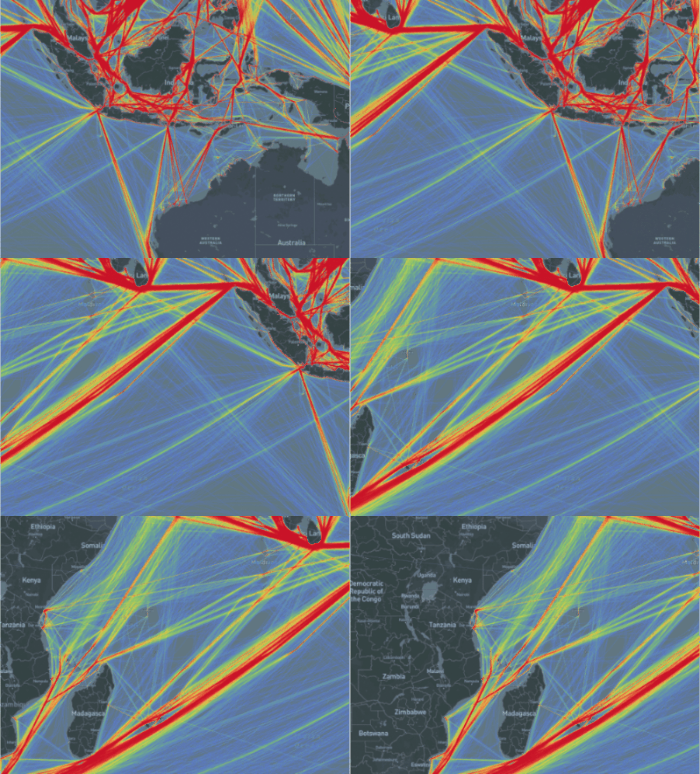
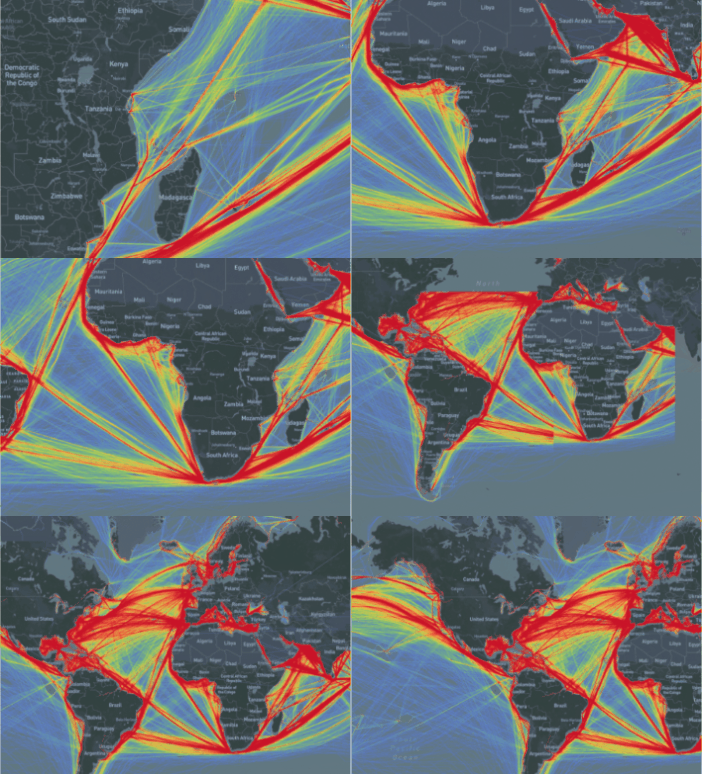
Real-time aggregation of 31,000,000 trajectory points and 450,000 trajectory lines:
Real-time aggregation of 308,000,000 building footprints:

Performance tuning
Enable parallel processing for large datasets
For large datasets, set parallel processing parameters before running ST_AsHMT. Adjust the degree of parallelism based on viewport zoom level — higher zoom levels typically cover smaller spatial extents and require less data to scan.
SET max_worker_processes = 300;
SET max_parallel_workers = 260;
SET max_parallel_workers_per_gather = 16;
ALTER TABLE table_name SET (parallel_workers=16);
SET force_parallel_mode = on;
For the full parameter reference, see the PostgreSQL documentation on resource consumption.
Trade-off: Increasing max_parallel_workers_per_gather speeds up individual queries but consumes more CPU per query. If multiple users send tile requests concurrently, high per-query parallelism can exhaust available workers. Set max_worker_processes and max_parallel_workers to at least the product of parallelism and expected concurrency.
Choose the right tile size
| Tile size | When to use | Trade-off |
|---|---|---|
| 512×512 (default) | Most datasets | Downsample to 256×256 on the backend to avoid visual aliasing at tile boundaries. |
| 1024×1024 | Extremely large datasets where each tile computation is expensive | Reduces the number of tile requests from the frontend, but each query covers a larger area and takes longer to compute, increasing per-tile response latency. |
Use && instead of ST_Intersects for spatial filtering
ST_AsHMT computation is significantly faster than ST_Intersects. Use the && bounding-box operator in the WHERE clause to take advantage of the GiST index:
SELECT ST_AsHMT(
    column_name,
    ST_MakeEnvelope(0, 0, 10, 10, 4326),
    512,
    512,
    value
)
FROM table_name
WHERE column_name && ST_MakeEnvelope(0, 0, 10, 10, 4326);
Convert the spatial reference of the query range
If the query bounding box and the geometry column use different spatial reference systems, transform the bounding box before querying. Relying on automatic conversion degrades performance.
SELECT ST_AsHMT(
    column_name,                                          -- Geometry column in WGS 84 (SRID 4326)
    ST_Transform(ST_TileEnvelope(6, 48, 32), 4326),      -- Transform tile envelope to SRID 4326
    512,
    512,
    value
)
FROM table_name
WHERE column_name && ST_Transform(ST_TileEnvelope(6, 48, 32), 4326);
After obtaining the tile, convert it to the target spatial reference for display.
Run VACUUM FULL and CLUSTER on spatial tables
These two operations improve I/O efficiency for spatial queries:
VACUUM FULLreclaims free space and compacts the table file, reducing disk reads during queries.VACUUM FULL table_name;CLUSTERphysically reorders table rows to match the spatial index, so spatially adjacent data is stored on adjacent data pages. This can significantly reduce random disk access.CLUSTER table_name USING index_name;For the full syntax reference, see the PostgreSQL CLUSTER documentation.
Summary
GanosBase currently supports thousands of application scenarios across dozens of industries. Stability, cost-effectiveness, high performance, and ease of use are the long-term goals of GanosBase. HMT represents the kernel-level core competitiveness of GanosBase in efficient aggregation and visualization of large-scale spatial data, providing customers with powerful and easy-to-use solutions for large-scale data analysis.
To try HMT, visit the PolarDB free trial page, select PolarDB, and explore the HMT real-time heatmap aggregation query feature of GanosBase.