GanosBase H3 geographic grid: Capabilities and best practices
GanosBase includes a geospatial grid engine built on H3's hierarchical hexagonal grid system. Use it to encode, query, aggregate, and visualize large-scale spatial point data directly in the database—without external middleware or preprocessing pipelines.
Background
A geographical grid divides the Earth's surface into polygon cells at multiple scales, from coarse to fine. Each cell gets a unique code, making it possible to represent, index, and join spatial features with other spatiotemporal data. Three-dimensional geographical grids consider not only latitude and longitude but also include height in the subdivision and encoding range.
GanosBase supports two grid systems:
GeoSOT: A multi-scale regional location identification system based on geospatial subdivision theory developed in China.
H3: A two-dimensional global hexagonal grid system developed by Uber. H3 covers the Earth's surface with a unified, multi-layered hexagonal structure.
H3's hexagonal cells have three properties that make them well suited for spatial analysis: uniform neighbor distance, fixed six-neighbor relationships, and no directional bias. These properties simplify path planning, geocoding, geofencing, and density analysis compared to square or triangular grid systems.
GanosBase extends H3 with degenerated grid computing, which expresses a spatial range using the minimum set of grid cells across multiple hierarchy levels—reducing encoding storage costs. GanosBase also ships a self-developed grid index for efficient grid code queries and aggregate calculations.

Use cases
H3 grids are used across spatial data workloads:
Logistics and travel services: Route planning, area coverage analysis, delivery range delineation, and hotspot discovery.
Data analysis: Population density analysis, mobile user behavior analysis, and geographical market segmentation.
Internet of Things (IoT): Spatial distribution analysis of monitoring data in smart city, environmental monitoring, and asset tracking scenarios.
Social networks: Location-based services (LBS), friend location sharing, and event notifications.
Emergency response and public services: Disaster distribution analysis, heatmaps for early warning, emergency resource allocation, and rescue area delineation.
Capabilities
GanosBase H3 supports the following operations:
Encode points, lines, and polygons as H3 grid codes
Decode grid codes back to spatial geometry
Determine parent-child grid relationships
Compute grid path distance and traversal
Query grids by spatial range, level, or proximity
Convert H3 grid codes to GanosBase Geometry type for spatial analysis with vector data
Run pixel statistics by combining H3 grids with raster data
Apply degenerated grid computing to minimize encoding storage
For the full function reference, see .
Technical advantages
GanosBase H3 provides several capabilities beyond the open-source H3 library:
Richer encoding input types: Encode GanosBase Point, LineString, and Polygon geometry types directly as H3 grid codes—not just lat/lon coordinates.
Performance optimization: Optimized encoding throughput and grid query efficiency for large datasets.
Cross-model query analysis: Join H3 grids with other GanosBase spatial models, such as converting geometry to H3 encoding or running pixel statistics against raster data.
Tiered storage for large-scale data: Leverages PolarDB's polymorphic tiered storage to encode and store large-scale point data in Object Storage Service (OSS), significantly reducing storage costs.
Best practices
This section walks through a complete workflow for storing, encoding, querying, and visualizing spatial point data using GanosBase H3. The dataset used is Uber's 2023 New York Taxi Pickup Dataset (FOIL).
Prerequisites
Before you begin, make sure you have:
A PolarDB cluster with GanosBase enabled
An OSS bucket containing the FOIL CSV data
Database credentials with permission to create extensions and tables
Import data
Step 1: Install the GeomGrid extension.
CREATE EXTENSION ganos_geomgrid CASCADE;Step 2: Create a table with the `h3grid` field type.
GeomGrid provides the h3grid type to store H3 grid codes. The field h3_lev13 stores level-13 H3 codes. Different H3 levels correspond to different spatial resolutions—choose the level that matches your analysis granularity. For the spatial resolution corresponding to each level of H3, see the H3 resolution table.
-- h3_lev13 stores level-13 H3 codes
CREATE TABLE FOIL2013 (
  id text,
  lon float,
  lat float,
  h3_lev13 h3grid
);
Step 3: Install the FDW extension and load the CSV data from OSS.
GanosBase FDW (foreign data wrapper) lets you query CSV files on OSS as if they were local tables, then insert the results directly.
Install the FDW extension.
CREATE EXTENSION ganos_fdw CASCADE;Create a server pointing to the CSV file on OSS. Replace the placeholders with your actual credentials and path. For the
datasourceformat, see .CREATE SERVER csvserver FOREIGN DATA WRAPPER ganos_fdw OPTIONS ( datasource 'OSS://<access_id>:<secrect_key>@[<Endpoint>]/<bucket>/path_to/file.csv', format 'CSV' ); CREATE USER MAPPING FOR CURRENT_USER SERVER csvserver OPTIONS (user '<access_id>', password '<secrect_key>');Map the CSV file to a foreign table. The columns
medallion,pickup_longitude, andpickup_latitudeare mapped to the foreign tabletrip_data_1.CREATE FOREIGN TABLE trip_data_1 ( medallion varchar, pickup_longitude varchar, pickup_latitude varchar) SERVER csvserver OPTIONS ( layer 'trip_data_1' );Verify the foreign table is accessible.
SELECT * FROM trip_data_1;Insert the data into
FOIL2013.INSERT INTO FOIL2013 SELECT medallion AS id, CAST(pickup_longitude AS double precision) AS lon, CAST(pickup_latitude AS double precision) AS lat FROM trip_data_1;Verify the import.
SELECT * FROM FOIL2013;
Encode points as H3 grid codes
GanosBase H3 supports multiple encoding methods:
| Function | Input | Use when |
|---|---|---|
| Latitude, longitude, level | Encoding raw coordinates | |
| Standard H3 string | Importing existing H3 strings | |
| Integer H3 encoding | Working with integer-format H3 IDs | |
| Point geometry | Converting directly from GanosBase Point type |
This example uses ST_H3FromLatLng to generate level-13 H3 codes from the lat and lon columns, then stores the result in h3_lev13.
-- Generate level-13 H3 codes from lat/lon
UPDATE FOIL2013 SET h3_lev13 = ST_H3FromLatLng(lat, lon, 13);

-- Verify: display H3 codes as text
SELECT id, lon, lat, ST_AsText(h3_lev13) AS h3
FROM FOIL2013
LIMIT 100;
Aggregate grid data
H3 grids are well suited for spatial aggregation—grouping points by grid cell to generate heatmaps and thematic maps. The following example counts taxi pickups per grid cell at level 13.
-- Count points per H3 cell and store results
CREATE TABLE h3_count_lev13 AS
SELECT ST_AsText(h3_lev13) AS h3code, COUNT(*) AS count
FROM FOIL2013
GROUP BY h3_lev13;

-- Query the top cells by pickup count
SELECT ST_AsText(h3_lev13), ST_AsText(geometry), count
FROM h3_count_lev13
ORDER BY count DESC;
Query by grid proximity
Use to filter points by how many grid steps they are from a target location. The following query returns all pickup points within 10 grid steps of coordinates (40.71481749, -73.99100368) at level 13.
SELECT *
FROM foil2013
WHERE ST_GridDistance(
  ST_H3FromLatLng(40.71481749, -73.99100368, 13),
  h3_lev13
) < 10;
Grid distance counts the number of cell hops between two H3 cells at the same level, not Euclidean distance.
Visualize H3 grids
GanosBase can serve H3 grids as Mapbox Vector Tiles (MVT) directly from the database. A Python backend queries the database for the current map viewport and streams vector tiles to a browser—no separate tile server needed.
GanosBase also supports dynamically generating H3 grids at visualization time. For example, if a table stores level-13 data but the map requests level-10 tiles, use ST_AsMVTGeom(ST_H3FromLatLng(lat, lon, 10), ...) to generate them on the fly. Pre-computed grids are faster; dynamic generation avoids storing multiple grid levels.
The steps below use pre-computed grids from h3_count_lev13.
Step 1: Create a grid index to speed up tile queries.
CREATE INDEX ON h3_count_lev13 USING GIST(h3_lev13);Step 2: Query vector tiles by tile coordinates.
The following query returns the MVT for tile (z=14, x=4826, y=6157). The tile coordinates come from the map frontend based on the user's viewport and zoom level.
SELECT ST_AsMVT(tile)
FROM (
  SELECT ST_AsMVTGeom(
           h3_lev13,
           ST_Transform(ST_TileEnvelope(14, 4826, 6157), 4326)
         ) AS grid,
         count
  FROM h3_count_lev13
  WHERE h3_lev13 && ST_Transform(ST_TileEnvelope(14, 4826, 6157), 4326)
) AS tile;
Step 3: Run the frontend.
The visualization frontend uses a Python (Quart + asyncpg) backend and an HTML page with Mapbox GL JS. Start the Python script, then open localhost:5100 in a browser. The script generates the tile query SQL dynamically from the map's current position and zoom level, and colors each cell by pickup count.
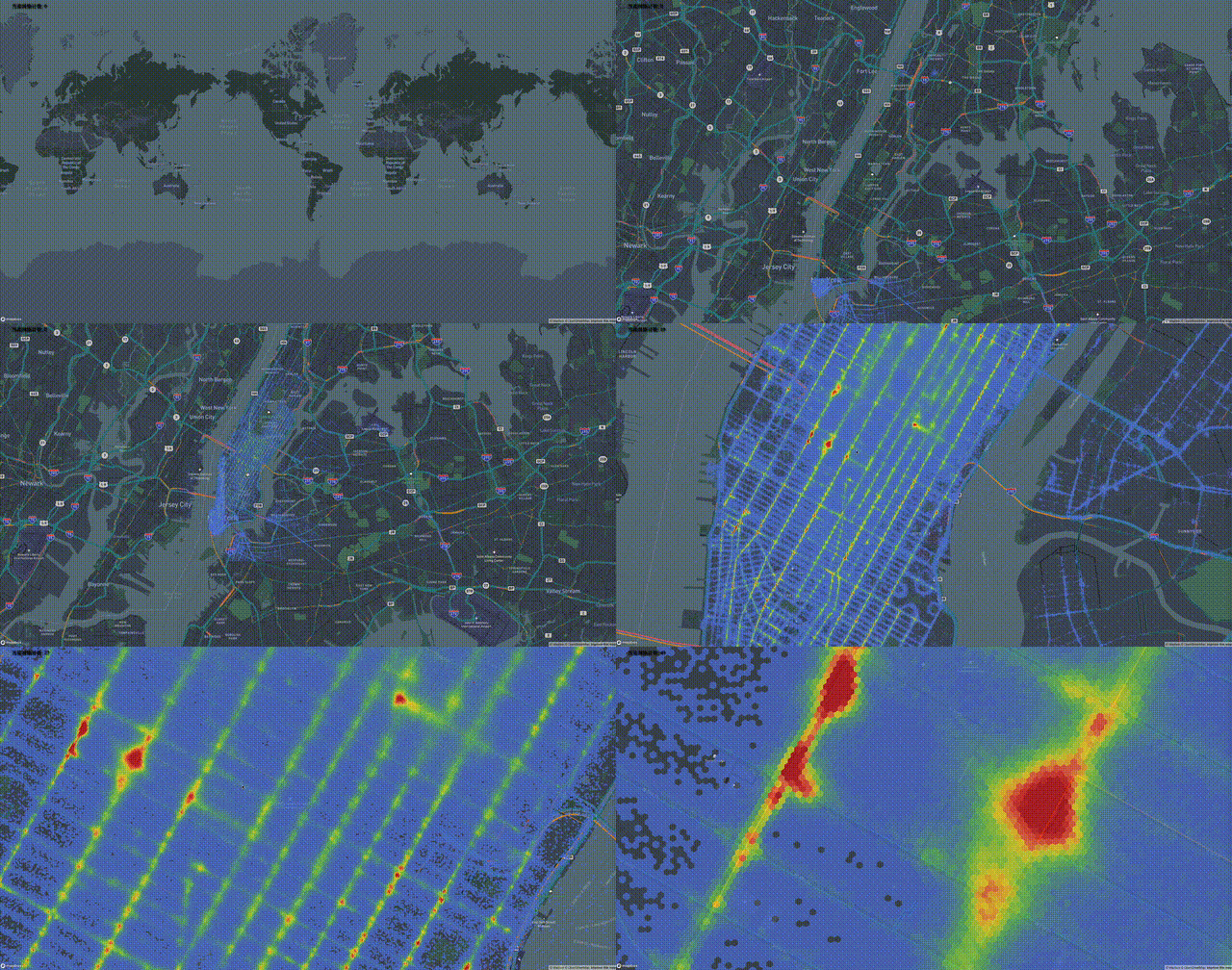
The frontend requires a Mapbox access token. ReplaceYOUR_TOKENinindex.htmlwith your own token.
Conclusion
The geographical grid is essential for mobile object-related application scenarios, delivering significant business value when integrated with data types such as trajectories, vectors, and rasters. As the world's first database to support mobile objects (MOD), GanosBase has validated its geospatial grid capabilities with customers across industries such as transportation, logistics, travel, and automotive. Compared with traditional middleware or business code implementations, GanosBase provides a spatiotemporal processing framework for large-scale mobile objects at the database system level, significantly improving computing efficiency and reducing overall costs.
Appendix
The following code provides a complete frontend implementation for H3 grid visualization.
Python backend (`app.py`)
from quart import Quart, send_file, render_template
import asyncpg
import io
import re

## Database connection parameters
CONNECTION = {"host": "YOUR-HOST-NAME-OR-IP", "port": PORT_NO, "database": "DATABASE_NAME",
              "user": "USER_NAME", "password": "PASSWORD"}

## Target table name/field/ID
TABLE = "h3_count_lev13"
H3_COL = "h3_lev13"
H3_GEOM_COL = "geometry"
AGG_VAL_COL = "count"
COL_SRID = 4326

app = Quart(__name__, template_folder='./')


@app.before_serving
async def create_db_pool():
    app.db_pool = await asyncpg.create_pool(**CONNECTION)


@app.after_serving
async def close_db_pool():
    await app.db_pool.close()


@app.route("/")
async def home():
    sql = f'''
    SELECT ST_Extent(ST_Transform(ST_Envelope({H3_GEOM_COL}), 4326))
    FROM {TABLE};
    '''
    async with app.db_pool.acquire() as connection:
        box = await connection.fetchval(sql)
        box = re.findall('BOX\((.*?) (.*?),(.*?) (.*?)\)', box)[0]
        min_x, min_y, max_x, max_y = list(map(float, box))
        bounds = [[min_x, min_y], [max_x, max_y]]
        center = [(min_x + max_x) / 2, (min_y + max_y) / 2]
        return await render_template('./index.html', center=str(center), bounds=str(bounds))


@app.route("/h3_mvt/<int:z>/<int:x>/<int:y>")
async def h3_mvt(z, x, y):
    sql = f'''
    SELECT ST_AsMVT(tile.*)
    FROM
      (SELECT ST_AsMVTGeom({H3_COL}, ST_Transform(ST_TileEnvelope($1,$2,$3),{COL_SRID}), 4096, 512, true) geometry,
       {AGG_VAL_COL} count
      FROM {TABLE}
      WHERE ({H3_COL} && ST_Transform(ST_TileEnvelope($1,$2,$3),{COL_SRID}))) tile'''
    async with app.db_pool.acquire() as connection:
        tile = await connection.fetchval(sql, z, x, y)
        return await send_file(io.BytesIO(tile), mimetype='application/vnd.mapbox-vector-tile')

if __name__ == "__main__":
    app.run(port=5100)
HTML frontend (`index.html`)
<!DOCTYPE html>
<html>

<head>
  <meta charset="utf-8">
  <title>map viewer</title>
  <meta name="viewport" content="initial-scale=1,maximum-scale=1,user-scalable=no">
  <link href="https://api.mapbox.com/mapbox-gl-js/v2.14.1/mapbox-gl.css" rel="stylesheet">
  <script src="https://api.mapbox.com/mapbox-gl-js/v2.14.1/mapbox-gl.js"></script>
  <script src="https://cdnjs.cloudflare.com/ajax/libs/chroma-js/2.4.2/chroma.min.js"></script>
</head>

<body>
  <div id="map" style="position: absolute;left:0; top: 0; bottom: 0; width: 100%;cursor:pointer;"></div>
  <div class="counter"
    style="position: absolute;left:2%;font-size: 20px;padding: .1em .1em;text-shadow: 3px 3px 3px black;">
    <span>Current grid count:</span>
    <span id="count">0</span>
  </div>
  <script>
    let YOUR_TOKEN = "pk.eyJ1Ijoia3pmaWxlIiwiYSI6ImNqbHZueXdlZjB2cG4zdnFucGl1OHJsMjkifQ.kW_Utrh8ETQltRk6fnpa_A"

    mapboxgl.accessToken = YOUR_TOKEN;
    const map = new mapboxgl.Map({
      container: "map",
      style: "mapbox://styles/mapbox/navigation-night-v1",
      center: {{ center }},
      zoom: 1
    })

    map.on("load", () => {
      map.fitBounds({{ bounds }})

      map.on('mousemove', 'h3', (e) => {
        map.getCanvas().style.cursor = "default";
        if (e.features.length > 0)
          document.getElementById('count').innerText = e.features[0].properties.count
      })
      map.on('mouseleave', 'h3', () => {
        map.getCanvas().style.cursor = "grab";
        document.getElementById('count').innerText = 0
      })
      map.addSource("h3_source", {
        type: "vector",
        tiles: [`${window.location.href}h3_mvt/{z}/{x}/{y}`],
        tileSize: 512
      });

      // make color map
      const MIN = 1
      const MAX = 600
      const STEP = 10
      color_map = chroma.scale(["#536edb", "#5d96a5", "#68be70", "#91d54d", "#cddf37", "#fede28", "#fda938", "#fb7447", "#f75a40", "#f24734", "#e9352a", "#da2723", "#cb181d"])
        .domain([MIN, MAX]);
      let colors = []
      for (let i = MIN; i < MAX; i += STEP)
        colors.push(color_map(i).hex(), i)
      colors.push(color_map(MAX).hex())

      map.addLayer({
        id: "h3",
        type: "fill",
        source: "h3_source",
        "source-layer": "default",
        paint: {
          "fill-color": [
            "step", ["get", "count"],
            ...colors
          ],
          "fill-opacity": 0.8
        }
      });

    });
  </script>
</body>

</html>