A PolarDB cluster is billed across up to four items: compute nodes, storage space, backup storage, and SQL Explorer (optional). Compute nodes support both pay-as-you-go and subscription billing. Storage space, backup storage, and SQL Explorer are always billed pay-as-you-go, regardless of how you purchase compute nodes.
The following figure shows the approximate fee proportion for each billable item of a PolarDB cluster.
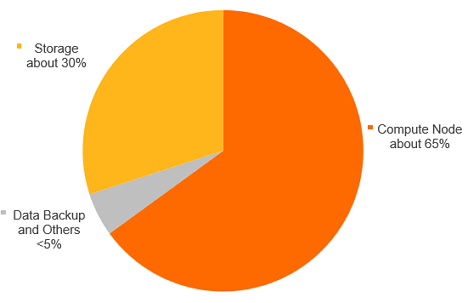
Billable items
| Billable item | Description | Billing methods |
|---|---|---|
| Compute nodes | Includes the primary node and read-only nodes. Fees vary based on the region, node specifications, and usage duration. |
|
| Storage space | Stores data files, index files, log files (online and archived), and temporary files. Charged for actual usage. Fees vary based on data volume and storage duration. |
|
| Backup storage (free quota applies) | PolarDB provides a free quota for backup storage. Fees apply only when usage exceeds this quota, and vary based on storage capacity and retention period. | Pay-as-you-go |
| SQL Explorer (optional) | A value-added service that provides security audit and performance diagnostics. Charged for audit log storage. Fees vary based on audit log storage capacity and retention period. | Pay-as-you-go |
FAQ
Does my subscription cover all billable items?
No. Subscription billing applies only to compute nodes. Storage space, backup storage, and SQL Explorer are always billed pay-as-you-go — even when your cluster uses a subscription plan.
How is the free backup storage quota calculated?
PolarDB provides a free quota for backup storage. Only usage beyond this free quota is charged. For details on pricing, see Pay-as-you-go rules.
What's next
For information about compute node purchase options, see Overview of purchase methods.
For compute node specifications, see Compute node specifications. For pay-as-you-go billing rules, see Compute node billing rules.
For storage billing rules, see Overview.
For backup storage billing rules, see Pay-as-you-go rules.
For SQL Explorer billing rules, see SQL Explorer billing rules (optional).