As spatial and spatio-temporal data grows to terabytes or petabytes, storing all of it on high-performance disk becomes expensive—especially when historical or auxiliary data is rarely accessed. GanosBase polymorphic tiered storage lets you move cold data (expired partitions, large object fields, or raster block data) to Object Storage Service (OSS) while keeping hot data and indexes on Elastic Block Storage (EBS) disks. A materialized cache layer on disk accelerates cold data access automatically. CRUD operations, index scans, and join queries on cold data require no SQL rewrites. The result is up to 90% storage cost reduction with transparent data access.
How it works
Cold data is segmented into small blocks, compressed, and written to OSS. A materialized cache layer built on database disks serves hot reads and writes against cold data, tiering automatically based on block access patterns.
Key mechanisms:
| Mechanism | Details |
|---|---|
| Compression | Cold data is compressed before writing to OSS. General data: 20%–40% ratio. Spatio-temporal data: 60%–70%. Average across workloads: 50%. |
| Materialized cache | Automatic tiering based on data block access patterns. Update and insert performance: 90% of disk. Point query performance: 80% of disk. |
| Data versioning | Uses a copy-on-write (COW) mechanism. After the first snapshot, only updated blocks are replicated—snapshots complete in seconds at minimal cost. |
| Reliability | OSS provides 99.9999999999% data reliability and 99.995% data availability, with LRS and ZRS options for redundancy. |
| Transparent access | CRUD operations, index scans, and join queries on cold data require no SQL rewrites. |
Storage cost comparison
The table below compares PolarDB disk (PSL4) with OSS for 100 GB of data:
| Disk (PSL4) | Polymorphic tiered storage (OSS) | |
|---|---|---|
| Billing rate | USD 0.238 per GB-month | LRS: USD 0.0173 per GB-month; ZRS: USD 0.0232 per GB-month |
| Compression ratio | 0% | 50% |
| Monthly cost for 100 GB | 0.238 × 100 GB = USD 23.8 0.238 × 100 GB = 23.8 USD | LRS: 0.0173 × 50 GB + 0.238 × 1 GB (cache) = USD 1.103; ZRS: 0.0232 × 50 GB + 0.238 × 1 GB (cache) = USD 1.398
|
OSS storage costs less than 10% of disk storage costs.
Supported storage combinations
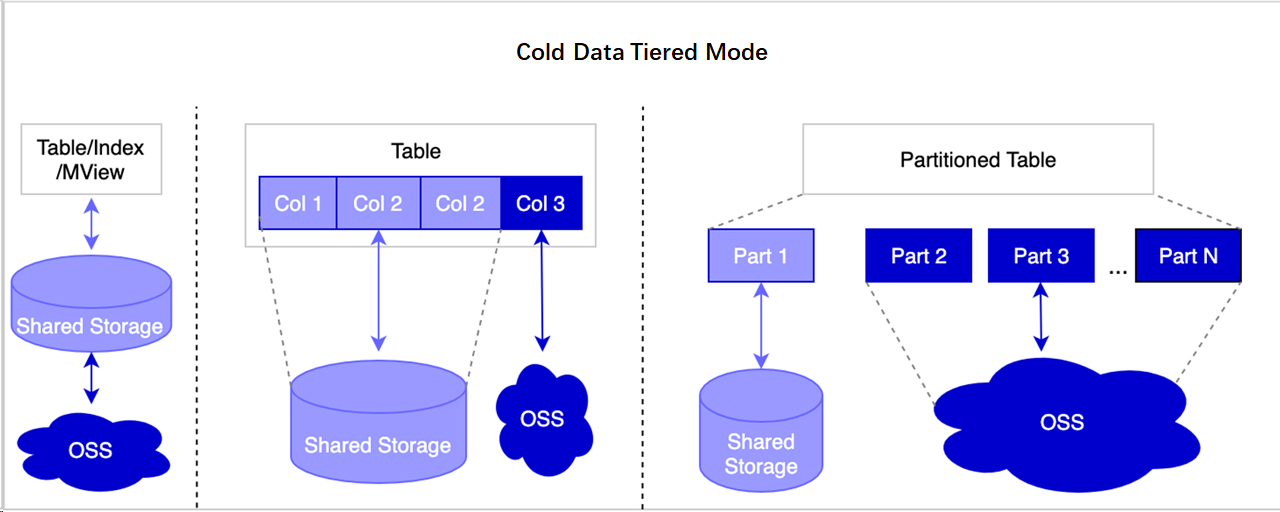
Polymorphic tiered storage supports several storage combinations:
Store all table data in OSS and keep indexes on disks—reduces costs while maintaining index access performance.
Store only large object (LOB) fields (for example,
BLOB,TEXT,JSON,JSONB,ANYARRAY, or spatio-temporal types) in OSS and keep the remaining fields on disks.Store expired partitions in OSS and keep hot partitions on disks. Further customization is possible, such as moving cold partition indexes to OSS or keeping hot partition indexes on disks.
Limitations
Before you configure tiered storage, note the following constraints:
Applies to new writes only: Only data inserted after you run the
ALTER COLUMNstatement moves to OSS. To migrate existing data, runVACUUM FULLafterALTER COLUMN. This rewrites all table data, but the table is unavailable for read or write operations during the process and may take a long time for large tables.OSS only: The feature is designed to support OSS, MinIO, and Hadoop Distributed File System (HDFS), but currently only OSS is supported.
Choose a tiering pattern
Three patterns cover the most common workloads:
| Pattern | Best for | How to tier |
|---|---|---|
| Archive expired partitions automatically | Time-series data with monthly or other periodic partitions | pg_cron + polar_alter_subpartition_to_oss |
| Move LOB fields to OSS | Non-partitioned tables with large text, JSON, or spatial fields | ALTER COLUMN ... SET (storage_type='oss') |
| Archive raster block data to OSS | Remote sensing or geospatial analysis with non-real-time requirements | Custom stored procedure + ALTER TABLE ... SET TABLESPACE oss |
Archive expired partitions automatically
This pattern fits time-series workloads where older partitions are rarely accessed. In the example below, trajectory data is partitioned by month, and partitions older than three months are moved to OSS automatically.
Prerequisites
Before you begin, make sure you have:
A PolarDB for PostgreSQL (Compatible with Oracle) cluster
Access to the
postgresdatabase with a privileged account
Set up the extension and scheduled archiving
Create a test database. For details, see Create a database. Then create a partitioned table and insert test data:
-- Create a partitioned table
CREATE TABLE traj(
  tr_id serial,
  tr_lon float,
  tr_lat float,
  tr_time timestamp(6)
)PARTITION BY RANGE (tr_time);

CREATE TABLE traj_202301 PARTITION OF traj
    FOR VALUES FROM ('2023-01-01') TO ('2023-02-01');
CREATE TABLE traj_202302 PARTITION OF traj
    FOR VALUES FROM ('2023-02-01') TO ('2023-03-01');
CREATE TABLE traj_202303 PARTITION OF traj
    FOR VALUES FROM ('2023-03-01') TO ('2023-04-01');
CREATE TABLE traj_202304 PARTITION OF traj
    FOR VALUES FROM ('2023-04-01') TO ('2023-05-01');

-- Insert test data
INSERT INTO traj(tr_lon,tr_lat,tr_time) values(112.35, 37.12, '2023-01-01');
INSERT INTO traj(tr_lon,tr_lat,tr_time) values(112.35, 37.12, '2023-02-01');
INSERT INTO traj(tr_lon,tr_lat,tr_time) values(112.35, 37.12, '2023-03-01');
INSERT INTO traj(tr_lon,tr_lat,tr_time) values(112.35, 37.12, '2023-04-01');

-- Create an index on the partitioned table
CREATE INDEX traj_idx on traj(tr_id);
Create the
polar_osfs_toolkitextension in the test database. This enables the utility functions for archiving tables and indexes to OSS:CREATE EXTENSION polar_osfs_toolkit;Connect to the
postgresdatabase with a privileged account and create thepg_cronextension:-- Only privileged accounts can run this statement in the postgres database CREATE EXTENSION pg_cron;For more information, see pg_cron.
Create a scheduled task named
task1that runs every minute. The task callspolar_alter_subpartition_to_ossto move partitions older than three months to OSS:SELECT cron.schedule_in_database('task1', '* * * * *', 'select polar_alter_subpartition_to_oss(''traj'', 3);', 'db01');The task ID is returned:
schedule_in_database
----------------------
                    1
Verify the result
Check the storage location of a partition that should have moved to OSS:
\d+ traj_202301The Tablespace field shows oss when the partition has been archived:
Table "public.traj_202301"
 Column  |              Type              | Collation | Nullable |               Default               | Storage | Compression | Stats target | Description
---------+--------------------------------+-----------+----------+-------------------------------------+---------+-------------+--------------+-------------
 tr_id   | integer                        |           | not null | nextval('traj_tr_id_seq'::regclass) | plain   |             |              |
 tr_lon  | double precision               |           |          |                                     | plain   |             |              |
 tr_lat  | double precision               |           |          |                                     | plain   |             |              |
 tr_time | timestamp(6) without time zone |           |          |                                     | plain   |             |              |
Partition of: traj FOR VALUES FROM ('2023-01-01 00:00:00') TO ('2023-02-01 00:00:00')
...
Tablespace: "oss" -- Already stored in OSS
Access method: heap
To review the scheduled task execution history, connect to the postgres database and run:
SELECT * FROM cron.job_run_details;Archived partitions no longer occupy disk space. CRUD operations on them continue to work with full transparency.
Store LOB fields in OSS for a non-partitioned table
Large objects (LOBs) include BLOB, TEXT, JSON, JSONB, ANYARRAY, and data types. This pattern separates LOB fields from the rest of the table, keeping small fields on disk and moving LOBs to OSS—field-level hot/cold separation without changing your SQL queries.
Redirect LOB storage to OSS
Create a table with a LOB column. This example uses
TEXT; the same steps apply to other LOB types:CREATE TABLE blob_table(id serial, val text);Set the storage location for the
valcolumn to OSS:ALTER TABLE blob_table ALTER COLUMN val SET (storage_type='oss');Insert data and confirm the storage location:
INSERT INTO blob_table(val) VALUES((SELECT string_agg(random()::text, ':') FROM generate_series(1, 100000)));Check where the
valcolumn's data is stored:WITH tmp AS (SELECT 'pg_toast_'||b.oid||'_'||c.attnum AS tblname FROM pg_class b, pg_attribute c WHERE b.relname='blob_table' AND c.attrelid=b.oid AND c.attname='val') SELECT t.spcname AS storage_engine FROM pg_tablespace t, pg_class r, tmp m WHERE r.relname = m.tblname AND t.oid=r.reltablespace;Expected output:
storage_engine
----------------
 oss
(1 row)
Only data inserted after you runALTER COLUMNis stored in OSS. To move existing LOB data from a table already in use, runALTER COLUMNfirst to set the storage location, then runVACUUM FULLto rewrite all existing data to OSS.VACUUM FULLdoes not affect in-flight CRUD operations but locks the table during execution, which can take a long time for large tables.
Reduce storage costs for spatio-temporal analysis
This pattern applies to remote sensing and geospatial workloads that require statistical analysis but not real-time query performance. The example uses satellite remote sensing images (raster data) and measures the trade-off between storage cost and normalized difference vegetation index (NDVI) calculation time when image block data moves to OSS.
This example uses advanced GanosBase features. Focus on the final comparison results if you want to skip intermediate steps.
Import and analyze remote sensing images
Prepare four Landsat remote sensing images.
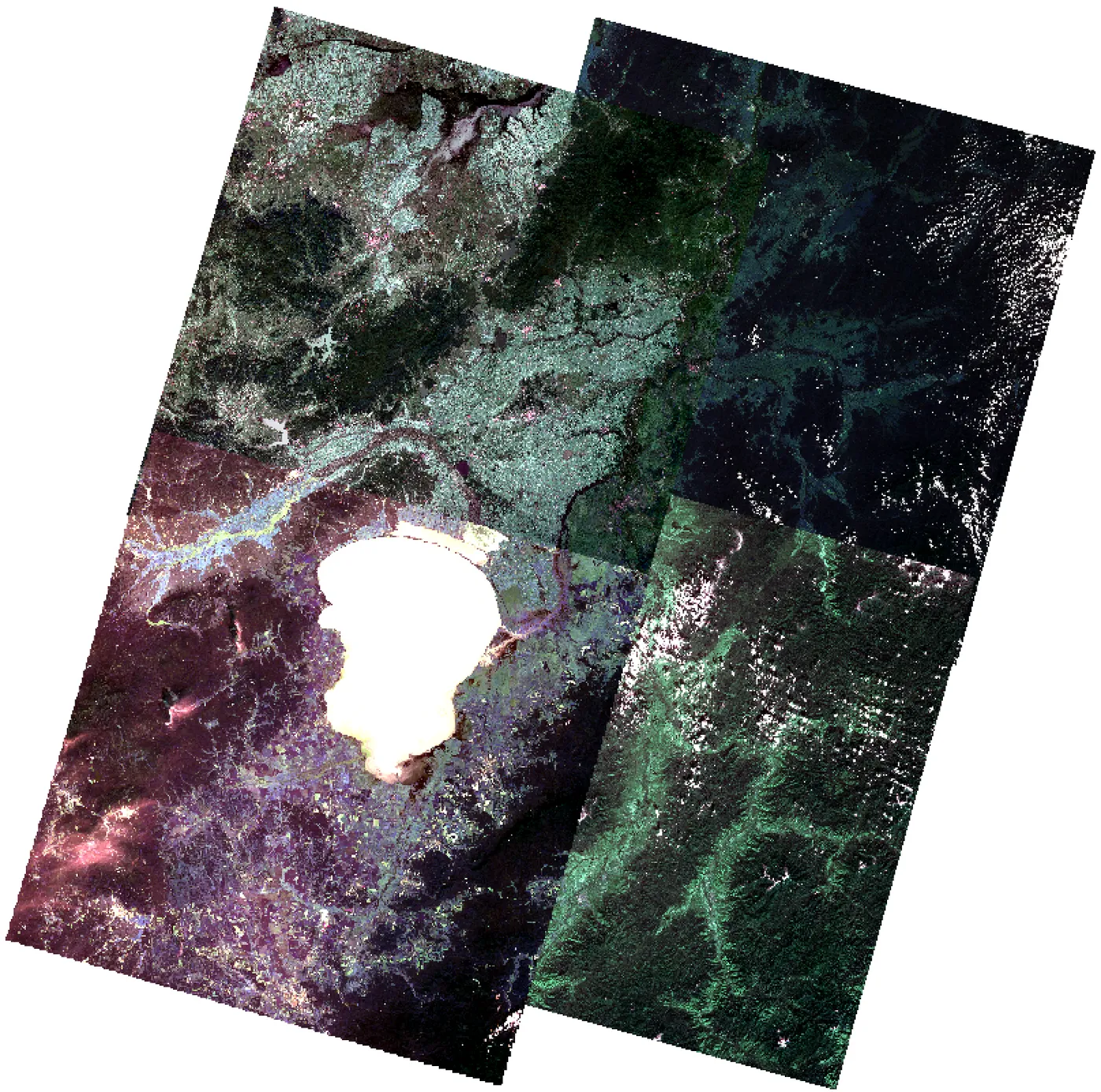
Import the images into the database:
Create a test database named
rastdb.Create the
ganos_rasterextension. For details, see GanosBase Raster:CREATE EXTENSION ganos_raster CASCADE;Import the images:
CREATE TABLE raster_table (id integer, rast raster);
INSERT INTO raster_table VALUES (1, ST_ImportFrom('rbt','/home/postgres/LC08_L1TP_113028_20190912_20190917_01_T1.TIF'));
INSERT INTO raster_table VALUES (2, ST_ImportFrom('rbt','/home/postgres/LC08_L1TP_113029_20191030_20191114_01_T1.TIF'));
INSERT INTO raster_table VALUES (3, ST_ImportFrom('rbt','/home/postgres/LC08_L1TP_114028_20191005_20191018_01_T1.TIF'));
INSERT INTO raster_table VALUES (4, ST_ImportFrom('rbt','/home/postgres/LC08_L1TP_114029_20200905_20200917_01_T1.TIF'));
Calculate the disk space used by the image block data. In GanosBase, raster metadata and block data are stored separately. Create a stored procedure to sum the block table sizes:
CREATE OR REPLACE FUNCTION raster_data_internal_total_size( rast_table_name text, rast_column_name text)
  RETURNS int8 AS $$
DECLARE
    sql                 text;
    sql2                text;
    rec                 record;
    size                int8;
    totalsize           int8;
    tbloid              Oid;
BEGIN
    size := 0;
    totalsize := 0;

    -- Query the block data table of the raster object
    sql = format('select distinct(st_datalocation(%s)) as tblname from %s where st_rastermode(%s) = ''INTERNAL'';', rast_column_name, rast_table_name, rast_column_name);
    for rec in
        execute sql
    loop
        sql2 = format('select a.oid from pg_class a, pg_tablespace b where a.reltablespace = b.oid and b.spcname=''oss'' and a.relname=''%s'';', rec.tblname);
        execute sql2 into tbloid;

        if (tbloid > 0) then
            size := 0;
        else
            -- Calculate the size of each data table
            sql2 = format('select pg_total_relation_size(''%s'');',rec.tblname);
            execute sql2 into size;
        end if;
        totalsize := (totalsize + size);
    end loop;
    return totalsize;
END;
$$ LANGUAGE plpgsql;
Run the calculation:
SELECT pg_size_pretty(raster_data_internal_total_size('raster_table','rast'));The images occupy approximately 1.2 GB of database storage:
pg_size_pretty
----------------
 1319 MB
(1 row)
Calculate NDVI with data on disk. A mosaic operation merges the images before NDVI analysis. For details on
ST_MosaicFrom, see ST_MosaicFrom:CREATE TABLE rast_mapalgebra_result(id integer, rast raster); INSERT INTO rast_mapalgebra_result SELECT 1, ST_MapAlgebra(ARRAY(SELECT st_mosaicfrom(ARRAY(SELECT rast FROM raster_table ORDER BY id), 'rbt_mosaic','','{"srid":4326,"cell_size":[0.005,0.005]')), '[{"expr":"([0,3] - [0,2])/([0,3] + [0,2])","nodata": true, "nodataValue":0}]', '{"chunktable":"rbt_algebra","celltype":"32bf"}');INSERT 0 1 Time: 39874.189 ms (00:39.874)Archive block data to OSS. Create a stored procedure that moves the block data tables to OSS while keeping the metadata on disk:
CREATE OR REPLACE FUNCTION raster_data_alter_to_oss( rast_table_name text, rast_column_name text)
  RETURNS VOID AS $$
DECLARE
    sql                 text;
    sql2                text;
    rec                 record;
BEGIN
    -- Query the data table of the raster object
    sql = format('select distinct(st_datalocation(%s)) as tblname from %s where st_rastermode(%s) = ''INTERNAL'';', rast_column_name, rast_table_name, rast_column_name);
    for rec in
        execute sql
    loop
        sql2 = format('alter table %s set tablespace oss;',rec.tblname);
        execute sql2;
    end loop;
END;
$$ LANGUAGE plpgsql;
Archive the block data and verify the result:
SELECT raster_data_alter_to_oss('raster_table', 'rast');

-- Confirm disk usage is now 0
SELECT pg_size_pretty(raster_data_internal_total_size('raster_table','rast'));
pg_size_pretty ---------------- 0 bytes (1 row)Block data is now in OSS.
Recalculate NDVI with block data in OSS:
INSERT INTO rast_mapalgebra_result select 2, ST_MapAlgebra(ARRAY(select st_mosaicfrom(ARRAY(SELECT rast FROM raster_table ORDER BY id), 'rbt_mosaic','','{"srid":4326,"cell_size":[0.005,0.005]')), '[{"expr":"([0,3] - [0,2])/([0,3] + [0,2])","nodata": true, "nodataValue":0}]', '{"chunktable":"rbt_algebra","celltype":"32bf"}');INSERT 0 1 Time: 69414.201 ms (01:09.414)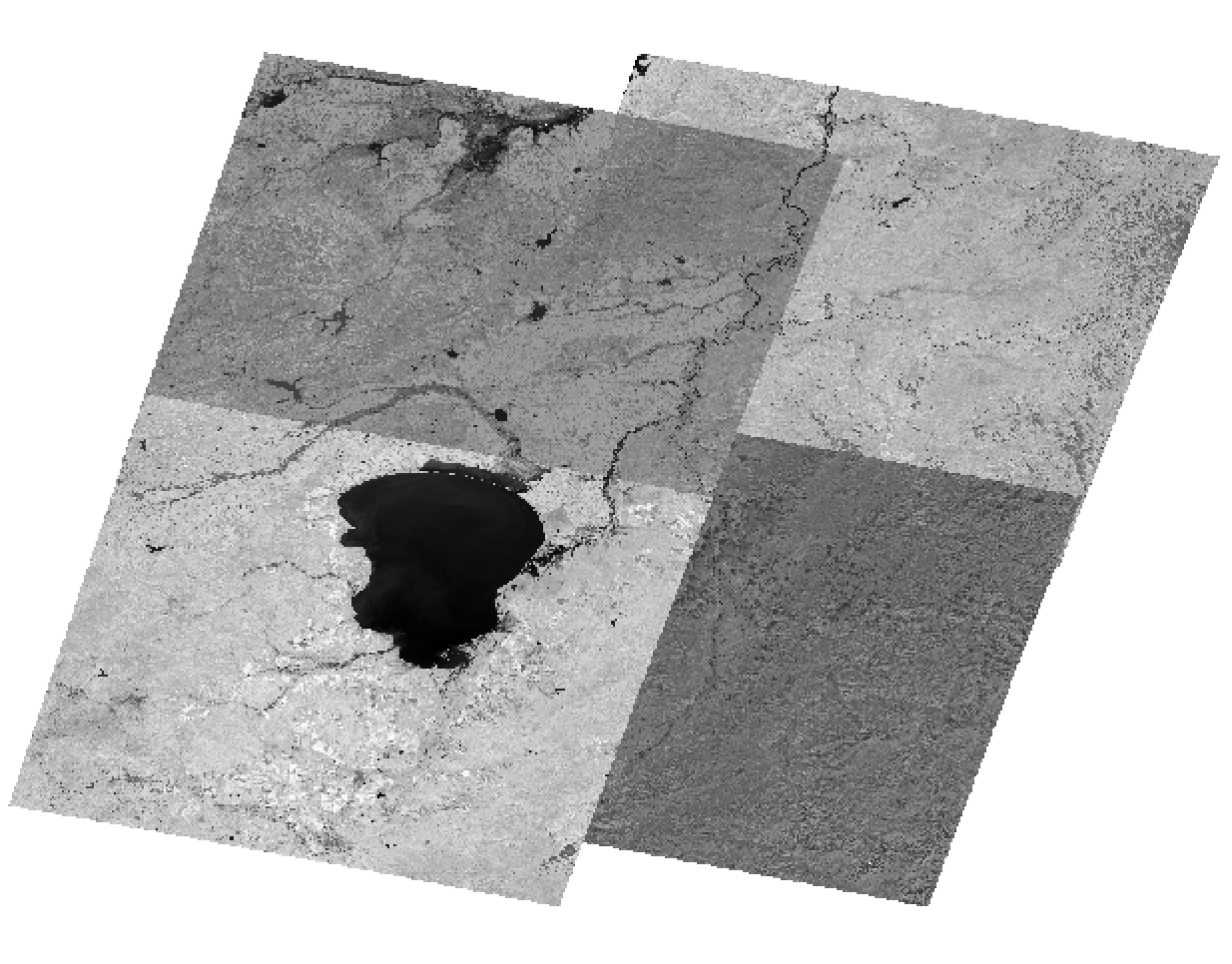
Storage cost vs. performance comparison
| Disk | OSS | Ratio | |
|---|---|---|---|
| Storage cost | 1,319 MB at USD 0.238/GB-month = USD 0.31 1011.834 MB at 0.0232 USD/GB/month = 0.023 USD. | 1,011.834 MB at USD 0.0232/GB-month = USD 0.023 | 10:1 |
| NDVI calculation time | 39 seconds | 69 seconds | 1:1.76 |
OSS storage costs less than one-tenth of disk storage costs. The performance overhead is under 100% (less than 2x), which is acceptable for non-real-time statistical analysis.