Extends a 3D point or linestring outward by a specified radius to form a closed mesh buffer.
Syntax
meshgeom ST_3DBuffer(geometry geom3d, float8 buffer_radius, boolean round_end DEFAULT true, float8 smooth DEFAULT 0.5)Return type: meshgeom — a PolarDB mesh geometry type that represents a 3D surface as a triangulated mesh. The mesh is composed of PATCH, INDEXSURFACE, and VERTEX components. Use ST_AsText to convert the output to a readable text representation.
Parameters
| Parameter | Type | Default | Description |
|---|---|---|---|
geom3d | geometry | — | The input geometry. Accepts Point and LineString types only. |
buffer_radius | float8 | — | The buffer radius. Must be a floating-point number. |
round_end | boolean | true | Controls end-cap behavior for linestrings. true adds hemisphere buffers at both endpoints; false leaves endpoints flat. |
smooth | float8 | 0.5 | The side length of the triangles on the buffer surface. Valid range: (0, 1]. Smaller values produce finer triangulation and a surface closer to a true curve. |
smooth is positional and depends on round_end. To use smooth, you must also specify round_end explicitly. Specifying smooth without round_end causes a parsing error.
Examples
Buffer a 3D point
The following example creates a spherical buffer around the origin point with a radius of 2. round_end and smooth use their defaults (true and 0.5).
SELECT ST_AsText(ST_3DBuffer('POINT(0 0 0)', 2));Output:
MESHGEOM(PATCH(INDEXSURFACE Z (VERTEX(0 0 2,-0.894427190999916 0 1.78885438199983,-0.447213595499958 ...The smooth value controls the triangle side length on the buffer surface. A smaller value produces a smoother sphere.
smooth value | Effect |
|---|---|
0.5 (default) | 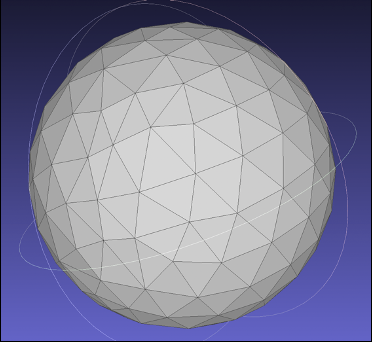 |
0.8 | 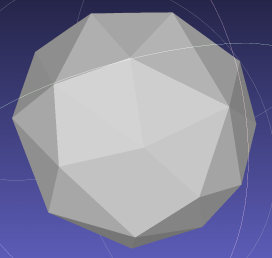 |
Buffer a 3D linestring without end caps
Set round_end to false to leave the endpoints of the linestring flat.
SELECT ST_AsText(ST_3DBuffer('LINESTRING(1 2 3, 0 0 4)', 0.5, false));Output:
MESHGEOM(PATCH(INDEXSURFACE Z (VERTEX(1.43294188107951 1.89763792560716 3.22821773229382,1.30266373925419...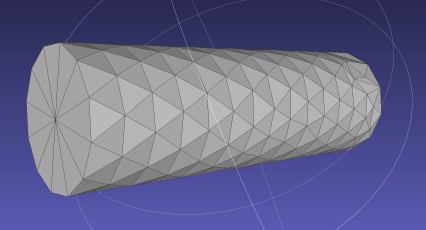
Buffer a 3D linestring with end caps
Set round_end to true to add hemisphere buffers at both endpoints. The following example also sets smooth to 0.6 to control surface resolution.
SELECT ST_AsText(ST_3DBuffer('LINESTRING(0 1 0, 1 3 2, 2 1 1)', 1, true, 0.6));Output:
MESHGEOM(PATCH(INDEXSURFACE Z (VERTEX(-0.89885050178969 1.01131599079557 0.438109260099278...The following table shows how round_end and smooth affect the result for the same linestring:
round_end | smooth | Effect |
|---|---|---|
true | 0.5 (default) | 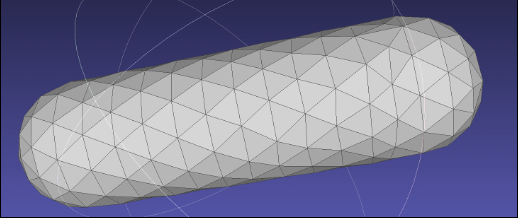 |
true | 0.3 | 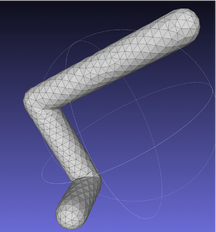 |
Usage notes
ST_3DBufferaccepts onlyPointandLineStringgeometry types.buffer_radiusis a floating-point number.smoothmust be in the range(0, 1].The
smoothparameter is positional. Specifyround_endbeforesmooth. Specifyingsmoothalone withoutround_endcauses a parsing error.Smaller
smoothvalues increase the triangle count and produce a smoother surface.
See also
ST_AsText— converts ameshgeomvalue to a readable text representation, as shown in the examples above.