Analyze data in external OSS
This topic describes the technical principles and usage of the columnstore index feature for querying external table data stored in OSS.
Background information
As your business grows, data volume increases, raising storage costs. In a competitive market, evolving business logic also increases the complexity of analytical workloads, making compute performance critical. Additionally, a complete data application typically combines multiple analytics tools to meet different requirements, which requires data to flow between systems.
Reading external table data from OSS using the columnstore index feature effectively addresses these needs. Key advantages include the following:
-
OSS offers high cost-effectiveness as a cloud-native storage solution.
-
The columnstore index feature delivers exceptional compute speed and flexibility.
-
Open data formats such as ORC and Parquet offer broad compatibility and high compression ratios, simplifying data exchange across systems.
Applicability
Only supports MySQL 8.0.2.
Do not use versions 8.0.2.2.30.2 and earlier directly, because they may have compatibility issues that affect column store node availability. For technical support, submit a ticket to contact us.
Technical principles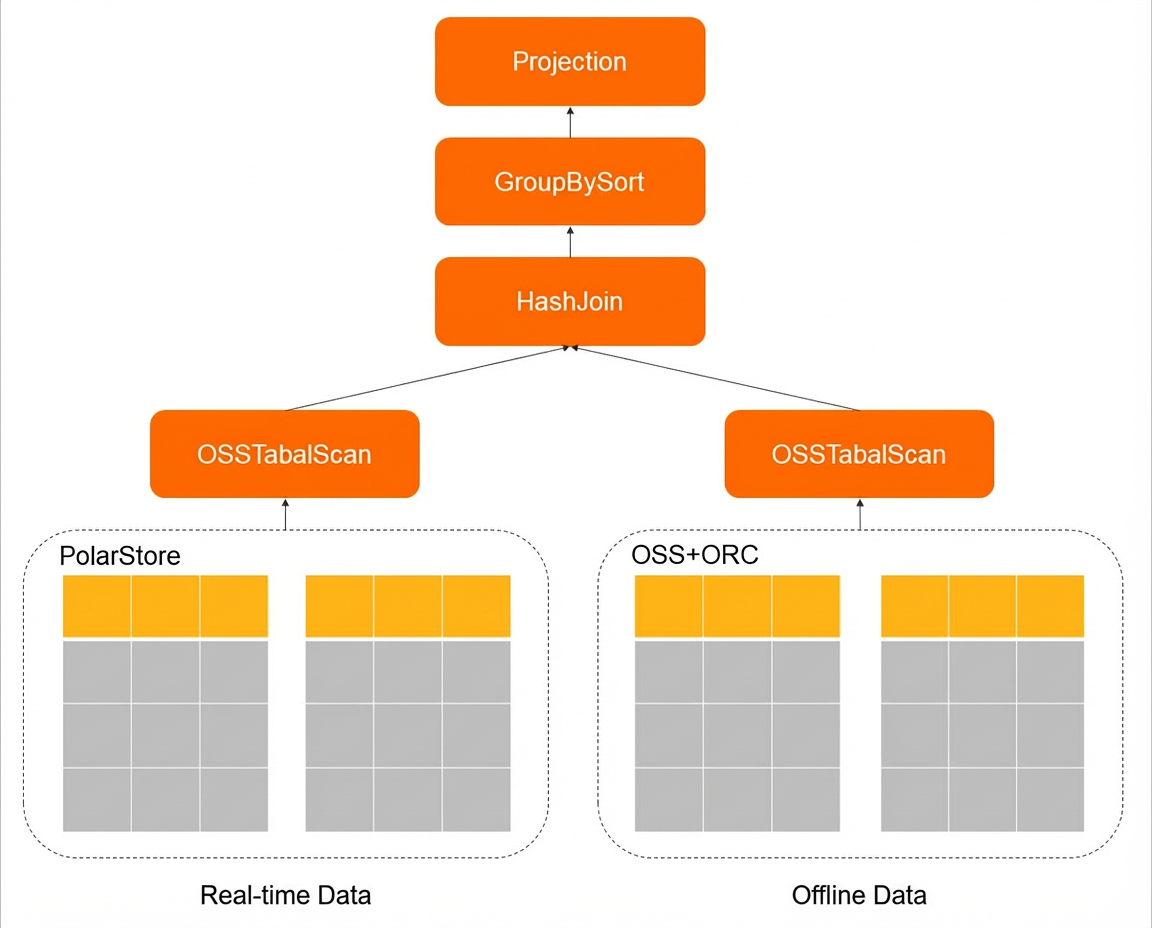
The In-Memory Column Index (IMCI) is a high-performance columnstore analytics engine. ORC and Parquet are also columnar formats. OSS supports high-concurrency reads, enabling higher network throughput under heavy load. IMCI’s parallel scan capability fully leverages OSS’s high bandwidth and uses parallel or vectorized computing to improve CPU efficiency, delivering extremely fast analytics performance for both offline and real-time aggregation and analysis.
Typical scenarios
In a typical data warehouse architecture, online data—such as relational database records or application service logs—is imported into an offline analytics platform via extract, transform, and load (ETL). The results—for example, the application data service layer or ADS in a data mart model—are then loaded back into a relational database to power BI reporting, monitoring, and ad hoc analysis applications.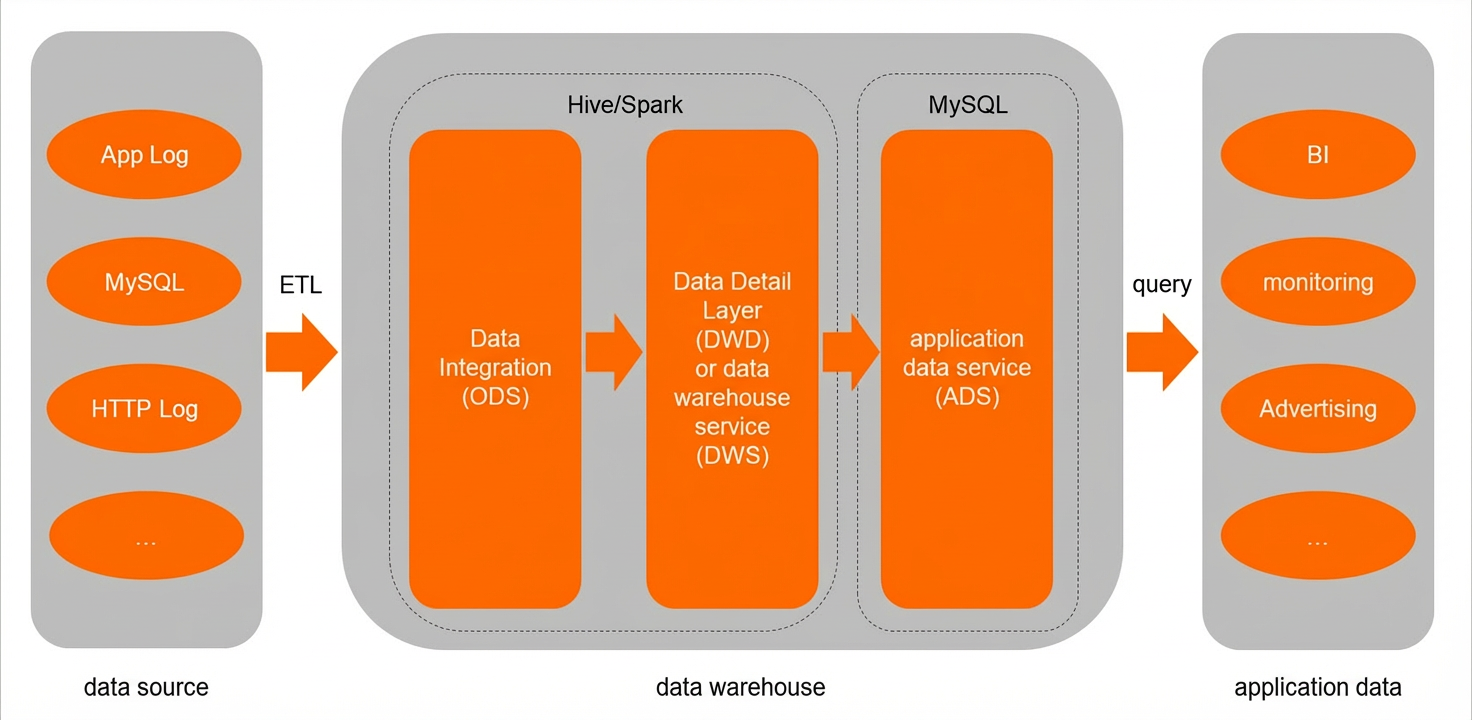
This architecture has two common bottlenecks:
-
Slow import speeds and high storage costs when loading offline data warehouse results into a relational database.
-
The application data service layer (ADS) often performs complex computations—not just simple queries—including aggregations of offline and real-time data. Row-store MySQL cannot efficiently support these operations.
After applying this feature, the data architecture becomes as shown below: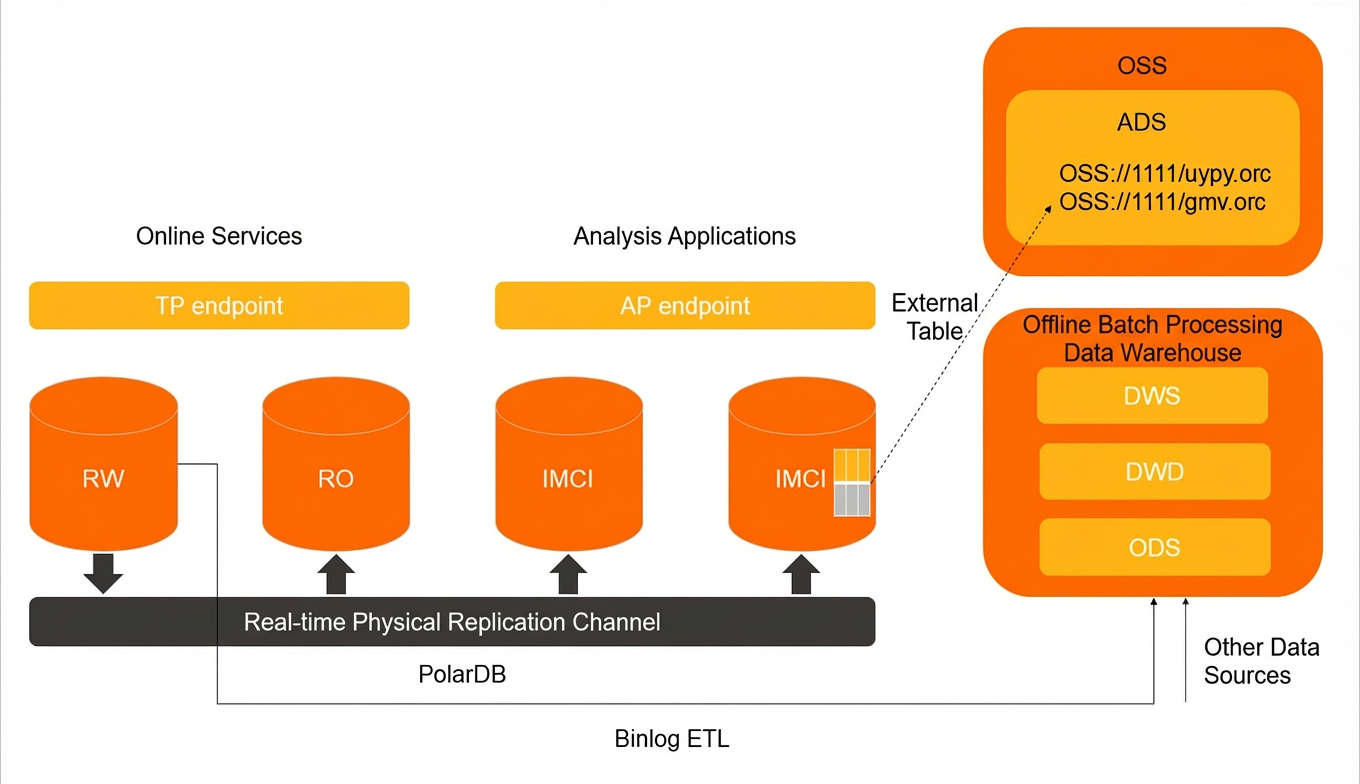
This approach reduces storage costs at the application data service layer (ADS) and enables high-performance “secondary” ad hoc analysis along with integrated analysis of offline and online data.
Important notes
-
The CREATE statement must include
COMMENT='columnar=1'andCONNECTIONinformation. -
When a query involves both local tables and OSS external tables, create a columnstore index on the local table.
Parameter settings
|
Parameter |
Description |
|
imci_ignore_schema_miss_match_oss_file |
Whether to ignore files on OSS that do not match the table schema during scanning. Valid values:
|
|
imci_oss_table_scan_unit |
The scan range per parallel scan operation by IMCI. Valid values: 0–1000. Default: 2. |
|
imci_oss_max_retries |
Number of retries when reading external table data from OSS fails. Valid values: 0–100. Default: 0. |
|
imci_oss_max_retriy_backoff_ms |
Valid values: 10–1000. Default: 300. |
|
imci_oss_scan_odps_compatible |
Whether to export data in ODPS-compatible mode. Valid values:
|
Usage
-
Create an OSS external table.
Use a CREATE statement to define the table, specifying column types, OSS connection details, and the path to the data file in OSS. You can define column types in one of two ways:
-
Method 1 (recommended): Infer column types from the OSS data file, as shown below:
CREATE FOREIGN TABLE `test` FROM CONNECTION='OSS://${oss_key}:${oss_key_secret}@${endpoint}/${bucket}/test.orc'
COMMENT='columnar=1';
Use the
SHOW CREATE TABLEtabnamecommand to view the inferred column types.mysql> create foreign table abc from CONNECTION='oss://xxx@oss-cn-hangzhou.aliyuncs.com/imci-test/tdir/region.tbl.orc' comment = 'columnar=1'; Query OK, 0 rows affected (0.70 sec) mysql> show create table abc; +-------+-----------------------------------------------------------------------------------------------------------+ | Table | Create Table | +-------+-----------------------------------------------------------------------------------------------------------+ | abc | CREATE TABLE `abc` ( `r_regionkey` bigint(20) DEFAULT NULL, `r_name` varchar(0) CHARACTER SET utf8 COLLATE utf8_general_ci DEFAULT NULL, `r_comment` varchar(0) CHARACTER SET utf8 COLLATE utf8_general_ci DEFAULT NULL ) ENGINE=InnoDB DEFAULT CHARSET=utf8 COMMENT='columnar=1' CONNECTION='oss://xxx@oss-cn-hangzhou.aliyuncs.com/imci-test/tdir/region.tbl.orc' | +-------+-----------------------------------------------------------------------------------------------------------+ -
Method 2: Explicitly specify column types during table creation, as shown below:
CREATE TABLE `test` (
  `r_regionkey` bigint(20),
  `r_name` text,
  `r_comment` text,
  PRIMARY KEY (`r_regionkey`)
)
COMMENT='columnar=1'
CONNECTION='OSS://${oss_key}:${oss_key_secret}@${endpoint}/${bucket}/test.orc'
You can include OSS connection details directly in the
CONNECTIONfield. Alternatively, create a FOREIGN SERVER first, then reference it in theCONNECTIONfield when creating the table. Example:CREATE SERVER test_oss_server FOREIGN DATA WRAPPER oss OPTIONS (EXTRA_SERVER_INFO '{"oss_bucket":"xxx", "oss_access_key_id":"xxx", "oss_endpoint":"xxx", "oss_access_key_secret":"xxx", "oss_prefix":"/test/path"}'); SELECT * FROM mysql.servers; CREATE TABLE `test` (...) COMMENT='columnar=1' CONNECTION='test_oss_server/test.orc';This configuration reads data from the file
test.orcunder the OSS path/test/path/. To read multiple files, specify the directory path ending with “/” in the table definition. Example:CREATE TABLE `test`(...) COMMENT='columnar=1' CONNECTION='OSS://${oss_key}:${oss_key_secret}@${endpoint}/${bucket}/orders/2022-09-01/'This reads all matching files under the OSS directory
orders/2022-09-01/.
-
-
Integrate with MaxCompute to export data.
-
Run the following commands to write data to OSS:
CREATE EXTERNAL TABLE IF NOT EXISTS mc_oss_orc_external
(
vehicleId int,
recordId int,
patientId int,
calls int,
locationLatitute double,
locationLongtitue double,
recordTime string,
direction string
)
STORED AS orc
LOCATION 'oss:///${oss_key}:${oss_key_secret}@oss-cn-hangzhou-internal.aliyuncs.com/oss-mc-test/Demo4/output/';
INSERT INTO TABLE mc_oss_orc_external SELECT * FROM mc_oss_orc_external;
These commands create a folder named
.odpsinside theoutputdirectory. This folder contains a.metafile and subfolders storing ORC files. Each write operation creates a new date-prefixed folder containing the latest data—for example:output/.odps/20220413*********/****.orc. -
Create a table and read data in ODPS (MaxCompute) compatible mode. Example:
SET imci_oss_scan_odps_compatible=on; CREATE FOREIGN TABLE `test` FROM CONNECTION='oss:///${oss_key}:${oss_key_secret}@oss-cn-hangzhou-internal.aliyuncs.com/oss-mc-test/Demo4/output/' COMMENT='columnar=1'; SELECT count(*) FROM test;NoteWhen ODPS-compatible mode is enabled, only the most recently written data is read.
-
Performance Testing
We generated 100 GB of TPC-H data to evaluate the performance of querying external table data in OSS using the columnstore index feature.
-
Staging environment: Ice Lake, 32 vCPUs, 256 GB RAM, NVMe local disk.
-
Parameter settings: Default cluster configuration.
-
Test results: See the table below.
Query SQL
Parquet format – SQL execution time (seconds)
ORC format – SQL execution time (seconds)
Q1
57.464
52.741
Q2
41.1
71.311
Q3
53.907
49.745
Q4
42.695
31.302
Q5
92.04
90.19
Q6
34.717
33.243
Q7
58.458
57.47
Q8
66.797
79.089
Q9
129.574
147.035
Q10
54.873
74.768
Q11
18.321
23.555
Q12
47.032
40.028
Q13
16.315
25.563
Q14
36.304
46.174
Q15
68.015
80.016
Q16
10.461
23.829
Q17
69.351
74.21
Q18
57.945
45.357
Q19
52.077
61.992
Q20
39.846
67.283
Q21
112.834
92.385
Q22
13.02
22.267
TOTAL
1173.146
1289.553