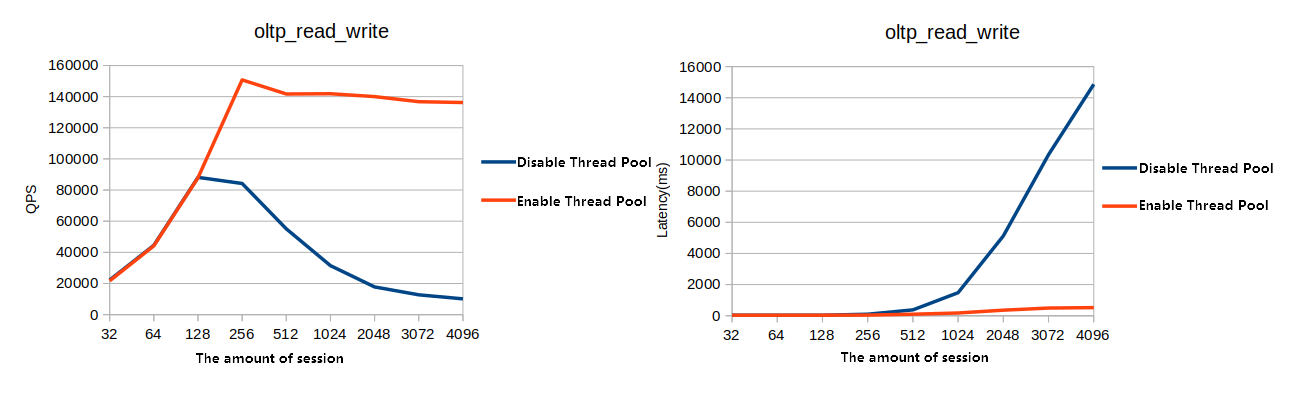
Under high connection counts, MySQL's default one-thread-per-session model causes excessive thread scheduling and frequent cache misses that sharply reduce throughput. PolarDB's thread pool replaces this model with a fixed pool of thread groups that serve many sessions concurrently, maintaining stable performance under high-connection and high-concurrency workloads.
How it works
PolarDB's thread pool uses a priority and concurrency control mechanism for different types of SQL operations. It maintains the number of connections near the optimal level, preventing CPU saturation. Within each thread group, a high-priority queue and a lower-priority queue let the pool serve administrative statements and in-transaction work before queued or complex statements.
The result:
Administrative statements (new connections, monitoring, maintenance) execute promptly even under peak load.
Complex or queued statements are rate-limited to prevent them from exhausting system resources.
Transactions in progress receive priority treatment to reduce resource contention.
Configure the thread pool
Modify thread pool parameters in the PolarDB console. For instructions, see Set cluster and node parameters.
All cluster parameters in the PolarDB console are prefixed with loose_ for MySQL configuration file compatibility. Select the parameters with the loose_ prefix when modifying them in the console.
General settings
| Parameter | Description | Default |
|---|---|---|
loose_thread_pool_enabled | Enables or disables the thread pool. Valid values: ON, OFF. No cluster restart is required. Default varies by version: MySQL 5.6 defaults to OFF; MySQL 5.7, 8.0.1, and 8.0.2 default to ON. | Version-dependent |
loose_thread_pool_size | Number of thread groups in the pool. Valid range: DBNodeClassCPU to DBNodeClassCPU × 10, where DBNodeClassCPU is the number of CPU cores on the primary node. Default: DBNodeClassCPU × 2 (MySQL 5.7: DBNodeClassCPU). See examples below. | DBNodeClassCPU × 2 |
loose_thread_pool_oversubscribe | Maximum number of active threads (threads executing SQL statements) per thread group. Valid range: 1–1,000. | 20 |
loose_thread_pool_stall_limit | Time in milliseconds before the pool is considered stalled. When stalled, the system creates a new thread to serve incoming statements. Valid range: 1–18,446,744,073,709,551,615. MySQL 5.6 default: 30 ms. | 10 ms |
loose_thread_pool_idle_timeout | Time in seconds before an idle thread is released. Valid range: 0–31,536,000. Applicable to MySQL 5.6 and 5.7. | 60 s |
Sizing `loose_thread_pool_size`
Start with the default (DBNodeClassCPU × 2) and monitor throughput. For InnoDB-heavy workloads, values close to the physical CPU core count often perform well; for workloads with many short transactions, higher values may help. Avoid setting this value above DBNodeClassCPU × 10.
Examples:
| Cluster type | Engine version | Primary node | Valid range | Default |
|---|---|---|---|---|
| Cluster Edition | MySQL 8.0.1 | 4 cores | 4–40 | 8 |
| Multi-master Cluster (Database/Table) | MySQL 8.0.1 | 2 × 4 cores | 8–80 | 16 |
| Cluster Edition | MySQL 5.7 | 4 cores | 4–40 | 4 |
Priority handling
| Parameter | Description | Default |
|---|---|---|
loose_thread_pool_high_prio_mode | Controls which statements enter the high-priority queue. Valid values: transactions — statements in an active transaction are queued at high priority for the number of executions specified by loose_thread_pool_high_prio_tickets, then drop to the lower-priority queue; statements — all statements are queued at high priority; none — no statements receive high-priority treatment. Applicable to MySQL 5.6 and 5.7. | transactions |
loose_thread_pool_high_prio_tickets | Number of high-priority executions granted to a single transaction before it moves to the lower-priority queue. Valid range: 0–4,294,967,295. Applicable to MySQL 5.6 and 5.7. | 4,294,967,295 |
loose_thread_pool_high_priority_users | Comma-separated list of database accounts whose requests are always placed in the high-priority queue. Example: user1, user2. Takes effect only for new connections established after the parameter is set. Avoid configuring too many high-priority accounts. Applicable to MySQL 8.0.1 revision ≥ 8.0.1.1.19 and MySQL 8.0.2 revision ≥ 8.0.2.2.12. | — |
Bypass settings
| Parameter | Description | Default |
|---|---|---|
loose_bypass_thread_pool_ips | Comma-separated list of client IP addresses that bypass thread pool restrictions. Use this to keep administrative connections available when the thread pool is saturated. Example: 10.69.96.16,10.69.96.17. Applicable to MySQL 8.0.1 revision ≥ 8.0.1.1.19. | — |
loose_bypass_thread_pool_check_ignore_proxy | Controls whether proxy client IPs are checked against loose_bypass_thread_pool_ips. ON — proxy clients remain subject to thread pool restrictions even if their IP is listed. OFF — proxy clients bypass restrictions if their IP is listed. Applicable to MySQL 8.0.1 revision ≥ 8.0.1.1.19. | ON |
DDL thread management
| Parameter | Description | Default |
|---|---|---|
loose_thread_pool_mark_ddl_thread_timeout_sec | Timeout in seconds for DDL threads. After this period, the DDL thread is marked as timed out and the system creates a new thread to handle pending requests. Valid range: 0–864,000. Applicable to MySQL 8.0.1 revision ≥ 8.0.1.1.19. | 600 s |
loose_thread_pool_mark_ddl_thread_timeout_immediately | When enabled, marks a DDL thread as timed out immediately when the thread pool is under high load and the lower-priority queue is backlogged, causing the system to create a new thread. Enable this for workloads with frequent batch DDL operations. Valid values: ON, OFF. Applicable to MySQL 8.0.1 revision ≥ 8.0.1.1.19. | OFF |
Check the thread pool status
Run the following query to inspect the current state of each thread group:
SELECT * FROM information_schema.THREAD_POOL_STATUS;Example output:
mysql> SELECT * FROM information_schema.THREAD_POOL_STATUS;
+----+--------------+---------------------+----------------------+-------------------+---------------------------+------------------+-----------------+------------------+
| ID | THREAD_COUNT | ACTIVE_THREAD_COUNT | WAITING_THREAD_COUNT | DUMP_THREAD_COUNT | SLOW_THREAD_TIMEOUT_COUNT | CONNECTION_COUNT | LOW_QUEUE_COUNT | HIGH_QUEUE_COUNT |
+----+--------------+---------------------+----------------------+-------------------+---------------------------+------------------+-----------------+------------------+
| 0 | 2 | 0 | 0 | 0 | 0 | 0 | 0 | 0 |
| 1 | 2 | 0 | 0 | 0 | 0 | 0 | 0 | 0 |
| 2 | 2 | 0 | 0 | 0 | 0 | 0 | 0 | 0 |
| 3 | 2 | 0 | 0 | 0 | 0 | 0 | 0 | 0 |
| 4 | 2 | 0 | 0 | 0 | 0 | 0 | 0 | 0 |
| 5 | 2 | 0 | 0 | 0 | 0 | 0 | 0 | 0 |
| 6 | 2 | 0 | 0 | 0 | 0 | 0 | 0 | 0 |
| 7 | 2 | 0 | 0 | 0 | 0 | 0 | 0 | 0 |
| 8 | 1 | 0 | 0 | 0 | 0 | 0 | 0 | 0 |
| 9 | 2 | 0 | 0 | 0 | 0 | 0 | 0 | 0 |
| 10 | 2 | 0 | 0 | 0 | 0 | 0 | 0 | 0 |
| 11 | 2 | 0 | 0 | 0 | 0 | 0 | 0 | 0 |
| 12 | 2 | 0 | 0 | 0 | 0 | 0 | 0 | 0 |
| 13 | 2 | 0 | 0 | 0 | 0 | 0 | 0 | 0 |
| 14 | 2 | 0 | 0 | 0 | 0 | 0 | 0 | 0 |
| 15 | 2 | 0 | 0 | 0 | 0 | 0 | 0 | 0 |
| 16 | 2 | 0 | 0 | 0 | 0 | 0 | 0 | 0 |
| 17 | 2 | 0 | 0 | 0 | 0 | 0 | 0 | 0 |
| 18 | 2 | 0 | 0 | 0 | 0 | 0 | 0 | 0 |
| 19 | 2 | 0 | 0 | 0 | 0 | 0 | 0 | 0 |
| 20 | 2 | 0 | 0 | 0 | 0 | 0 | 0 | 0 |
| 21 | 2 | 0 | 0 | 0 | 0 | 0 | 0 | 0 |
| 22 | 2 | 1 | 0 | 0 | 0 | 1 | 0 | 0 |
| 23 | 2 | 0 | 0 | 0 | 0 | 0 | 0 | 0 |
| 24 | 2 | 0 | 0 | 0 | 0 | 0 | 0 | 0 |
| 25 | 2 | 0 | 0 | 0 | 0 | 0 | 0 | 0 |
| 26 | 2 | 0 | 0 | 0 | 0 | 0 | 0 | 0 |
| 27 | 2 | 0 | 0 | 0 | 0 | 0 | 0 | 0 |
| 28 | 2 | 0 | 0 | 0 | 0 | 0 | 0 | 0 |
| 29 | 2 | 0 | 0 | 0 | 0 | 0 | 0 | 0 |
| 30 | 2 | 0 | 0 | 0 | 0 | 1 | 0 | 0 |
| 31 | 2 | 0 | 0 | 0 | 0 | 0 | 0 | 0 |
| 32 | 2 | 0 | 0 | 0 | 0 | 0 | 0 | 0 |
| 33 | 2 | 0 | 0 | 0 | 0 | 1 | 0 | 0 |
| 34 | 2 | 0 | 0 | 0 | 0 | 0 | 0 | 0 |
| 35 | 2 | 0 | 0 | 0 | 0 | 0 | 0 | 0 |
| 36 | 2 | 0 | 0 | 0 | 0 | 0 | 0 | 0 |
| 37 | 2 | 0 | 0 | 0 | 0 | 0 | 0 | 0 |
| 38 | 2 | 0 | 0 | 0 | 0 | 0 | 0 | 0 |
| 39 | 2 | 0 | 0 | 0 | 0 | 0 | 0 | 0 |
| 40 | 2 | 0 | 0 | 0 | 0 | 0 | 0 | 0 |
| 41 | 2 | 0 | 0 | 0 | 0 | 0 | 0 | 0 |
| 42 | 2 | 0 | 0 | 0 | 0 | 0 | 0 | 0 |
| 43 | 1 | 0 | 0 | 0 | 0 | 0 | 0 | 0 |
| 44 | 2 | 0 | 0 | 0 | 0 | 0 | 0 | 0 |
| 45 | 2 | 0 | 0 | 0 | 0 | 0 | 0 | 0 |
| 46 | 2 | 0 | 0 | 0 | 0 | 0 | 0 | 0 |
| 47 | 3 | 1 | 0 | 0 | 0 | 1 | 0 | 0 |
| 48 | 2 | 0 | 0 | 0 | 0 | 0 | 0 | 0 |
| 49 | 3 | 1 | 0 | 0 | 0 | 1 | 0 | 0 |
| 50 | 2 | 0 | 0 | 0 | 0 | 0 | 0 | 0 |
| 51 | 2 | 0 | 0 | 0 | 0 | 0 | 0 | 0 |
| 52 | 2 | 0 | 0 | 0 | 0 | 0 | 0 | 0 |
| 53 | 2 | 0 | 0 | 0 | 0 | 0 | 0 | 0 |
| 54 | 2 | 0 | 0 | 0 | 0 | 0 | 0 | 0 |
| 55 | 2 | 0 | 0 | 0 | 0 | 0 | 0 | 0 |
| 56 | 2 | 0 | 0 | 0 | 0 | 0 | 0 | 0 |
| 57 | 2 | 0 | 0 | 0 | 0 | 0 | 0 | 0 |
| 58 | 1 | 0 | 0 | 0 | 0 | 0 | 0 | 0 |
| 59 | 2 | 0 | 0 | 0 | 0 | 0 | 0 | 0 |
| 60 | 2 | 0 | 0 | 0 | 0 | 0 | 0 | 0 |
| 61 | 2 | 0 | 0 | 0 | 0 | 0 | 0 | 0 |
| 62 | 2 | 0 | 0 | 0 | 0 | 0 | 0 | 0 |
| 63 | 2 | 0 | 0 | 0 | 0 | 0 | 0 | 0 |
+----+--------------+---------------------+----------------------+-------------------+---------------------------+------------------+-----------------+------------------+
64 rows in set (0.00 sec)Field descriptions:
| Field | Description |
|---|---|
ID | Thread group ID |
THREAD_COUNT | Total threads in the group |
ACTIVE_THREAD_COUNT | Threads currently executing SQL statements |
WAITING_THREAD_COUNT | Threads waiting for disk I/O or transaction commits |
DUMP_THREAD_COUNT | DUMP-class persistent connections |
SLOW_THREAD_TIMEOUT_COUNT | Threads marked as timed out |
CONNECTION_COUNT | Established user connections in the group |
LOW_QUEUE_COUNT | Requests waiting in the lower-priority queue |
HIGH_QUEUE_COUNT | Requests waiting in the high-priority queue |
Sysbench tests
The following figures compare throughput with and without the thread pool across four Online Transaction Processing (OLTP) workloads. The results show significant performance gains in high-concurrency scenarios.
Figure 1. OLTP test for updates without an index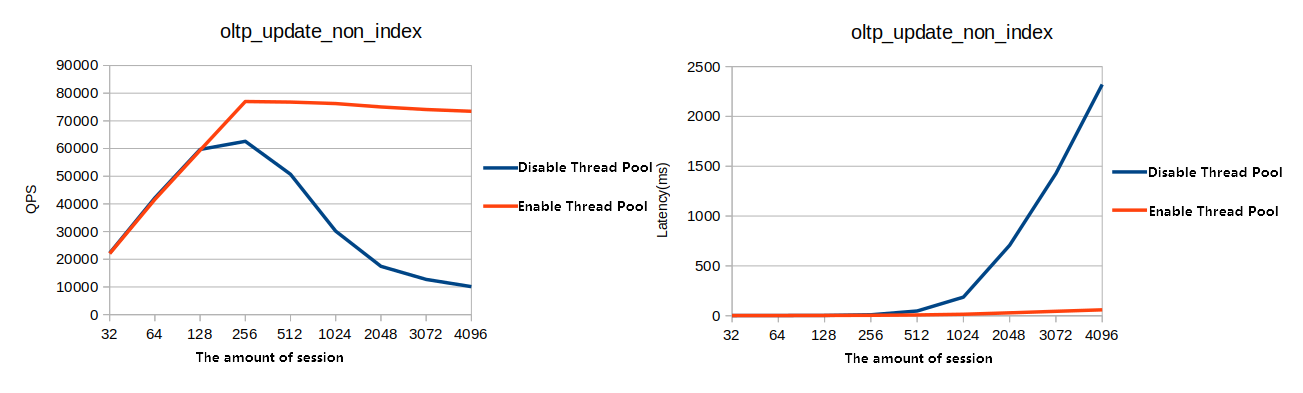
Figure 2. OLTP write-only test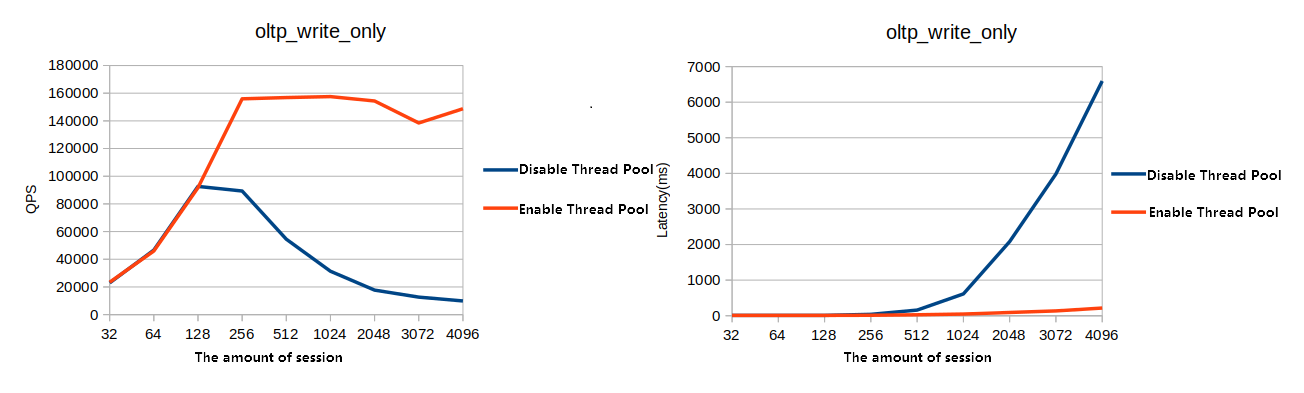
Figure 3. OLTP read-only test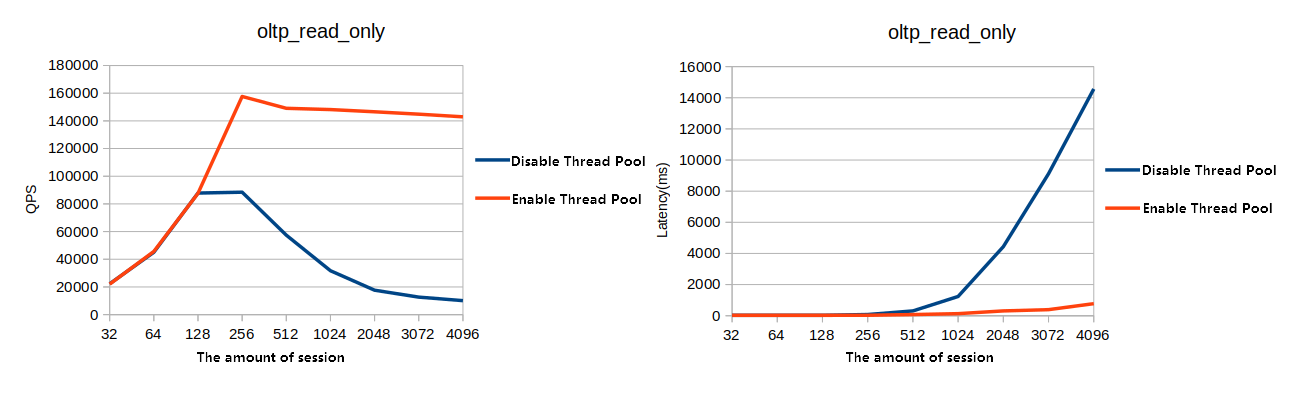
Figure 4. OLTP read/write test