This benchmark demonstrates the write and query performance of the PolarDB vector index for a hundred-million-scale dataset of 1,000-dimension vectors. The test uses the OpenSearch protocol with specific hardware and software configurations. This topic covers the test environment, dataset, key configuration parameters, reproduction steps, and an analysis of the performance results. The results provide data to help with technology selection, capacity planning, and performance tuning.
Scope
The performance data is based on a specific cluster environment and dataset. Before you use this data for decision-making, confirm that your environment is similar to the one described below.
Cluster specifications and versions
Master node: 2-core 8 GB.
Read-only node: 2-core 8 GB.
Search nodes: 32-core 256 GB × 3.
Client latency: 0.097 ms.
PolarDB vector index version: 2.19.3.
Dataset
Category | Item | Details |
Software version | PolarDB-Vector | 2.19.3 |
Dataset | MSMARCO V2.1 | |
Data scale | Total documents | 113,520,750 |
Vector dimensions | 1024 | |
Query set size | 1677 | |
Algorithm parameters | Distance measure | L2 (Euclidean distance) |
Index type | HNSW |
Test steps
The following steps describe how to reproduce index creation, data writing, and performance stress testing.
To obtain the test script and reproduce this test flow, submit a ticket.
Create an HNSW index and write data
Create an index: Use the following configuration to create an index for a hundred-million-scale dataset. This configuration balances build speed, memory usage, and query performance.
Define the index schema and key parameters.
number_of_shards: Set to 18 to distribute data and computing workloads evenly across three search nodes (96 physical cores in total).ef_constructionandm: These are key parameters for building an HNSW index. In this test,128and8are used to balance build speed and index quality.refresh_intervalanddurability: These are specific optimizations to maximize test performance and are not recommended for direct use in a production environment. For more information, see Going live.
Run the following command to create the index.
curl -X PUT "http://<endpoint>:<port>/msmarco" -H 'Content-Type: application/json' -d'
{
  "mappings": {
    "properties": {
      "docid": { "type": "keyword" },
      "domain": { "type": "keyword" },
      "emb": {
        "type": "knn_vector",
        "dimension": 1024,
        "method": {
          "engine": "faiss",
          "space_type": "l2",
          "name": "hnsw",
          "parameters": {
            "ef_construction": 128,
            "m": 8
          }
        }
      },
      "url": { "type": "text" }
    }
  },
  "settings": {
    "index": {
      "replication": { "type": "DOCUMENT" },
      "refresh_interval": "0s",
      "number_of_shards": "18",
      "translog": {
        "flush_threshold_size": "1gb",
        "sync_interval": "30s",
        "durability": "async"
      },
      "knn.algo_param": { "ef_search": "64" },
      "provided_name": "msmarco",
      "knn": "true",
      "number_of_replicas": "0"
    }
  }
}
'
Write data: Write the MSMARCO V2.1 dataset to the HNSW index.
Write performance
Total time: 13,523.85 seconds (about 3.75 hours). This time includes data network transfer, writing to the translog, and background HNSW index construction.
Average write throughput: 8,394.11 docs/sec.
Run a query performance test
The query throughput (QPS), latency, and recall rate were tested using different combinations of concurrency and the ef_search parameter.
concurrency: Simulates from 1 to 128 concurrent queries.ef_search: The breadth of neighbor nodes searched in the HNSW graph during a query. A larger value theoretically results in a higher recall rate but also increases computational overhead, which decreases QPS and increases latency.
Stress testing command
Run the following command to perform a 60-second stress test for different combinations of concurrency and ef_search.
# Example command. Replace it with your actual script.
python benchmark.py --concurrency 1/2/4/8/16/32/64/128 --ef-search 32/64/128/256 --max-duration 60
Performance test results
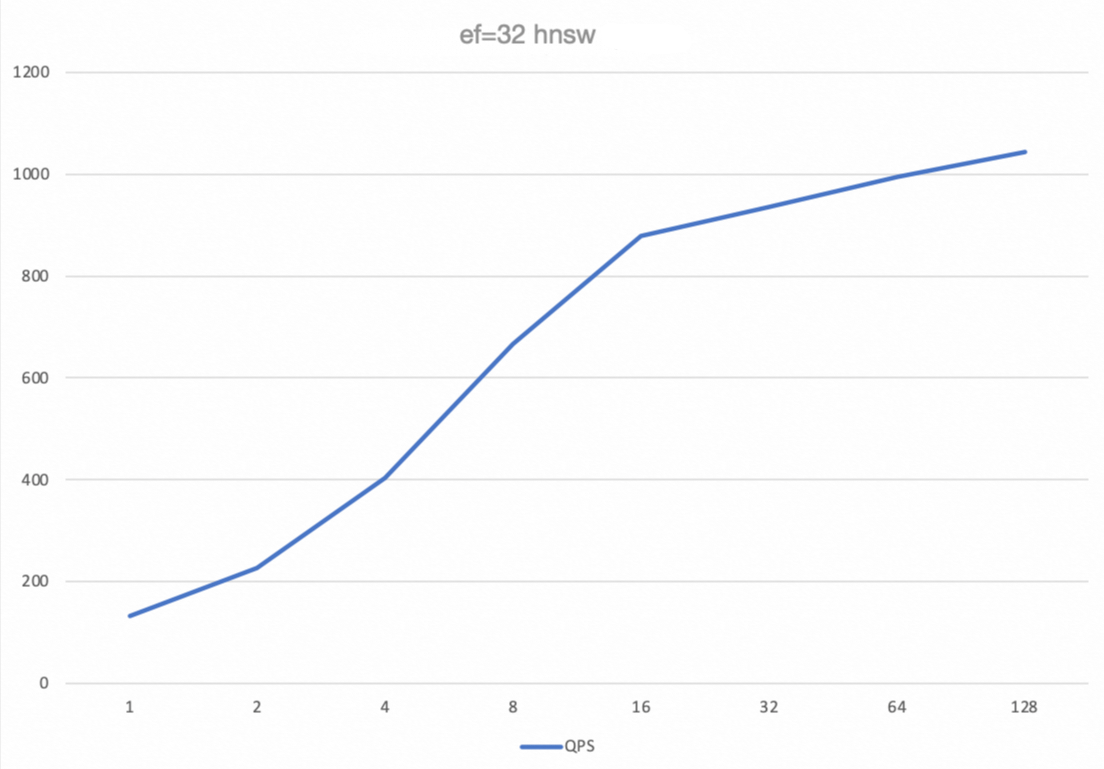
ef_search | concurrency | QPS | Avg (ms) | P99 (ms) | Recall |
32 | 1 | 132.4 | 7.53 | 8.83 | 0.9585 |
32 | 16 | 878.19 | 18.13 | 30.14 | 0.9586 |
32 | 64 | 994.43 | 63.48 | 135.83 | 0.9621 |
32 | 128 | 1043.22 | 118.53 | 256.14 | 0.9693 |
64 | 1 | 132.82 | 7.5 | 8.82 | 0.9585 |
64 | 16 | 878.44 | 18.11 | 30.35 | 0.9586 |
64 | 64 | 989.47 | 63.77 | 136.55 | 0.9622 |
64 | 128 | 1062 | 116.74 | 238.94 | 0.9696 |
128 | 1 | 132.74 | 7.51 | 8.82 | 0.9585 |
128 | 16 | 884.77 | 17.99 | 29.91 | 0.9588 |
128 | 64 | 998.4 | 63.28 | 133.64 | 0.962 |
128 | 128 | 1063.91 | 116.85 | 244.43 | 0.9695 |
256 | 1 | 132.45 | 7.52 | 8.82 | 0.9585 |
256 | 16 | 881.95 | 18.05 | 30.16 | 0.9587 |
256 | 64 | 993.25 | 63.4 | 135.17 | 0.962 |
256 | 128 | 1067.68 | 116.09 | 227.54 | 0.9697 |
Analysis of performance results
Concurrency scalability: The QPS curve shows that as concurrency increases from 1 to 64, system throughput (QPS) grows almost linearly. This indicates that the PolarDB vector engine has good horizontal scalability. Beyond a concurrency of 64, QPS growth slows and peaks at a concurrency of 128. At this point, system resources, most likely the CPU, are nearly saturated and have become the performance bottleneck.
Relationship between latency and concurrency: The average (Avg) and P99 latencies increase significantly as concurrency grows. This behavior is expected as the system load increases. In scenarios that require high QPS, ensure that the P99 latency meets your business requirements.
Recall rate performance: Under all test conditions, the recall rate remains stable above 95.8%. This indicates that the HNSW index has high search accuracy with the current parameters.
Going live
Using the test environment configuration directly in a production environment is risky. The following sections provide configuration recommendations for key parameters and guidance for resource planning in a production environment.
Production recommendations for key parameters
The following parameters were set to achieve maximum test performance. Evaluate them carefully before using them in a production environment.
"refresh_interval": "0s"Test purpose: To disable auto-refresh. This ensures that during the write test, data is written only to memory and the translog. A manual
refreshis run before the query test to obtain query performance data without interference from background tasks.Production recommendation: Do not set this to
0sin a production environment. Set a reasonable value based on your data visibility requirements. For example, a value of1smeans that new data is searchable approximately 1 second after it is written.
"durability": "async"Test purpose: To use asynchronous translog flushing. Data is written to memory and a success response is returned immediately. A background thread then asynchronously persists the data to disk. This improves write throughput.
Production recommendation: Use this with caution in scenarios that require high data reliability. In extreme situations, such as a server breakdown, the
asyncmode can lead to the loss of the last few seconds of data that has not been persisted to disk. If you have high data reliability requirements, use the defaultrequestmode in your production environment. This mode ensures that a success response is returned only after data is written to the translog and persisted to the disk, but it reduces write performance.
Resource utilization assessment
Understanding the system's resource consumption under peak load is crucial for accurate capacity planning.
Write-intensive scenarios: During peak writes at 8,394 docs/sec, the primary system bottlenecks are CPU (used for index construction) and disk I/O (used for translog writes).
Query-intensive scenarios: During peak queries at a concurrency of 128 and 1,067 QPS, the system bottleneck is primarily CPU usage.