An ECS security group acts as a virtual firewall that controls the inbound and outbound traffic of the ECS instances in the security group. This topic describes how to configure an ECS security group so that the ECS instances in the security group can access a PolarDB for MySQL cluster.
Scenario
After you create a PolarDB for MySQL cluster, you cannot access the cluster. You must add an ECS security group to the whitelist of the PolarDB for MySQL cluster. Then, the ECS instances in the security group can access the PolarDB for MySQL cluster.
For more information about ECS security groups and how to configure a security group in the ECS console, see Create a security group.
You can also add the IP addresses of ECS instances to an IP whitelist of the cluster. Both the ECS instances whose IP addresses are in the IP whitelist and the ECS instances in the security group that is added to the cluster whitelist can access the PolarDB for MySQL cluster.
Precautions
You can add only ECS security groups whose network type is the same as that of the PolarDB for MySQL cluster to the cluster. For example, if the cluster is deployed in a VPC, you can add only VPC-type ECS security groups.
You can add up to 10 security groups to a PolarDB for MySQL cluster.
When you configure a security group for PolarDB for MySQL, only the IP addresses of the ECS instances in the security group are added to the whitelist of the cluster as IP addresses. This operation is independent of the rules of the ECS security group.
Procedure
Log on to the PolarDB console.
-
In the navigation pane on the left, click Clusters。
-
In the upper-left corner, select the region where the cluster is deployed.
-
Find the target cluster and click its ID.
In the left-side navigation pane, choose .
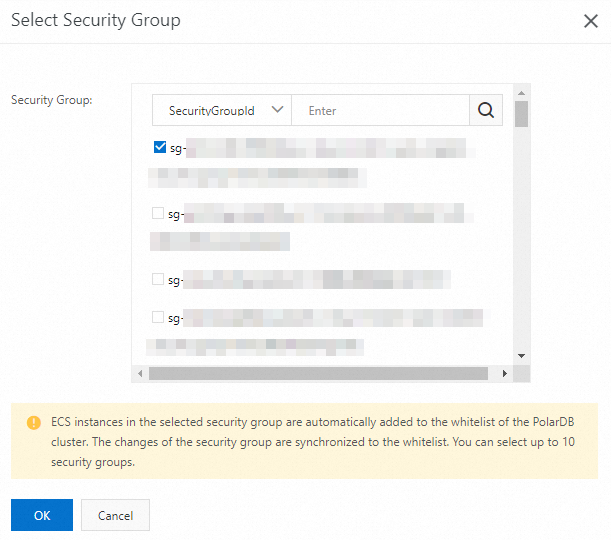
On the Cluster Whitelists page, you can click Select a security group or click Configuration in the Actions column of the target security group to change the security group settings.

In the Select a security group dialog box, select the target security group and click OK.
 Note
NoteFor more information about how to create an ECS security group, see Create a security group.
Related operations
API | Description |
Queries the IP addresses that are allowed to access the database cluster. | |
Modifies the IP addresses that are allowed to access the database cluster. |