Bloom filter pushdown reduces the volume of data transferred between the storage engine and the SQL layer during hash join queries, lowering compute overhead on the SQL layer and improving overall query performance.
Prerequisites
Before you begin, make sure that:
Your PolarDB for MySQL cluster version is 8.0 with revision version 8.0.2.2.3 or later. To check the version, see Query the engine version.
The data is of the INT type.
How it works
When PolarDB for MySQL executes a hash join, it builds a hash table from the smaller (build-side) table. At the same time, the database creates a bloom filter from the hash table and pushes it down to the probe engine.
The probe engine uses the bloom filter to filter out rows that are unnecessary for the query before they reach the SQL layer. This reduces the volume of data the SQL layer needs to process.
Enable bloom filter pushdown
Use the loose_bloom_filter_enabled parameter to enable or disable bloom filters. The parameter is enabled by default.
To configure the parameter, see Specify cluster and node parameters.
| Parameter | Scope | Default | Valid values |
|---|---|---|---|
loose_bloom_filter_enabled | Global and session | ON | ON, OFF |
Verify that bloom filter pushdown is active
After enabling the parameter, run EXPLAIN on a hash join query. In the output, look for hash join with bloom filter in the Extra field. This confirms that bloom filters are active.
Example from a TPC-H Q3 query:
*************************** 2. row ***************************
      Extra: Using where; Using join buffer (hash join with bloom filter)
Performance test
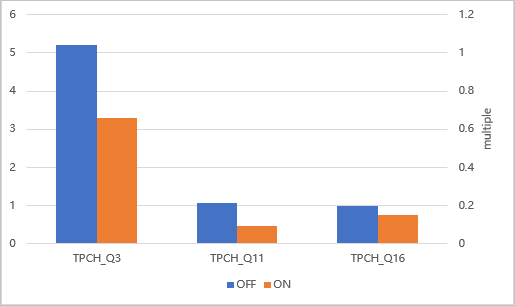
The following results are based on a TPC-H schema (scale factor 1) with no primary keys or indexes. The execution plans for Q3, Q11, and Q16 are shown below. Each plan includes at least one table where the Extra field shows hash join with bloom filter, confirming that bloom filters are active.
Q3
EXPLAIN
SELECT l_orderkey,
       SUM(l_extendedprice * (1 - l_discount)) AS revenue,
       o_orderdate,
       o_shippriority
FROM customer,
     orders,
     lineitem
WHERE c_mktsegment = 'MACHINERY'
  AND c_custkey = o_custkey
  AND l_orderkey = o_orderkey
  AND o_orderdate < '1995-03-10'
  AND l_shipdate > '1995-03-10'
GROUP BY l_orderkey,
         o_orderdate,
         o_shippriority
ORDER BY revenue DESC,
         o_orderdate
LIMIT 10\G
*************************** 1. row ***************************
           id: 1
  select_type: SIMPLE
        table: customer
   partitions: NULL
         type: ALL
possible_keys: NULL
          key: NULL
      key_len: NULL
          ref: NULL
         rows: 148463
     filtered: 10.00
        Extra: Using where; Using temporary; Using filesort
*************************** 2. row ***************************
           id: 1
  select_type: SIMPLE
        table: orders
   partitions: NULL
         type: ALL
possible_keys: NULL
          key: NULL
      key_len: NULL
          ref: NULL
         rows: 1486962
     filtered: 3.33
        Extra: Using where; Using join buffer (hash join with bloom filter)
*************************** 3. row ***************************
           id: 1
  select_type: SIMPLE
        table: lineitem
   partitions: NULL
         type: ALL
possible_keys: NULL
          key: NULL
      key_len: NULL
          ref: NULL
         rows: 5948979
     filtered: 3.33
        Extra: Using where; Using join buffer (hash join with bloom filter)
Q11
EXPLAIN
SELECT ps_partkey,
       SUM(ps_supplycost * ps_availqty) AS value
FROM partsupp,
     supplier,
     nation
WHERE ps_suppkey = s_suppkey
  AND s_nationkey = n_nationkey
  AND n_name = 'INDIA'
GROUP BY ps_partkey
HAVING SUM(ps_supplycost * ps_availqty) >
  (SELECT SUM(ps_supplycost * ps_availqty) * 0.0001000000
   FROM partsupp,
        supplier,
        nation
   WHERE ps_suppkey = s_suppkey
     AND s_nationkey = n_nationkey
     AND n_name = 'INDIA' )
ORDER BY value DESC\G
*************************** 1. row ***************************
           id: 1
  select_type: PRIMARY
        table: nation
   partitions: NULL
         type: ALL
possible_keys: NULL
          key: NULL
      key_len: NULL
          ref: NULL
         rows: 25
     filtered: 10.00
        Extra: Using where; Using temporary; Using filesort
*************************** 2. row ***************************
           id: 1
  select_type: PRIMARY
        table: supplier
   partitions: NULL
         type: ALL
possible_keys: NULL
          key: NULL
      key_len: NULL
          ref: NULL
         rows: 10000
     filtered: 10.00
        Extra: Using where; Using join buffer (hash join with bloom filter)
*************************** 3. row ***************************
           id: 1
  select_type: PRIMARY
        table: partsupp
   partitions: NULL
         type: ALL
possible_keys: NULL
          key: NULL
      key_len: NULL
          ref: NULL
         rows: 791815
     filtered: 10.00
        Extra: Using where; Using join buffer (hash join with bloom filter)
*************************** 4. row ***************************
           id: 2
  select_type: SUBQUERY
        table: nation
   partitions: NULL
         type: ALL
possible_keys: NULL
          key: NULL
      key_len: NULL
          ref: NULL
         rows: 25
     filtered: 10.00
        Extra: Using where
*************************** 5. row ***************************
           id: 2
  select_type: SUBQUERY
        table: supplier
   partitions: NULL
         type: ALL
possible_keys: NULL
          key: NULL
      key_len: NULL
          ref: NULL
         rows: 10000
     filtered: 10.00
        Extra: Using where; Using join buffer (hash join with bloom filter)
*************************** 6. row ***************************
           id: 2
  select_type: SUBQUERY
        table: partsupp
   partitions: NULL
         type: ALL
possible_keys: NULL
          key: NULL
      key_len: NULL
          ref: NULL
         rows: 791815
     filtered: 10.00
        Extra: Using where; Using join buffer (hash join with bloom filter)
Q16
EXPLAIN SELECT p_brand,
       p_type,
       p_size,
       COUNT(DISTINCT ps_suppkey) AS supplier_cnt
FROM partsupp,
     part
WHERE p_partkey = ps_partkey
  AND p_brand <> 'Brand#33'
  AND p_type NOT LIKE 'PROMO POLISHED%'
  AND p_size IN (34,
                 45,
                 33,
                 42,
                 9,
                 24,
                 26,
                 7)
  AND ps_suppkey NOT IN
    (SELECT s_suppkey
     FROM supplier
     WHERE s_comment LIKE '%Customer%Complaints%' )
GROUP BY p_brand,
         p_type,
         p_size
ORDER BY supplier_cnt DESC,
         p_brand,
         p_type,
         p_size\G
*************************** 1. row ***************************
           id: 1
  select_type: PRIMARY
        table: part
   partitions: NULL
         type: ALL
possible_keys: NULL
          key: NULL
      key_len: NULL
          ref: NULL
         rows: 198116
     filtered: 40.00
        Extra: Using where; Using temporary; Using filesort
*************************** 2. row ***************************
           id: 1
  select_type: PRIMARY
        table: partsupp
   partitions: NULL
         type: ALL
possible_keys: NULL
          key: NULL
      key_len: NULL
          ref: NULL
         rows: 791815
     filtered: 10.00
        Extra: Using where; Using join buffer (hash join with bloom filter)
*************************** 3. row ***************************
           id: 2
  select_type: SUBQUERY
        table: supplier
   partitions: NULL
         type: ALL
possible_keys: NULL
          key: NULL
      key_len: NULL
          ref: NULL
         rows: 10000
     filtered: 11.11
        Extra: Using where
Test results
The chart below shows query time with bloom filters enabled versus disabled across Q3, Q11, and Q16 (TPC-H scale factor 1, no primary keys or indexes).