If your business requires both OLAP and OLTP queries to be sent to the database through the same application, you can set the Read/Write mode of the cluster endpoint and enable automatic request distribution. Once enabled, the database proxy uses the estimated query cost of incoming SQL statements to automatically route requests, maximizing query performance. When the query cost of a statement exceeds a specified threshold, the database proxy automatically routes the request to a read-only column store node. Otherwise, a read-only row store node or the primary node handles the request.
How it works
The database proxy in PolarDB for MySQL uses the estimated query cost of an SQL statement to decide its route. By comparing this cost against a configurable threshold, the proxy routes the request to a row store or a column store node, optimizing performance for both.
Request distribution rules:
-
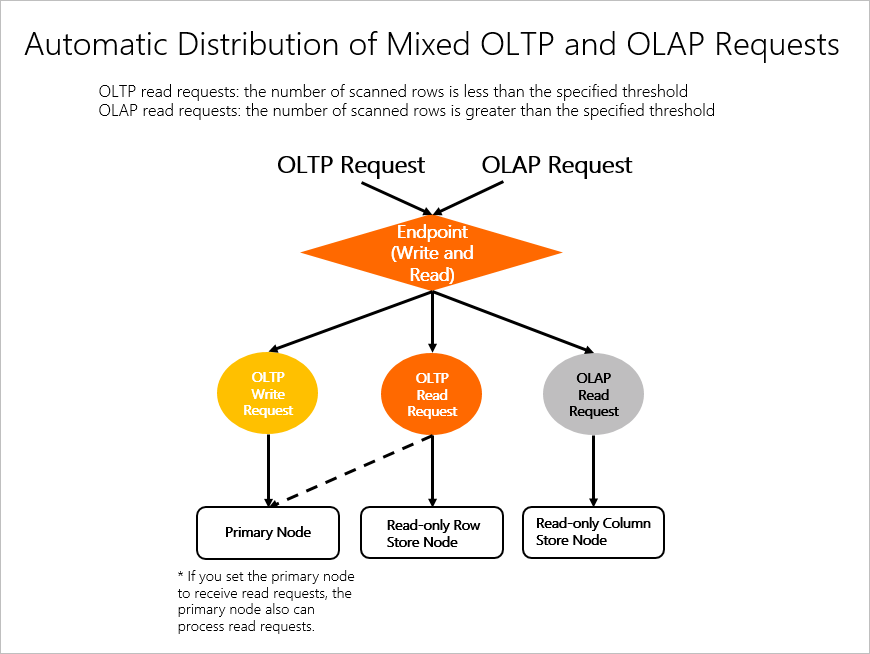
OLTP service: includes read and write requests in most cases. All write requests are processed by the primary node. Read requests are processed by the read-only row store nodes or the primary node.
-
OLAP service: includes only read requests in most cases. All read requests are processed by the read-only column store nodes.
Automatic request distribution solution:
-
Request distribution between the primary node and read-only column store nodes: The primary node can process OLTP read requests because the primary node is also in row store mode. In this solution, write requests and OLTP read requests are distributed to the primary node. OLAP read requests are distributed to the read-only column store nodes.
-
Request distribution between the read-only row store nodes and read-only column store nodes: In this solution, write requests are distributed to the primary node, OLTP read requests are distributed to the read-only row store nodes or the primary node, and OLAP read requests are distributed to the read-only column store nodes.
Limitations
The service nodes must include at least one read-only column store node and one row store node (either the primary node or a read-only row store node).
Step 1: Enable automatic request distribution
-
Log on to the PolarDB console. In the left-side navigation pane, click Clusters, select the region where your cluster is deployed, and then click the cluster ID.
-
On the Basic Information page, in the PolarProxy section, click Modify next to the target cluster endpoint.
-
Select a Read/Write based on your requirements.
-
The read/write mode of the cluster endpoint is set to Read/Write (Automatic Read/Write Splitting).
-
The read/write mode of the cluster endpoint is set to Read-only, and the load balancing policy is set to Active requests-based load balancing.
-
-
In the Node Settings settings, select the primary node and the read-only row and column store nodes. In the HTAP Optimization section on the right, enable Transactional/Analytical Processing Splitting. Click OK.
Note-
You must select at least one read-only column store node in the Node Settings settings.
-
After you enable Transactional/Analytical Processing Splitting, you must also create an IMCI for the feature to take effect.
-
After you enable Transactional/Analytical Processing Splitting, the change applies only to new connections. Existing connections are not affected; to apply the change, you must disconnect and then reconnect.
Example 1: In addition to the primary node, the service nodes include one read-only row store node and two read-only column store nodes. If you enable automatic request distribution:
-
Write requests are routed to the primary node.
-
OLAP read requests are routed to the read-only column store nodes.
-
OLTP read requests are routed to the read-only row store node. If Primary Node Accepts Read Requests is set to Yes in the Load Balancing Settings, the proxy may also route requests to the primary node.
Example 2: The service nodes include the primary node and one read-only column store node. If you enable automatic request distribution, write requests and OLTP read requests are routed to the primary node, and OLAP read requests are routed to the read-only column store node.
NoteIn Read/Write (Automatic Read/Write Splitting) mode, the proxy sends all write requests to the primary node, regardless of whether the primary node is selected as a service node.
-
Step 2: Configure the distribution threshold
After enabling automatic request distribution, you must set the query cost threshold. The database proxy uses this threshold to route requests. If a request's query cost exceeds the threshold, the proxy routes it to a column store node. Otherwise, the proxy routes it to a row store node.
The query cost threshold is controlled by the parameters in the following table. You can modify these values on the Parameters page of your cluster to fine-tune automatic request distribution.
|
Parameter |
Description |
|
loose_imci_ap_threshold |
The query cost threshold for routing SQL statements to column store nodes. Default value: 50000. Note
After automatic request distribution is enabled, the proxy routes SQL statements with a query cost greater than 50000 to column store nodes. Important
In PolarDB for MySQL versions 8.0.1.1.39, 8.0.2.2.23, and later, this parameter is deprecated. Use |
|
loose_cost_threshold_for_imci |
The query cost threshold used on column store nodes to decide whether to use a column-store execution plan. Default value: 50000. Note
After automatic request distribution is enabled, if the query cost of an SQL statement is greater than 50000, the system selects a column-store execution plan. Otherwise, it selects a row-store execution plan. |
You can run the SHOW STATUS LIKE 'Last_query_cost_for_imci' command to check the query cost of the last SQL statement. This information helps you adjust the parameter values.
If you connect to the database by using a cluster endpoint, you must add the hint /* ROUTE_TO_LAST_USED*/ before the SHOW STATUS LIKE 'Last_query_cost_for_imci' command. This ensures that you can retrieve the query cost of the previous statement from the correct node. For example:
/*ROUTE_TO_LAST_USED*/SHOW STATUS LIKE 'Last_query_cost_for_imci';For example, run the following statement to view the query cost of the previous SQL statement:
/*ROUTE_TO_LAST_USED*/SHOW STATUS LIKE 'Last_query_cost_for_imci';The output is as follows:
+--------------------------+-------+
| Variable_name            | Value |
+--------------------------+-------+
| Last_query_cost_for_imci | 2     |
+--------------------------+-------+
1 row in set (0.01 sec)
The query cost of the SQL statement is 2.
To route this SQL query to a column store node for column-store execution, set the parameter values as follows:
-
For PolarDB for MySQL versions 8.0.1.1.38, 8.0.2.2.22, and earlier
Set both the loose_imci_ap_threshold and loose_cost_threshold_for_imci parameters to 1.
-
For PolarDB for MySQL versions 8.0.1.1.39, 8.0.2.2.23, and later
Set the loose_cost_threshold_for_imci parameter to 1.
Force execution plans with hints
If automatic request distribution does not meet your expectations, you can use hints to force a row-store or column-store execution plan.
-
A
hintapplies only to the SQL statement in which it is specified; it does not affect other statements or connections. -
If you use a MySQL client earlier than version 5.7.7 to run statements with
hints, you must add the--commentsoption when you connect to the database engine. You can run themysql --versioncommand to check your MySQL client version.
-
Force a column-store execution plan.
-
For PolarDB for MySQL versions 8.0.1.1.38, 8.0.2.2.22, and earlier
When using the database proxy for automatic request distribution, you can use a
hintto force the database proxy to route an SQL statement to a column store node, regardless of the loose_imci_ap_threshold setting. Add/* FORCE_IMCI_NODES */before the SQL keyword. For example:/*FORCE_IMCI_NODES*/EXPLAIN SELECT COUNT(*) FROM t1 WHERE t1.a > 1;An SQL statement that is routed to a column store node is still affected by the loose_cost_threshold_for_imci setting. To force an SQL statement to use a column-store execution plan, you can use a
hintto lower the value of loose_cost_threshold_for_imci. For example:/*FORCE_IMCI_NODES*/EXPLAIN SELECT /*+ SET_VAR(cost_threshold_for_imci=0) */ COUNT(*) FROM t1 WHERE t1.a > 1; -
For PolarDB for MySQL versions 8.0.1.1.39, 8.0.2.2.23, and later
Use a hint to set the loose_cost_threshold_for_imci parameter to 0.
EXPLAIN SELECT /*+ SET_VAR(cost_threshold_for_imci=0) */ COUNT(*) FROM t1 WHERE t1.a > 1;
NoteWhen you use
/*+SET_VAR()*/to modify a threshold, you must remove theloose_prefix from the parameter name. Otherwise, thehintdoes not take effect. -
-
Force a row-store execution plan.
You can use a
hintto set the value ofUSE_IMCI_ENGINEto OFF. This forces the SQL statement to use a row-store execution plan. For example:EXPLAIN SELECT /*+ SET_VAR(USE_IMCI_ENGINE=OFF) */ COUNT(*) FROM t1 WHERE t1.a > 1;