Automatically selects optimal ARIMA models for time series data using procedures from Gomez and Maravall (1998) and TRAMO (1996).
How it works
The component selects the best ARIMA model through four steps:
Default model estimation
For
frequency = 1, the default model is(0,1,1).For
frequency > 1, the default model is(0,1,1)(0,1,1).
Differencing order identification: If
diffandseasonalDiffare specified, this step is skipped. Otherwise, unit root tests determine the non-seasonal differencing order d and seasonal differencing order D.ARMA order identification: Selects the most appropriate model based on Bayesian Information Criterion (BIC).
maxOrderandmaxSeasonalOrderparameters control upper bounds.Model comparison and final checks: Ljung-Box Q statistic compares the identified model against the default model. If both models are unacceptable, falls back to
(3,d,1)(0,D,1)model.
For more information about ARIMA, see Autoregressive integrated moving average.
Limitations
Runs only on MaxCompute computing resources.
Maximum 1,200 data records per group.
One numeric column.
Resource calculation
Without
groupColNames:coreNum = 1 memSizePerCore = 4096With
groupColNames:coreNum = floor(Total number of rows / 120,000) memSizePerCore = 4096
Configure the component
Configure x13_auto_arima in one of the following ways:
Method 1: Configure in the PAI console
Configure parameters on the pipeline page of Machine Learning Designer.
Fields Setting
Parameter | Required | Description |
Time Series Column | Yes | Sorts values in the value column. |
Value Column | Yes | Numeric column containing time series values. |
Stratification Column | No | Separate multiple columns with commas ( |
Parameters Setting
Parameter | Description | Default |
Start Date | Format: | -- |
Series Frequency | Positive integer in the range (0,12]. | -- |
Maximum of p and q | Positive integer in the range (0,4]. | -- |
Maximum of Seasonal p and q | Number in the range (0,2]. | -- |
Maximum of Difference d | Positive integer in the range (0,2]. | -- |
Maximum of Seasonal Difference d | Positive integer in the range (0,1]. | -- |
Difference d | Positive integer in the range (0,2]. If both | -- |
Seasonal Difference d | Positive integer in the range (0,1]. If both | -- |
Prediction Entries | Number of predictions. For example, to predict sales for the next 7 days based on the past month, set this to | -- |
Prediction Confidence Interval | Confidence level for calculating prediction intervals. | 0.95 |
Tolerance | Optional. Convergence tolerance for model fitting. | 1e-5 |
Maximum Iterations | Positive integer. | 1500 |
Execution Tuning
Parameter | Description |
Cores | Number of cores. System determines automatically by default. |
Memory Size | Memory size per core, in MB. |
Method 2: Configure with PAI commands
Run PAI commands through SQL scripts. For more information, see SQL Script.
PAI -name x13_auto_arima
    -project algo_public
    -DinputTableName=pai_ft_x13_arima_input
    -DseqColName=id
    -DvalueColName=number
    -Dstart=1949.1
    -Dfrequency=12
    -DpredictStep=12
    -DoutputPredictTableName=pai_ft_x13_arima_out_predict2
    -DoutputDetailTableName=pai_ft_x13_arima_out_detail2
Parameter reference
Parameter | Required | Description | Default |
inputTableName | Yes | Name of the input table. | N/A |
inputTablePartitions | No | Feature columns selected from the input table for model training. | Full table |
seqColName | Yes | Time series column. Sorts values in the value column. | N/A |
valueColName | Yes | Value column. | N/A |
groupColNames | No | Stratification columns. Separate multiple columns with commas ( | N/A |
start | No | Start time of the time series. Format: | 1.1 |
frequency | No | Time series frequency. Positive integer in the range (0,12]. A value of 12 indicates 12 months (one year). For details, see Time series format. | 12 |
maxOrder | No | Maximum values of p and q. Positive integer in the range [0,4]. | 2 |
maxSeasonalOrder | No | Maximum values of seasonal p and q. Positive integer in the range [0,2]. | 1 |
maxDiff | No | Maximum non-seasonal differencing order d. Positive integer in the range [0,2]. | 2 |
maxSeasonalDiff | No | Maximum seasonal differencing order d. Positive integer in the range [0,1]. | 1 |
diff | No | Non-seasonal differencing order d. Positive integer in the range [0,2]. If both | -1 |
seasonalDiff | No | Seasonal differencing order d. Positive integer in the range [0,1]. If both | -1 |
maxiter | No | Maximum number of iterations. Positive integer. | 1500 |
tol | No | Convergence tolerance. DOUBLE type. | 1e-5 |
predictStep | No | Number of prediction entries. Positive integer in the range (0,365]. | 12 |
confidenceLevel | No | Confidence level for prediction intervals. Number in the range (0,1). | 0.95 |
outputPredictTableName | Yes | Output prediction table. | N/A |
outputDetailTableName | Yes | Output details table. | N/A |
outputTablePartition | No | Whether to export data to a partition. | Does not export data to partitions |
coreNum | No | Number of cores. Positive integer. Used with | Determined by the system |
memSizePerCore | No | Memory size per core, in MB. Positive integer in the range [1024, 65536]. | Determined by the system |
lifecycle | No | Lifecycle of the output table. | N/A |
Time series format
start and frequency parameters define two time dimensions, ts1 and ts2, for the numeric column.
frequencyspecifies how many ts2 units fit within one ts1 unit.startuses the formatn1.n2, meaning the series starts at the n2th ts2 in the n1th ts1.
Common configurations:
Time unit | ts1 | ts2 | frequency | start example |
12 months/year | Year | Month | 12 |
|
4 quarters/year | Year | Quarter | 4 |
|
7 days/week | Week | Day | 7 |
|
1 | Any time unit | 1 | 1 |
|
Time series examples
Given: value = [1, 2, 3, 5, 6, 7, 8, 9, 10, 11, 12, 13, 14, 15]
start=1949.3, frequency=12 (monthly data, 12 months per year)
Prediction starts from June 1950.
year | Jan | Feb | Mar | Apr | May | Jun | Jul | Aug | Sep | Oct | Nov | Dec |
1949 | 1 | 2 | 3 | 4 | 5 | 6 | 7 | 8 | 9 | 10 | ||
1950 | 11 | 12 | 13 | 14 | 15 |
start=1949.3, frequency=4 (quarterly data, 4 quarters per year)
Prediction starts from Q2 1953.
year | Qtr1 | Qtr2 | Qtr3 | Qtr4 |
1949 | 1 | 2 | ||
1950 | 3 | 4 | 5 | 6 |
1951 | 7 | 8 | 9 | 10 |
1952 | 11 | 12 | 13 | 14 |
1953 | 15 |
start=1949.3, frequency=7 (daily data, 7 days per week)
Prediction starts from the fourth day of the 1951st week.
week | Sun | Mon | Tue | Wed | Thu | Fri | Sat |
1949 | 1 | 2 | 3 | 4 | 5 | ||
1950 | 6 | 7 | 8 | 9 | 10 | 11 | 12 |
1951 | 13 | 14 | 15 |
start=1949.1, frequency=1 (non-seasonal data)
Prediction starts in 1963.
cycle | p1 |
1949 | 1 |
1950 | 2 |
1951 | 3 |
1952 | 4 |
1953 | 5 |
1954 | 6 |
1955 | 7 |
1956 | 8 |
1957 | 9 |
1958 | 10 |
1959 | 11 |
1960 | 12 |
1961 | 13 |
1962 | 14 |
1963 | 15 |
Examples
Prepare test data
This example uses the AirPassengers.csv dataset, which records the number of international airline passengers per month from 1949 to 1960. For more information about the dataset, see AirPassengers.
Sample data:
id | number |
1 | 112 |
2 | 118 |
3 | 132 |
4 | 129 |
5 | 121 |
... | ... |
Run the following Tunnel commands on the MaxCompute client to upload data. For information about installing and configuring the MaxCompute client, see MaxCompute client (odpscmd). For more information about Tunnel commands, see Tunnel commands.
create table pai_ft_x13_arima_input(id bigint, number bigint);
tunnel upload xxx/airpassengers.csv pai_ft_x13_arima_input -h true;
Run PAI commands
Use the SQL script or ODPS SQL component to run PAI commands:
PAI -name x13_auto_arima
    -project algo_public
    -DinputTableName=pai_ft_x13_arima_input
    -DseqColName=id
    -DvalueColName=number
    -Dstart=1949.1
    -Dfrequency=12
    -DmaxOrder=4
    -DmaxSeasonalOrder=2
    -DmaxDiff=2
    -DmaxSeasonalDiff=1
    -DpredictStep=12
    -DoutputPredictTableName=pai_ft_x13_arima_auto_out_predict
    -DoutputDetailTableName=pai_ft_x13_arima_auto_out_detail
Output
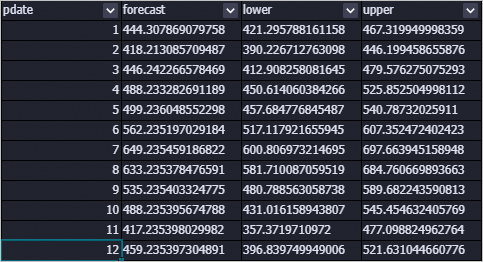
Prediction table (outputPredictTableName)
Column | Description |
pdate | Date of the prediction. |
forecast | Prediction conclusion. |
lower | Lower bound of the prediction interval at the specified confidence level. Default: 0.95. |
upper | Upper bound of the prediction interval at the specified confidence level. Default: 0.95. |
Generated data:
Details table (outputDetailTableName)
Column | Description |
key | One of the following: |
summary | Storage details for the corresponding key. |
Generated data:

FAQ
Why are all prediction results the same value?
This happens when the model training encounters an exception and falls back to the mean model, which outputs the mean of the training data for all predictions. Common causes include instability after differencing, failure to converge during training, or a variance of 0 in the input data.
To diagnose the specific error, check the stderr file of individual nodes in Logview.
How do I choose between x13_arima and x13_auto_arima?
x13_arima requires manually specifying the p, d, q, sp, sd, and sq parameters. If you are unsure which values to use, choose x13_auto_arima instead. With x13_auto_arima, set only upper bounds (such as maxOrder and maxDiff), and the component tunes parameters automatically.
Error: Number of observations after differencing is less than the minimum series length
ERROR: Number of observations after differencing and/or conditional AR estimation
is 9, which is less than the minimum series length required for the model estimated, 24
The training data is insufficient for the specified model. Modify the frequency parameter or add more training data.
Error: Order of the MA operator is too large
ERROR: Order of the MA operator is too largeThis error typically indicates insufficient training data. Add more data points to your input table.
Error: Series must have at least 3 complete years of data
ERROR: Series to be modelled and/or seasonally adjusted must have at least 3 complete
years of data
When seasonal parameters are specified, the input data must contain at least three complete years of observations.
References
X-13ARIMA-SEATS is a seasonally adjusted autoregressive integrated moving average (ARIMA) model algorithm based on the open-source X-13ARIMA-SEATS algorithm. For the related manual-parameter component, see x13_arima.