The video classification component trains a video classification model from raw video data using 3D CNN or transformer architectures, then outputs the model for use with the video prediction component. This topic describes how to configure the component in Machine Learning Designer of Platform for AI (PAI) and provides an example pipeline.
Prerequisites
Before you begin, make sure you have:
An active Object Storage Service (OSS) instance — see Activate OSS
Machine Learning Studio authorized to access OSS — see Grant the permissions required to use Machine Learning Designer
Limitations
The video classification component is available only in Machine Learning Designer of PAI.
The component runs on Deep Learning Container (DLC) computing resources only.
Supported models
The video classification component provides the following model architectures for training jobs. Find the component in the component library under Video Algorithm > Offline Training.
| Model family | Models |
|---|---|
| X3D (3D CNN) | x3d_xs, x3d_m, x3d_l |
| Swin transformer | swin_t, swin_s, swin_b |
| Swin-T-BERT | swin_t_bert |
The swin_t_bert model supports dual-modal input based on video and text data.
Configure the component
Input ports
| Input port (left to right) | Data type | Upstream component | Required |
|---|---|---|---|
| train data | OSS | Read File Data | No — if unused, configure oss path to train file on the Fields Setting tab |
| eval data | OSS | Read File Data | No — if unused, configure oss path to evaluation file on the Fields Setting tab |
Note: If you connect both an input port and the corresponding OSS path parameter, the input port takes priority.
Component parameters
Fields Setting tab
| Parameter | Required | Default | Description |
|---|---|---|---|
| oss path to save checkpoint | Yes | — | The OSS path where checkpoints are stored. Example: oss://pai-online-shanghai.oss-cn-shanghai-internal.aliyuncs.com/test/test_video_cls |
| oss path to data | No | — | The OSS directory containing video files. The full video path is this directory joined with the filename in the annotation file. For example, directory oss://pai-vision-data-hz/EasyMM/DataSet/kinetics400/ + filename video/1.mp4 = oss://pai-vision-data-hz/EasyMM/DataSet/kinetics400/video/1.mp4 |
| oss path to train file | No | — | The OSS path of the training annotation file. Required if the train data input port is not connected. Example: oss://pai-vision-data-hz/EasyMM/DataSet/kinetics400/train_pai.txt |
| oss path to evaluation file | No | — | The OSS path of the evaluation annotation file. Required if the eval data input port is not connected. Example: oss://pai-vision-data-hz/EasyMM/DataSet/kinetics400/train_pai.txt |
| oss path to pretrained model | No | — | The OSS path of a pre-trained model. Using a pre-trained model improves model precision. |
Parameters Setting tab
| Parameter | Required | Default | Description |
|---|---|---|---|
| video classification network | Yes | x3d_xs | The model architecture. See Supported models for available values and their characteristics. |
| whether to use multilabel | No | false | Enables multi-label classification. Available only for swin_t_bert. |
| numclasses | Yes | — | The number of categories. |
| learning rate | Yes | 0.1 (x3d); 0.0001 (swin) | The initial learning rate. |
| number of train epochs | Yes | 10 (default); 300 (x3d recommended); 30 (swin recommended) | The number of training epochs. |
| warmup epoch | Yes | 35 | The number of warmup epochs. The learning rate starts at a small value and increases gradually to the configured learning rate over this period. Setting warmup epochs prevents gradient explosion at the start of training. |
| batch size | Yes | 32 | The number of samples per training iteration. |
| model save interval | No | 1 | The epoch interval at which a checkpoint is saved. 1 saves a checkpoint after every epoch. |
Tuning tab
| Parameter | Required | Default | Description |
|---|---|---|---|
| use fp 16 | Yes | — | Enables FP16 mixed-precision training to reduce GPU memory usage during training. |
| single worker or distributed on dlc | No | single_dlc | The execution mode. single_dlc: single-worker on DLC. distribute_dlc: distributed on DLC. |
| gpu machine type | No | 8vCPU+60GB Mem+1xp100-ecs.gn5-c8g1.2xlarge | The GPU node specification. |
Output port
| Output port (left to right) | Data type | Downstream component |
|---|---|---|
| output model | OSS path — same location as oss path to save checkpoint; model stored in .pth format | Video prediction |
Annotation file format
The annotation file maps each video file to its category label. Two formats are supported:
Without text (space-separated) — use for all models except swin_t_bert:
video/clip_001.mp4 3
video/clip_002.mp4 7
video/clip_003.mp4 1
With text (tab-separated) — use for swin_t_bert multimodal input:
video/clip_001.mp4	A person playing tennis	3
video/clip_002.mp4	A dog running in a park	7
video/clip_003.mp4	Cooking pasta on a stove	1
Each row contains: video file path (relative to oss path to data), optional text, and the category label.
Example
The following figure shows a sample pipeline using the video classification component.
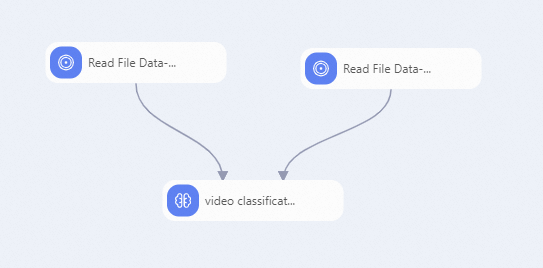
To set up this pipeline:
Add two Read File Data components. Set the OSS Data Path parameter of each to the OSS path of your training data and evaluation data respectively.
The following figure shows the expected annotation file format.
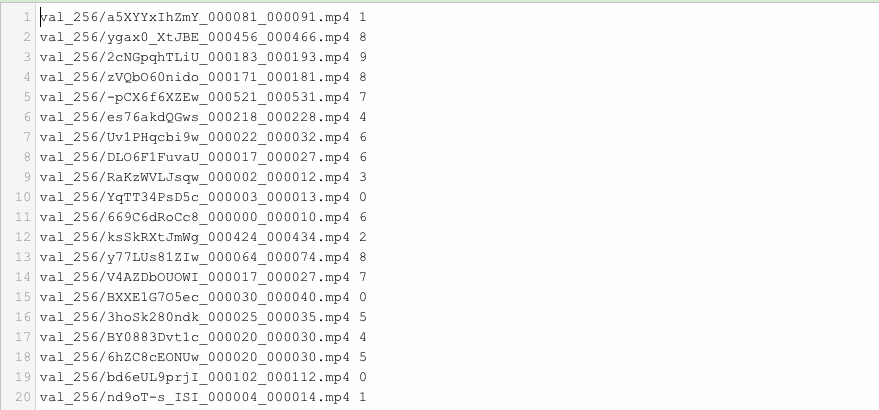
Each row contains a video file path and a category label separated by a space.
Connect the two Read File Data components to the train data and eval data input ports of the video classification component, then configure the component parameters as described in Configure the component.
Related topics
Video prediction — use the trained model for inference
Overview of Machine Learning Designer — learn about all Designer components
Component reference: overview of all components — browse components for data processing and other tasks