The LLM-Sensitive Content Mask (MaxCompute) component masks sensitive information in the text data that is used to train large language models (LLMs).
Limits
The LLM-Sensitive Content Mask (MaxCompute) component supports only MaxCompute resources.
Algorithm
The LLM-Sensitive Content Mask (MaxCompute) component masks the following sensitive information:
Mobile phone numbers: Strings that match the following regular expressions are replaced with
[MOBILEPHONE].r'(?<!\d)(1(3[0-9]|4[579]|5[0-3,5-9]|6[6]|7[0135678]|8[0-9]|9[89])\d{8})(?!\d)'
r'(?<!\d)(1[\d]{2}-\d{4}-\d{4}\D|\D1\d{10}\D|\D1[\d]{2} \d{4} \d{4})(?!\d)'
r'(?<!\d)(1[3-9]\d{9})(?!\d)'
Landline phone numbers: Strings that match the following regular expression are replaced with
[TELEPHONE].r'(?<!\d)(\(?0\d{2,3}[-\s)]?\d{7,8})(?!\d)'
Email addresses: Strings that match the following regular expression are replaced with
[EMAIL].r'[a-zA-Z0-9_.+-]+@[a-zA-Z0-9-]+.[a-zA-Z0-9-.]+'
China resident identity card (PRC) numbers: Strings that match the following regular expressions are replaced with
[IDNUM].r'(?<!\d)([1-6]\d{5}[12]\d{3}(0[1-9]|1[12])(0[1-9]|1[0-9]|2[0-9]|3[01])\d{3}(\d|X|x))(?!\d)'
r'(?<!\d)([1-9]\d{5}[12]\d{3}(0[1-9]|1[012])(0[1-9]|[12][0-9]|3[01])\d{3}[0-9xX])(?!\d)'
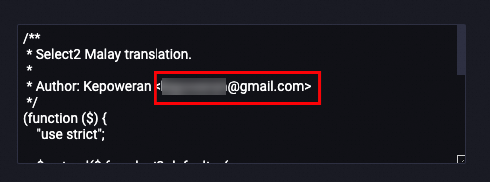
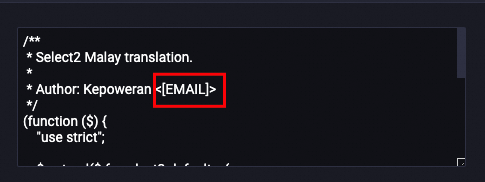
The following example shows how an email address is masked.
Before processing
After processing
Configure the component
You can configure the parameters of the LLM-Sensitive Content Mask (MaxCompute) component in Machine Learning Designer. The following table describes the parameters.
Tab | Parameter | Required | Description | Default value |
Fields Setting | Select Target Column | Yes | The columns that you want to process. You can select multiple columns. | No default value |
Output table lifecycle | No | The value is a positive integer. Unit: days. Default value: 28. After the default lifecycle of the table elapses, the temporary tables generated by the component are recycled. | 28 | |
Tuning | Number of CPUs per instance of map task | No | The number of CPUs for each instance of a map task. Valid values: 50 to 800. | 100 |
The memory size per instance of map task | No | The memory size of each instance of a map task. Unit: MB. Valid values: 256 to 12288. | 1024 | |
The maximum size of input data for a map | No | The maximum amount of data that each instance of a map task can process. You can use this parameter to manage the input of a map. Unit: MB. Valid values: 1 to Integer.MAX_VALUE. | 256 |
References
For more information about Machine Learning Designer, see Overview of Machine Learning Designer.