The topic model is a type of statistical model that is used to discover abstract topics from a collection of documents. In Machine Learning Platform for AI (PAI), you can set the Topics parameter for the PLDA component to abstract different topics for each document.
Latent Dirichlet allocation (LDA) is a topic model that provides topics of each document based on probability distribution. LDA is an unsupervised learning algorithm. You need only to specify the number of topics in a document set by using K. You do not need to manually annotate training sets. K is the Topics parameter of the PLDA component.
LDA is a technique that was developed by David M. Blei, Andrew Y. Ng, and Michael I. Jordan in 2003. It is used to recognize texts, classify texts, and calculate the similarity between texts in the text mining field.
Configure the component
You can use one of the following methods to configure the PLDA component.
Method 1: Configure the component on the pipeline page
You can configure the parameters of the PLDA component on the pipeline page of Machine Learning Designer of Machine Learning Platform for AI (PAI). Machine Learning Designer is formerly known as Machine Learning Studio. The following table describes the parameters.
Table 1. Parameters
Tab | Parameter | Description |
Fields Setting | Feature Columns | The feature columns that are used for training. |
Parameters Setting | Topics | The number of topics that are generated by LDA. |
Alpha | The prior Dirichlet distribution parameter of | |
Beta | The prior Dirichlet distribution parameter of | |
Burn-in Iterations | The number of burn-in iterations. The value of this parameter must be smaller than the total number of iterations. Default value: 100. | |
Total Iterations | Optional. The total number of iterations. The value must be a positive integer. Default value: 150. |
Method 2: Use PAI commands
Configure the component parameters by using PAI commands. You can use the SQL Script component to call PAI commands. For more information, see SQL Script.
pai -name PLDA
    -project algo_public
    -DinputTableName=lda_input
    -DtopicNum=10
    -topicWordTableName=lda_output;
Parameter | Required | Description | Type | Default value |
inputTableName | Yes | The name of the input table. | STRING | No default value |
inputTablePartitions | No | The partitions selected from the input table for training. The following formats are supported:
Note If you specify multiple partitions, separate them with commas (,). | STRING | All partitions |
selectedColNames | No | The names of the columns selected from the input table for LDA. | STRING | All columns |
topicNum | Yes | The number of topics. Valid values: 2 to 500. | Positive integer | No default value |
kvDelimiter | No | The delimiter used to separate keys and values. Valid values:
| STRING | Colon (:) |
itemDelimiter | No | The delimiter used to separate keys. Valid values:
| STRING | Space |
alpha | No | The prior Dirichlet distribution parameter of | FLOAT | 0.1 |
beta | No | The prior Dirichlet distribution parameter of | FLOAT | 0.01 |
topicWordTableName | Yes | The name of the topic-word frequency contribution table. | STRING | No default value |
pwzTableName | No | The name of the | STRING | The |
pzwTableName | No | The name of the | STRING | The |
pdzTableName | No | The name of the | STRING | The |
pzdTableName | No | The name of the | STRING | The |
pzTableName | No | The name of the | STRING | The |
burnInIterations | No | The number of burn-in iterations. The value of this parameter must be smaller than the value of the totalIterations parameter. | Positive integer | 100 |
totalIterations | No | The total number of iterations. Note z indicates the topic, w the word, and d the document. | Positive integer | 150 |
enableSparse | No | Specifies whether the data in the input table is key-value pairs. The data can be key-value pairs or word segmentation results. Valid values:
| BOOL | true |
coreNum | No | The parameter and the memSizePerCore parameter must be used in pair. By default, the system calculates the number of cores based on the amount of the input data. Default value: -1. | Positive integer | -1 |
memSizePerCore | No | The memory size of each core. Unit: MB. Valid values: [1024,65536]. By default, the system automatically calculates the memory size of each core. Default value: -1. | Positive integer | -1 |
Input and output settings
Input
The data must be in the format of a sparse matrix. You can use the Convert Row, Column, and Value to KV Pair component to convert the data.
Input format shows the input format.
Figure 1. Input format

Column 1: the ID of a document
Column 2: key-value data of words and word frequencies
Output
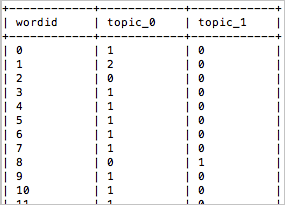
The following tables are generated in sequence: topic-word frequency contribution table, P(w/z) table, P(z/w) table, P(d/z) table, P(z/d) table, and P(z) table.
Output format shows the output format of the topic-word frequency contribution table.
Figure 2. Output format