Platform for AI (PAI) is integrated with ActionTrail. By default, you can view and retrieve PAI behavior event logs for your Alibaba Cloud account from the last 90 days. You can create a trail to save events to Simple Log Service (SLS) or Object Storage Service (OSS) for long-term storage and analysis.
PAI events
For a list of supported PAI events, see API Reference.
Event query
Basic query
ActionTrail records operation events for each Alibaba Cloud account for the last 90 days by default. You can query these events in the ActionTrail console. For more information, see Query events in the ActionTrail console.
Advanced query
Log on to the ActionTrail console.
A trail is created, and events are delivered to Simple Log Service. For more information, see Create a single-account trail and Create a multi-account trail.
In the navigation pane on the left, choose .
On the Default tab of the Custom Template page, configure query conditions.
You can perform custom event queries in simple query mode or SQL query mode. In simple query mode, you can query events in a visual manner. In SQL query mode, you can query events based on SQL statements that are converted from conditions in simple query mode.
Simple query
In the upper-right corner of the page, turn on Simple Mode. Configure the query conditions based on on-screen instructions.
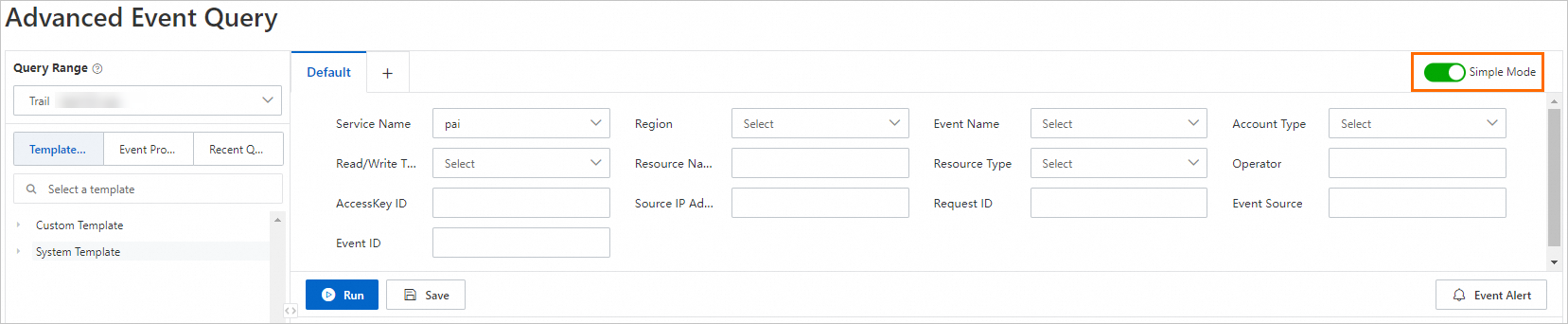
The following table describes the key parameters.
Parameter
Description
Service Name
Select Platform for AI (PAI).
Region
Select the region in which you want to query events. Example: China (Hangzhou).
Event Name
Select the event that you want to query. Example: StopJob.
Read/Write Type
Select the log read/write type:
Write(Write)
Read(Read)
SQL query
In the upper-right corner of the page, turn off Simple Mode and enter the SQL query condition as shown in the following figure.
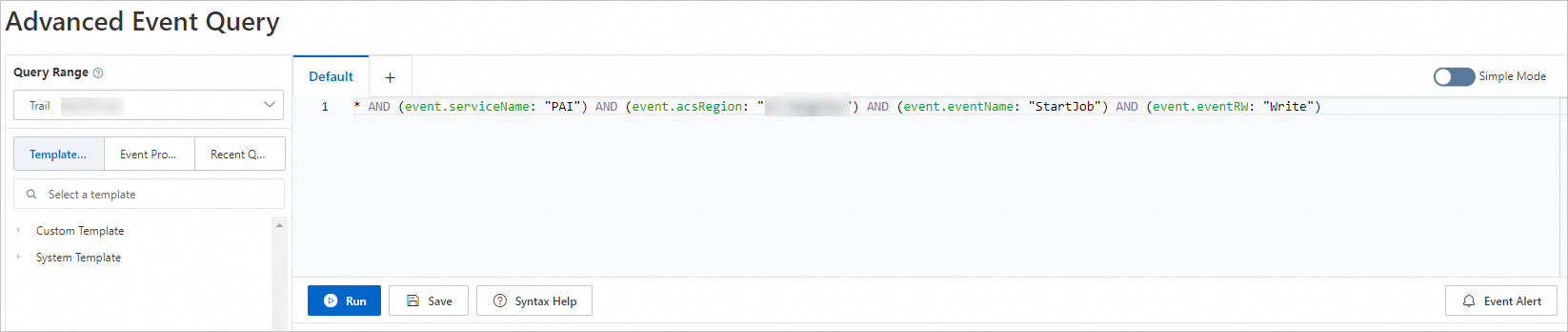
If the simple query mode cannot meet your business requirements, use the SQL query mode. In this case, you can configure query conditions as prompted in Simple Mode and turn off Simple Mode. The configured query conditions in Simple Mode are automatically converted into an SQL statement. Then, you can configure a custom SQL statement.
For more information about the SQL syntax for advanced event queries and sample queries, see SQL statements in advanced event queries.
Click Run.
The Raw Logs tab displays the event logs that match your query conditions.
In the event list, click View Event Details in the Actions column.
In the View Event Details panel, view the basic information and event records of the event.