The k-core algorithm is used to find the subgraph with the specified coreness in a graph. The k-core of a graph refers to the remaining subgraph after vertices with the degree k or a lower degree are repeatedly excluded. The K-Core component can generate the vertices that are connected to each vertex in the subgraph.
Configure the component
Method 1: Configure the component on the pipeline page
You can add the K-Core component on the pipeline page of Machine Learning Designer in the Platform for AI (PAI) console. The following table describes the parameters.
|
Tab |
Parameter |
Description |
|
Fields Setting |
Source Vertex Column |
The start vertex column in the edge table. |
|
Target Vertex Column |
The end vertex column in the edge table. |
|
|
Parameters Setting |
k |
The coreness of a vertex. Default value: 1. If a vertex belongs to the k-core but is not included in the (k+1)-core, the coreness of the vertex is k. |
|
Tuning |
Workers |
The number of vertices for parallel job execution. The degree of parallelism and framework communication costs increase with the value of this parameter. |
|
Memory Size per Worker |
The maximum size of memory that a single job can use. Unit: MB. Default value: 4096. If the size of used memory exceeds the value of this parameter, the |
Method 2: Configure the component by using PAI commands
You can configure the K-Core component by using PAI commands. You can use the SQL Script component to run PAI commands. For more information, see Scenario 4: Execute PAI commands within the SQL script component in the "SQL Script" topic.
PAI -name KCore
    -project algo_public
    -DinputEdgeTableName=KCore_func_test_edge
    -DfromVertexCol=flow_out_id
    -DtoVertexCol=flow_in_id
    -DoutputTableName=KCore_func_test_result
-Dk=2;|
Parameter |
Required |
Default value |
Description |
|
inputEdgeTableName |
Yes |
No default value |
The name of the input edge table. |
|
inputEdgeTablePartitions |
No |
Full table |
The partitions in the input edge table. |
|
fromVertexCol |
Yes |
No default value |
The start vertex column in the input edge table. |
|
toVertexCol |
Yes |
No default value |
The end vertex column in the input edge table. |
|
outputTableName |
Yes |
No default value |
The name of the output table. |
|
outputTablePartitions |
No |
No default value |
The partitions in the output table. |
|
lifecycle |
No |
No default value |
The lifecycle of the output table. |
|
workerNum |
No |
Not specified |
The number of vertices for parallel job execution. The degree of parallelism and framework communication costs increase with the value of this parameter. |
|
workerMem |
No |
4096 |
The maximum size of memory that a single job can use. Unit: MB. Default value: 4096. If the size of used memory exceeds the value of this parameter, the |
|
splitSize |
No |
64 |
The data split size. |
|
k |
Yes |
1 |
The coreness of a vertex. |
Example
-
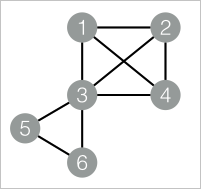
Add the SQL Script component as a vertex to the canvas and execute the following SQL statements to generate training data.
drop table if exists KCore_func_test_edge;
create table KCore_func_test_edge as
select * from
(
  select '1' as flow_out_id,'2' as flow_in_id
  union all
  select '1' as flow_out_id,'3' as flow_in_id
  union all
  select '1' as flow_out_id,'4' as flow_in_id
  union all
  select '2' as flow_out_id,'3' as flow_in_id
  union all
  select '2' as flow_out_id,'4' as flow_in_id
  union all
  select '3' as flow_out_id,'4' as flow_in_id
  union all
  select '3' as flow_out_id,'5' as flow_in_id
  union all
  select '3' as flow_out_id,'6' as flow_in_id
  union all
  select '5' as flow_out_id,'6' as flow_in_id
)tmp;
Data structure
-
Add the SQL Script component as a vertex to the canvas and run the following PAI commands to train the model.
drop table if exists ${o1}; PAI -name KCore -project algo_public -DinputEdgeTableName=KCore_func_test_edge -DfromVertexCol=flow_out_id -DtoVertexCol=flow_in_id -DoutputTableName=${o1} -Dk=2; -
Right-click the SQL Script component and choose View Data > SQL Script Output to view the training results.
| node1 | node2 |
| ----- | ----- |
| 1     | 2     |
| 1     | 3     |
| 1     | 4     |
| 2     | 1     |
| 2     | 3     |
| 2     | 4     |
| 3     | 1     |
| 3     | 2     |
| 3     | 4     |
| 4     | 1     |
| 4     | 2     |
| 4     | 3     |