You can export Notebook files in multiple formats or share the files with other users.
Background information
Data Science Workshop (DSW) of Platform for AI (PAI) allows you to export Notebook files in the following formats:
AsciiDoc files in the .asciidoc format
HTML files in the .html format
LaTeX files in the .tex format
Markdown files in the .md format
PDF files in the .pdf format
reStructuredText files in the .rst format
Executable scripts in the .py format
Reveal.js slides in the .html format
Procedure
Go to the development environment of a DSW instance.
Log on to the PAI console.
In the left-side navigation pane, click Workspaces. On the Workspaces page, click the name of the workspace that you want to manage.
In the upper-left corner of the page, select the region where you want to use PAI.
In the left-side navigation pane, choose .
Optional: On the Data Science Workshop (DSW) page, enter the name of a DSW instance or a keyword in the search box to search for the DSW instance.
Click Open in the Actions column of the instance.
Share and export Notebook files
Export Notebook files
Open the Notebook file that you want to export.
In the top navigation bar, choose and select a format in which you want to export the Notebook file.
 Note
NoteThe available file formats vary based on the nbconvert configuration. For more information, see nbconvert: Convert Notebooks to other formats.
Share Notebook files
On the Notebook tab, right-click the Notebook file that you want to share, or click Share in the upper-right corner of the file page.
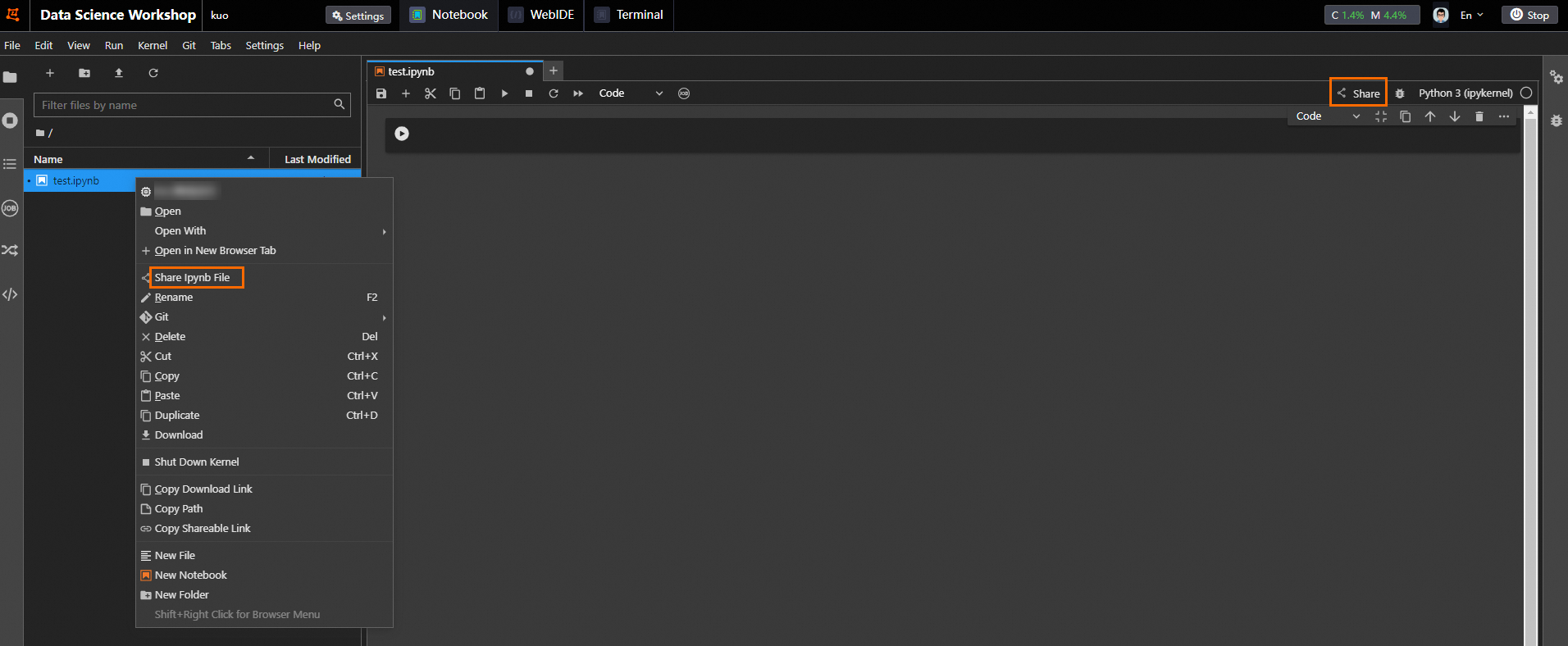
Click Copy to share the file with other users.