Elastic Algorithm Service (EAS) provides the EasyRec processor to deploy recommendation models as scoring services with integrated feature engineering and inference optimization.
How it works
The EasyRec processor is an inference service built on PAI EAS processor specifications. For more information, see Develop custom processors using C or C++. It supports two scenarios:
-
A deep learning model trained with Feature generation overview and configuration (FG) and EasyRec. The processor caches item features in memory and optimizes feature transformation and inference for improved scoring performance. FeatureStore manages online and real-time features. The solution integrates with PAI-Rec recommendation system development platform to connect training, feature changes, and inference optimization. Combined with PAI-Rec DPI engine, it enables quick integration of model deployment and online services.
-
A model trained with EasyRec or TensorFlow without Feature Generator.
EasyRec processor architecture:

EasyRec processor modules:
-
Item Feature Cache: Caches FeatureStore features in memory to reduce network overhead and FeatureStore load. Supports incremental and real-time updates.
-
Feature Generator: Feature engineering module (FG) that ensures consistency between offline and online feature processing.
-
TFModel: Loads Saved_Model files exported by EasyRec and uses Blade to optimize CPU and GPU inference.
-
Feature instrumentation and incremental model update modules: Support real-time training scenarios. For more information, see Real-time training.
Limitations
CPU inference: Supported only on general-purpose instance families g6, g7, and g8 with Intel CPUs.
GPU inference: Supported on T4, A10, GU30, L20, 3090, and 4090. P100 is not supported.
For more information, see General-purpose (g series).
Version list
The EasyRec processor is under active development. Use the latest version for improved features and inference performance.
Step 1: Deploy a service
To deploy an EasyRec model service with eascmd, set Processor type to easyrec-{version}. For more information, see Service deployment: EASCMD. Configuration examples:
Example using the new FG library (fg_mode=normal)
This example uses the PyOdps3 node type for deployment. This mode supports the new FeatureGenerator with built-in and custom FG operators, complex input types (array and map), and feature dependencies in Directed Acyclic Graph (DAG) mode.
This example uses PAI-FeatureStore to manage feature data. Replace the ${fs_project},${fs_model} variables with your actual values. For more information, see Manage recommendation features with FeatureStore.
import json
import os

service_name = 'ali_rec_rnk_with_fg'

config = {
  'name': service_name,
  'metadata': {
    "cpu": 8,
    #"cuda": "11.2",
    "gateway": "default",
    "gpu": 0,
    "memory": 32000,
    "rolling_strategy": {
        "max_unavailable": 1
    },
    "rpc": {
        "enable_jemalloc": 1,
        "max_queue_size": 256
    }
  },
  "processor_envs": [
  {
  "name": "ADAPTE_FG_CONFIG",
  "value": "true"
  }
],
"model_path": "",
  "processor": "easyrec-2.9",
  "storage": [
    {
      "mount_path": "/home/admin/docker_ml/workspace/model/",
      "oss": {
        "path": "oss://easyrec/ali_rec_sln_acc_rnk/20250722/export/final_with_fg"
      }
    }
  ],
  # When you change fg_mode, you must also change the corresponding invocation method.
  # If fg_mode is normal or tf, use the EasyRecRequest SDK for invocation.
  # If fg_mode is bypass, use the TFRequest SDK for invocation.
  'model_config': {
    'outputs': 'probs_ctr,probs_cvr',
    'fg_mode': 'normal',
    'steady_mode': True,
    'period': 2880,
    'access_key_id': f'{o.account.access_id}',
    'access_key_secret': f'{o.account.secret_access_key}',
    "load_feature_from_offlinestore": True,
    'region': 'cn-shanghai',
    'fs_project': '${fs_project}',
    'fs_model': '${fs_model}',
    'fs_entity': 'item',
    'featuredb_username': 'guest',
    'featuredb_password': '123456',
    'log_iterate_time_threshold': 100,
    'iterate_featuredb_interval': 5,
    'mc_thread_pool_num': 1,
  }
}

with open('echo.json', 'w') as output_file:
    json.dump(config, output_file)

os.system(f'/home/admin/usertools/tools/eascmd -i {o.account.access_id} -k {o.account.secret_access_key} -e pai-eas.cn-shanghai.aliyuncs.com create echo.json')
# os.system(f'/home/admin/usertools/tools/eascmd -i {o.account.access_id} -k {o.account.secret_access_key} -e pai-eas.cn-shanghai.aliyuncs.com modify {service_name} -s echo.json')
Example using the TF OP version of FG (fg_mode=tf)
The TF OP version of FG supports only these built-in features: id_feature, raw_feature, combo_feature, lookup_feature, match_feature, and sequence_feature. Custom FG operators are not supported.
This shell script example contains the AccessKey ID and AccessKey secret in plaintext. It does not include PAI-FeatureStore or MaxCompute data loading. For PAI-FeatureStore and MaxCompute configurations, see Manage recommendation features with FeatureStore. That referenced document uses a Python script with the DataWorks built-in object o and a temporary Security Token Service (STS) token for improved security, and sets load_feature_from_offlinestore to True.
bizdate=$1
# When you change fg_mode, you must also change the corresponding invocation method. If fg_mode is normal or tf, use the EasyRecRequest SDK. If fg_mode is bypass, use the TFRequest SDK.
cat << EOF > echo.json
{
  "name":"ali_rec_rnk_with_fg",
  "metadata": {
    "instance": 2,
    "rpc": {
      "enable_jemalloc": 1,
      "max_queue_size": 100
    }
  },
  "cloud": {
    "computing": {
      "instance_type": "ecs.g7.large",
      "instances": null
    }
  },
  "model_config": {
    "remote_type": "hologres",
    "url": "postgresql://<AccessKeyID>:<AccessKeySecret>@<domain name>:<port>/<database>",
    "tables": [{"name":"<schema>.<table_name>","key":"<index_column_name>","value": "<column_name>"}],
    "period": 2880,
    "fg_mode": "tf",
    "outputs":"probs_ctr,probs_cvr",
  },
  "model_path": "",
  "processor": "easyrec-3.1",
  "storage": [
    {
      "mount_path": "/home/admin/docker_ml/workspace/model/",
      "oss": {
        "path": "oss://easyrec/ali_rec_sln_acc_rnk/20221122/export/final_with_fg"
      }
    }
  ]
}

EOF
# Execute the deployment command.
eascmd  create echo.json
# eascmd -i <AccessKeyID>  -k  <AccessKeySecret>   -e <endpoint> create echo.json
# Execute the update command.
eascmd update ali_rec_rnk_with_fg -s echo.json
Example without FG (fg_mode=bypass)
bizdate=$1
# When you change fg_mode, you must also change the corresponding invocation method. If fg_mode is normal or tf, use the EasyRecRequest SDK. If fg_mode is bypass, use the TFRequest SDK.
cat << EOF > echo.json
{
  "name":"ali_rec_rnk_no_fg",
  "metadata": {
    "instance": 2,
    "rpc": {
      "enable_jemalloc": 1,
      "max_queue_size": 100
    }
  },
  "cloud": {
    "computing": {
      "instance_type": "ecs.g7.large",
      "instances": null
    }
  },
  "model_config": {
    "fg_mode": "bypass"
  },
  "processor": "easyrec-3.1",
  "processor_envs": [
    {
      "name": "INPUT_TILE",
      "value": "2"
    }
  ],
  "storage": [
    {
      "mount_path": "/home/admin/docker_ml/workspace/model/",
      "oss": {
        "path": "oss://easyrec/ali_rec_sln_acc_rnk/20221122/export/final/"
      }
    }
  ],
  "warm_up_data_path": "oss://easyrec/ali_rec_sln_acc_rnk/rnk_warm_up.bin"
}

EOF
# Execute the deployment command.
eascmd  create echo.json
# eascmd -i <AccessKeyID>  -k  <AccessKeySecret>   -e <endpoint> create echo.json
# Execute the update command.
eascmd update ali_rec_rnk_no_fg -s echo.json
Key parameters are described in the following table. For other parameters, see JSON deployment.
|
Parameter |
Required |
Description |
Example |
|
processor |
Yes |
EasyRec processor version. |
|
|
fg_mode |
Yes |
Feature engineering mode. Select the corresponding SDK and request method based on the mode.
|
|
|
outputs |
Yes |
TensorFlow model output variable names, such as |
"outputs":"probs_ctr,probs_cvr" |
|
save_req |
No |
Saves request data to the model directory for warmup and performance testing. Valid values:
|
"save_req": "false" |
|
Parameters related to Item Feature Cache |
|||
|
period |
Yes |
Item feature update interval in minutes. For daily updates, set a value greater than one day (for example, 2880 = two days). Features update during routine daily service updates. |
|
|
remote_type |
Yes |
Item feature data source. Valid values:
|
|
|
tables |
No |
Item feature table. Required when remote_type is hologres. Parameters:
Multiple tables are supported. The configuration format is:
If multiple tables have duplicate columns, columns from later tables overwrite earlier ones. |
|
|
url |
No |
Hologres endpoint. |
|
|
Parameters for processor access to FeatureStore |
|||
|
fs_project |
No |
FeatureStore project name. Required when using FeatureStore. For more information, see Configure a FeatureStore project. |
"fs_project": "fs_demo" |
|
fs_model |
No |
Model feature name in FeatureStore. |
"fs_model": "fs_rank_v1" |
|
fs_entity |
No |
Entity name in FeatureStore. |
"fs_entity": "item" |
|
region |
No |
Region of the FeatureStore instance. |
"region": "cn-beijing" |
|
access_key_id |
No |
AccessKey ID for FeatureStore access. |
"access_key_id": "xxxxx" |
|
access_key_secret |
No |
AccessKey secret for FeatureStore access. |
"access_key_secret": "xxxxx" |
|
featuredb_username |
No |
FeatureDB username. |
"featuredb_username": "xxxxx" |
|
featuredb_password |
No |
FeatureDB password. |
"featuredb_password": "xxxxx" |
|
load_feature_from_offlinestore |
No |
Whether to load offline features directly from FeatureStore OfflineStore. Valid values:
|
"load_feature_from_offlinestore": True |
|
iterate_featuredb_interval |
No |
Interval in seconds for real-time statistical feature updates. Shorter intervals improve feature freshness but increase read costs when features change frequently. |
"iterate_featuredb_interval": 5 |
|
input_tile: Parameters related to automatic feature extension |
|||
|
INPUT_TILE |
No |
Enables automatic broadcasting for item features. For features with the same value in a single request (such as user_id), pass the value only once.
Note
|
"processor_envs": [ { "name": "INPUT_TILE", "value": "2" } ] |
|
ADAPTE_FG_CONFIG |
No |
Enable for compatibility with models exported from training samples based on an older FG version. |
"processor_envs": [ { "name": "ADAPTE_FG_CONFIG", "value": "true" } ] |
|
DISABLE_FG_PRECISION |
No |
Disables the float precision limit for compatibility with older FG versions. The old FG version limits float features to six significant digits. The new version removes this limitation. |
"processor_envs": [ { "name": "DISABLE_FG_PRECISION", "value": "false" } ] |
Inference optimization parameters for EasyRecProcessor
|
Parameter |
Required |
Description |
Example |
|
TF_XLA_FLAGS |
No |
For GPU inference, uses XLA to compile, optimize, and automatically fuse operators. |
"processor_envs": [ { "name": "TF_XLA_FLAGS", "value": "--tf_xla_auto_jit=2" }, { "name": "XLA_FLAGS", "value": "--xla_gpu_cuda_data_dir=/usr/local/cuda/" }, { "name": "XLA_ALIGN_SIZE", "value": "64" } ] |
|
TF scheduling parameters |
No |
inter_op_parallelism_threads: Thread count for parallel operations. intra_op_parallelism_threads: Thread count within a single operation. For a 32-core CPU, 16 threads each generally yields optimal performance. The sum of both thread counts should not exceed CPU core count. |
"model_config": { "inter_op_parallelism_threads": 16, "intra_op_parallelism_threads": 16, } |
|
rpc.worker_threads |
No |
Set to the CPU core count of the instance. Configured under metadata in PAI EAS. Example: for 15 CPU cores, set worker_threads to 15. |
"metadata": { "rpc": { "worker_threads": 15 } |
Step 2: Call the service
2.1 Network configuration
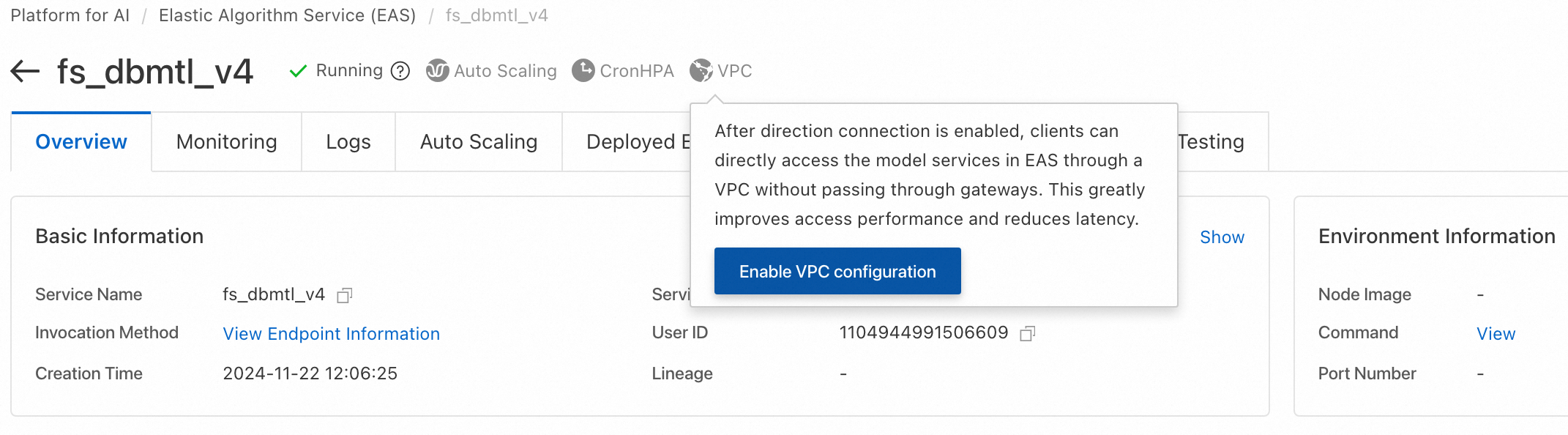
PAI-Rec engine and model scoring service are both deployed on PAI EAS and require a direct network connection. On the PAI EAS instance page, click VPC in the upper-right corner and set the same VPC, vSwitch, and security group. For more information, see Configure network access. If you use Hologres, configure the same VPC information.
2.2 Get service information
After deploying the service, go to the Elastic Algorithm Service (EAS) page. In the Service Method column, find the target service and click Invocation Method to view endpoint and token information.
2.3 SDK invocation examples
EasyRec uses protobuf for input and output, so testing on the PAI EAS console is not supported.
Identify the fg_mode configured in model_config during deployment. Each mode requires a different SDK request class.
|
Deployment mode (fg_mode) |
SDK request class to use |
|
normal or tf (with built-in feature engineering) |
EasyRecRequest |
|
bypass (without built-in feature engineering) |
TFRequest |
With FG: fg_mode=normal or tf
Java
For Maven environment configuration, see Java SDK instructions. Example request to the ali_rec_rnk_with_fg service:
import com.aliyun.openservices.eas.predict.http.*;
import com.aliyun.openservices.eas.predict.request.EasyRecRequest;

PredictClient client = new PredictClient(new HttpConfig());
// When accessing through a public gateway, use the Endpoint that starts with the user UID. You can get this information from the service's invocation details in the EAS console.
client.setEndpoint("xxxxxxx.vpc.cn-hangzhou.pai-eas.aliyuncs.com");
client.setModelName("ali_rec_rnk_with_fg");
// Replace with the service token information.
client.setToken("******");

EasyRecRequest easyrecRequest = new EasyRecRequest(separator);
// userFeatures: User features. Features are separated by \u0002 (CTRL_B). The feature name and value are separated by a colon (:).
//  user_fea0:user_fea0_val\u0002user_fea1:user_fea1_val
// For the format of feature values, see: https://easyrec.readthedocs.io/en/latest/feature/rtp_fg.html
easyrecRequest.appendUserFeatureString(userFeatures);
// You can also add one user feature at a time:
// easyrecRequest.addUserFeature(String userFeaName, T userFeaValue).
// The type T of the feature value can be: String, float, long, int.

// contextFeatures: Context features. Features are separated by \u0002 (CTRL_B). The feature name and value are separated by a colon (:). Multiple feature values are separated by colons (:).
//   ctxt_fea0:ctxt_fea0_ival0:ctxt_fea0_ival1:ctxt_fea0_ival2\u0002ctxt_fea1:ctxt_fea1_ival0:ctxt_fea1_ival1:ctxt_fea1_ival2
easyrecRequest.appendContextFeatureString(contextFeatures);
// You can also add one context feature at a time:
// easyrecRequest.addContextFeature(String ctxtFeaName, List<Object> ctxtFeaValue).
// The type of ctxtFeaValue can be: String, Float, Long, Integer.

// itemIdStr: A list of itemIds to predict, separated by a comma (,).
easyrecRequest.appendItemStr(itemIdStr, ",");
// You can also add one itemId at a time:
// easyrecRequest.appendItemId(String itemId)

PredictProtos.PBResponse response = client.predict(easyrecRequest);

for (Map.Entry<String, PredictProtos.Results> entry : response.getResultsMap().entrySet()) {
    String key = entry.getKey();
    PredictProtos.Results value = entry.getValue();
    System.out.print("key: " + key);
    for (int i = 0; i < value.getScoresCount(); i++) {
        System.out.format("value: %.6g\n", value.getScores(i));
    }
}

// Get the features after FG processing to compare them with offline features for consistency.
// Set DebugLevel to 1 to return the generated features.
easyrecRequest.setDebugLevel(1);
PredictProtos.PBResponse response = client.predict(easyrecRequest);
Map<String, String> genFeas = response.getGenerateFeaturesMap();
for(String itemId: genFeas.keySet()) {
    System.out.println(itemId);
    System.out.println(genFeas.get(itemId));
}
Python
For environment configuration, see Python SDK instructions. Use Java SDK in production for better performance. Example:
from eas_prediction import PredictClient

from eas_prediction.easyrec_request import EasyRecRequest
from eas_prediction.easyrec_predict_pb2 import PBFeature
from eas_prediction.easyrec_predict_pb2 import PBRequest

if __name__ == '__main__':
    endpoint = 'http://xxxxxxx.vpc.cn-hangzhou.pai-eas.aliyuncs.com'
    service_name = 'ali_rec_rnk_with_fg'
    token = '******'

    client = PredictClient(endpoint, service_name)
    client.set_token(token)
    client.init()

    req = PBRequest()
    uid = PBFeature()
    uid.string_feature = 'u0001'
    req.user_features['user_id'] = uid
    age = PBFeature()
    age.int_feature = 12
    req.user_features['age'] = age
    weight = PBFeature()
    weight.float_feature = 129.8
    req.user_features['weight'] = weight

    req.item_ids.extend(['item_0001', 'item_0002', 'item_0003'])

    easyrec_req = EasyRecRequest()
    easyrec_req.add_feed(req, debug_level=0)
    res = client.predict(easyrec_req)
    print(res)
Where:
-
endpoint: Service endpoint (starts with your UID). Obtain from the PAI EAS Online Model Service page by clicking Invocation Method in the Service Method column.
-
service_name: Service name. Obtain from the PAI EAS Online Model Service page.
-
token: Service token. Obtain from the Invocation Method dialog box.
Without FG: fg_mode=bypass
Java
For Maven environment configuration, see Java SDK instructions. Example request to the ali_rec_rnk_no_fg service:
import java.util.List;

import com.aliyun.openservices.eas.predict.http.PredictClient;
import com.aliyun.openservices.eas.predict.http.HttpConfig;
import com.aliyun.openservices.eas.predict.request.TFDataType;
import com.aliyun.openservices.eas.predict.request.TFRequest;
import com.aliyun.openservices.eas.predict.response.TFResponse;

public class TestEasyRec {
    public static TFRequest buildPredictRequest() {
        TFRequest request = new TFRequest();

        request.addFeed("user_id", TFDataType.DT_STRING,
                        new long[]{3}, new String []{ "u0001", "u0001", "u0001"});
      	request.addFeed("age", TFDataType.DT_FLOAT,
                        new long[]{3}, new float []{ 18.0f, 18.0f, 18.0f});
        // Note: If you set INPUT_TILE=2, you can pass the same value for the feature only once:
        //    request.addFeed("user_id", TFDataType.DT_STRING,
        //            new long[]{1}, new String []{ "u0001" });
        //    request.addFeed("age", TFDataType.DT_FLOAT,
        //            new long[]{1}, new float []{ 18.0f});
      	request.addFeed("item_id", TFDataType.DT_STRING,
                        new long[]{3}, new String []{ "i0001", "i0002", "i0003"});
        request.addFetch("probs");
      	return request;
    }

    public static void main(String[] args) throws Exception {
        PredictClient client = new PredictClient(new HttpConfig());

        // To use the direct network connection feature, use the setDirectEndpoint method, for example:
        //   client.setDirectEndpoint("pai-eas-vpc.cn-shanghai.aliyuncs.com");
        // The direct network connection must be enabled in the EAS console. Provide the source vSwitch for accessing the EAS service.
        // Direct network connection offers better stability and performance.
        client.setEndpoint("xxxxxxx.vpc.cn-hangzhou.pai-eas.aliyuncs.com");
        client.setModelName("ali_rec_rnk_no_fg");
        client.setToken("");
        long startTime = System.currentTimeMillis();
        for (int i = 0; i < 100; i++) {
            try {
                TFResponse response = client.predict(buildPredictRequest());
                // probs is the output field name of the model. You can use the curl command to view the model's input and output:
                //   curl xxxxxxx.vpc.cn-hangzhou.pai-eas.aliyuncs.com -H "Authorization:{token}"
                List<Float> result = response.getFloatVals("probs");
                System.out.print("Predict Result: [");
                for (int j = 0; j < result.size(); j++) {
                    System.out.print(result.get(j).floatValue());
                    if (j != result.size() - 1) {
                        System.out.print(", ");
                    }
                }
                System.out.print("]\n");
            } catch (Exception e) {
                e.printStackTrace();
            }
        }
        long endTime = System.currentTimeMillis();
        System.out.println("Spend Time: " + (endTime - startTime) + "ms");
        client.shutdown();
    }
}
Python
For more information, see Python SDK instructions. Python offers lower performance and is recommended only for debugging. Use Java SDK in production. Example request to the ali_rec_rnk_no_fg service:
#!/usr/bin/env python

from eas_prediction import PredictClient
from eas_prediction import StringRequest
from eas_prediction import TFRequest

if __name__ == '__main__':
    client = PredictClient('http://xxxxxxx.vpc.cn-hangzhou.pai-eas.aliyuncs.com', 'ali_rec_rnk_no_fg')
    client.set_token('')
    client.init()

    # Note: Replace server_default with the actual signature_name of your model. For details, see the SDK instructions mentioned above.
    req = TFRequest('server_default')
    req.add_feed('user_id', [3], TFRequest.DT_STRING, ['u0001'] * 3)
    req.add_feed('age', [3], TFRequest.DT_FLOAT, [18.0] * 3)
    # Note: After enabling the INPUT_TILE=2 optimization, you can pass the value for the above features only once.
    #   req.add_feed('user_id', [1], TFRequest.DT_STRING, ['u0001'])
    #   req.add_feed('age', [1], TFRequest.DT_FLOAT, [18.0])
    req.add_feed('item_id', [3], TFRequest.DT_STRING,
        ['i0001', 'i0002', 'i0003'])
    for x in range(0, 100):
        resp = client.predict(req)
        print(resp)
2.4 Build a custom service request
For other languages, generate prediction request code from the .proto files. Protobuf definitions:
-
tf_predict.proto: TensorFlow model request definitionsyntax = "proto3"; option cc_enable_arenas = true; option go_package = ".;tf"; option java_package = "com.aliyun.openservices.eas.predict.proto"; option java_outer_classname = "PredictProtos"; enum ArrayDataType { // Not a legal value for DataType. Used to indicate a DataType field // has not been set. DT_INVALID = 0; // Data types that all computation devices are expected to be // capable to support. DT_FLOAT = 1; DT_DOUBLE = 2; DT_INT32 = 3; DT_UINT8 = 4; DT_INT16 = 5; DT_INT8 = 6; DT_STRING = 7; DT_COMPLEX64 = 8; // Single-precision complex DT_INT64 = 9; DT_BOOL = 10; DT_QINT8 = 11; // Quantized int8 DT_QUINT8 = 12; // Quantized uint8 DT_QINT32 = 13; // Quantized int32 DT_BFLOAT16 = 14; // Float32 truncated to 16 bits. Only for cast ops. DT_QINT16 = 15; // Quantized int16 DT_QUINT16 = 16; // Quantized uint16 DT_UINT16 = 17; DT_COMPLEX128 = 18; // Double-precision complex DT_HALF = 19; DT_RESOURCE = 20; DT_VARIANT = 21; // Arbitrary C++ data types } // Dimensions of an array message ArrayShape { repeated int64 dim = 1 [packed = true]; } // Protocol buffer representing an array message ArrayProto { // Data Type. ArrayDataType dtype = 1; // Shape of the array. ArrayShape array_shape = 2; // DT_FLOAT. repeated float float_val = 3 [packed = true]; // DT_DOUBLE. repeated double double_val = 4 [packed = true]; // DT_INT32, DT_INT16, DT_INT8, DT_UINT8. repeated int32 int_val = 5 [packed = true]; // DT_STRING. repeated bytes string_val = 6; // DT_INT64. repeated int64 int64_val = 7 [packed = true]; // DT_BOOL. repeated bool bool_val = 8 [packed = true]; } // PredictRequest specifies which TensorFlow model to run, along with // how inputs are mapped to tensors and how outputs are filtered before // returning to user. message PredictRequest { // A named signature to evaluate. If unspecified, the default signature // will be used string signature_name = 1; // Input tensors. // Names of input tensor are alias names. The mapping from aliases to real // input tensor names is expected to be stored as named generic signature // under the key "inputs" in the model export. // Each alias listed in a generic signature named "inputs" should be provided // exactly once to run the prediction. map<string, ArrayProto> inputs = 2; // Output filter. // Names specified are alias names. The mapping from aliases to real output // tensor names is expected to be stored as named generic signature under // the key "outputs" in the model export. // Only tensors specified here will be run/fetched and returned, with the // exception that when none is specified, all tensors specified in the // named signature will be run/fetched and returned. repeated string output_filter = 3; // Debug flags // 0: just return prediction results, no debug information // 100: return prediction results, and save request to model_dir // 101: save timeline to model_dir int32 debug_level = 100; } // Response for PredictRequest on successful run. message PredictResponse { // Output tensors. map<string, ArrayProto> outputs = 1; } -
easyrec_predict.proto: TensorFlow model with FG request definitionsyntax = "proto3"; option cc_enable_arenas = true; option go_package = ".;easyrec"; option java_package = "com.aliyun.openservices.eas.predict.proto"; option java_outer_classname = "EasyRecPredictProtos"; import "tf_predict.proto"; // context features message ContextFeatures { repeated PBFeature features = 1; } message PBFeature { oneof value { int32 int_feature = 1; int64 long_feature = 2; string string_feature = 3; float float_feature = 4; } } // PBRequest specifies the request for aggregator message PBRequest { // Debug flags // 0: just return prediction results, no debug information // 3: return features generated by FG module, string format, feature values are separated by \u0002, // could be used for checking feature consistency check and generating online deep learning samples // 100: return prediction results, and save request to model_dir // 101: save timeline to model_dir // 102: for recall models such as DSSM and MIND, only only return Faiss retrieved results // but also return user embedding vectors. int32 debug_level = 1; // user features map<string, PBFeature> user_features = 2; // item ids, static(daily updated) item features // are fetched from the feature cache resides in // each processor node by item_ids repeated string item_ids = 3; // context features for each item, realtime item features // could be passed as context features. map<string, ContextFeatures> context_features = 4; // embedding retrieval neighbor number. int32 faiss_neigh_num = 5; } // return results message Results { repeated double scores = 1 [packed = true]; } enum StatusCode { OK = 0; INPUT_EMPTY = 1; EXCEPTION = 2; } // PBResponse specifies the response for aggregator message PBResponse { // results map<string, Results> results = 1; // item features map<string, string> item_features = 2; // fg generate features map<string, string> generate_features = 3; // context features map<string, ContextFeatures> context_features = 4; string error_msg = 5; StatusCode status_code = 6; // item ids repeated string item_ids = 7; repeated string outputs = 8; // all fg input features map<string, string> raw_features = 9; // output tensors map<string, ArrayProto> tf_outputs = 10; }