Save the environment of your current DSW instance as a custom image and push it to Container Registry (ACR) for quick reuse or sharing. This preserves your code, dependencies, and system configurations. This is useful when official images do not meet your specific requirements, such as a particular CUDA or Python version. The resulting image is also compatible with other PAI services, such as DLC or EAS.
Important
Instance status: Create images only from DSW instances in the Running status. If the instance is stopped, the Create Image button is grayed out.
Region: The DSW instance and the Container Registry (ACR) instance must be in the same Region. A Region mismatch is the most common reason you cannot find an image repository or namespace.
Image size limit: A single image layer cannot exceed 10 GiB. Otherwise, the build process fails due to a timeout or insufficient capacity.
Environment limit: DSW is a containerized environment and does not support installing or using Docker.
Differences between ACR Personal Edition and Enterprise Edition:
Feature
ACR Personal Edition
ACR Enterprise Edition
Cost
The instance is free of charge.
You must purchase an instance. For more information, see Billing of Enterprise instances.
Network configuration
Accessed over the public network. No special network configuration is required.
Must be in the same Virtual Private Cloud (VPC) as the DSW instance. Access over the internal network ensures more stable data transfer.
Performance and stability
Speed is affected by public network bandwidth. Pushing or pulling large images (approaching 10 GiB) may fail due to network fluctuations.
Offers high speed and stability. Data transfer over the VPC internal network is ideal for large images and production environments.
Region flexibility
An Alibaba Cloud account can only create a Personal Edition instance in one region. If your DSW instance is in another region, you cannot use it.
You can create Enterprise Edition instances in multiple Regions, allowing use by DSW instances across different regions.
Recommended scenarios
Personal learning, functional testing, and backing up small image environments.
Team collaboration, production environments, scenarios requiring high stability and transfer speeds, and cross-region image usage.
Procedure
Step 1: Prepare ACR
Choose either ACR Personal Edition or ACR Enterprise Edition based on your business needs.
ACR Personal Edition: Create a Container Registry Personal Edition instance, then create a namespace and an image repository in the namespace.
ACR Enterprise Edition:
Create a security group and attach it to the VPC that you created.
Create an Enterprise Edition instance, add a VPC, and attach the VPC and vSwitch that you created. Then, create a namespace and an image repository in that namespace.
Step 2: Create the image
For a DSW instance in the Running status, click Create Image, select either Image (Container Registry Personal Edition) or Image (Container Registry Enterprise Edition), configure the following key parameters, and then click Save.

Parameter | Description |
Image Name (Image Version Name in Container Registry) | The display name for the custom image and the image tag in ACR. |
Container Registry Namespace | Select an existing namespace. |
Container Registry Repository | Select an existing image repository. |
Custom Excluded Path | Exclude specific files or directories when creating an image to improve creation speed, save storage space, and protect sensitive information. If you do not specify any paths, the system uses default exclusion paths. Note A single image layer cannot exceed 10 GiB, or the build will fail. Exclude any non-essential paths to reduce image size.
|
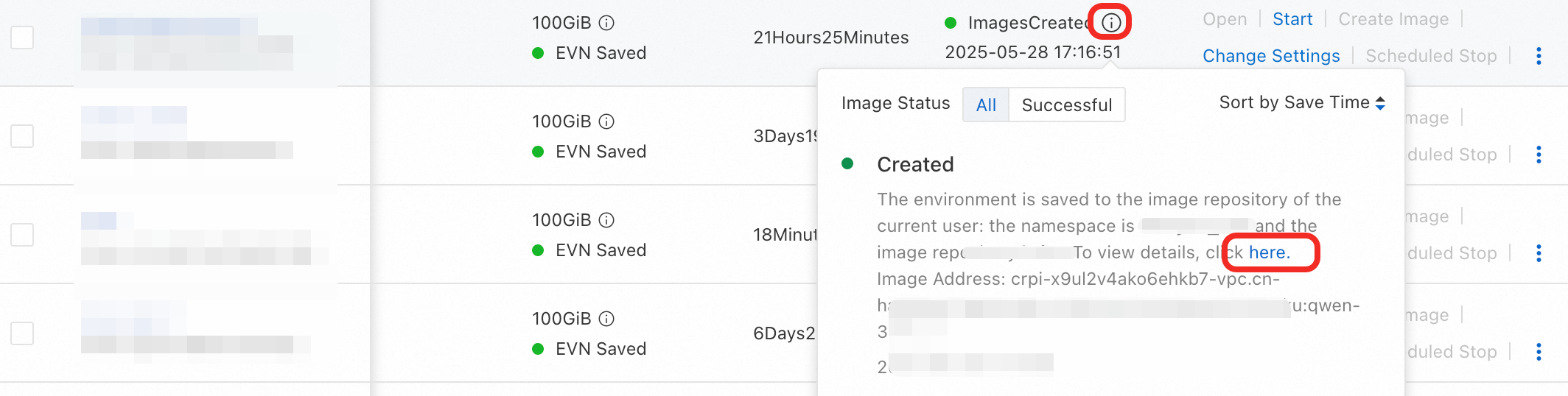
After the image is created, hover over the  icon to view the image address, or click here to go to the Container Registry console and view the image details.
Step 3: Use the custom image
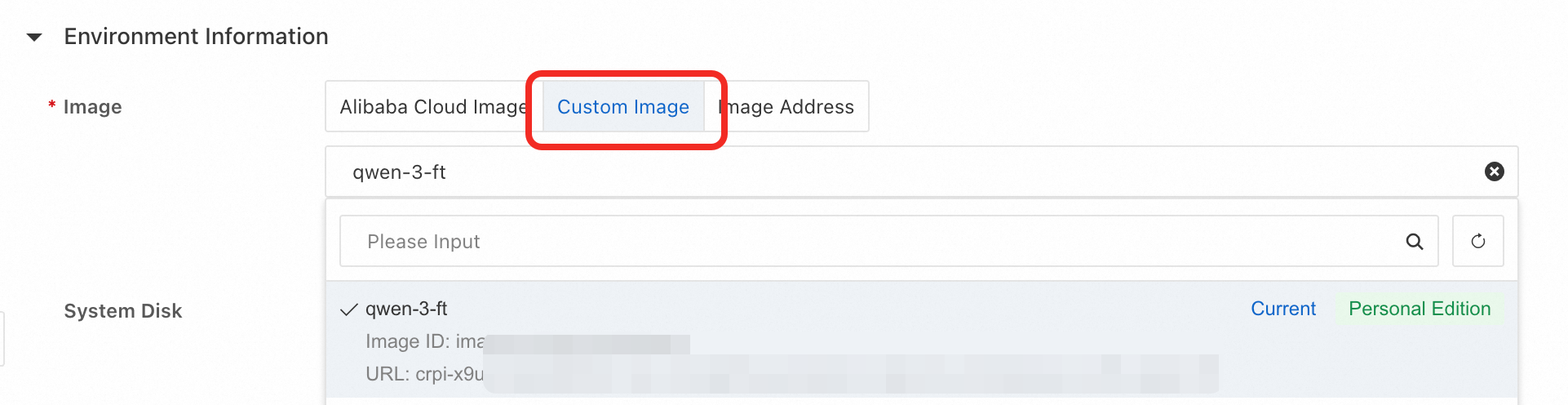
After the image is created, when you create a new DSW instance, select Images > Custom Image to use your custom image.
FAQ
Q: Why is my DSW image creation failing with a timeout or an "insufficient capacity of ephemeral storage" error?
Image size exceeds the 10 GiB limit. Each image layer has a hard limit of 10 GiB. If your data exceeds this, the build will fail.
Solution: Reduce the image size by excluding non-essential files and directories. For consistently large images, use ACR Enterprise Edition, which offers better performance and stability over a private network.
Region mismatch between DSW and ACR. The DSW instance and the ACR instance must be in the same region.
Solution: Verify that both services are deployed in the exact same region. This is the most common cause of not being able to find an ACR repository.Insufficient system disk space.
The error messageinsufficient capacity of ephemeral storageindicates that the DSW instance's system disk ran out of space during the image creation process.
Solution: Exclude large, unnecessary directories from the image to reduce its size.Network instability with ACR Personal Edition.
ACR Personal Edition pushes images over the public internet, which can be slow and unreliable for large images, often resulting in timeouts.
Solution: For better reliability, use an ACR Enterprise Edition instance configured in the same VPC as your DSW instance. This pushes the image over a fast and stable internal network.
Q: Why is the "Create Image" button disabled in DSW, or why can't I find my ACR repository?
The DSW instance is not running.
The Create Image button is only active for instances in the Running state.
Solution: Start your DSW instance from the console. If it is Stopped or in another state, the button will be grayed out.ACR prerequisites are not met.
You must first create a Container Registry (ACR) instance, and then create a namespace and an image repository within the instance.
Ensure that the ACR instance and the DSW instance are in the same region.
Q: Is there a way to install and run Docker inside a DSW instance?
No, you cannot install or run the Docker daemon inside a DSW instance.
DSW itself is a containerized environment and does not support nested containerization. Attempting to install Docker will fail.
The correct way to use a Docker image is to specify it when creating the instance:
Push your desired Docker image to an ACR repository.
When creating a new DSW instance, select Custom Image.
Provide the full address of your image in ACR.
Q: What is the correct way to upgrade the NVIDIA driver or CUDA version on a DSW instance?
You should not attempt to upgrade the NVIDIA driver or CUDA version manually inside a running DSW instance. These components are pre-installed and locked to ensure system stability. Modifying them can permanently corrupt the instance.
The correct method is to replace the instance with one based on a newer official image:
Stop and save any work from your current DSW instance.
Create a new DSW instance.
In the image selection step, choose an official DSW image that includes your target CUDA version. You can identify the version from the image tag.
For example, an image with a tag like ...-cu118-... is built with CUDA version 11.8.
Q: Why does my DSW instance fail to create when using a custom or third-party image?
Image pull permissions: This is the most common cause. Error logs showing
pull access deniedorauthorization failedconfirm a permission issue.
Solution: If using a private repository, verify that the DSW instance's network configuration (e.g., VPC) allows access and that the ACR repository's authorization policies are correctly set up.Image incompatibility: The custom image may not be compatible with the DSW runtime environment.
Solution: For guaranteed compatibility, build your custom image using an official DSW image as your base. If starting from scratch, ensure it is based on a standard Linux distribution.Incorrect image address format: The system cannot parse an invalid image path.
Solution: Double-check that the image address is formatted correctly (e.g.,registry.region-id.aliyuncs.com/namespace/repository:tag) and points to a valid image.