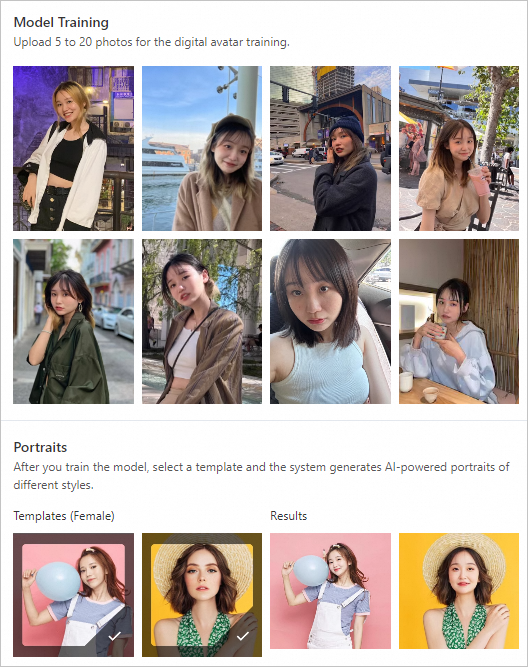
The AI Portrait service provides an algorithm for creating custom digital avatars. You can upload 5 to 20 photos to train a custom digital avatar model. Then, you can call the model using an API operation and select different templates to generate professional-quality AI portraits in various styles.
Feature description
Using the AI Portrait service involves the following operations:
Image quality check: Analyzes and evaluates uploaded images to ensure they meet the requirements for AI portrait training.
AI portrait training: Upload 5 to 20 photos to train a custom digital avatar model.
AI portrait creation: Call the custom digital avatar model using an API operation and select different templates to generate professional-quality AI portraits.
Service type
The AI Portrait service can be implemented in one of the following ways:
Method 1: Call the AI Portrait API operations. For more information, see SDK usage notes.
Method 2: Deploy a service using Elastic Algorithm Service (EAS). For more information, see Portrait Camera Solution.
Billing
Billing for API operations:
Free trial quota: A free trial quota is available that includes 5 free portrait training calls and 200 free portrait creation calls. Usage that exceeds the quota is charged at the list price.
AI Portrait supports two billing methods: pay-as-you-go and subscription (resource plan). For more information, see AI Portrait Billing.
Pricing for deploying an EAS service to use the AI portrait feature:
For more information about the fees for deploying an EAS service, see Elastic Algorithm Service (EAS) Billing Details.
Demo experience
For more information, see the open-source WebUI on GitHub.
If you encounter issues when you use the demo, search for the group number 38250008552 in DingTalk and join the official PAI AI Portrait partner group for assistance.
Activate AI Portrait and apply for usage qualification
Activate the AI Portrait service
Before using AI Portrait, you must activate the service.
Log on to the PAI console.
In the navigation pane on the left, click Scenario-based Solution > AI Portrait.
On the AI Portrait page, click Activate Now. The page automatically redirects to the Pay-As-You-Go Model Service page. On this page, click Activate Now.
After activating AI Portrait, you can purchase a resource plan. A one-time payment offers a better price. If you do not purchase a resource plan, you are charged for each service call on a pay-as-you-go basis.
On the AI Portrait page, click Purchase Point Package.
On the Subscription Model Service page, configure the parameters and click Buy Now. Follow the on-screen instructions to confirm the order and complete the payment.
Apply for usage qualification
Apply to join the group
Before you call the API operations, you must join the AI Portrait business group. To apply, add the DingTalk contact tdaj393 displayed on the console or scan the QR code, and include the note AI Portrait Application. Then, send the prepared User Agreement to the AI Portrait business group for review and archiving to request permission to call the API.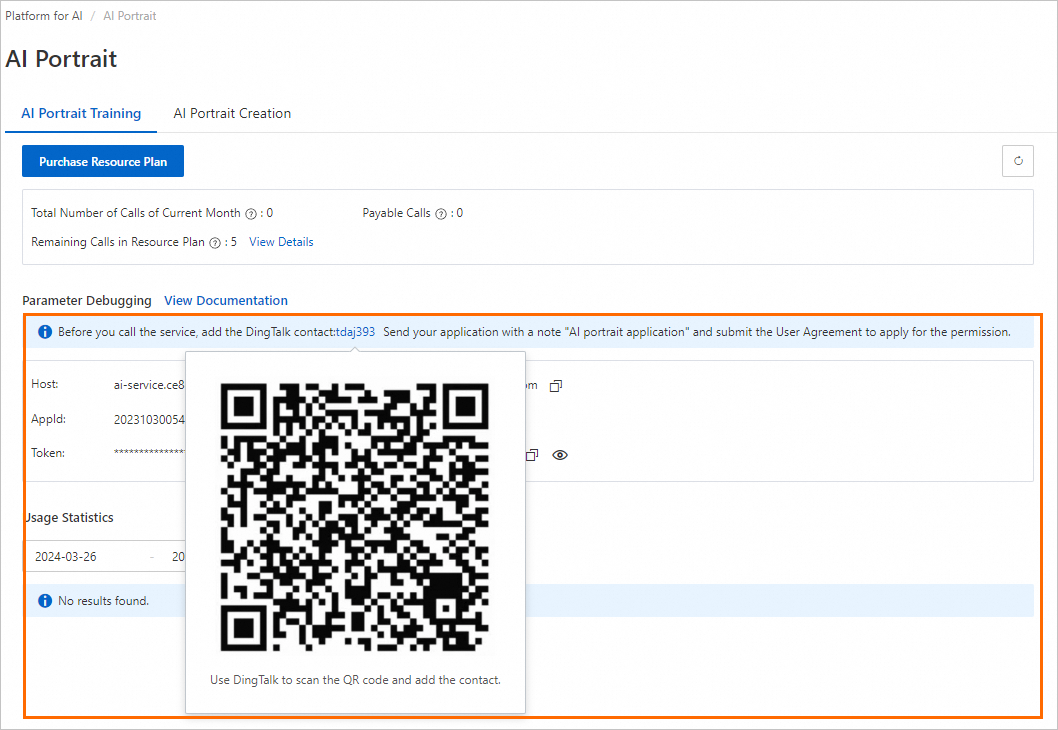
SDK usage notes
The API call flow is as follows:

Note the following:
Image generation applications are subject to laws and regulations. The Alibaba Cloud Content Moderation service reviews images and templates sent for portrait training and creation. The accuracy of this filtering depends on the Content Moderation review, and some content may be filtered in error.
Before model training, call the
aigc_images_checkoperation to check the image quality.Compare the number of images you sent with the number returned by the
aigc_images_checkoperation to determine how many images were filtered by the Content Moderation service. This helps you decide whether to continue training or upload new images.If the Content Moderation service filters all images and considers them invalid, the server returns the error message
all images are invalid. You can call the API operation to perform portrait model training only if at least one image is valid.In the response from the
aigc_images_checkoperation, you can check the valid images for issues related to faces, decoding, or other business logic.
The following call methods are supported:
For information about how to use the Python SDK to call API operations, see AI Portrait: Python SDK usage notes.
For information about how to use the Java SDK to call API operations, see AI Portrait: Java SDK usage notes.
API SLA
The response time of API calls varies based on resource availability. For a guaranteed service level, contact your sales manager or scan the QR code on the AI Portrait console to join the group and request a solution upgrade.
API
Queries per second (QPS)
Response speed
Portrait Training (aigc_images_train)
2
10 minutes to 24 hours.
Portrait Training Query (get_async_job)
20
1 second.
Solo Portrait Creation (aigc_images_create)
10
15 seconds to 5 minutes.
Multi-person Portrait Creation (aigc_images_create_by_multi_model_ids)
5
15 × N seconds to 5 × N minutes, where N is the number of people.