In recommendation scenarios, use the FM-Embedding solution in Designer to obtain user and item feature vectors. In the recall module, calculate the dot product of these feature vectors to predict the rating for a user-item pair. This topic describes how to use the Factorization Machine (FM) algorithm and an embedding extraction algorithm to quickly generate user and item feature vectors.
Prerequisites
-
You have created a workspace. For more information, seeCreate and manage workspaces.
-
You have associated MaxCompute resources with the workspace. For more information, seeManage the computing resources of a workspace.
Background
A recommendation system typically includes recall and sorting modules. In the recall module, vectors represent users and items (the content to be recommended). The dot product of a user vector and an item vector indicates the user's level of interest in the item. This pipeline is based on real-world recommendation data, and its complete business workflow is pre-configured in aDesigner template. This lets you generate user and item feature vectors by dragging and dropping components.
Dataset
The source data includes the following fields.
|
Parameter |
Type |
Description |
|
userid |
STRING |
The user ID. |
|
age |
DOUBLE |
The user's age. |
|
gender |
STRING |
The user's gender. |
|
itemid |
STRING |
The item ID. |
|
price |
DOUBLE |
The item price. |
|
size |
DOUBLE |
The item size. |
|
label |
DOUBLE |
The target column. Valid values:
|
Procedure
Go to the Machine Learning Designer page.
Log on to the PAI console.
In the left-side navigation pane, click Workspaces. On the Workspaces page, click the name of the workspace that you want to manage.
In the left-side navigation pane, choose .
-
Build a pipeline.
-
On the Designer page, click the Preset Templates tab.
-
In the template list, clickCreateunderCreate.
-
In the Create Pipeline dialog box, configure the parameters. You can use the default settings for all parameters.
The Data Storage parameter specifies an OSS Bucket path to store temporary data and models generated during the pipeline run.
-
Click Confirm.
It takes about 10 seconds to create the pipeline.
-
The system automatically builds the pipeline based on the preset template, as shown in the following figure.
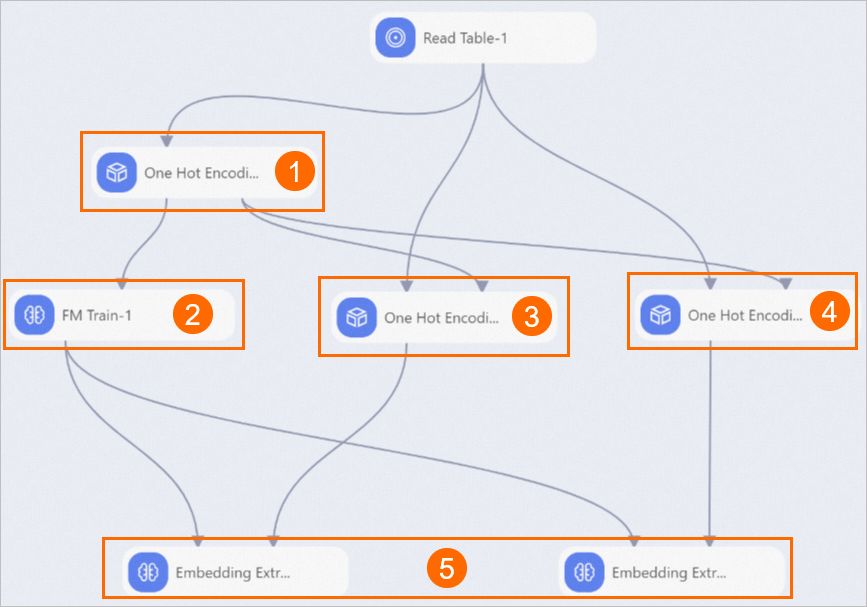
Section
Description
①
Performs one-hot encoding on all features. one-hot encoding converts string data into numerical data. In this pipeline, theOne-hot Encoding-1component first encodes the full dataset and then passes the generated model to theOne-hot Encoding-2andOne-hot Encoding-3components.
②
Generates a Factorization Machine (FM) model. You can click this component and view the default parameters on theParameterstab. The third parameter ofDimensions(default value:1,1,10) specifies the dimension of the generated embedding, which is10.
③
Generates user feature encoding. The inputs for theSelect Binarize Columnsparameter areuserid,gender, andage. The input for theAppended Columnsparameter isuserid.
④
Generates item feature encoding. The inputs for theSelect Binarize Columnsparameter areitemid,price, andsize. The input for theAppended Columnsparameter isitemid.
⑤
Extracts the item embedding. The parameters for this component are as follows:
-
Embedding Vector ID Column: Thefeature_idfrom the trained FM model.
-
Embedding Vector Column: Thefeature_weightsfrom the trained FM model.
-
Weight Vector Column: The sparse data column from the one-hot encoding.
-
Output Column Name: The field name for the output embedding.
-
-
-
Run the pipeline and view the results.
-
Click the
 button at the top of the canvas.
 -
After the pipeline run is complete, right-click theEmbedding Extraction-1component on the canvas and chooseto view the user feature vectors. The user feature vector table contains three columns:userid(user ID),kv(key-value features, for example,
10:1,7:1,37:1), andembedding(a high-dimensional vector consisting of space-separated floating-point numbers). -
Right-click theEmbedding Extraction-2component on the canvas and chooseto view the item feature vectors. The item feature vector table contains three columns:itemid(item identifier, for example, A to J),kv(sparse feature encoding, for example,
31;1,11;1,27:1), andembedding(a multi-dimensional floating-point vector).
-