The Tree Depth component calculates the depth of each node in a tree structure — specifically, the number of edges on the path from the root node to the farthest leaf node. It takes a directed edge table as input and outputs the depth, root, and tree membership for every node in the graph.
Tree Depth is a graph algorithm component. It computes structural depth in a directed graph (such as an organizational hierarchy or dependency tree), not the max_depth hyperparameter used in decision tree models.How it works
Read the input edge table, where each row represents a directed edge from a start node to an end node.
Traverse from each root node (a node with no incoming edges) to assign depth values.
Write the depth and root assignment for every node to the output table.
If the graph contains multiple disconnected trees, each tree is processed independently. Nodes in different trees have different root values in the output.
Configure the component
Method 1: Configure on the pipeline canvas
Add the Tree Depth component to your pipeline in Machine Learning Designer. The following tables describe the parameters.
Fields setting tab
| Parameter | Description |
|---|---|
| Edge Table: Start vertex column | The column in the edge table that contains the start node of each edge. |
| Edge Table: End vertex column | The column in the edge table that contains the end node of each edge. |
Tuning tab
| Parameter | Description |
|---|---|
| Workers | The number of parallel workers. Higher values increase parallelism but also increase inter-worker communication overhead. Leave blank to let the system decide. |
| Memory size per worker | The maximum memory allocated to each worker, in MB. Default: 4096. If a worker exceeds this limit, an OutOfMemory error is reported. Increase this value when processing dense subgraphs or large adjacency lists. |
| Data split size (MB) | The size of each data partition, in MB. Default: 64. Decrease this value to create more, smaller partitions for better load balancing on uneven graphs. |
Method 2: Configure using PAI commands
Run Tree Depth using the SQL Script component. For setup instructions, see Scenario 4: Execute PAI commands within the SQL script component.
PAI -name TreeDepth
    -project algo_public
    -DinputEdgeTableName=TreeDepth_func_test_edge
    -DfromVertexCol=flow_out_id
    -DtoVertexCol=flow_in_id
    -DoutputTableName=TreeDepth_func_test_result;
Parameters
| Parameter | Required | Default | Description |
|---|---|---|---|
inputEdgeTableName | Yes | — | The name of the input edge table. |
inputEdgeTablePartitions | No | Full table | The partitions to read from the input edge table. |
fromVertexCol | Yes | — | The column containing the start node of each edge. |
toVertexCol | Yes | — | The column containing the end node of each edge. |
outputTableName | Yes | — | The name of the output table. |
outputTablePartitions | No | — | The partitions to write to in the output table. |
lifecycle | No | — | The lifecycle of the output table. |
workerNum | No | System default | The number of parallel workers. |
workerMem | No | 4096 | The maximum memory per worker, in MB. Increase this when processing dense subgraphs or large adjacency lists. |
splitSize | No | 64 | The data partition size, in MB. Decrease this for better load balancing on uneven graphs. |
Example
This example builds a small graph with two disconnected trees and runs Tree Depth to compute node depths.
Step 1: Create the input edge table
Add a SQL Script component to the canvas. Clear the Use Script Mode and Whether the system adds a create table statement checkboxes, then enter the following SQL:
drop table if exists TreeDepth_func_test_edge;
create table TreeDepth_func_test_edge as
select * from
(
    select '0' as flow_out_id, '1' as flow_in_id
    union all
    select '0' as flow_out_id, '2' as flow_in_id
    union all
    select '1' as flow_out_id, '3' as flow_in_id
    union all
    select '1' as flow_out_id, '4' as flow_in_id
    union all
    select '2' as flow_out_id, '4' as flow_in_id
    union all
    select '2' as flow_out_id, '5' as flow_in_id
    union all
    select '4' as flow_out_id, '6' as flow_in_id
    union all
    select 'a' as flow_out_id, 'b' as flow_in_id
    union all
    select 'a' as flow_out_id, 'c' as flow_in_id
    union all
    select 'c' as flow_out_id, 'd' as flow_in_id
    union all
    select 'c' as flow_out_id, 'e' as flow_in_id
)tmp;
drop table if exists TreeDepth_func_test_result;
create table TreeDepth_func_test_result
(
  node string,
  root string,
  depth bigint
);
The SQL creates a graph with two disconnected trees:
| Data structure |
|---|
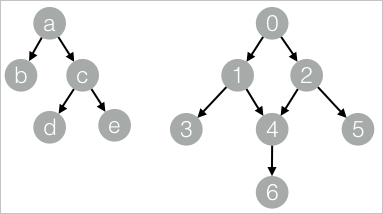 |
Step 2: Run Tree Depth
Add a second SQL Script component, clear both checkboxes, enter the following PAI command, and connect it to the first component:
drop table if exists ${o1};
PAI -name TreeDepth
    -project algo_public
    -DinputEdgeTableName=TreeDepth_func_test_edge
    -DfromVertexCol=flow_out_id
    -DtoVertexCol=flow_in_id
    -DoutputTableName=${o1};
Step 3: Run the pipeline
Click  in the upper-left corner of the canvas to run the pipeline.
Step 4: View results
Right-click the SQL Script component from Step 2 and choose View Data > SQL Script Output.
| node | root | depth |
|---|---|---|
| a | a | 0 |
| b | a | 1 |
| c | a | 1 |
| d | a | 2 |
| e | a | 2 |
| 0 | 0 | 0 |
| 1 | 0 | 1 |
| 2 | 0 | 1 |
| 3 | 0 | 2 |
| 4 | 0 | 2 |
| 5 | 0 | 2 |
| 6 | 0 | 3 |
Output columns:
node: The node identifier.root: The root node of the tree this node belongs to. All nodes in the same tree share the samerootvalue. When the graph contains multiple disconnected trees, each tree has a distinctrootvalue. In this example, nodes0–6belong to the tree rooted at0, and nodesa–ebelong to the tree rooted ata.depth: The number of edges from the root node to this node. Root nodes have depth0; their direct children have depth1; and so on.