Deep Learning Containers (DLC) of Platform for AI (PAI) supports distributed training jobs of the MPIJob type. This guide walks you through submitting an MPIJob using mpirun or DeepSpeed (pdsh), from preparing a code source to monitoring training logs.
Prerequisites
Before you begin, make sure you have:
-
DLC activated and a default workspace created. See Activate PAI and create the default workspace
-
Lingjun resources purchased and a resource quota created. See Create resource quotas
Limitations
MPIJob training jobs are only supported in the China (Ulanqab) region when using Lingjun resources.
How it works
An MPIJob uses two roles: a launcher and one or more workers. The launcher starts the training process on all nodes, while workers execute the distributed computation. DLC automatically generates the hostfile and configures node-to-node communication — you don't need to set up SSH between nodes manually.
DLC pre-configures environment variables for the launcher. You can override these defaults in your startup command when needed. See System environment variables.
Choose a launch method
DLC supports two methods for launching MPIJob training:
| Method | Launch mechanism | Use when |
|---|---|---|
| mpirun | kubexec (DLC-managed) | Standard MPI distributed training |
| DeepSpeed (pdsh) | pdsh | DeepSpeed pipeline parallelism training |
Both methods use the same resource configuration. The only difference is the startup command.
Step 1: Prepare a code source
Create a code source using the official DeepSpeed examples repository.
-
In the DLC console, go to Code Builds and create a new code source with the following parameters. For other parameters, keep the defaults. See Code configuration.
Parameter Value Name deepspeed-examplesGit repository https://github.com/microsoft/DeepSpeedExamples.git
Step 2: Submit a distributed training job
Option 1: mpirun
-
In the PAI console, select your region and workspace, then click Deep Learning Containers (DLC).
-
On the DLC page, click Create Job.
-
On the Create Job page, configure the following parameters. For other parameters, see Create a training job. Startup command:
Resource type and Driver settings appear only when the workspace supports both Lingjun and general resources.
Environment information
Parameter Value Image URL dsw-registry-vpc.<RegionID>.cr.aliyuncs.com/pai-common/deepspeed-training:23.08-gpu-py310-cu122-ubuntu22.04— replace<RegionID>with your region ID. For China (Ulanqab), usecn-wulanchabu. For other region IDs, see Regions and zones.Startup command See below Code Builds Select Online configuration, then select the code source you created. Keep the default Mount path. Resource information
Parameter Value Resource type Lingjun AI Computing Service Source Resource Quota Resource quota Select the Lingjun resource quota you created Framework MPI Number of nodes 2 vCPUs 4 GPUs 1 Memory (GiB) 8 Shared memory (GiB) 8 Driver settings 535.54.03(recommended for the test image above)cd /root/code/DeepSpeedExamples/training/cifar/ # -np 2: launch 2 processes (one per node) # -bind-to none -map-by slot: use all available CPU cores on each slot # -x LD_LIBRARY_PATH -x PATH: forward these environment variables to worker nodes # -mca pml ob1 -mca btl ^openib: use TCP instead of InfiniBand for point-to-point messaging mpirun -np 2 --allow-run-as-root \ -bind-to none -map-by slot \ -x LD_LIBRARY_PATH -x PATH \ -mca pml ob1 -mca btl ^openib \ python /root/code/DeepSpeedExamples/training/cifar/cifar10_tutorial.py -
Click OK.
Option 2: DeepSpeed (pdsh)
Use this startup command instead of the mpirun command above. All other parameters are the same.
cd /root/code/DeepSpeedExamples/training/pipeline_parallelism

# --hostfile: DLC auto-generates this file with all node addresses
# -p 2: number of pipeline stages
# --steps 200: total training steps
deepspeed --hostfile /etc/mpi/hostfile train.py \
  --deepspeed_config=ds_config.json \
  -p 2 \
  --steps=200
To use a custom image with DeepSpeed, install the required MPI and DeepSpeed libraries in the image. Official DeepSpeed images from DockerHub include these libraries pre-installed.
Step 3: View job details and logs
-
After the job is submitted, click the job name on the Deep Learning Containers (DLC) page.
-
On the job details page, check the basic information and running status.
-
In the Instance section at the bottom of the page, find the instance with type launcher and click Log in the Actions column.
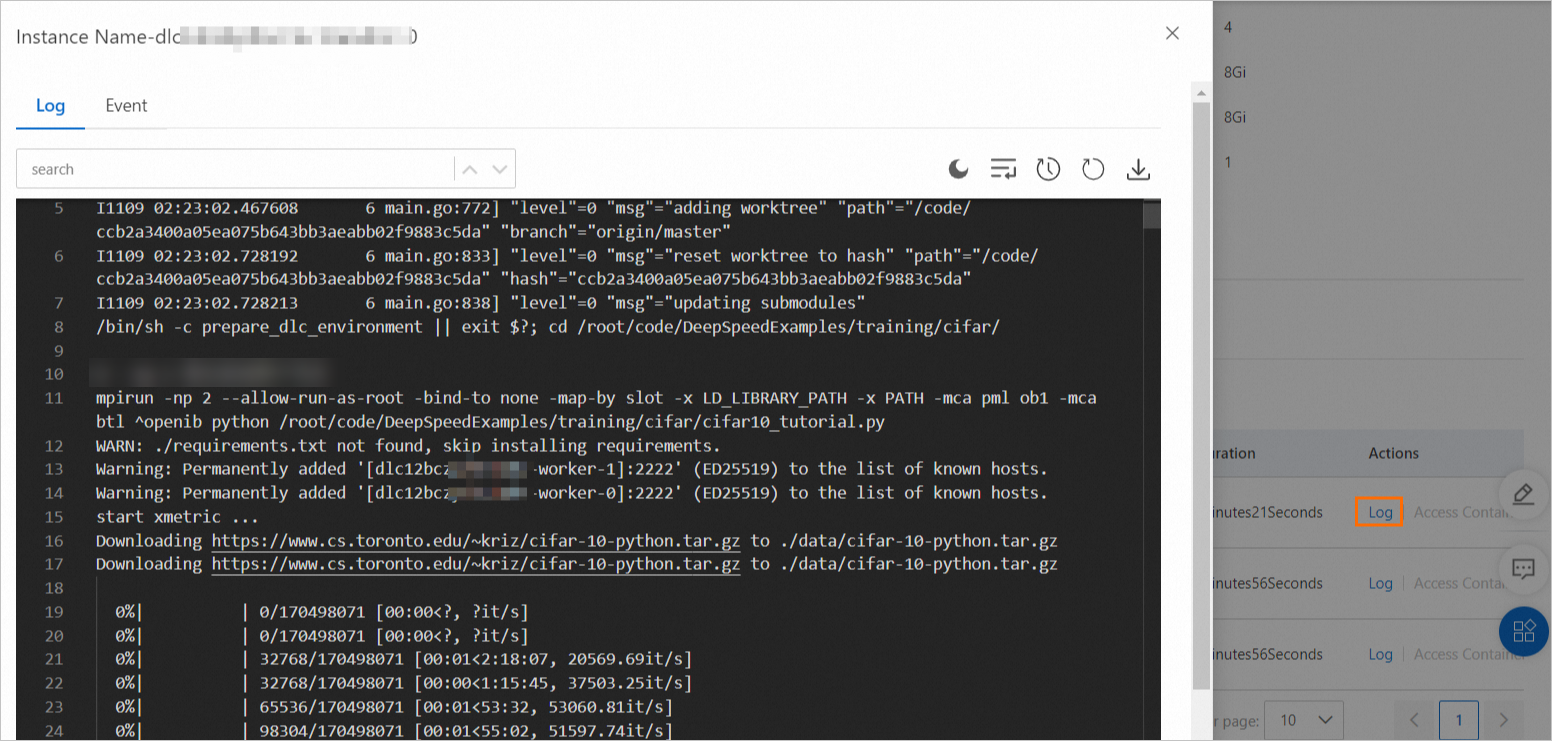
System environment variables
DLC pre-configures the following environment variables for the launcher role. Override them in your startup command when your environment requires different settings.
| Environment variable | Description | Default | Applicable method |
|---|---|---|---|
OMPI_MCA_btl_tcp_if_include |
Network interface controller (NIC) for launcher–worker communication. Separate multiple NICs with commas. | eth0 |
mpirun |
OMPI_MCA_orte_default_hostfile |
Host file path for the mpirun command. DLC auto-generates this file. | /etc/mpi/hostfile |
|
OMPI_MCA_plm_rsh_agent |
Method used by the launcher to start worker processes on remote nodes. | /etc/mpi/kubexec.sh |
|
PDSH_RCMD_TYPE |
Remote command type for pdsh. | ssh |
DeepSpeed (pdsh) |
When to override: Override OMPI_MCA_btl_tcp_if_include if your nodes use a NIC other than eth0 for inter-node communication (for example, eth1 or a bonded interface). Override PDSH_RCMD_TYPE if your cluster requires a remote execution method other than SSH.