The Object detection (easycv) component provides mainstream models, such as YOLOX, FCOS, YOLOv5, and YOLOv7, for training object detection models. Use this component to build a model that identifies and locates entities in images. This topic describes how to configure the component and provides an example pipeline.
Prerequisites
OSS is activated, and Machine Learning Studio is authorized to access OSS. For more information, see Activate OSS and Grant required permissions to use Machine Learning Designer.
Limitations
This component is available only in Designer.
Only the DLC engine is supported.
Configure component parameters
Input ports
Input port
Type
Upstream component
Required
Training data
Object Storage Service
No.
If you do not connect this port, you can configure the Training data OSS path parameter on the Field settings tab.
Validation data
Object Storage Service
No.
If you do not connect this port, you can configure the Validation data OSS path parameter on the Field settings tab.
Class list file
Object Storage Service
No.
If you do not connect this port, you can configure the Class list file OSS path parameter on the Field settings tab.
Component parameters
Tab
Parameter
Required
Description
Default
Field settings
Model type
Yes
The model architecture to use for training. Valid values:
FCOS
YOLOX
YOLOv5
YOLOv7
YOLOX
OSS directory for training
No
The OSS directory to store the trained model. Example:
examplebucket.oss-cn-shanghai-internal.aliyuncs.com/test/ckpt/. If you leave this parameter empty, the component uses the default workspace path.None
Annotation file path for training set
No
If Data format is set to DetSourcePAI, provide a file with a .manifest extension.
If Data format is set to COCO, provide a file with a .json extension.
This parameter is not required if you provide training data through the input port. If both are configured, the input from the input port takes precedence.
None
Annotation file path for validation set
No
If Data format is set to DetSourcePAI, provide a file with a .manifest extension.
If Data format is set to COCO, provide a file with a .json extension.
This parameter is not required if you provide validation data through the input port. If both are configured, the input from the input port takes precedence.
None
Class list file OSS path
No
Specify the OSS path to the label list file, which must be a .txt file.
This parameter is not required if you provide the class list file through the input port. If both are configured, the input from the input port takes precedence.
None
Pre-trained model OSS path
No
The OSS path to your custom pre-trained model. If you do not configure this parameter, PAI uses a default pre-trained model.
None
Training data OSS path
Yes
This parameter appears only when Data format is set to COCO. Specify the path to training images in COCO format.
None
Validation data OSS path
Yes
This parameter appears only when Data format is set to COCO. Specify the path to validation images in COCO format.
None
Data format
Yes
The format of the source dataset. Valid values:
COCO
DetSourcePAI (YOLOv5 and YOLOv7 models support only DetSourcePAI datasets.)
DetSourcePAI
Parameters
YOLOX model structure
Yes
This parameter appears only when Model type is set to YOLOX. You can select a structure from the drop-down list. Valid values:
yolox-s
yolox-m
yolox-l
yolox-x
yolox-s
Number of classes
Yes
The number of class labels in the dataset.
20
Image scale
Yes
The size of the image after resizing. Use a space to separate the height and width. Example: 320 320.
320 320
Optimizer
Yes
This parameter is available only when Model type is set to YOLOX.
The optimization method for model training. Valid values:
momentum
adam
momentum
Initial learning rate
Yes
The initial learning rate.
0.01
Training batch size
Yes
The number of samples per training iteration.
8
Validation batch size
Yes
The number of samples per validation iteration.
8
Number of epochs
Yes
The total number of training epochs.
NoteFor YOLOX models, the value of this parameter must be greater than the sum of the values of the Warmup epochs and Last no augmented lr epochs parameters.
20
Log loss frequency
No
The interval for printing the loss value. The default value is 200, which indicates that the loss value is printed every 200 training batches.
200
Validation frequency
No
The validation interval in epochs. The default value is 2, which indicates that validation is performed every two epochs.
2
Warmup epochs
No
This parameter applies only to YOLOX models.
5
Last no augmented lr epochs
No
This parameter applies only to YOLOX models.
5
Export model format
Yes
The format of the exported model. Valid values:
raw
jit (The jit format is not supported for YOLOv5 and YOLOv7 models.)
onnx
raw
Checkpoint saving frequency
No
The interval (in epochs) for saving checkpoint files. A value of 1 indicates that a checkpoint is saved after each epoch.
1
Tuning
GPU machine type
Yes
This component requires a GPU instance to run.
4
Enable FP16
No
Enables or disables the FP16 half-precision mode.
false
Execution mode
Yes
Only distributed training on DLC is supported.
Distributed DLC
Output ports
Output port
Type
Downstream component
Output model
The trained model is stored in SavedModel format at the path specified in the OSS directory for training parameter on the Field settings tab.
Example
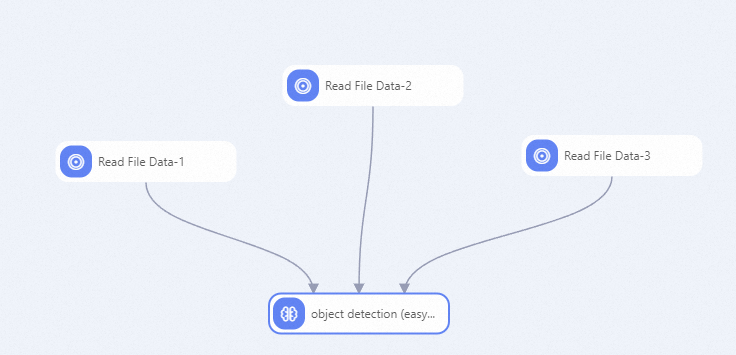
For FCOS, YOLOX, YOLOv5, and YOLOv7, you can use the Object detection (easycv) component to build a pipeline as shown in the following figure.
In this example, configure the components as follows:
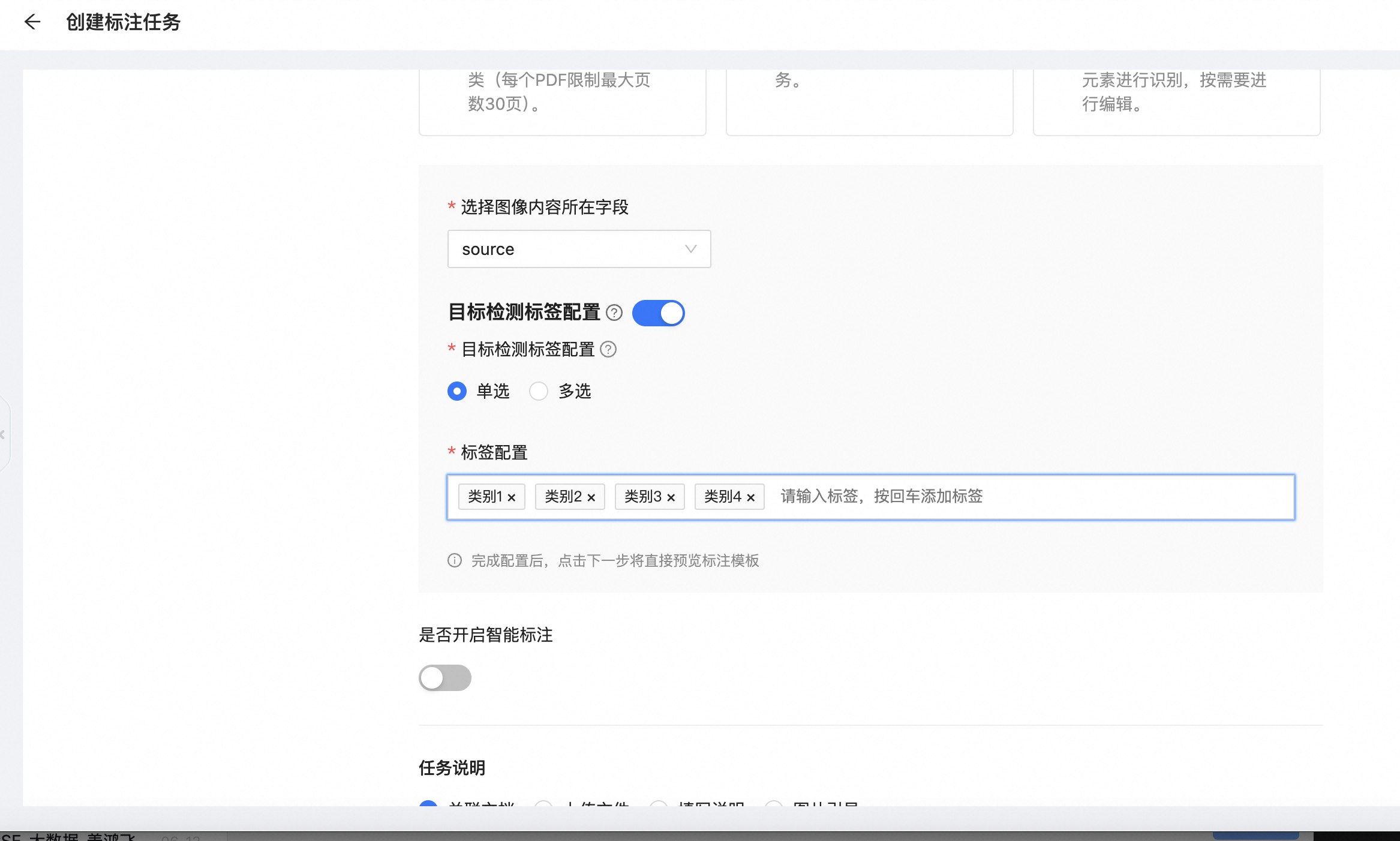
Use iTAG in PAI to label images. For more information, see Create a dataset for data labeling and Create a labeling job.
NoteiTAG is supported in limited regions only. See iTAG Regions and zones for details.
After you create a dataset, select the Object Detection template under General Template when creating a labeling job.
In the Object Detection Label Configuration section, select Single-label. In the Label Configuration section, enter all required label names to facilitate the labeling process.
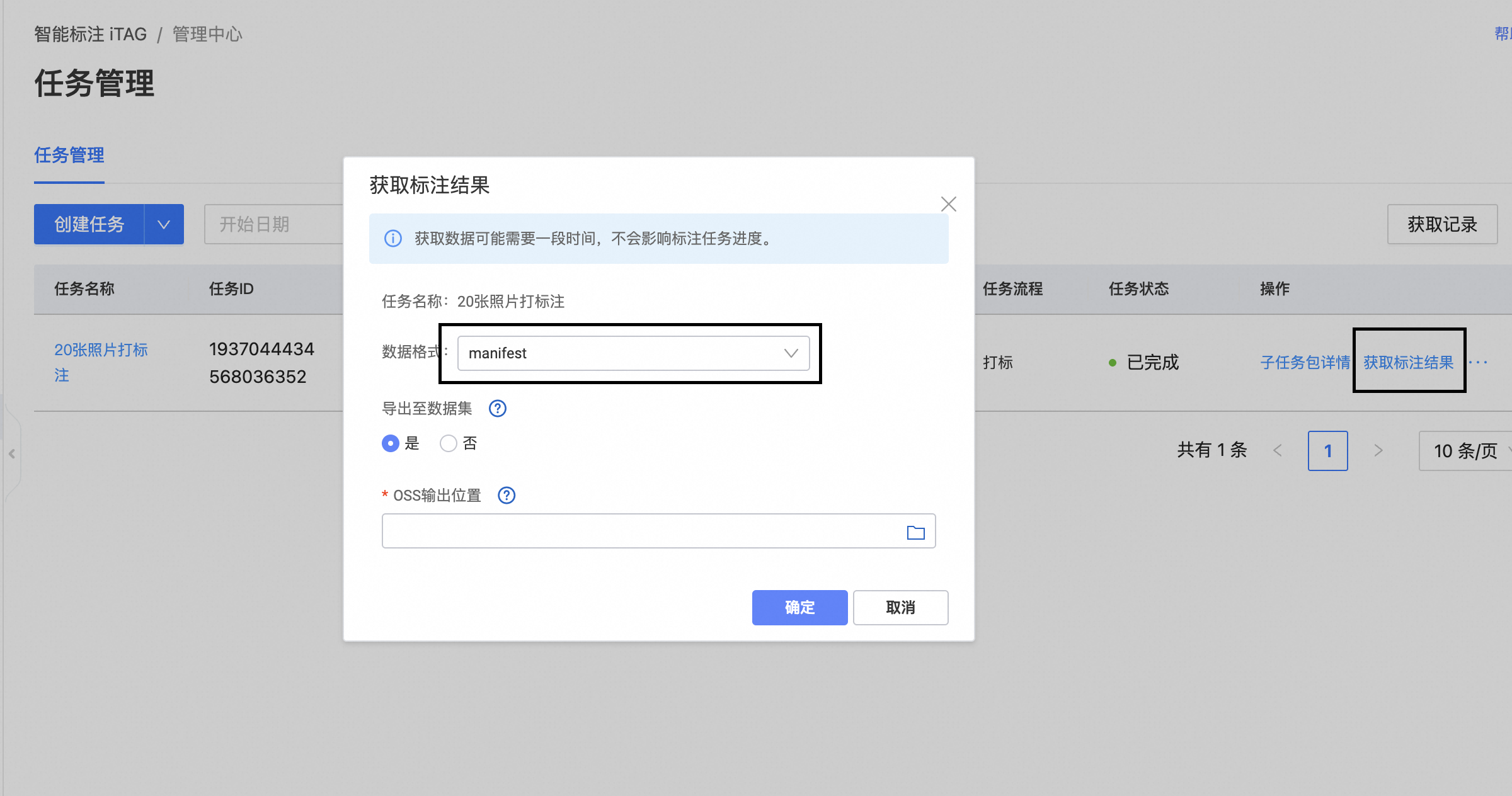
After the labeling is complete, export the labeling results in the manifest format to Object Storage Service (OSS) so that subsequent components can use them.
Use the Read File Data component to read the labeling results file (for example, xxx.manifest). Set the OSS Data Path parameter of the Read File Data component to the OSS path of the dataset that contains the labeling results. Example:
oss://examplebucket.oss-cn-shanghai.aliyuncs.com/ev_demo/xxx.manifest.Connect the training and validation data to the Object detection (easycv) component and configure its parameters. For more information, see Configure component parameters.
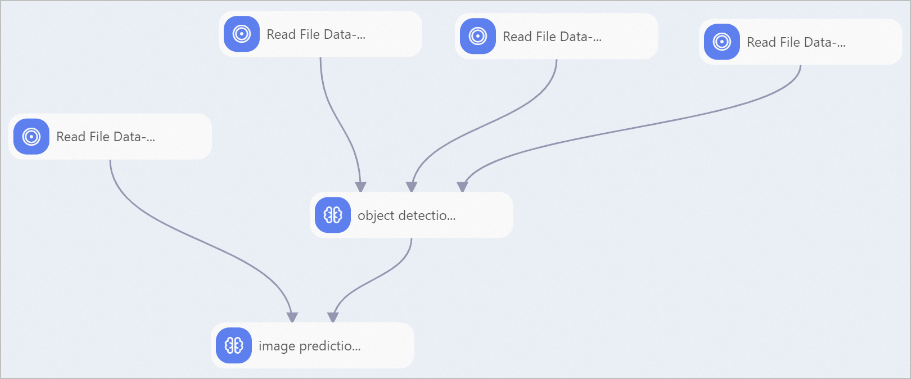
For FCOS and YOLOX, you can also use the image prediction component to perform offline inference. For more information, see image prediction.
Related documents
After an object detection model is trained, you can connect an image prediction component downstream of the Object detection (easycv) component to make predictions with the model and evaluate its performance. For more information, see image prediction.
For more information about Designer components, see Designer overview.
Designer provides multiple preset algorithm components. You can select the appropriate component for your use case. For more information, see Designer component reference.