Model compression uses techniques like quantization to reduce model size and computational complexity while preserving prediction performance. It's useful when GPU memory is limited or to lower deployment costs.
Introduction
PAI-Model Gallery supports model quantization based on Weight-only Quantization technology. It uses MinMax-8Bit or MinMax-4Bit strategies to quantize floating-point parameters to 8-bit or 4-bit integer representations. This reduces model size and GPU memory usage while maintaining good performance.
Compress the model
-
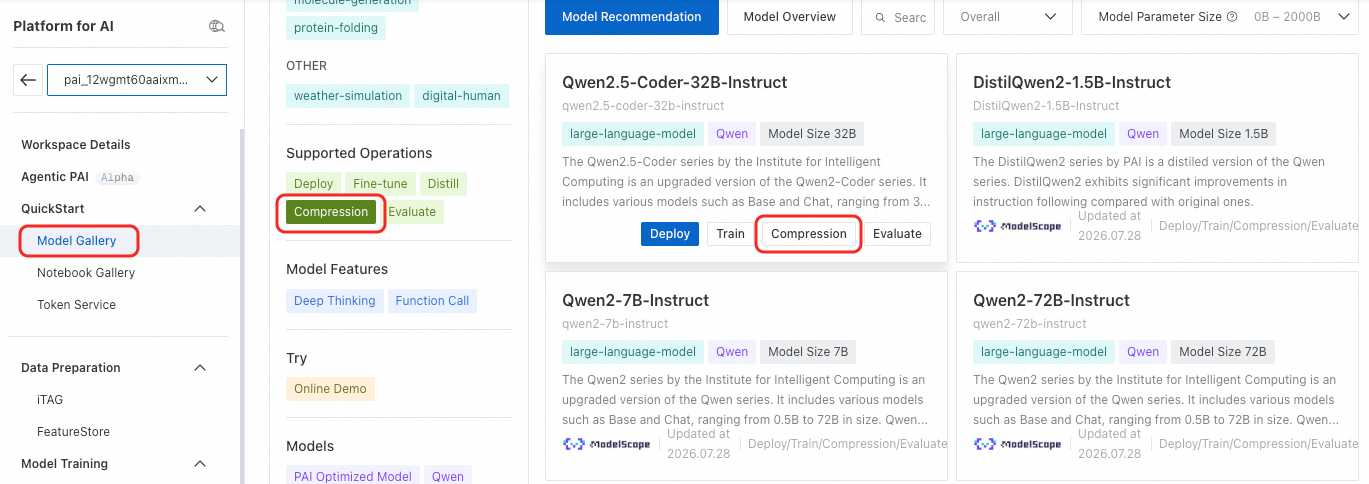
Filter for compressible models. On the Model Gallery page, select Compression from the Supported operations filter on the left to show only compressible models.
-
Click Compression on the target model card to configure the compression job. The key parameters are described below. Configure other parameters as needed.
Parameter
Description
Compression method
Only the model quantization method based on Weight-only Quantization technology is currently supported. It converts the model's weight parameters to lower bit widths, reducing GPU memory usage during inference.
Compression strategy
-
MinMax-8Bit: Uses the min-max scaling method to quantize the model to 8-bit integer representation.
-
MinMax-4Bit: Uses the min-max scaling method to quantize the model to 4-bit integer representation.
-
-
After completing the configuration, click Compression. The page redirects to the Task details page, where you can view the compression job's basic information, real-time status, and job logs.
The compression job is also available under PAI-Model Gallery > Job Management > Compression Jobs
Deploy the model
After the compression job succeeds, click Deploy in the upper-right corner of the model details page to deploy the compressed model. For information about calling the service, see Invoke service via shared gateway (public/VPC).
Evaluate the model
After the model is deployed, evaluate it to check the effects of compression. For details, see Model evaluation (ModelEval).