Use the Label Propagation Algorithm (LPA) to detect communities in social networks, knowledge graphs, and recommendation systems by iteratively assigning each vertex the most frequent label among its neighbors.
How it works
Graph clustering divides a graph into subgraphs based on topology, maximizing internal connections and minimizing cross-subgraph connections.
LPA works by giving each vertex a unique label at initialization, then iteratively reassigning each vertex the label held by the majority of its neighbors. The algorithm converges when every vertex already holds the most frequent label among its neighbors.
The intuition: a label spreads quickly through a densely connected cluster but struggles to cross sparse regions. Labels become trapped inside dense communities, so vertices that end up with the same label form a natural community.
LPA differs from connected-component algorithms. Connected components answer a binary question: are two nodes reachable from each other? LPA goes further — within an already-connected structure, it finds natural sub-clusters based on the density and pattern of connections.
Configure the component
Configure on the pipeline page (recommended)
Add the Label Propagation Clustering component to the pipeline canvas and configure the following parameters.
| Tab | Parameter | Description |
|---|---|---|
| Fields Setting | Vertex Table: Vertex Column | Vertex column name in the vertex table. |
| Vertex Table: Weight Column | Weight column name in the vertex table. | |
| Edge Table: Source Vertex Column | Source vertex column name in the edge table. | |
| Edge Table: Target Vertex Column | Target vertex column name in the edge table. | |
| Edge Table: Weight Column | Weight column name in the edge table. | |
| Parameters Setting | Maximum Iterations | Maximum number of iterations. Default: 30. |
| Tuning | Workers | Number of workers for parallel execution. Higher values increase parallelism but also communication costs. |
| Memory Size per Worker (MB) | Maximum memory per worker in MB. Default: 4096. If memory usage exceeds this value, an OutOfMemory error occurs. |
Configure using PAI commands
Configure the component using PAI commands within the SQL Script component. For more information, see Scenario 4: Execute PAI commands within the SQL script component in the SQL Script topic.
PAI -name LabelPropagationClustering
    -project algo_public
    -DinputEdgeTableName=LabelPropagationClustering_func_test_edge
    -DfromVertexCol=flow_out_id
    -DtoVertexCol=flow_in_id
    -DinputVertexTableName=LabelPropagationClustering_func_test_node
    -DvertexCol=node
    -DoutputTableName=LabelPropagationClustering_func_test_result
    -DhasEdgeWeight=true
    -DedgeWeightCol=edge_weight
    -DhasVertexWeight=true
    -DvertexWeightCol=node_weight
    -DrandSelect=true
    -DmaxIter=100;
The following table lists all PAI command parameters.
| Parameter | Required | Default value | Description |
|---|---|---|---|
inputEdgeTableName |
Yes | — | Input edge table name. |
inputEdgeTablePartitions |
No | Full table | Partitions to read from the input edge table. |
fromVertexCol |
Yes | — | Source vertex column name in the edge table. |
toVertexCol |
Yes | — | Target vertex column name in the edge table. |
inputVertexTableName |
Yes | — | Input vertex table name. |
inputVertexTablePartitions |
No | Full table | Partitions to read from the input vertex table. |
vertexCol |
Yes | — | Vertex column name in the vertex table. |
outputTableName |
Yes | — | Output table name. |
outputTablePartitions |
No | — | Partitions to write in the output table. |
lifecycle |
No | — | Lifecycle of the output table in days. |
workerNum |
No | — | Number of workers for parallel execution. Higher values increase parallelism but also communication costs. |
workerMem |
No | 4096 | Maximum memory per worker in MB. If memory usage exceeds this value, an OutOfMemory error occurs. |
splitSize |
No | 64 | Data split size in MB. |
hasEdgeWeight |
No | false | Whether edges have weights. Set to true to enable edge weights, then specify the weight column in edgeWeightCol. |
edgeWeightCol |
No | — | Weight column name in the edge table. Takes effect only when hasEdgeWeight=true. |
hasVertexWeight |
No | false | Whether vertices have weights. Set to true to enable vertex weights, then specify the weight column in vertexWeightCol. |
vertexWeightCol |
No | — | Weight column name in the vertex table. Takes effect only when hasVertexWeight=true. |
randSelect |
No | false | Whether to randomly select a label when multiple labels share the same maximum frequency. Set to true to break ties randomly, which can improve result stability across runs. |
maxIter |
No | 30 | Maximum number of iterations. |
Example
-
Add the SQL Script component to the canvas and run the following SQL statements to generate training data.
drop table if exists LabelPropagationClustering_func_test_edge;
create table LabelPropagationClustering_func_test_edge as
select * from
(
    select '1' as flow_out_id,'2' as flow_in_id,0.7 as edge_weight
    union all
    select '1' as flow_out_id,'3' as flow_in_id,0.7 as edge_weight
    union all
    select '1' as flow_out_id,'4' as flow_in_id,0.6 as edge_weight
    union all
    select '2' as flow_out_id,'3' as flow_in_id,0.7 as edge_weight
    union all
    select '2' as flow_out_id,'4' as flow_in_id,0.6 as edge_weight
    union all
    select '3' as flow_out_id,'4' as flow_in_id,0.6 as edge_weight
    union all
    select '4' as flow_out_id,'6' as flow_in_id,0.3 as edge_weight
    union all
    select '5' as flow_out_id,'6' as flow_in_id,0.6 as edge_weight
    union all
    select '5' as flow_out_id,'7' as flow_in_id,0.7 as edge_weight
    union all
    select '5' as flow_out_id,'8' as flow_in_id,0.7 as edge_weight
    union all
    select '6' as flow_out_id,'7' as flow_in_id,0.6 as edge_weight
    union all
    select '6' as flow_out_id,'8' as flow_in_id,0.6 as edge_weight
    union all
    select '7' as flow_out_id,'8' as flow_in_id,0.7 as edge_weight
)tmp
;
drop table if exists LabelPropagationClustering_func_test_node;
create table LabelPropagationClustering_func_test_node as
select * from
(
    select '1' as node,0.7 as node_weight
    union all
    select '2' as node,0.7 as node_weight
    union all
    select '3' as node,0.7 as node_weight
    union all
    select '4' as node,0.5 as node_weight
    union all
    select '5' as node,0.7 as node_weight
    union all
    select '6' as node,0.5 as node_weight
    union all
    select '7' as node,0.7 as node_weight
    union all
    select '8' as node,0.7 as node_weight
)tmp;
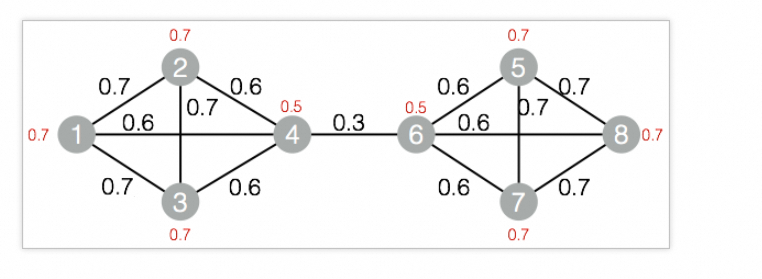
The graph structure used in this example:
-
Add the SQL Script component to the canvas and run the following PAI commands.
drop table if exists ${o1}; PAI -name LabelPropagationClustering -project algo_public -DinputEdgeTableName=LabelPropagationClustering_func_test_edge -DfromVertexCol=flow_out_id -DtoVertexCol=flow_in_id -DinputVertexTableName=LabelPropagationClustering_func_test_node -DvertexCol=node -DoutputTableName=${o1} -DhasEdgeWeight=true -DedgeWeightCol=edge_weight -DhasVertexWeight=true -DvertexWeightCol=node_weight -DrandSelect=true -DmaxIter=100; -
Right-click the SQL Script component and choose View Data > SQL Script Output to view results.
node group_id 1 3 3 3 5 7 7 7 2 3 4 3 6 7 8 7 Nodes 1–4 form one community (
group_id = 3) and nodes 5–8 form another (group_id = 7). This matches the graph structure: nodes 1–4 are densely connected among themselves, and nodes 5–8 are densely connected among themselves, with only a weak cross-community edge between nodes 4 and 6.