The K-Core component identifies densely connected subgraphs by iteratively removing vertices whose degree is k or lower until no such vertices remain. The remaining subgraph — the k-core — contains only vertices that each have at least k neighbors within the subgraph. The K-Core component generates the vertices connected to each vertex in the subgraph.
Use K-Core to detect cohesive communities, rank node influence by coreness, or prune peripheral nodes before running more computationally intensive graph algorithms.
The coreness of a vertex is the highest value of k for which the vertex belongs to the k-core but not the (k+1)-core.
Configure the component
Method 1: Configure on the pipeline page
Add the K-Core component to the pipeline canvas in Machine Learning Designer in the Platform for AI (PAI) console. The following table describes the parameters.
| Tab | Parameter | Description |
|---|---|---|
| Fields Setting | Source Vertex Column | The start vertex column in the edge table. |
| Target Vertex Column | The end vertex column in the edge table. | |
| Parameters Setting | k | The coreness of a vertex. Default value: 1. |
| Tuning | Workers | The number of vertices for parallel job execution. Higher values increase parallelism and framework communication overhead. |
| Memory Size per Worker | The maximum memory per job. Unit: MB. Default value: 4096. If memory usage exceeds this limit, an OutOfMemory error is reported. |
Method 2: Configure using PAI commands
Run the following PAI command in an SQL Script component. For details on running PAI commands in the SQL Script component, see Scenario 4: Execute PAI commands within the SQL script component.
PAI -name KCore
    -project algo_public
    -DinputEdgeTableName=KCore_func_test_edge
    -DfromVertexCol=flow_out_id
    -DtoVertexCol=flow_in_id
    -DoutputTableName=KCore_func_test_result
    -Dk=2;
The following table describes all parameters.
| Parameter | Required | Default | Description |
|---|---|---|---|
inputEdgeTableName |
Yes | — | The name of the input edge table. |
inputEdgeTablePartitions |
No | Full table | The partitions to read from the input edge table. |
fromVertexCol |
Yes | — | The start vertex column in the input edge table. |
toVertexCol |
Yes | — | The end vertex column in the input edge table. |
outputTableName |
Yes | — | The name of the output table. |
outputTablePartitions |
No | — | The partitions to write in the output table. |
lifecycle |
No | — | The lifecycle of the output table. |
workerNum |
No | Not specified | The number of vertices for parallel job execution. |
workerMem |
No | 4096 |
The maximum memory per job. Unit: MB. Default value: 4096. If memory usage exceeds this limit, an OutOfMemory error is reported. |
splitSize |
No | 64 |
The data split size. |
k |
Yes | 1 |
The coreness of a vertex. |
Example
This example uses a 9-edge graph to find all vertices belonging to the 2-core (k=2).
-
Add an SQL Script component to the canvas and run the following statements to create the edge table.
drop table if exists KCore_func_test_edge;
create table KCore_func_test_edge as
select * from
(
  select '1' as flow_out_id,'2' as flow_in_id
  union all
  select '1' as flow_out_id,'3' as flow_in_id
  union all
  select '1' as flow_out_id,'4' as flow_in_id
  union all
  select '2' as flow_out_id,'3' as flow_in_id
  union all
  select '2' as flow_out_id,'4' as flow_in_id
  union all
  select '3' as flow_out_id,'4' as flow_in_id
  union all
  select '3' as flow_out_id,'5' as flow_in_id
  union all
  select '3' as flow_out_id,'6' as flow_in_id
  union all
  select '5' as flow_out_id,'6' as flow_in_id
)tmp;
The graph structure is shown below.
Data structure 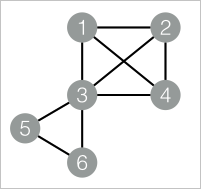
-
Add a second SQL Script component and run the following PAI command to compute the k-core.
drop table if exists ${o1}; PAI -name KCore -project algo_public -DinputEdgeTableName=KCore_func_test_edge -DfromVertexCol=flow_out_id -DtoVertexCol=flow_in_id -DoutputTableName=${o1} -Dk=2; -
Right-click the SQL Script component and choose View Data > SQL Script Output to view the results.
node1 node2 1 2 1 3 1 4 2 1 2 3 2 4 3 1 3 2 3 4 4 1 4 2 4 3 Each row represents a directed edge within the 2-core subgraph. Vertices 1, 2, 3, and 4 form the 2-core: each has at least 2 neighbors within the group. Vertices 5 and 6 are excluded — although connected to each other and to vertex 3, neither has 2 neighbors within any stable subgraph at k=2.
Each execution computes a single k-core. To explore multiple core levels, run the component separately for each value of
k.