Clusters data by density without requiring predefined cluster count. Discovers arbitrary-shaped clusters and identifies outliers.
Point classification
DBSCAN assigns each data point to one of three categories:
Core point: Has at least minPoints neighbors within epsilon radius. Forms cluster foundation.
Border point: Within epsilon radius of a core point but has fewer than minPoints neighbors. Belongs to a cluster without expanding it.
Noise point (outlier): Neither a core point nor within epsilon radius of any core point. Does not belong to any cluster. Receives cluster ID 2147483648 (2^31).
A cluster is a maximal set of density-connected points. Two core points are density-connected if within epsilon distance of each other, either directly or through a chain of core points.
Configuration
Configure DBSCAN using these parameters.
Tab | Parameter | Description |
Field Setting | idCol | ID column name. |
vectorCol | Vector column containing feature data for clustering. | |
Parameter Setting | epsilon | Maximum distance between two neighboring data points. Smaller values produce more, tighter clusters. Larger values merge nearby clusters. See Appendix 1: Estimating Resource Usage. |
minPoints | Minimum data points within epsilon neighborhood for a point to qualify as core point. Higher values produce denser clusters and classify more points as noise. See Appendix 1: Estimating Resource Usage. | |
predictionCol | Prediction result column name. Stores cluster ID assigned to each data point. | |
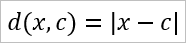
distanceType | Distance metric for clustering. Default: EUCLIDEAN. The supported values are as follows:
| |
Execution Tuning | Number of Workers | Number of workers for distributed execution. Must be positive integer. Valid values: 1 to 9,999. See Appendix 1: Estimating Resource Usage. |
Memory per worker, unit MB | Memory per worker in MB. Valid values: 1,024 to 65,536 (64 x 1,024). See Appendix 1: Estimating Resource Usage. |


Appendix 1: Estimating Resource Usage
How to estimate the memory size of each node?
Multiply the input data size by 15 to determine the memory size for each node.
For example: If the input data size is 1 GB, the memory size for each node can be configured to 15 GB.How to estimate the number of nodes?
Due to communication overhead, as the number of nodes increases, the speed of distributed training tasks will initially increase and then decrease. If you observe that the training speed slows down after adding more nodes, you should stop increasing the node count.How much data can this algorithm support?
The algorithm supports a data size of less than 1 million records (samples) and fewer than 200 dimensions.NoteIf your data size exceeds this limit, it is recommended to partition (group) the data first and run the DBSCAN algorithm on each group separately.
Why is the cluster ID of a core point 2147483648?
Because this data point is an outlier, it does not belong to any cluster center.
Appendix 2: How to Configure Parameters
The two most commonly used parameters of the DBSCAN component are: minPoints (the threshold for the minimum number of samples in a neighborhood) and epsilon (the neighborhood distance threshold). The tuning guidelines are as follows:
To reduce the number of clusters (when you observe too many clusters): It is recommended to first increase minPoints, and then decrease epsilon.
To increase the number of clusters (when you observe too few clusters): It is recommended to first decrease minPoints, and then increase epsilon.