Alibaba Collective Communication Library (ACCL) is a proprietary collective communication library from Alibaba Cloud. It is based on the Nvidia Collective Communication Library (NCCL). ACCL leverages Alibaba Cloud's network architecture and expertise in tuning communication for large language model (LLM) jobs. This combination delivers higher communication performance for your tasks and provides fault diagnosis and self-healing capabilities. This topic describes the main features of ACCL and how to install it.
Enhanced features of ACCL
ACCL supports the following enhanced features. All features can be enabled or disabled using environment variables:
Fixes bugs from the open-source version of NCCL.
Optimizes various operators and message sizes for collective communication to achieve better performance than the open-source NCCL.
Supports statistical analysis of collective communication during training. This helps diagnose issues such as slow performance or hangs caused by device faults. When used with PAI's AIMaster: Elastic automatic fault tolerance engine and C4D: Model training task problem diagnosis tool, it enables rapid anomaly detection and automatic fault tolerance.
Supports multi-path transmission and load balancing. This reduces or eliminates congestion caused by uneven hashing in training clusters and improves overall training performance.
Limits
You only need to install ACCL when you submit DLC jobs that use Lingjun resources and custom images in regions where AI compute resources (Lingjun resources) are deployed.
Installation method
The official Lingjun images from PAI have ACCL pre-installed. If you use an official Lingjun image to submit a DLC job, you do not need to perform the following steps.
Step 1: Check if the NCCL library that PyTorch depends on is a dynamic library
Perform the following steps in the custom image container:
Confirm the location of the PyTorch library.
If you know the installation directory of PyTorch, search that directory directly. For example, if PyTorch is in
/usr/local/lib, run the following command to find the exact path of thelibtorch.sofile:find /usr/local/lib -name "libtorch*" # Example output: /usr/local/lib/python3.10/dist-packages/torch/lib/libtorchcuda.so /usr/local/lib/python3.10/dist-packages/torch/lib/libtorch.so /usr/local/lib/python3.10/dist-packages/torch/lib/libtorchbindtest.soUse the
lddcommand to check how the PyTorch library depends on the NCCL library.ldd libtorch.so | grep ncclIf the command returns a result similar to the following, PyTorch depends on NCCL as a dynamic library. You can then download and install ACCL.
libnccl.so.2=>/usr/lib/x86_64-linux-gnu/libnccl.so.2(0x00007feab3b27000)If the command returns no output, it means PyTorch depends on NCCL as a static library, and you cannot install ACCL. In this case, you must create your own image based on an official NVIDIA NGC image or switch to a PyTorch version that depends on a dynamic NCCL library before you install ACCL.
Step 2: Check the CUDA version in the image
In the custom image container, run the following command to check the CUDA version of the current environment.
nvidia-smiThe output shows the CUDA version, such as 12.2. Use the version number returned by the command in the following steps.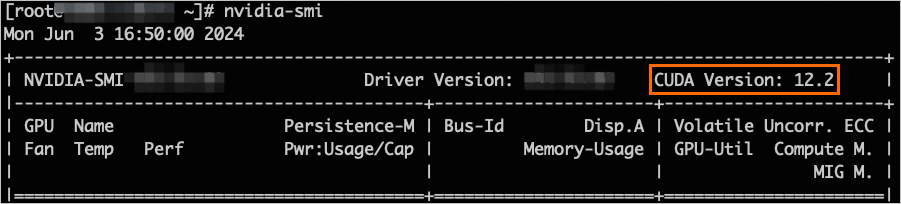
Step 3: Download the ACCL version for your CUDA version
The following table lists the ACCL download links for different CUDA versions:
CUDA version | ACCL library download link |
12.8 | http://accl-n.oss-cn-beijing.aliyuncs.com/cuda12.8/lib/libnccl.so.2 |
12.6 | http://accl-n.oss-cn-beijing.aliyuncs.com/cuda12.6/lib/libnccl.so.2 |
12.5 | http://accl-n.oss-cn-beijing.aliyuncs.com/cuda12.5/lib/libnccl.so.2 |
12.4 | http://accl-n.oss-cn-beijing.aliyuncs.com/cuda12.4/lib/libnccl.so.2 |
12.3 | http://accl-n.oss-cn-beijing.aliyuncs.com/cuda12.3/lib/libnccl.so.2 |
12.2 | http://accl-n.oss-cn-beijing.aliyuncs.com/cuda12.2/lib/libnccl.so.2 |
12.1 | http://accl-n.oss-cn-beijing.aliyuncs.com/cuda12.1/lib/libnccl.so.2 |
11.8 | http://accl-n.oss-cn-beijing.aliyuncs.com/cuda11.8/lib/libnccl.so.2 |
11.7 | http://accl-n.oss-cn-beijing.aliyuncs.com/cuda11.7/lib/libnccl.so.2 |
11.4 | http://accl-n.oss-cn-beijing.aliyuncs.com/cuda11.4/lib/libnccl.so.2 |
In the custom image container, run the following command to download the ACCL version that corresponds to your CUDA version. The following example is for CUDA 12.3:
wget http://accl-n.oss-cn-beijing.aliyuncs.com/cuda12.3/lib/libnccl.so.2Step 4: Install the ACCL library
Before you install the ACCL library, check if NCCL is already installed on the system. Run the following command to check if the libnccl.so.2 library file exists:
sudo find / -name "libnccl.so.2"There are two possible outcomes. Follow the instructions that correspond to your result:
The
libnccl.so.2file is not found, or it is in a system directory such as/usr/lib64or/lib64. In this case, use thecpcommand to copy the newly downloadedlibnccl.so.2file to one of these system directories to make it available to the system.sudo cp -f ./libnccl.so.2 /usr/lib64The
libnccl.so.2file is found in a different directory, such as/opt/xxx/. This can happen if NCCL was installed in a non-default path. In this case, use the cp command to copy the new libnccl.so.2 file to that directory and overwrite the existing file.sudo cp -f libnccl.so.2 /opt/xxx/
Step 5: Refresh the dynamic library cache
In the custom image container, run the following command to refresh the dynamic library cache.
sudo ldconfigStep 6: Confirm that the ACCL library is loaded
Submit a DLC job using the custom image. For more information, see Create a training task.
Check the task logs. If the logs show the ACCL version information as in the following example, this indicates that the ACCL library was successfully applied to the task. For more information about how to view task logs, see View training details.
NoteThe log must contain the
accl-nidentifier. If it is missing, the ACCL library was not loaded successfully.NCCL version 2.20.5.7-accl-n+cuda12.4, COMMIT_ID Zeaa6674c2f1f896e3a6bbd77e85231e0700****, BUILD_TIME 2024-05-10 15:40:56
Recommended environment variable configurations
The PAI team has compiled a list of recommended environment variables to improve communication throughput. You can use these settings for reference:
export NCCL_IB_TC=136
export NCCL_IB_SL=5
export NCCL_IB_GID_INDEX=3
export NCCL_SOCKET_IFNAME=eth
export NCCL_DEBUG=INFO
export NCCL_IB_HCA=mlx5
export NCCL_IB_TIMEOUT=22
export NCCL_IB_QPS_PER_CONNECTION=8
export NCCL_MIN_NCHANNELS=4
export NCCL_NET_PLUGIN=none
export ACCL_C4_STATS_MODE=CONN
export ACCL_IB_SPLIT_DATA_NUM=4
export ACCL_IB_QPS_LOAD_BALANCE=1
export ACCL_IB_GID_INDEX_FIX=1
export ACCL_LOG_TIME=1
The following table describes the key environment variables:
Environment variable | Description |
NCCL_IB_TC | This variable matches the Alibaba Cloud network mapping rules. If this variable is not configured or is configured incorrectly, performance may be degraded. |
NCCL_IB_GID_INDEX | Sets the GID used by the RDMA protocol. If this variable is not configured or is configured incorrectly, NCCL reports an error. |
NCCL_SOCKET_IFNAME | NCCL needs to select the correct port to establish a connection. Different instance types have different port requirements. If this variable is not configured or is configured incorrectly, the NCCL connection may fail. |
NCCL_DEBUG | Set the log level to INFO. This provides more NCCL-related log output to help identify and resolve potential issues. |
NCCL_IB_HCA | Specifies the network interface controller (NIC) used for RDMA communication. If this variable is not configured or is configured incorrectly, performance may be degraded. |
NCCL_IB_TIMEOUT | Sets the RDMA connection timeout. This can improve the fault tolerance of training tasks. If this variable is not configured or is configured incorrectly, the training task may be interrupted. |
NCCL_IB_QPS_PER_CONNECTION | Increasing the number of Queue Pairs (QPs) for each connection in NCCL can effectively improve network throughput. |
NCCL_NET_PLUGIN | Configures the NCCL network plugin. Set this to none to prevent other plugins from being loaded by mistake, which could affect system performance. |
ACCL_C4_STATS_MODE | Controls the dimension of ACCL statistics information. Set this to CONN to collect statistics by connection. |
ACCL_IB_SPLIT_DATA_NUM | Splits data across multiple Queue Pairs (QPs) for transmission. |
ACCL_IB_QPS_LOAD_BALANCE | Enables or disables the load balancing feature. |
ACCL_IB_GID_INDEX_FIX | If set to 1, automatically checks for GID anomalies before the task starts and bypasses them. |
ACCL_LOG_TIME | If set to 1, prepends a timestamp to each log entry to help with troubleshooting. |