A/B testing integration
-
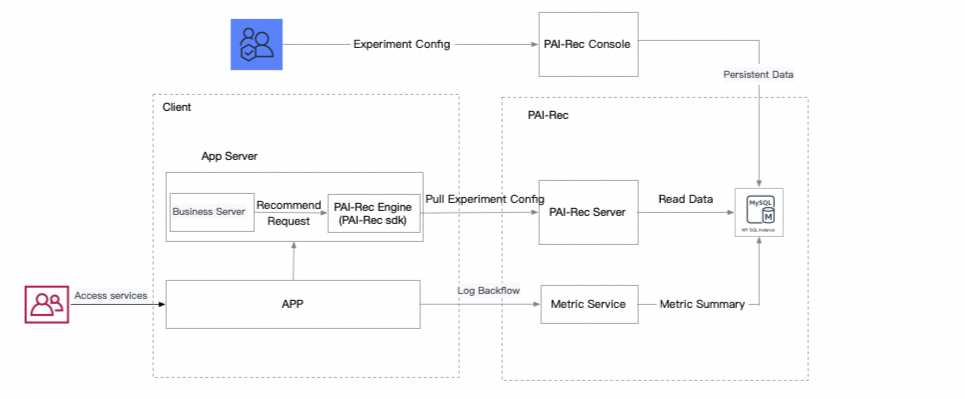
In the diagram, "Client" refers to your client-side service. You can configure experiments in the PAI-Rec console.
-
After you integrate the PAI-Rec engine, it automatically fetches experiment configurations on startup. When a recommendation request arrives, the SDK matches the request to an experiment and retrieves the corresponding parameters. The engine then adjusts its behavior accordingly, such as using different recall strategies or calling different ranking models.
-
PAI-Rec provides predefined experiment parameters. You must use the exact parameter names as specified. Otherwise, the engine cannot find the parameters even if an experiment is matched.
|
Parameter |
Type |
Description |
Example |
|
default.RecallNames |
json array |
All recall strategies to use. |
"default.RecallNames":[ "HomepageEtrecRecall", "HomepageDssmRecall"] |
|
"recall." + The name of the specific recall |
json object |
Configuration for a new recall. |
{"recall.MyRecall":{"version":"v2"}} |
|
filterNames |
json array |
Filter processes to apply. |
{"filterNames":["UniqueFilter", "UserExposureFilter"]} |
|
default.SortNames |
json array |
Re-ranking processes to apply. |
{"default.SortNames":["ItemRankScore"]} |
|
rankconf |
recconf.RankConfig |
Ranking algorithm configuration. |
"rankconf":{"RankAlgoList":["pai_homepage_fm"],"RankScore":"${pai_homepage_fm}"} |
|
features.scene.name |
string |
Recommendation scenario name for feature loading. |
"homepagetf" |
|
generalRankConf |
recconf.GeneralRankConfig |
Coarse ranking configuration, including user feature retrieval and the RankConf algorithm. For details, see Configure coarse ranking. |
{"generalRankConf":{"FeatureLoadConfs":[{"FeatureDaoConf":{}}],"RankConf":{},"ActionConfs":[]}} |
|
coldStartGeneralRankConf |
recconf.ColdStartGeneralRankConfig |
Coarse ranking configuration for cold start scenarios. For details, see Configure coarse ranking. |
{"coldStartGeneralRankConf":{"FeatureLoadConfs":[{"FeatureDaoConf":{}}],"RankConf":{},"ActionConfs":[]}} |
|
coldStartRankConf |
recconf.ColdStartRankConfig |
Ranking algorithm for cold start scenarios. |
{"coldStartRankConf":{"RecallName":"ColdStartRecall", "AlgoName":"linucb"}} |
        func (c *HomeFeedController) makeRecommendContext() {
        c.context = context.NewRecommendContext()
        c.context.Size = c.param.Limit
        c.context.Param = &c.param
        c.context.RecommendId = c.RequestId
        c.context.Config = recconf.Config
        c.context.Debug = c.param.Debug
        abcontext := model.ExperimentContext{
                Uid:         c.param.DistinctId,
                RequestId:   c.RequestId,
                FilterParams: map[string]interface{}{},
        }
        if abtest.GetExperimentClient() != nil {
                c.context.ExperimentResult = abtest.GetExperimentClient().MatchExperiment(c.param.SceneId, &abcontext)
                log.Info(c.context.ExperimentResult.Info())
        }
}-
To adjust experiment parameters in your code, retrieve them from the
context.ExperimentResultobject within aRecommendContextobject.
        count := r.recallCount
        if context.ExperimentResult != nil {
                count = context.ExperimentResult.GetLayerParams("").GetInt("recall.base.count", count)
        }
        fmt.Println("test count", count)
GetLayerParams retrieves experiment parameters from a specific layer. Use methods such as Get, GetInt, GetFloat, or GetInt64 to access a specific parameter. The first argument is the parameter name, and the second is a default value returned if the parameter is not found.
Use dynamic parameters
You can use custom parameters to change the engine's behavior at runtime without restarting the service, similar to experiment parameters.
In the left navigation pane, click system configuration > parameter management. Select the current development environment, such as Daily, and the recommendation scenario, such as HomePage. Then, click Create Parameter to add a custom parameter. For example, create a parameter with the name custom_param and the value custom.
// Get the name of the recommendation scenario.
scene := context.GetParameter("scene").(string)
// Retrieve the list of parameters for the scenario, and then use a Get* function to obtain a specific parameter value.
count := abtest.GetParams(scene).GetInt("count", 100)
fmt.Println("recall count:", count)