Same-region replication (SRR) automatically and asynchronously copies objects—and any operations on them, such as creations, updates, and deletions—from a source bucket to a destination bucket within the same region.
Use cases
When local laws or compliance requirements mandate that your data does not leave your country or region, configure SRR rules to store copies of your data from a source bucket in multiple destination buckets within the same region. Objects in a destination bucket are exact replicas of the objects in the source bucket. They share the same object name, version information, content, and metadata, which includes attributes such as creation time, owner, user-defined metadata, and object ACLs.
Features
SRR supports the following features:
Data replication between buckets in the same region
Data from a source bucket can be replicated to multiple destination buckets in the same region. A single bucket can have up to 100 replication rules. In these rules, a bucket can serve as either a source bucket or a destination bucket.
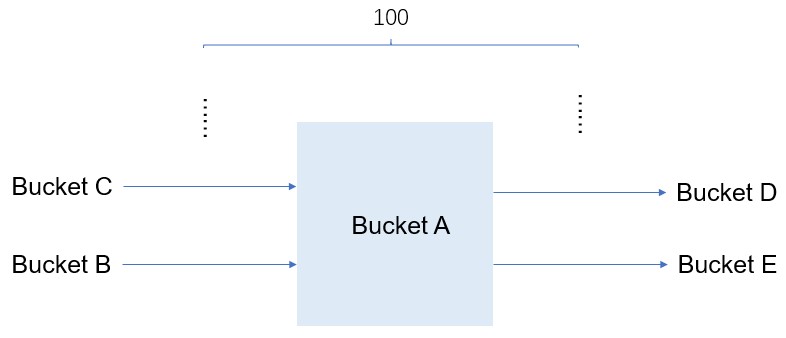
If your use case requires more than 100 replication rules, contact technical support.
-
Near real-time data replication
Object creations, deletions, and modifications are replicated to the destination bucket in near real-time.
-
Data consistency
By default, OSS ensures eventual consistency between the source and destination buckets. However, writing an object with the same name directly to the destination bucket during replication breaks this guarantee.
-
Replicate existing data
Both new objects and objects that existed before the replication rule was created can be replicated.
-
Track replication progress
View the timestamp of the latest replication and track progress for existing data replication.
-
Versioning
Eventual consistency for all object versions is ensured if versioning is enabled for both the source and destination buckets. If you configure a rule to replicate only the added and modified data, deletion operations performed on a specific version of an object in the source bucket are not replicated to the destination bucket. However, delete markers created in the source bucket are replicated to the destination bucket.
Replication of encrypted data
SRR replicates unencrypted objects and server-side encrypted objects using KMS-managed keys (
SSE-KMS) or OSS-managed keys (SSE-OSS) .-
Configure event notifications
Use event types
ObjectReplication:ObjectCreated,ObjectReplication:ObjectRemoved, andObjectReplication:ObjectModifiedto receive notifications when objects are added, modified, deleted, or overwritten during CRR. For more information, see Use event notifications to process real-time object changes.
Usage notes
Billing
The following billing rules apply to SRR within the same account and SRR across accounts.
After you enable SRR, the data transfer traffic generated by replicating objects from a source bucket to a destination bucket in OSS is not charged.
NoteThe traffic generated by SRR does not consume your default OSS bandwidth.
After you enable SRR, requests for replicated objects are counted but not charged.
When you use SRR to replicate Archive objects from a source bucket to a destination bucket, no data is restored and you are not charged data retrieval fees.
Duration
SRR employs an asynchronous, near real-time mechanism. The period of time required to replicate data from the source bucket to the destination bucket may range from a few minutes to a few hours, depending on the data size. If a replication task takes a long period of time, we recommend that you check whether the replication task is delayed due to bandwidth limits. If the bandwidth limits the replication speed, we recommend that you submit a ticket to increase the bandwidth to improve the replication efficiency.
View the SRR Inbound data in the Used Bandwidth section on the tab of the OSS console. This metric shows the inbound bandwidth to the Destination Bucket for SRR. For more information, see Used Bandwidth.
Risk of overwriting objects with the same name
As you can operate on both the source and destination buckets while a replication rule is active, objects replicated from the source bucket might overwrite objects with the same name in the destination bucket.
Limitations
You can enable SRR only between two Buckets that share the same
Versioningstatus (either both enabled or both disabled).You cannot change the versioning status of either bucket while a replication rule is active.
SRR does not replicate objects in the
Cold ArchiveorDeep Cold Archivestorage classes, regardless of whether these objects have been restored.SRR does not replicate appendable objects to a destination bucket that uses the
Cold ArchiveorDeep Cold Archivestorage class.