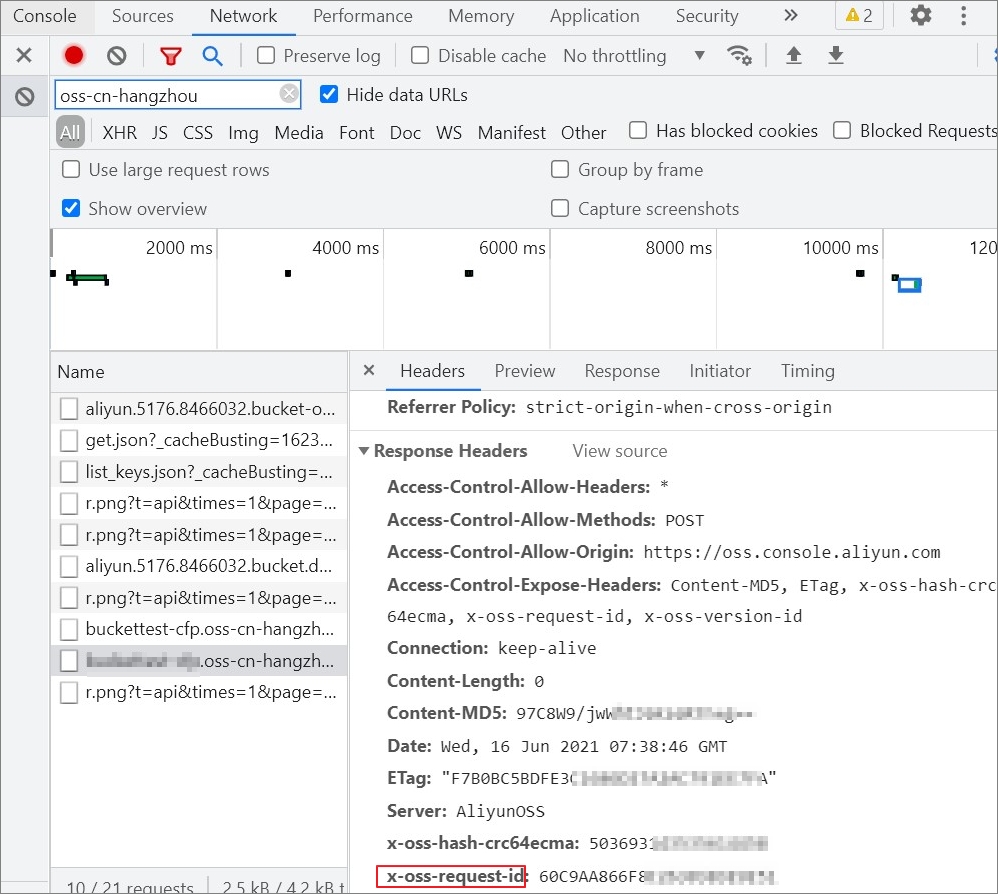
Object Storage Service (OSS) assigns a unique server request ID to each incoming request. This ID is used to correlate log information. If you encounter an error while using OSS, provide the request ID to Alibaba Cloud Technical Support for assistance. This topic describes several ways to obtain a request ID.
Obtain a request ID by using SDKs
The following code samples show how to obtain a request ID using common SDKs.
import com.aliyun.oss.*;
import com.aliyun.oss.common.auth.*;
import com.aliyun.oss.common.comm.SignVersion;
import com.aliyun.oss.model.PutObjectRequest;
import com.aliyun.oss.model.PutObjectResult;
import java.io.File;

public class Demo {

    public static void main(String[] args) throws Exception {
        // In this example, the endpoint of the China (Hangzhou) region is used. Specify your actual endpoint.
        String endpoint = "https://oss-cn-hangzhou.aliyuncs.com";
        // Obtain access credentials from environment variables. Before you run the sample code, make sure that the OSS_ACCESS_KEY_ID and OSS_ACCESS_KEY_SECRET environment variables are configured.
        EnvironmentVariableCredentialsProvider credentialsProvider = CredentialsProviderFactory.newEnvironmentVariableCredentialsProvider();
        // Specify the name of the bucket. Example: examplebucket.
        String bucketName = "examplebucket";
        // Specify the full path of the object. Do not include the bucket name in the full path. Example: exampledir/exampleobject.txt.
        String objectName = "exampledir/exampleobject.txt";
        // Specify the full path of the local file that you want to upload. Example: D:\\localpath\\examplefile.txt.
        // By default, if the path of the local file is not specified, the local file is uploaded from the path of the project to which the sample program belongs.
        String filePath= "D:\\localpath\\examplefile.txt";
        // Specify the region in which the bucket is located. For example, if the bucket is located in the China (Hangzhou) region, set the region to cn-hangzhou.
        String region = "cn-hangzhou";

        // Create an OSSClient instance.
        // Call the shutdown method to release associated resources when the OSSClient is no longer in use.
        ClientBuilderConfiguration clientBuilderConfiguration = new ClientBuilderConfiguration();
        clientBuilderConfiguration.setSignatureVersion(SignVersion.V4);
        OSS ossClient = OSSClientBuilder.create()
        .endpoint(endpoint)
        .credentialsProvider(credentialsProvider)
        .clientConfiguration(clientBuilderConfiguration)
        .region(region)
        .build();

        try {
            // Create a PutObjectRequest object.
            PutObjectRequest putObjectRequest = new PutObjectRequest(bucketName, objectName, new File(filePath));
            // The following sample code provides an example on how to specify the storage class and ACL of an object when you upload the object:
            // ObjectMetadata metadata = new ObjectMetadata();
            // metadata.setHeader(OSSHeaders.OSS_STORAGE_CLASS, StorageClass.Standard.toString());
            // metadata.setObjectAcl(CannedAccessControlList.Private);
            // putObjectRequest.setMetadata(metadata);

            // Upload the local file.
            PutObjectResult result = ossClient.putObject(putObjectRequest);
        } catch (OSSException oe) {
            System.out.println("Caught an OSSException, which means your request made it to OSS, "
                    + "but was rejected with an error response for some reason.");
            System.out.println("Error Message:" + oe.getErrorMessage());
            System.out.println("Error Code:" + oe.getErrorCode());
            System.out.println("Request ID:" + oe.getRequestId());
            System.out.println("Host ID:" + oe.getHostId());
        } catch (ClientException ce) {
            System.out.println("Caught an ClientException, which means the client encountered "
                    + "a serious internal problem while trying to communicate with OSS, "
                    + "such as not being able to access the network.");
            System.out.println("Error Message:" + ce.getMessage());
        } finally {
            if (ossClient != null) {
                ossClient.shutdown();
            }
        }
    }
}<?php
if (is_file(__DIR__ . '/../autoload.php')) {
require_once __DIR__ . '/../autoload.php';
}
if (is_file(__DIR__ . '/../vendor/autoload.php')) {
require_once __DIR__ . '/../vendor/autoload.php';
}
use OSS\OssClient;
use OSS\Core\OssException;
use OSS\Model\StyleConfig;
// Obtain access credentials from environment variables. Before you run this sample code, make sure that the OSS_ACCESS_KEY_ID and OSS_ACCESS_KEY_SECRET environment variables are set.
$accessKeyId = getenv("OSS_ACCESS_KEY_ID");
$accessKeySecret = getenv("OSS_ACCESS_KEY_SECRET");
// Set yourEndpoint to the endpoint of the region where your bucket is located. For example, if your bucket is in the China (Hangzhou) region, set the endpoint to https://oss-cn-hangzhou.aliyuncs.com.
$endpoint = "yourEndpoint";
// Specify the bucket name.
$bucket= "examplebucket";
try{
$ossClient = new OssClient($accessKeyId, $accessKeySecret, $endpoint);
$result = $ossClient->getObject($bucket, "demo.txt");
} catch(OssException $e) {
printf($e->getMessage() . "\n");
printf($e->getRequestId() . "\n");
}const OSS = require('ali-oss')
const path=require("path")
const client = new OSS({
// Set yourregion to the region where the bucket is located. For example, if the bucket is in the China (Hangzhou) region, set Region to oss-cn-hangzhou.
region: 'yourregion',
// Obtain access credentials from environment variables. Before you run this sample code, make sure that the OSS_ACCESS_KEY_ID and OSS_ACCESS_KEY_SECRET environment variables are set.
accessKeyId: process.env.OSS_ACCESS_KEY_ID,
accessKeySecret: process.env.OSS_ACCESS_KEY_SECRET,
authorizationV4: true,
// Specify the bucket name.
bucket: 'examplebucket',
});
// Custom request headers
const headers = {
// Specify the storage class of the object.
'x-oss-storage-class': 'Standard',
// Specify the access permissions of the object.
'x-oss-object-acl': 'private',
// When the file is accessed using its URL, specify that the file is downloaded as an attachment. The downloaded file is named example.txt.
'Content-Disposition': 'attachment; filename="example.txt"',
// Set tags for the object. You can set multiple tags at the same time.
'x-oss-tagging': 'Tag1=1&Tag2=2',
// Specify whether to overwrite an object that has the same name during a PutObject operation. This parameter is set to true to prevent the object from being overwritten.
'x-oss-forbid-overwrite': 'true',
};
async function put () {
try {
// Specify the full path of the OSS object and the full path of the local file. The full path of the OSS object cannot contain the bucket name.
// If you do not specify a local path in the full path of the local file, the file is uploaded from the local path of the project to which the sample program belongs.
const result = await client.put('exampleobject.txt', path.normalize('D:\\localpath\\examplefile.txt')
// Custom headers
,{headers}
);
console.log(result);
} catch (e) {
console.log(e);
}
}
put();# -*- coding: utf-8 -*-
import oss2
from oss2.credentials import EnvironmentVariableCredentialsProvider
# Obtain access credentials from the environment variables. Before you run the sample code, make sure that you have configured environment variables OSS_ACCESS_KEY_ID and OSS_ACCESS_KEY_SECRET.
auth = oss2.ProviderAuthV4(EnvironmentVariableCredentialsProvider())
# Specify the endpoint of the region in which the bucket is located. For example, if the bucket is located in the China (Hangzhou) region, set the endpoint to https://oss-cn-hangzhou.aliyuncs.com.
endpoint = "https://oss-cn-hangzhou.aliyuncs.com"
# Specify the ID of the region that maps to the endpoint. Example: cn-hangzhou. This parameter is required if you use the signature algorithm V4.
region = "cn-hangzhou"
# Specify the name of the bucket.
bucket = oss2.Bucket(auth, endpoint, "examplebucket", region=region)
try:
# Specify the name of the downloaded object. Example: exampleobject.txt.
stream = bucket.get_object('exampleobject.txt')
except oss2.exceptions.NoSuchKey as e:
print('status={0}, request_id={1}'.format(e.status, e.request_id)) package main
import (
"fmt"
"net/http"
"os"
"strings"
"github.com/aliyun/aliyun-oss-go-sdk/oss"
)
// The error handling function.
func HandleError(err error) {
fmt.Println("Error:", err)
os.Exit(-1)
}
func main() {
// Obtain access credentials from environment variables. Before you run this sample code, make sure that the OSS_ACCESS_KEY_ID and OSS_ACCESS_KEY_SECRET environment variables are set.
provider, err := oss.NewEnvironmentVariableCredentialsProvider()
if err != nil {
fmt.Println("Error:", err)
os.Exit(-1)
}
// Create an OSSClient instance.
// Set yourEndpoint to the endpoint of the region where your bucket is located. This example uses https://oss-cn-hangzhou.aliyuncs.com, which is the endpoint of the China (Hangzhou) region. Replace it with the actual endpoint.
// An AccessKey pair from an Alibaba Cloud account has permissions for all API operations. Using these credentials for OSS operations is a high-risk practice. We recommend that you use a RAM user for API calls or routine O&M. To create a RAM user, log on to the RAM console.
client, err := oss.New("https://oss-cn-hangzhou.aliyuncs.com", "", "", oss.SetCredentialsProvider(&provider))
if err != nil {
HandleError(err)
}
// Specify the bucket name. Example: examplebucket.
bucketName := "examplebucket"
// Specify the object name. Example: exampleobject.txt.
objectName := "exampleobject.txt"
bucket, err := client.Bucket(bucketName)
if err != nil {
HandleError(err)
}
var responseHeader http.Header
// Upload a string.
err = bucket.PutObject(objectName, strings.NewReader("Hello OSS"), oss.GetResponseHeader(&responseHeader))
if err != nil {
if _, ok := err.(oss.ServiceError); ok {
// err is an oss.ServiceError.
fmt.Println("Error Message:", err.(oss.ServiceError).Message)
fmt.Println("Error Code:", err.(oss.ServiceError).Code)
fmt.Println("Request ID:", err.(oss.ServiceError).RequestID)
fmt.Println("Host ID:", err.(oss.ServiceError).HostID)
} else {
// err is not an oss.ServiceError.
fmt.Println("Error:", err)
os.Exit(-1)
}
}
requestId := oss.GetRequestId(responseHeader)
fmt.Println("Request ID:", requestId)
}
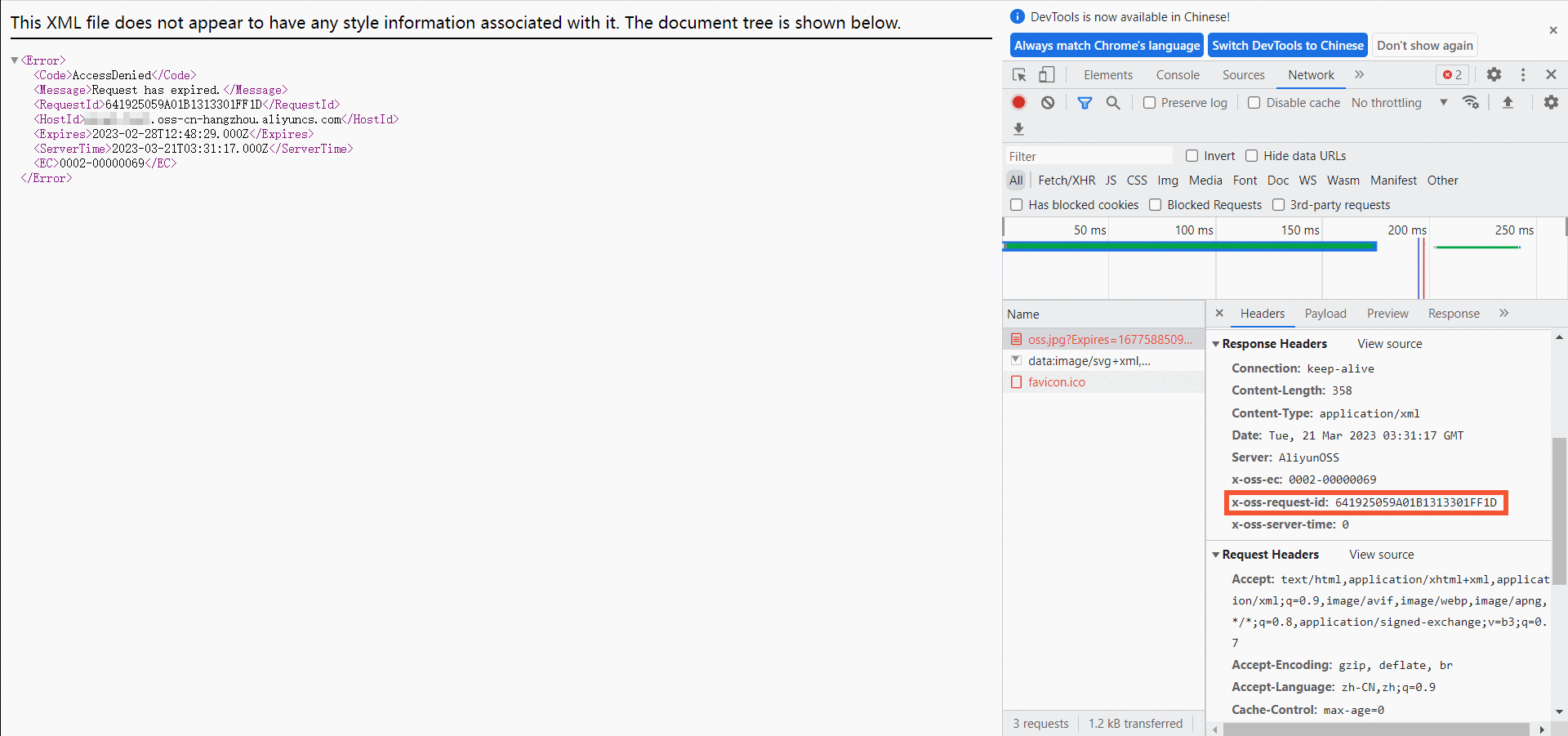
Obtain a request ID from a browser
Follow these steps to obtain a request ID when you access an OSS object from a browser.
On a Windows computer, press
F12to open the developer tools.On the developer tools page, click the Network tab.
On the Name tab, select the target object.
Click the Headers tab. In the Response Headers section, obtain the request ID from x-oss-request-id.
Obtain a request ID from real-time logs
You can query real-time logs for buckets and objects in the OSS console. These logs contain the request ID.
Log on to the OSS console.
In the navigation pane, click Buckets. Then, click the name of the target bucket.
Choose .
Press
Ctrl+Fand search for request_id.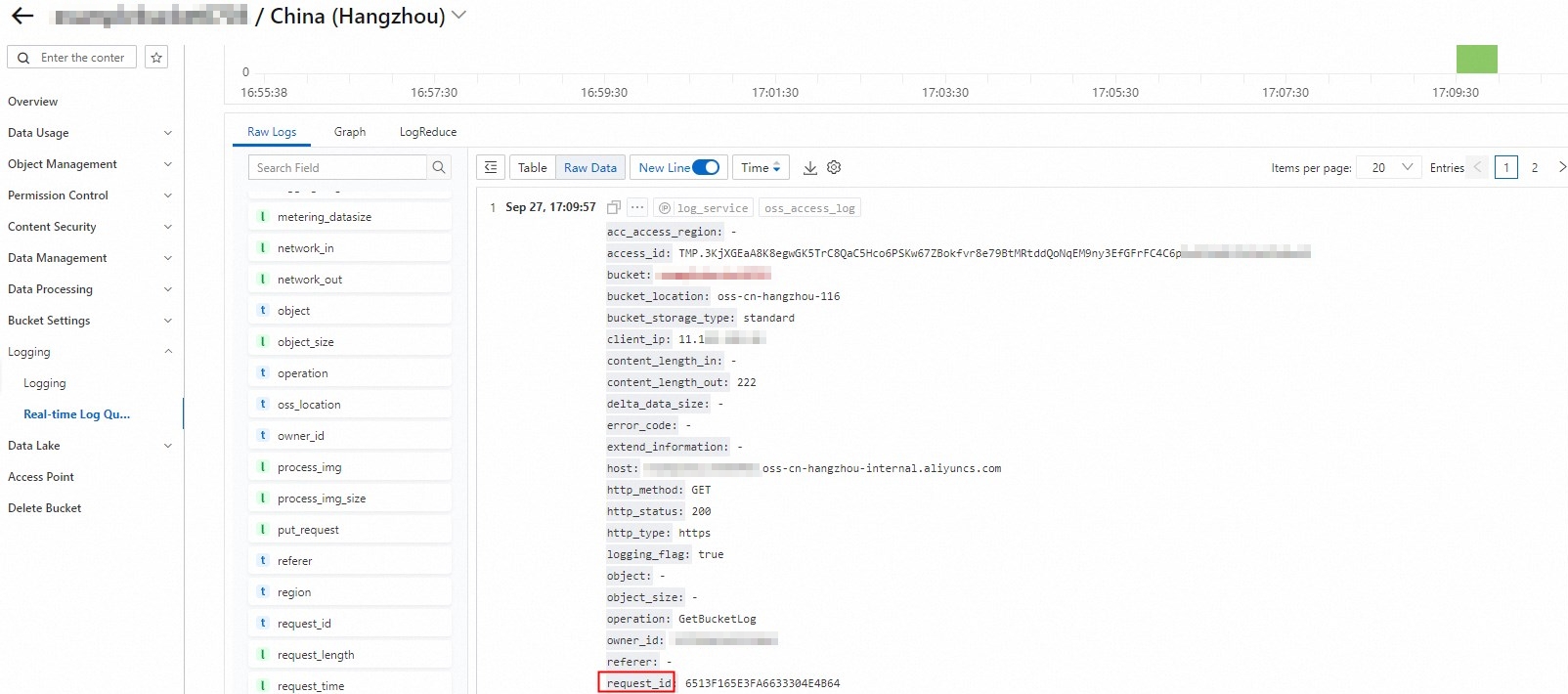
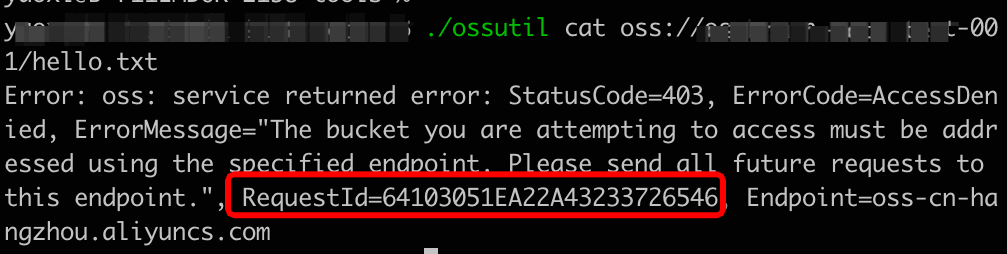
Obtain a request ID by using ossutil
When you run an ossutil command, you can obtain the request ID from the command output.
Obtain a request ID by using the CLI
Follow these steps to obtain a request ID using the command-line interface (CLI) on a Linux system.
Obtain the object URL.
Log on to the OSS console.
In the left-side navigation pane, click Buckets. On the Buckets page, find and click the desired bucket.
In the left-side navigation tree, choose .
Click View Details in the Actions column of the target object. Then, click Copy Object URL.
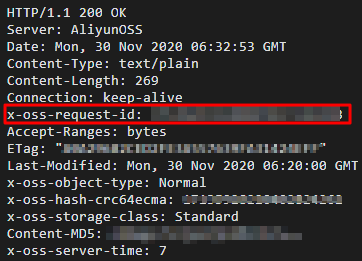
Run the following command to obtain the request ID from the HTTP response header.
curl -voa "[$URL]"Replace [$URL] with the object URL that you copied.
The following figure shows the returned result.
Obtain a request ID from the console
This section explains how to obtain the request ID for an upload operation by using the developer tools.
Open the developer tools.
On a Windows computer, press
F12to open the developer tools.On the developer tools page, click the Network tab.
Upload an object.
In the OSS console, click Buckets in the navigation pane. Then, click the name of the target bucket.
In the navigation pane, click Object Management.
Upload an object. For more information, see Upload objects.
Obtain the request ID from the developer tools.
On the developer tools page, click the Name tab and select the target object.
Click the Headers tab. In the Response Headers section, obtain the request ID from x-oss-request-id.