As the demand for RAG and semantic search grows, vector retrieval systems often face two common challenges:
Multi-tenant isolation: SaaS providers that serve knowledge bases for many enterprise customers, or companies with separate knowledge bases for different departments, require strict data isolation.
Ultra-large-scale data: When a single index contains tens or hundreds of millions of vectors, retrieval latency increases significantly, making it difficult to meet real-time requirements.
OSS Vectors allows you to create a large number of vector indexes within the same account and region. By using a multi-index architecture, you can partition data by tenant or business dimension to achieve both data isolation and high-performance retrieval.
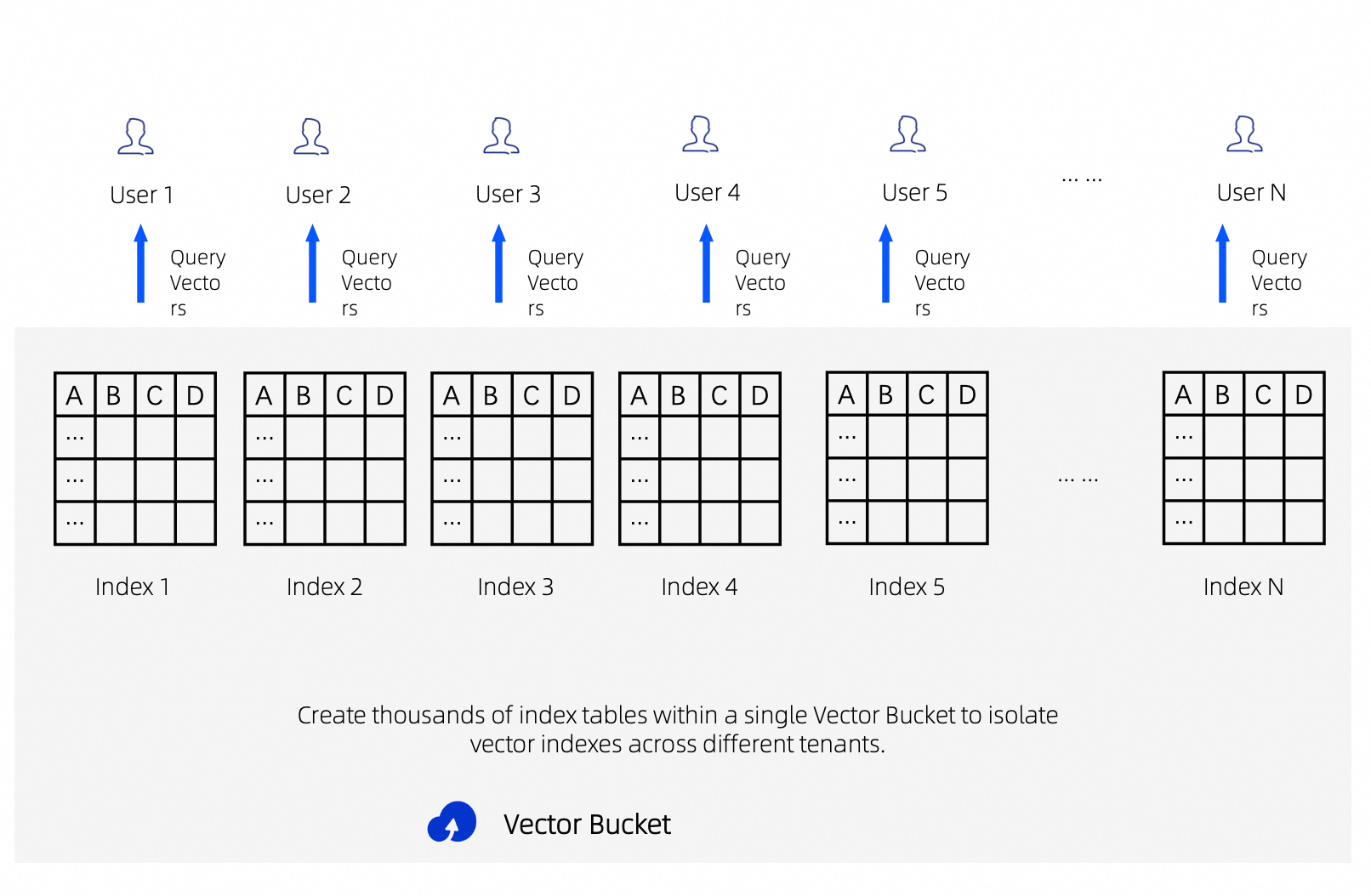
Advantages of a multi-index architecture
Data isolation: Data for different tenants or business units is stored in separate indexes, preventing cross-tenant data leakage.
Faster retrieval: Partitioning a large index into multiple smaller ones narrows the scope of each search. By searching multiple indexes in parallel and then merging the results, you can significantly reduce the overall response time.
Flexible operations: Configure dimensions, models, and similarity algorithms independently for each index. To delete data for a specific tenant, simply delete the corresponding index instead of filtering and deleting records one by one.
Import data by tenant using the CLI
The oss-vectors-embed CLI tool lets you write files to a specific index, enabling targeted data import by tenant or business dimension.
For installation instructions, see Use the OSS Vectors Embed CLI tool to write and query vector data.
Before you begin, make sure you meet the following requirements:
The
OSS_ACCESS_KEY_ID,OSS_ACCESS_KEY_SECRET, andDASHSCOPE_API_KEYenvironment variables are configured.You have created a vector bucket and corresponding vector indexes for each tenant.
Replace the placeholders in the following examples with your actual values:
Placeholder | Description |
| Your Alibaba Cloud account ID |
| The name of your vector bucket |
Write data to different indexes by tenant
Write data for different tenants to their respective indexes to ensure data isolation.
# Write a document for Tenant A to Tenant A's index
oss-vectors-embed \
  --account-id "<your-account-id>" \
  --vectors-region cn-hangzhou \
  put \
  --vector-bucket-name "<your-vector-bucket>" \
  --index-name "tenantcompanya" \
  --model-id text-embedding-v4 \
  --text-value "Knowledge base content for Tenant A" \
  --key "doc_001" \
  --metadata '{"tenant": "company_a", "category": "faq"}'

# Write a document for Tenant B to Tenant B's index
oss-vectors-embed \
  --account-id "<your-account-id>" \
  --vectors-region cn-hangzhou \
  put \
  --vector-bucket-name "<your-vector-bucket>" \
  --index-name "tenantcompanyb" \
  --model-id text-embedding-v4 \
  --text-value "Knowledge base content for Tenant B" \
  --key "doc_001" \
  --metadata '{"tenant": "company_b", "category": "manual"}'
Targeted searches by tenant
Querying only the target tenant's index ensures data isolation.
# Search only in Tenant A's index
oss-vectors-embed \
  --account-id "<your-account-id>" \
  --vectors-region cn-hangzhou \
  query \
  --vector-bucket-name "<your-vector-bucket>" \
  --index-name "tenantcompanya" \
  --model-id text-embedding-v4 \
  --text-value "frequently asked questions" \
  --top-k 5 \
  --return-metadata
Build a multi-index architecture with an SDK
Python SDK
Before you begin, install the alibabacloud-oss-v2 SDK:
pip install alibabacloud-oss-v2Make sure the OSS_ACCESS_KEY_ID and OSS_ACCESS_KEY_SECRET environment variables are configured.
Create multi-tenant indexes
Name indexes with the tenant ID as a suffix to create dedicated vector indexes in batches.
import alibabacloud_oss_v2 as oss
import alibabacloud_oss_v2.vectors as oss_vectors

ACCOUNT_ID = "<your-account-id>"
REGION = "cn-hangzhou"
BUCKET = "<your-vector-bucket>"


def create_vector_client():
    credentials_provider = oss.credentials.EnvironmentVariableCredentialsProvider()
    cfg = oss.config.load_default()
    cfg.credentials_provider = credentials_provider
    cfg.region = REGION
    cfg.account_id = ACCOUNT_ID
    return oss_vectors.Client(cfg)


client = create_vector_client()

# Create indexes for tenants in batches
tenant_ids = ["companya", "companyb", "companyc"]

for tenant_id in tenant_ids:
    index_name = f"tenant{tenant_id}"
    result = client.put_vector_index(oss_vectors.models.PutVectorIndexRequest(
        bucket=BUCKET,
        index_name=index_name,
        dimension=1024,
        data_type="float32",
        distance_metric="cosine",
    ))
    print(f"Index {index_name} created, status_code={result.status_code}")
Output:
Index tenantcompanya created, status_code=200
Index tenantcompanyb created, status_code=200
Index tenantcompanyc created, status_code=200
Write data by tenant
Write data for different tenants to their respective indexes.
import alibabacloud_oss_v2 as oss
import alibabacloud_oss_v2.vectors as oss_vectors

ACCOUNT_ID = "<your-account-id>"
REGION = "cn-hangzhou"
BUCKET = "<your-vector-bucket>"


def create_vector_client():
    credentials_provider = oss.credentials.EnvironmentVariableCredentialsProvider()
    cfg = oss.config.load_default()
    cfg.credentials_provider = credentials_provider
    cfg.region = REGION
    cfg.account_id = ACCOUNT_ID
    return oss_vectors.Client(cfg)


client = create_vector_client()

# Write data to Tenant A's index
result = client.put_vectors(oss_vectors.models.PutVectorsRequest(
    bucket=BUCKET,
    index_name="tenantcompanya",
    vectors=[
        {
            "key": "faq_001",
            "data": {"float32": [0.1] * 1024},  # The vector dimension must match the index.
            "metadata": {"tenant": "company_a", "category": "faq"}
        }
    ]
))
print(f"Tenant A write completed, status_code={result.status_code}")

# Write data to Tenant B's index
result = client.put_vectors(oss_vectors.models.PutVectorsRequest(
    bucket=BUCKET,
    index_name="tenantcompanyb",
    vectors=[
        {
            "key": "manual_001",
            "data": {"float32": [0.2] * 1024},  # The vector dimension must match the index.
            "metadata": {"tenant": "company_b", "category": "manual"}
        }
    ]
))
print(f"Tenant B write completed, status_code={result.status_code}")
Output:
Tenant A write completed, status_code=200
Tenant B write completed, status_code=200
Parallel search and merge
After partitioning a large index into smaller ones, you can reduce the overall response time by searching the indexes in parallel and then merging and sorting the results.
from concurrent.futures import ThreadPoolExecutor, as_completed

import alibabacloud_oss_v2 as oss
import alibabacloud_oss_v2.vectors as oss_vectors

ACCOUNT_ID = "<your-account-id>"
REGION = "cn-hangzhou"
BUCKET = "<your-vector-bucket>"


def create_vector_client():
    credentials_provider = oss.credentials.EnvironmentVariableCredentialsProvider()
    cfg = oss.config.load_default()
    cfg.credentials_provider = credentials_provider
    cfg.region = REGION
    cfg.account_id = ACCOUNT_ID
    return oss_vectors.Client(cfg)


def search_index(client, index_name, query_vector, top_k=10):
    """Search a single index."""
    result = client.query_vectors(oss_vectors.models.QueryVectorsRequest(
        bucket=BUCKET,
        index_name=index_name,
        query_vector=query_vector,
        return_metadata=True,
        return_distance=True,
        top_k=top_k,
    ))
    return {
        "index": index_name,
        "status_code": result.status_code,

        "vectors": result.vectors or [ ],

    }


def parallel_search(index_names, query_vector, top_k=10):
    """Search multiple indexes in parallel and merge the results."""
    client = create_vector_client()

    all_vectors = [ ]


    with ThreadPoolExecutor(max_workers=len(index_names)) as executor:
        futures = {
            executor.submit(search_index, client, idx, query_vector, top_k): idx
            for idx in index_names
        }
        for future in as_completed(futures):
            result = future.result()
            print(f"Index {result['index']} returned {len(result['vectors'])} results")
            all_vectors.extend(result["vectors"])

    # Sort by distance in ascending order (smaller distance means higher similarity) and get the global top-K results.
    all_vectors.sort(key=lambda v: v.get("distance", float("inf")))
    return all_vectors[:top_k]


# Search three partitioned indexes in parallel.
indices = ["tenantcompanya", "tenantcompanyb", "tenantcompanyc"]
query_vec = {"float32": [0.1] * 1024}  # The vector dimension must match the index.

results = parallel_search(indices, query_vec, top_k=5)
print(f"\nGlobal Top-5 after merging:")
for v in results:
    print(f"  key={v.get('key')}, distance={v.get('distance')}, metadata={v.get('metadata')}")
Output:
Index tenantcompanya returned 1 result
Index tenantcompanyb returned 1 result
Index tenantcompanyc returned 0 results

Global Top-5 after merging:
  key=faq_001, distance=0.0, metadata={'tenant': 'company_a', 'category': 'faq'}
key=manual_001, distance=0.19999998807907104, metadata={'tenant': 'company_b', 'category': 'manual'}Note: After a parallel search across multiple indexes, the results are merged and sorted on the client side based on distance. For higher precision, you can introduce a Rerank model for secondary ranking.
Go SDK
Before you begin, install the alibabacloud-oss-go-sdk-v2 SDK:
go get github.com/aliyun/alibabacloud-oss-go-sdk-v2Make sure the OSS_ACCESS_KEY_ID and OSS_ACCESS_KEY_SECRET environment variables are configured.
Create multi-tenant indexes
package main

import (
	"context"
	"fmt"
	"log"

	"github.com/aliyun/alibabacloud-oss-go-sdk-v2/oss"
	"github.com/aliyun/alibabacloud-oss-go-sdk-v2/oss/credentials"
	"github.com/aliyun/alibabacloud-oss-go-sdk-v2/oss/vectors"
)

const (
	region     = "cn-hangzhou"
	bucketName = "<your-vector-bucket>"
	accountId  = "<your-account-id>"
)

func main() {
	cfg := oss.LoadDefaultConfig().
		WithCredentialsProvider(credentials.NewEnvironmentVariableCredentialsProvider()).
		WithRegion(region).
		WithAccountId(accountId)

	client := vectors.NewVectorsClient(cfg)

	// Create indexes for tenants in batches.
	tenantIDs := [ ]string{"companya", "companyb", "companyc"}


	for _, tenantID := range tenantIDs {
		indexName := fmt.Sprintf("tenant%s", tenantID)
		result, err := client.PutVectorIndex(context.TODO(), &vectors.PutVectorIndexRequest{
			Bucket:         oss.Ptr(bucketName),
			IndexName:      oss.Ptr(indexName),
			Dimension:      oss.Ptr(1024),
			DataType:       oss.Ptr("float32"),
			DistanceMetric: oss.Ptr("cosine"),
		})
		if err != nil {
			log.Printf("Index %s creation failed: %v", indexName, err)
			continue
		}
		fmt.Printf("Index %s created, status_code=%d\n", indexName, result.StatusCode)
	}
}
Output:
Index tenantcompanya created, status_code=200
Index tenantcompanyb created, status_code=200
Index tenantcompanyc created, status_code=200
Parallel search and merge
package main

import (
	"context"
	"fmt"
	"log"
	"sort"
	"sync"

	"github.com/aliyun/alibabacloud-oss-go-sdk-v2/oss"
	"github.com/aliyun/alibabacloud-oss-go-sdk-v2/oss/credentials"
	"github.com/aliyun/alibabacloud-oss-go-sdk-v2/oss/vectors"
)

const (
	region     = "cn-hangzhou"
	bucketName = "<your-vector-bucket>"
	accountId  = "<your-account-id>"
	dimension  = 1024
)


func makeVector(val float32, dim int) [ ]float32 {


	v := make([ ]float32, dim)

	for i := range v {
		v[i] = val
	}
	return v
}

func main() {
	cfg := oss.LoadDefaultConfig().
		WithCredentialsProvider(credentials.NewEnvironmentVariableCredentialsProvider()).
		WithRegion(region).
		WithAccountId(accountId)

	client := vectors.NewVectorsClient(cfg)


	indices := [ ]string{"tenantcompanya", "tenantcompanyb", "tenantcompanyc"}

	queryVector := map[string]any{"float32": makeVector(0.1, dimension)}

	var mu sync.Mutex

	var allVectors [ ]map[string]any

	var wg sync.WaitGroup

	for _, indexName := range indices {
		wg.Add(1)
		go func(idx string) {
			defer wg.Done()

			result, err := client.QueryVectors(context.TODO(), &vectors.QueryVectorsRequest{
				Bucket:         oss.Ptr(bucketName),
				IndexName:      oss.Ptr(idx),
				QueryVector:    queryVector,
				ReturnMetadata: oss.Ptr(true),
				ReturnDistance:  oss.Ptr(true),
				TopK:           oss.Ptr(10),
			})
			if err != nil {
				log.Printf("Index %s query failed: %v", idx, err)
				return
			}
			fmt.Printf("Index %s returned %d results\n", idx, len(result.Vectors))

			mu.Lock()
			allVectors = append(allVectors, result.Vectors...)
			mu.Unlock()
		}(indexName)
	}

	wg.Wait()

	// Sort by distance in ascending order and get the global top-K results.
	sort.Slice(allVectors, func(i, j int) bool {
		di, _ := allVectors[i]["distance"].(float64)
		dj, _ := allVectors[j]["distance"].(float64)
		return di < dj
	})

	topK := 5
	if len(allVectors) < topK {
		topK = len(allVectors)
	}

	fmt.Printf("\nGlobal Top-%d after merging:\n", topK)
	for _, v := range allVectors[:topK] {
		fmt.Printf("  key=%v, distance=%v, metadata=%v\n", v["key"], v["distance"], v["metadata"])
	}
}
Output:
Index tenantcompanya returned 1 result
Index tenantcompanyc returned 0 results
Index tenantcompanyb returned 1 result

Global Top-2 after merging:
  key=faq_001, distance=0, metadata=map[category:faq tenant:company_a]
  key=manual_001, distance=0.19999998807907104, metadata=map[category:manual tenant:company_b]
Best practices
Index naming conventions: Use a tenant ID or business dimension as a suffix for index names, such as
tenant{tenantid}. Index names can contain only lowercase letters and numbers. Underscores and hyphens are not supported.When you have a large number of tenants: Use index names for logical isolation. Creating an OSS vector index takes only seconds and has minimal management overhead.
When you require extremely low latency: If a single index grows beyond tens of millions of vectors, use horizontal partitioning based on business logic, such as time or category. Then, run a parallel search across multiple indexes and merge the results.
Result reranking (Rerank): After merging the search results from multiple indexes, you can reorder the results based on distance or use a Rerank model for secondary ranking.
Index cleanup: To delete data for a tenant or business, call
DeleteVectorIndexto delete the corresponding index instead of filtering and deleting the data one by one.