Cloudera Distribution of Hadoop (CDH) is an enterprise-grade big data platform that supports Hadoop 3.0.0. This guide shows you how to configure components in a CDH 6 environment, including Hadoop, Hive, Spark, and Impala, to query data stored in Alibaba Cloud OSS.
Prerequisites
You have an active CDH 6 cluster. For instructions, see the Installation Guide. The examples in this guide use CDH 6.0.1.
Step 1: Add OSS configurations
-
Use Cloudera Manager (CM) to add the required configurations.
If you do not have a cluster managed by CM, you can modify core-site.xml. For a CM-managed cluster, you need to add the following configuration:
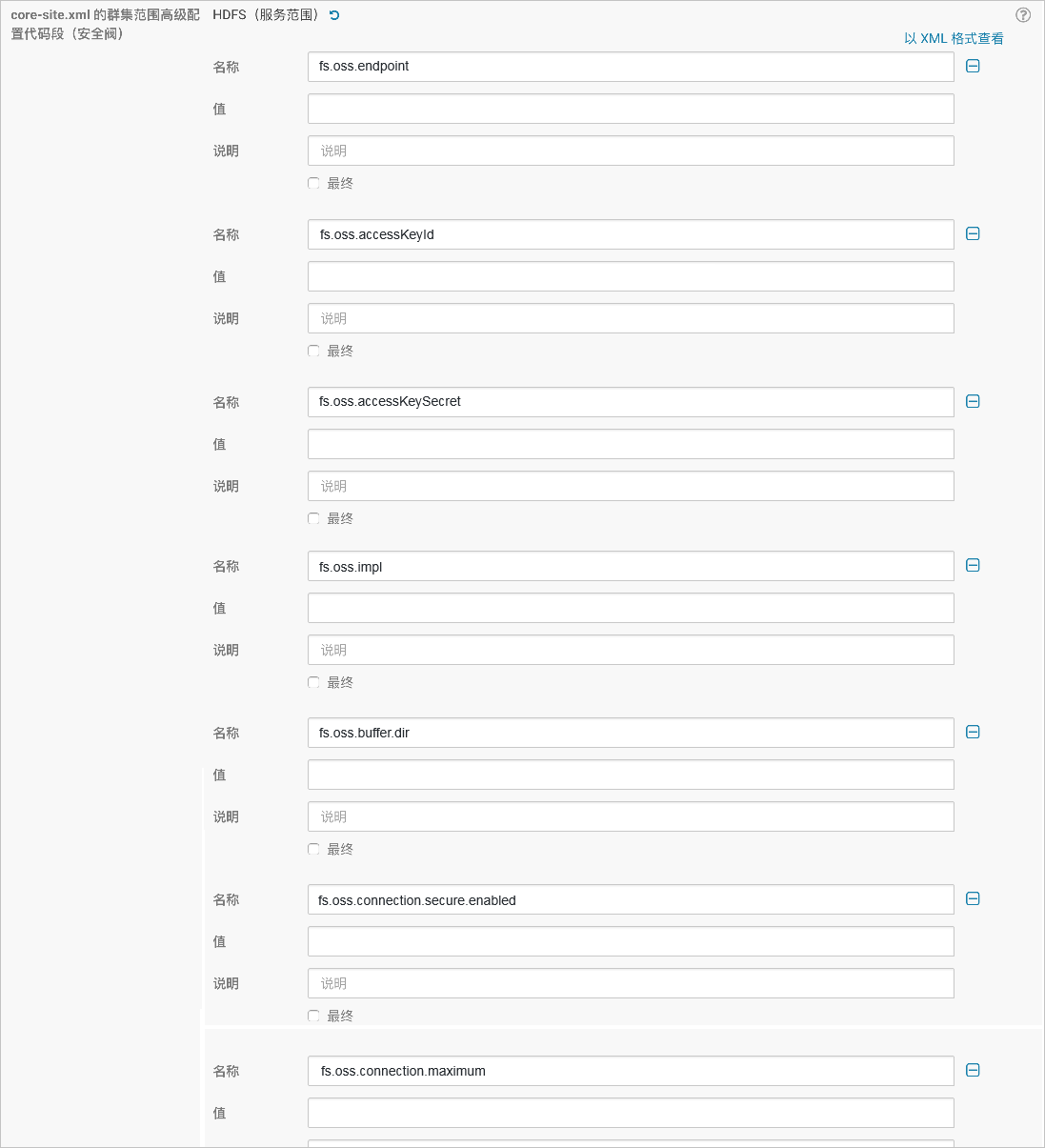
Parameter
Description
fs.oss.endpoint
The public or internal endpoint of the region where your OSS bucket is located. For example: oss-cn-zhangjiakou-internal.aliyuncs.com.
fs.oss.accessKeyId
The AccessKeyId of the AccessKey that has permissions to access OSS.
fs.oss.accessKeySecret
The AccessKeySecret of the AccessKey that has permissions to access OSS.
fs.oss.impl
The implementation class for the Hadoop OSS file system. The value must be
org.apache.hadoop.fs.aliyun.oss.AliyunOSSFileSystem.fs.oss.buffer.dir
The directory for temporary files. Recommended value:
/tmp/oss.fs.oss.connection.secure.enabled
Specifies whether to use HTTPS. Set to
falsefor better performance.fs.oss.connection.maximum
The maximum number of concurrent connections to OSS. Recommended value:
2048.For a full list of parameters, see the Hadoop-Aliyun module documentation.
-
Restart the cluster as prompted by CM.
-
Test reading from and writing to OSS.
-
Test reading from OSS:
hadoop fs -ls oss://${your-bucket-name}/ -
Test writing to OSS:
hadoop fs -mkdir oss://${your-bucket-name}/hadoop-testIf the commands succeed, your configuration is correct. Otherwise, review the configuration parameters.
NoteIn this document, all items formatted as ${} are environment variables. Please modify their values based on your actual environment.
-
Step 2: Configure Apache Impala
To enable Impala in CDH 6 to access OSS, you must manually add the OSS JAR packages to the CLASSPATH environment variable on all Impala nodes. Follow these steps:
-
Navigate to the ${CDH_HOME}/lib/impala directory, and create a symbolic link:
[root@cdh-master impala]# cd lib/ [root@cdh-master lib]# ln -s ../../../jars/hadoop-aliyun-3.0.0-cdh6.0.1.jar hadoop-aliyun.jar [root@cdh-master lib]# ln -s ../../../jars/aliyun-sdk-oss-2.8.3.jar aliyun-sdk-oss-2.8.3.jar [root@cdh-master lib]# ln -s ../../../jars/jdom-1.1.jar jdom-1.1.jar -
Go to the ${CDH_HOME}/bin directory, and for each of the impalad, statestored, and catalogd files, add the following content before the exec command on the last line:
export CLASSPATH=${CLASSPATH}:${IMPALA_HOME}/lib/hadoop-aliyun.jar:${IMPALA_HOME}/lib/aliyun-sdk-oss-2.8.3.jar:${IMPALA_HOME}/lib/jdom-1.1.jar -
Restart all Impala-related processes on all nodes.
Step 3: Verify the configuration
Verify the configuration by querying OSS data with Apache Impala and running TPC-DS queries. For more information, see Apache Impala and TPC-DS query.
TPC-DS provides a suite of complex queries based on HiveQL. While Impala SQL is highly compatible with HiveQL, allowing most TPC-DS queries to run directly, minor differences exist. As a result, some queries may fail due to compatibility issues.
The following example uses a set of Impala-compatible TPC-DS queries to demonstrate its performance in large-scale data processing.
-
Generate sample data and upload it to OSS.
[root@cdh-master ~]# git clone https://github.com/hortonworks/hive-testbench.git [root@cdh-master ~]# cd hive-testbench [root@cdh-master hive-testbench]# git checkout hive14 [root@cdh-master hive-testbench]# ./tpcds-build.sh [root@cdh-master hive-testbench]# FORMAT=textfile ./tpcds-setup.sh 50 oss://{your-bucket-name}/ -
Create the tables.
The table creation statements for the benchmark are compatible with those for Apache Impala. You only need to copy the table creation statements from ddl-tpcds/text/alltables.sql and modify ${LOCATION}.
[root@cdh-master hive-testbench]# impala-shell -i cdh-slave01 -d default Starting Impala Shell without Kerberos authentication Connected to cdh-slave01:21000 Server version: impalad version 3.0.0-cdh6.0.1 RELEASE(build9a74a5053de5f7b8dd983802e6d75e58d31472db) *********************************************************************************** Welcome to the Impala shell. (Impala Shell v3.0.0-cdh6.0.1(9a74a50) built on Wed Sep 1911:27:37 PDT 2018) Want to know what version of Impala you're connected to? Run the VERSION command to find out! *********************************************************************************** Query: use `default` [cdh-slave01:21000] default> create external table call_center( > cc_call_center_sk bigint > , cc_call_center_id string > , cc_rec_start_date string > , cc_rec_end_date string > , cc_closed_date_sk bigint > , cc_open_date_sk bigint > , cc_name string > , cc_class string > , cc_employees int > , cc_sq_ft int > , cc_hours string > , cc_manager string > , cc_mkt_id int > , cc_mkt_class string > , cc_mkt_desc string > , cc_market_manager string > , cc_division int > , cc_division_name string > , cc_company int > , cc_company_name string > , cc_street_number string > , cc_street_name string > , cc_street_type string > , cc_suite_number string > , cc_city string > , cc_county string > , cc_state string > , cc_zip string > , cc_country string > , cc_gmt_offset double > , cc_tax_percentage double > ) > row format delimited fields terminated by '|' > location 'oss://{your-bucket-name}/50/call_center'; Query: create external table call_center( cc_call_center_sk bigint , cc_call_center_id string , cc_rec_start_date string , cc_rec_end_date string , cc_closed_date_sk bigint , cc_open_date_sk bigint , cc_name string , cc_class string , cc_employees int , cc_sq_ft int , cc_hours string , cc_manager string , cc_mkt_id int , cc_mkt_class string , cc_mkt_desc string , cc_market_manager string , cc_division int , cc_division_name string , cc_company int , cc_company_name string , cc_street_number string , cc_street_name string , cc_street_type string , cc_suite_number string , cc_city string , cc_county string , cc_state string , cc_zip string , cc_country string , cc_gmt_offset double , cc_tax_percentage double ) row format delimited fields terminated by '|' location 'oss://{your-bucket-name}/50/call_center' +-------------------------+ | summary | +-------------------------+ | Table has been created. | +-------------------------+ Fetched 1 row(s) in 4.10s -
Verify that the tables exist.
[cdh-slave01:21000] default> show tables; Query: show tables +------------------------+ | name | +------------------------+ | call_center | | catalog_page | | catalog_returns | | catalog_sales | | customer | | customer_address | | customer_demographics | | date_dim | | household_demographics | | income_band | | inventory | | item | | promotion | | reason | | ship_mode | | store | | store_returns | | store_sales | | time_dim | | warehouse | | web_page | | web_returns | | web_sales | | web_site | +------------------------+ Fetched 24 row(s) in 0.03s -
Run a TPC-DS query against the data in OSS.
-
Enter the sample-queries-tpcds directory that contains the SQL statements that you want to query.
[root@cdh-master hive-testbench]# ls sample-queries-tpcds query12.sql query20.sql query27.sql query39.sql query46.sql query54.sql query64.sql query71.sql query7.sql query87.sql query93.sql README.md query13.sql query21.sql query28.sql query3.sql query48.sql query55.sql query65.sql query72.sql query80.sql query88.sql query94.sql testbench.settings query15.sql query22.sql query29.sql query40.sql query49.sql query56.sql query66.sql query73.sql query82.sql query89.sql query95.sql testbench-withATS.settings query17.sql query24.sql query31.sql query42.sql query50.sql query58.sql query67.sql query75.sql query83.sql query90.sql query96.sql query18.sql query25.sql query32.sql query43.sql query51.sql query60.sql query68.sql query76.sql query84.sql query91.sql query97.sql query19.sql query26.sql query34.sql query45.sql query52.sql query63.sql query70.sql query79.sql query85.sql query92.sql query98.sql -
Execute the TPC-DS query query13.sql.
[root@cdh-master hive-testbench]# impala-shell -i cdh-slave01 -d default -f sample-queries-tpcds/query13.sql
Starting Impala Shell without Kerberos authentication
Connected to cdh-slave01:21000
Server version: impalad version 3.0.0-cdh6.0.1 RELEASE(build9a74a5053de5f7b8dd983802e6d75e58d31472db)
Query: use`default`Query: selectavg(ss_quantity)
       ,avg(ss_ext_sales_price)
       ,avg(ss_ext_wholesale_cost)
       ,sum(ss_ext_wholesale_cost)
 from store_sales
     ,store
     ,customer_demographics
     ,household_demographics
     ,customer_address
     ,date_dim
 where store.s_store_sk = store_sales.ss_store_sk
 and  store_sales.ss_sold_date_sk = date_dim.d_date_sk and date_dim.d_year = 2001and((store_sales.ss_hdemo_sk=household_demographics.hd_demo_sk
  and customer_demographics.cd_demo_sk = store_sales.ss_cdemo_sk
  and customer_demographics.cd_marital_status = 'M'and customer_demographics.cd_education_status = '4 yr Degree'and store_sales.ss_sales_price between100.00and150.00and household_demographics.hd_dep_count = 3
     )or
    (store_sales.ss_hdemo_sk=household_demographics.hd_demo_sk
  and customer_demographics.cd_demo_sk = store_sales.ss_cdemo_sk
  and customer_demographics.cd_marital_status = 'D'and customer_demographics.cd_education_status = 'Primary'and store_sales.ss_sales_price between50.00and100.00and household_demographics.hd_dep_count = 1
     ) or
    (store_sales.ss_hdemo_sk=household_demographics.hd_demo_sk
  and customer_demographics.cd_demo_sk = ss_cdemo_sk
  and customer_demographics.cd_marital_status = 'U'and customer_demographics.cd_education_status = 'Advanced Degree'and store_sales.ss_sales_price between150.00and200.00and household_demographics.hd_dep_count = 1
     ))
 and((store_sales.ss_addr_sk = customer_address.ca_address_sk
  and customer_address.ca_country = 'United States'and customer_address.ca_state in('KY', 'GA', 'NM')
  and store_sales.ss_net_profit between100and200
     ) or
    (store_sales.ss_addr_sk = customer_address.ca_address_sk
  and customer_address.ca_country = 'United States'and customer_address.ca_state in('MT', 'OR', 'IN')
  and store_sales.ss_net_profit between150and300
     ) or
    (store_sales.ss_addr_sk = customer_address.ca_address_sk
  and customer_address.ca_country = 'United States'and customer_address.ca_state in('WI', 'MO', 'WV')
  and store_sales.ss_net_profit between50and250
     ))
Query submitted at: 2018-10-3011:44:47(Coordinator: http://cdh-slave01:25000)
Query progress can be monitored at: http://cdh-slave01:25000/query_plan?query_id=ff4b3157eddfc3c4:8a31c6500000000
+-------------------+-------------------------+----------------------------+----------------------------+
| avg(ss_quantity)  | avg(ss_ext_sales_price) | avg(ss_ext_wholesale_cost) | sum(ss_ext_wholesale_cost) |
+-------------------+-------------------------+----------------------------+----------------------------+
| 30.87106918238994 | 2352.642327044025       | 2162.600911949685          | 687707.09                  |
+-------------------+-------------------------+----------------------------+----------------------------+
Fetched 1 row(s) in 353.16s
This query involves six tables: store, store_sales, customer_demographics, household_demographics, customer_address, and date_dim.
[cdh-slave01:21000] default> showtable STATS store; Query: showtable STATS store +-------+--------+---------+--------------+-------------------+--------+-------------------+-------------------------------------------+ | #Rows | #Files | Size | Bytes Cached | CacheReplication | Format | Incremental stats | Location | +-------+--------+---------+--------------+-------------------+--------+-------------------+-------------------------------------------+ | -1 | 1 | 37.56KB | NOT CACHED | NOT CACHED | TEXT | false | oss://{your-bucket-name}/50/store | +-------+--------+---------+--------------+-------------------+--------+-------------------+-------------------------------------------+ Fetched 1 row(s) in 0.01s [cdh-slave01:21000] default> showtable STATS store_sales; Query: showtable STATS store_sales +-------+--------+---------+--------------+-------------------+--------+-------------------+-------------------------------------------------+ | #Rows | #Files | Size | Bytes Cached | CacheReplication | Format | Incremental stats | Location | +-------+--------+---------+--------------+-------------------+--------+-------------------+-------------------------------------------------+ | -1 | 50 | 18.75GB | NOT CACHED | NOT CACHED | TEXT | false | oss://{your-bucket-name}/50/store_sales | +-------+--------+---------+--------------+-------------------+--------+-------------------+-------------------------------------------------+ Fetched 1 row(s) in 0.01s [cdh-slave01:21000] default> showtable STATS customer_demographics; Query: showtable STATS customer_demographics +-------+--------+---------+--------------+-------------------+--------+-------------------+-----------------------------------------------------------+ | #Rows | #Files | Size | Bytes Cached | CacheReplication | Format | Incremental stats | Location | +-------+--------+---------+--------------+-------------------+--------+-------------------+-----------------------------------------------------------+ | -1 | 50 | 76.92MB | NOT CACHED | NOT CACHED | TEXT | false | oss://{your-bucket-name}/50/customer_demographics | +-------+--------+---------+--------------+-------------------+--------+-------------------+-----------------------------------------------------------+ Fetched 1 row(s) in 0.01s [cdh-slave01:21000] default> showtable STATS household_demographics; Query: showtable STATS household_demographics +-------+--------+----------+--------------+-------------------+--------+-------------------+------------------------------------------------------------+ | #Rows | #Files | Size | Bytes Cached | CacheReplication | Format | Incremental stats | Location | +-------+--------+----------+--------------+-------------------+--------+-------------------+------------------------------------------------------------+ | -1 | 1 | 148.10KB | NOT CACHED | NOT CACHED | TEXT | false | oss://{your-bucket-name}/50/household_demographics | +-------+--------+----------+--------------+-------------------+--------+-------------------+------------------------------------------------------------+ Fetched 1 row(s) in 0.01s [cdh-slave01:21000] default> showtable STATS customer_address; Query: showtable STATS customer_address +-------+--------+---------+--------------+-------------------+--------+-------------------+------------------------------------------------------+ | #Rows | #Files | Size | Bytes Cached | CacheReplication | Format | Incremental stats | Location | +-------+--------+---------+--------------+-------------------+--------+-------------------+------------------------------------------------------+ | -1 | 1 | 40.54MB | NOT CACHED | NOT CACHED | TEXT | false | oss://{your-bucket-name}/50/customer_address | +-------+--------+---------+--------------+-------------------+--------+-------------------+------------------------------------------------------+ Fetched 1 row(s) in 0.01s [cdh-slave01:21000] default> showtable STATS date_dim; Query: showtable STATS date_dim +-------+--------+--------+--------------+-------------------+--------+-------------------+----------------------------------------------+ | #Rows | #Files | Size | Bytes Cached | CacheReplication | Format | Incremental stats | Location | +-------+--------+--------+--------------+-------------------+--------+-------------------+----------------------------------------------+ | -1 | 1 | 9.84MB | NOT CACHED | NOT CACHED | TEXT | false | oss://{your-bucket-name}/50/date_dim | +-------+--------+--------+--------------+-------------------+--------+-------------------+----------------------------------------------+ Fetched 1 row(s) in 0.01s -