Overview
This topic describes how to use Object Storage Service (OSS) SDK for C on Ubuntu for cross-compilation.
Introduction and procedure
Introduction
Cross-compilation: An executable file is generated on one platform that can run on another platform. For example, an executable file is generated on Linux that can run on Windows. In this example, an executable file is generated on Linux that can run on the ARM development environment. Compilation is different from cross-compilation. In compilation, an executable file that can run on the compilation platform is generated.
Prepare the installation environment
Download the arm-linux-gcc cross-compiler.
Download OSS SDK for C. For download URL, see Preface.
Download the APR and APR-util source code from the Apache official website.
Download the cURL source code from the cURL official website.
Download the MXML source code of version 2.9.1 from the SourceForge official website.
Download the expat source code from the expat official website.
Installation
Install arm-linux-gcc
Log on to a server and run the following command to create a
/usr/local/arm_4.4.3directory:mkdir /usr/local/arm_4.4.3Run the following command to decompress the cross-compiler:
tar zvxf arm-linux-gcc-4.4.3.tar.gzRun the following command to copy all files of the cross-compiler to the
/usr/local/arm_4.4.3directory:mv opt/FriendlyARM/toolschain/4.4.3/* /usr/local/arm_4.4.3Modify the environment variable and add the following content to the end of the
/etc/profilefile:export PATH=$PATH:/usr/local/arm_4.4.3/bin/Run the following command to load the new environment variable configurations:
source /etc/profileRun the following command to check whether arm-linux-gcc is installed:
arm-linux-gcc -VA command output that is similar to the following information is displayed:
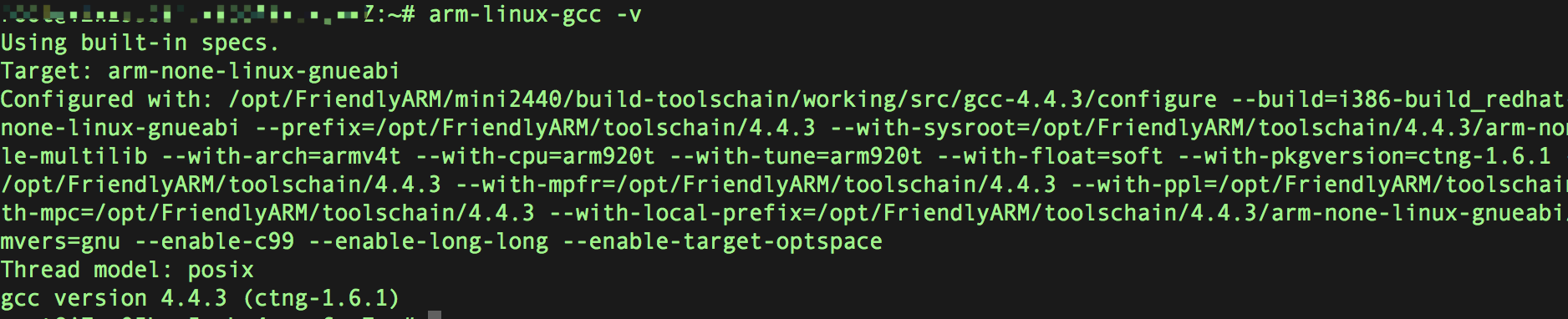
Install the cURL library
After you decompress the cURL source code, run the following command to configure the cURL library:
./configure --prefix=/root/curl --host=arm-none-linux CC=/usr/local/arm_4.4.3/bin/arm-none-linux-gnueabi-gcc CXX=/usr/local/arm_4.4.3/bin/arm-none-linux-gnueabi-g++NoteNote: The cURL library is installed in the
/root/curldirectory.Run the following commands to compile the cURL library:
make
make install
make clean
Install the APR library
Run the following command to configure the APR library:
./configure --prefix=/root/apr-1/ --host=arm-none-linux CC=/usr/local/arm_4.4.3/bin/arm-none-linux-gnueabi-gcc CXX=/usr/local/arm_4.4.3/bin/arm-none-linux-gnueabi-g++ ac_cv_file__dev_zero=yes ac_cv_func_setpgrp_void=yes apr_cv_process_shared_works=yes apr_cv_mutex_robust_shared=yes apr_cv_tcp_nodelay_with_cork=yes ap_void_ptr_lt_long=noNoteNote: The APR library is installed in the
/root/apr-1directory.If the following error is reported during installation, define the I/O vector structure.
./include/apr_want.h:94:8: error: redefinition of 'struct iovec'The definition of the I/O vector structure is shown in the following figure.
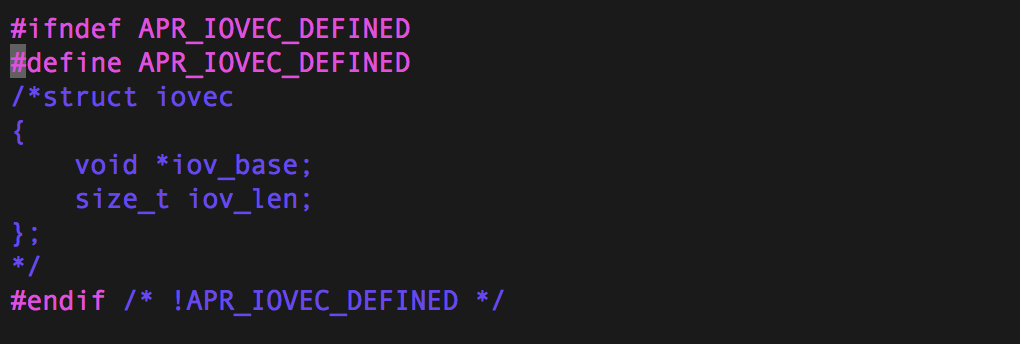
Run the make command. If the following error is reported, perform the following operations. If no error is reported, run the
make installcommand.encoding/apr_escape.c:79:33: error: 'test_char_table' undeclared tools/gen_test_char > include/private/apr_escape_test_char.h /bin/bash: tools/gen_test_char: cannot execute binary file: Exec format errorRun the following command in sequence to generate a gen_test_char file that runs on the current platform:
gcc -Wall -O2 -DCROSS_COMPILE tools/gen_test_char.c -s -o gen_test_char
./gen_test_char > include/private/apr_escape_test_char.h
Modify the MakeFile file in the current directory to prevent the automatic generation of the gen_test_char file.
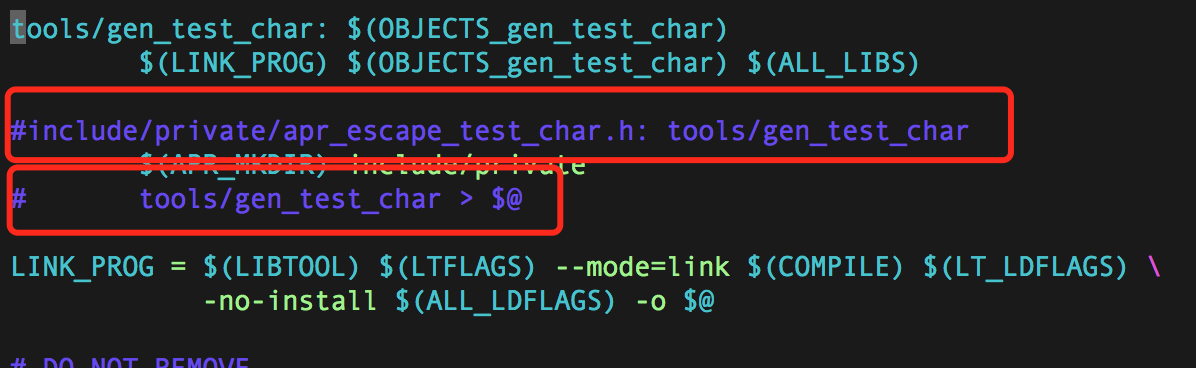
Run the following command to re-install the APR library:
make
make install
make clean
Install the Expat library
If you directly install the APR-util library, the following error occurs. You must install the Expat library first because the XML parser does not exist.
xml/apr_xml.c:35:19: fatal error: expat.h: No such file or directory#include <expat.h>Run the following command to decompress the Expat package:
bzip2 -d expat-2.2.5.tar.bz2
tar vxf expat-2.2.5.tar
Run the following command to access the specified directory:
cd expat-2.2.5/Run the following command to configure the Expat library:
./configure --prefix=/root/expat --host=arm-none-linux CC=/usr/local/arm_4.4.3/bin/arm-none-linux-gnueabi-gcc CXX=/usr/local/arm_4.4.3/bin/arm-none-linux-gnueabi-g++NoteNote: Install the Expat library in the /root/expat directory.
Install the APR-util library
Run the following command to configure the APR-util library:
./configure --prefix=/root/apr-util --host=arm-none-linux CC=/usr/local/arm_4.4.3/bin/arm-none-linux-gnueabi-gcc CXX=/usr/local/arm_4.4.3/bin/arm-none-linux-gnueabi-g++ --with-apr=/root/apr-1 --with-expat=/root/expatInstall the libmxml library
Run the following command to decompress the libmxml package:
tar zvxf libmxml-0.9.1.tar.gzRun the following command to access the specified directory:
cd libmxml-0.9.1/Run the following command to create the libmxml directory:
mkdir /root/libmxmlRun the following command to install the libmxml library:
./configure --prefix=/root/libmxml --host=arm-none-linux CC=/usr/local/arm_4.4.3/bin/arm-none-linux-gnueabi-gcc CXX=/usr/local/arm_4.4.3/bin/arm-none-linux-gnueabi-g++
Install OSS SDK for C
Run the following command to decompress the installation package of OSS SDK for C:
tar zvxf aliyun-oss-c-sdk-3.5.0.tar.gzRun the following command to access the specified directory:
cd aliyun-oss-c-sdk-3.5.0Modify the CMakeList.txt file and add the path of the cross-compiler to the start of the file:

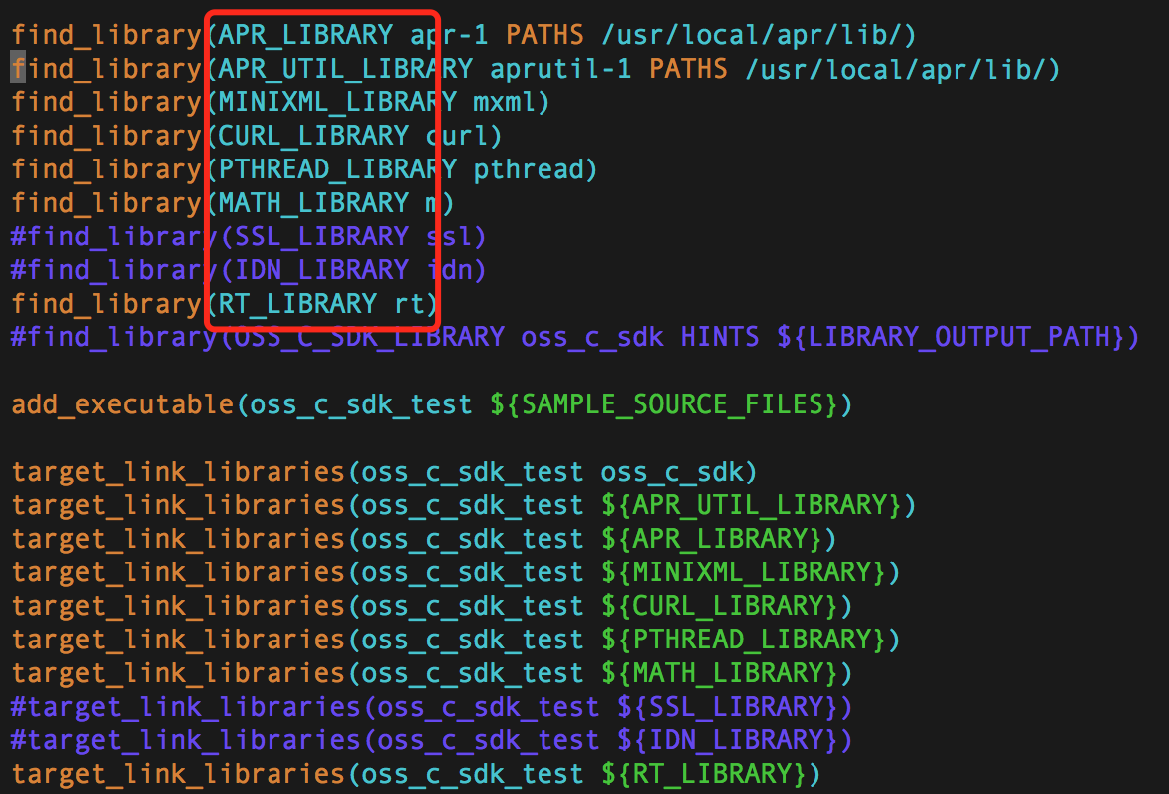
Change the retrieval path for apr-1 and APR-util configurations:
Go to the oss_c_sdk_test and oss_c_sdk_sample directories, and modify the following CMakeList.txt files.
Run the following installation command:
cmake . -DCMAKE_INSTALL_PREFIX=/root/oss_c_sdk -DCURL_INCLUDE_DIR=/root/curl/include/ -DCURL_LIBRARY=/root/curl/lib/libcurl.a -DAPR_INCLUDE_DIR=/root/apr-1/include/apr-1/ -DAPR_LIBRARY=/root/apr-1/lib/libapr-1.a -DAPR_UTIL_INCLUDE_DIR=/root/apr-util/include/apr-1 -DAPR_UTIL_LIBRARY=/root/apr-util/lib/libaprutil-1.a -DMINIXML_INCLUDE_DIR=/root/libmxml/include/ -DMINIXML_LIBRARY=/root/libmxml/lib/libmxml.a -DPTHREAD_LIBRARY=/usr/local/arm_4.4.3/arm-none-linux-gnueabi/sys-root/usr/lib/libpthread.a -DMATH_LIBRARY=/usr/local/arm_4.4.3/arm-none-linux-gnueabi/sys-root/usr/lib/libm.a -DRT_LIBRARY=/usr/local/arm_4.4.3/arm-none-linux-gnueabi/sys-root/usr/lib/librt.aNoteNote: The cross-compiler and installation paths of several third-party libraries in the preceding screenshot are executed in this command. The system library path must also reference the system library path of the cross-compiler.
Run the following command to compile OSS SDK for C:
make
make install
make clean
Supported scope
OSS