Problem description
In normal cases, after you configure a default 404 page for a static website, the default 404 page appears when you access resources that do not exist on the website. If the error shown in the following occurs, follow the procedure described in this topic to troubleshoot the error.
This site can't be reached. The webpage at http://xxxxx.oss-cn-beijing.aliyuncs.com/help/agreements/student/ might be temporarily down or it may have moved permanently to a new web address. ERR_INVALID_RESPONSETroubleshooting procedure
View the Network tab in Chrome
Turn on the developer mode in Chrome and click the Network tab. In the Name section, click the Response tab.
Failed to load response dataappears on the Response tab.Click the Headers tab and check whether HTTP status code 404 exists in the content.
Capture and analyze packets
Capture and analyze packets. If the corresponding message body is returned from the Object Storage Service (OSS) server, the error is caused by the client.
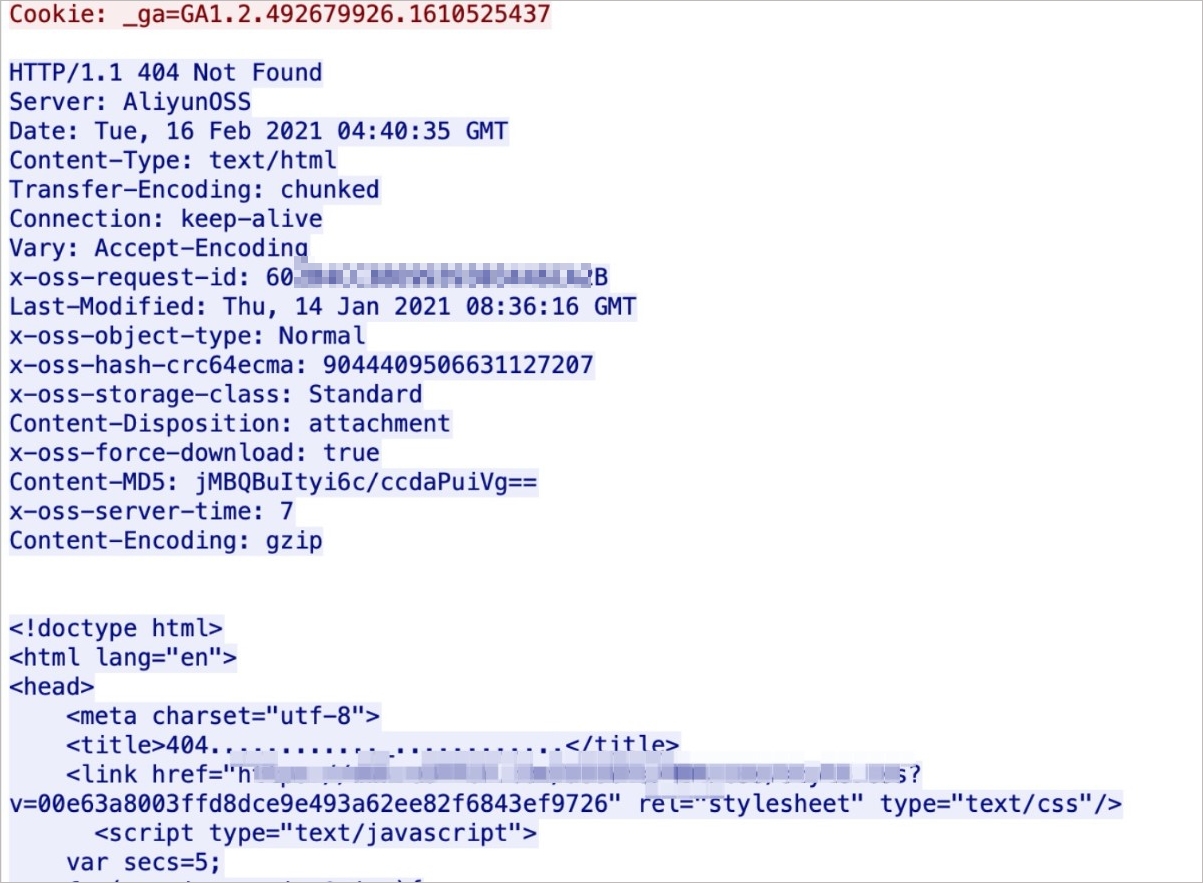
Causes
OSS returns HTTP status code 404 when resources that do not exist are queried. Because you specified a default 404 page for the static website, OSS returns the default 404 HTML page. When you use an OSS domain name to access resources that do not exist on the website, the Content-Disposition: attachment header is returned in the response and your request is considered invalid.
Solutions
Map a custom domain name and use it to access the static website. For more information, see Map custom domain names. After you map a custom domain name to the OSS bucket, the Content-Disposition: attachment header is not returned. In this case, when resources that do not exist are queried, the default 404 page that you specified appears.