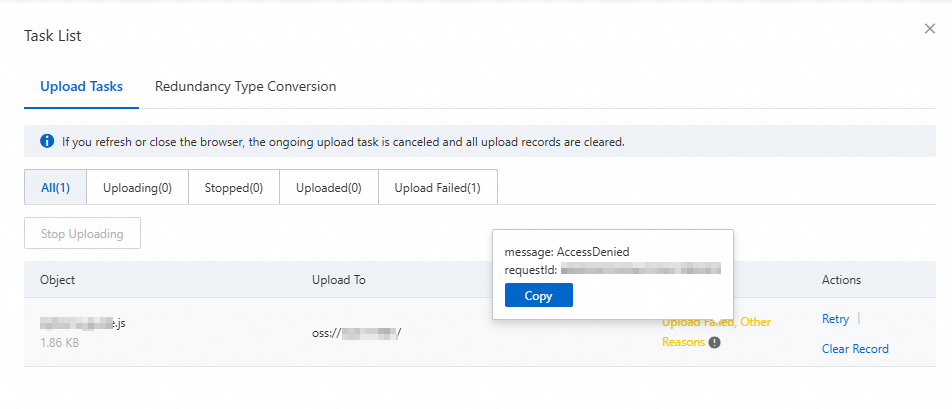
Problem description
Certain file types, such as .js and .exe, may contain malicious scripts. If these files are uploaded to OSS and then accidentally executed or opened, they can pose a security risk to your systems, services, or users. To prevent this risk, you can restrict these file types from being uploaded.
Solution
Go to the Bucket Policy tab for the target bucket.
As a Resource Access Management (RAM) user, go to the Buckets page and click the name of the target bucket.
In the navigation pane on the left, choose .
Add a policy to deny uploads of specified file types.
On the Bucket Policy tab, click Add by Syntax.
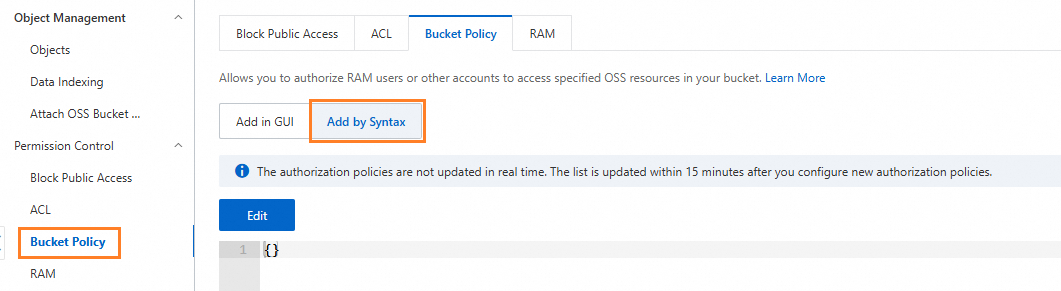
Click Edit and enter the policy in JSON format in the editor.
The following example shows how to configure a policy that denies uploads of .js and .exe files:
NoteIn the example, replace
<uid>with your Alibaba Cloud account ID and<bucketName>with the name of your target bucket.{ "Version": "1", "Statement": [{ "Effect": "Deny", "Action": [ "oss:PutObject" ], "Principal": [ "*" ], "Resource": [ "acs:oss:*:<uid>:<bucketName>/*.js", "acs:oss:*:<uid>:<bucketName>/*.exe" ] }] }After you confirm that the policy is correct, click Save. Follow the on-screen instructions to save the policy.
Test the result. If you try to upload a .js file using a simple upload, the bucket policy blocks the request.