Get started with OSS SDK for Go V1. Install the SDK, configure access credentials, and perform basic operations such as creating buckets and uploading, downloading, listing, and deleting objects.
Prerequisites
Before you begin, make sure you have:
-
An Alibaba Cloud account with OSS activated
-
A Resource Access Management (RAM) user with an AccessKey pair. For details, see CreateAccessKey
-
Go installed
Verify your Go installation:
go versionConfigure environment variables
-
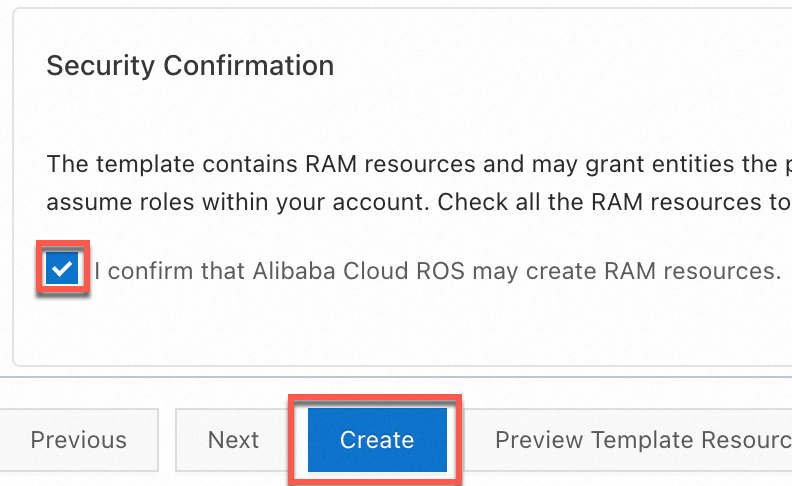
You can quickly create an AccessKey pair for a RAM user that has full OSS access permissions by using a Resource Orchestration Service (ROS) script. To do so, go to the wizard for template-based stack creation, select I confirm that Alibaba Cloud ROS may create RAM resources in the Security Confirmation section, and click Create.
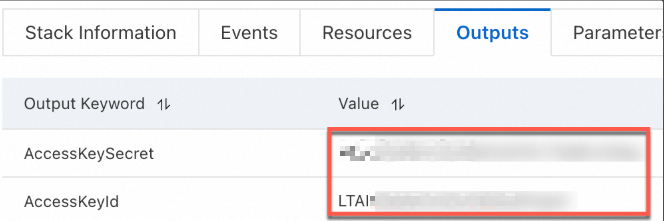
After the AccessKey pair is created, copy the AccessKey pair on the Outputs tab.
-
Configure environment variables for the AccessKey pair.
Linux
-
Run the following commands on the CLI to add the configurations of the environment variables to the
~/.bashrcfile:echo "export OSS_ACCESS_KEY_ID='YOUR_ACCESS_KEY_ID'" >> ~/.bashrc echo "export OSS_ACCESS_KEY_SECRET='YOUR_ACCESS_KEY_SECRET'" >> ~/.bashrc-
Apply the changes.
source ~/.bashrc -
Check whether the environment variables have taken effect:
echo $OSS_ACCESS_KEY_ID
echo $OSS_ACCESS_KEY_SECRET
-
macOS
-
Run the following command in the terminal to view the default shell type:
echo $SHELL-
Configure environment variables based on the default shell type.
Zsh
-
Run the following commands to add the configurations of the environment variables to the
~/.zshrcfile:echo "export OSS_ACCESS_KEY_ID='YOUR_ACCESS_KEY_ID'" >> ~/.zshrc echo "export OSS_ACCESS_KEY_SECRET='YOUR_ACCESS_KEY_SECRET'" >> ~/.zshrc -
Apply the changes.
source ~/.zshrc -
Check whether the environment variables have taken effect:
echo $OSS_ACCESS_KEY_ID
echo $OSS_ACCESS_KEY_SECRET
Bash
-
Run the following commands to add the configurations of the environment variables to the
~/.bash_profilefile:echo "export OSS_ACCESS_KEY_ID='YOUR_ACCESS_KEY_ID'" >> ~/.bash_profile echo "export OSS_ACCESS_KEY_SECRET='YOUR_ACCESS_KEY_SECRET'" >> ~/.bash_profile -
Apply the changes.
source ~/.bash_profile -
Check whether the environment variables have taken effect:
echo $OSS_ACCESS_KEY_ID
echo $OSS_ACCESS_KEY_SECRET
-
-
Windows
CMD
-
Run the following commands in CMD:
setx OSS_ACCESS_KEY_ID "YOUR_ACCESS_KEY_ID" setx OSS_ACCESS_KEY_SECRET "YOUR_ACCESS_KEY_SECRET"-
Check whether the environment variables take effect:
echo %OSS_ACCESS_KEY_ID%
echo %OSS_ACCESS_KEY_SECRET%
-
PowerShell
-
Run the following commands in PowerShell:
[Environment]::SetEnvironmentVariable("OSS_ACCESS_KEY_ID", "YOUR_ACCESS_KEY_ID", [EnvironmentVariableTarget]::User) [Environment]::SetEnvironmentVariable("OSS_ACCESS_KEY_SECRET", "YOUR_ACCESS_KEY_SECRET", [EnvironmentVariableTarget]::User)-
Check whether the environment variable takes effect:
[Environment]::GetEnvironmentVariable("OSS_ACCESS_KEY_ID", [EnvironmentVariableTarget]::User)
[Environment]::GetEnvironmentVariable("OSS_ACCESS_KEY_SECRET", [EnvironmentVariableTarget]::User)
-
-
-
After you set the environment variables, you must restart any open terminal sessions or IDEs for the changes to take effect.
Install OSS SDK for Go
-
Verify that Go 1.13 or later is installed.
Check your Go version:
go versionIf Go is not installed, follow the Golang installation guide.
-
Create a project directory and initialize a Go module.
mkdir oss-go-example && cd oss-go-example && go mod init oss-go-example -
Install the SDK:
go get github.com/aliyun/aliyun-oss-go-sdk/oss
Quick Start
These examples show how to create a bucket, upload, download, list, and delete objects.
Create a bucket
package main

import (
	"fmt"
	"os"

	"github.com/aliyun/aliyun-oss-go-sdk/oss"
)

func main() {
	/// Obtain a credential from the environment variables. Before you execute the sample code, make sure that the OSS_ACCESS_KEY_ID and OSS_ACCESS_KEY_SECRET environment variables are configured.
	provider, err := oss.NewEnvironmentVariableCredentialsProvider()
	if err != nil {
		fmt.Println("Error:", err)
		os.Exit(-1)
	}

	// Create an OSSClient instance.
	// Set yourEndpoint to the endpoint of the region in which the bucket is located. For example, if the bucket is located in the China (Hangzhou) region, set the endpoint to https://oss-cn-hangzhou.aliyuncs.com. Specify the actual endpoint.
	// Specify the region in which the bucket is located. For example, if your bucket is located in the China (Hangzhou) region, set the region to cn-hangzhou. Specify the actual endpoint.
	clientOptions := []oss.ClientOption{oss.SetCredentialsProvider(&provider)}
	clientOptions = append(clientOptions, oss.Region("yourRegion"))
	// Specify the signature version
	clientOptions = append(clientOptions, oss.AuthVersion(oss.AuthV4))
	client, err := oss.New("yourEndpoint", "", "", clientOptions...)
	if err != nil {
		fmt.Println("Error:", err)
		os.Exit(-1)
	}

	// Create a bucket named examplebucket. Set the storage class to IA (oss.StorageIA), the ACL to public-read (oss.ACLPublicRead), and the redundancy type to ZRS (oss.RedundancyZRS).
	err = client.CreateBucket("examplebucket", oss.StorageClass(oss.StorageIA), oss.ACL(oss.ACLPublicRead), oss.RedundancyType(oss.RedundancyZRS))
	if err != nil {
		fmt.Println("Error:", err)
		os.Exit(-1)
	}
}
Upload an object
package main

import (
	"log"
	"strings"

	"github.com/aliyun/aliyun-oss-go-sdk/oss"
)

func main() {
	// Obtain a credential from the environment variables. Before you execute the sample code, make sure that the OSS_ACCESS_KEY_ID and OSS_ACCESS_KEY_SECRET environment variables are configured.
	provider, err := oss.NewEnvironmentVariableCredentialsProvider()
	if err != nil {
		log.Fatalf("Failed to create credentials provider: %v", err)
	}

	// Create an OSSClient instance.
	// Set yourEndpoint to the endpoint of the region in which the bucket is located. For example, if the bucket is located in the China (Hangzhou) region, set the endpoint to https://oss-cn-hangzhou.aliyuncs.com. Specify the actual endpoint.
	// Specify the region in which the bucket is located. For example, if your bucket is located in the China (Hangzhou) region, set the region to cn-hangzhou. Specify the actual endpoint.
	clientOptions := []oss.ClientOption{oss.SetCredentialsProvider(&provider)}
	clientOptions = append(clientOptions, oss.Region("yourRegion"))
	// Specify the signature version
	clientOptions = append(clientOptions, oss.AuthVersion(oss.AuthV4))
	client, err := oss.New("yourEndpoint", "", "", clientOptions...)
	if err != nil {
		log.Fatalf("Failed to create OSS client: %v", err)
	}

	// Specify the name of the bucket. Example: examplebucket.
	bucketName := "examplebucket" // Replace examplebucket with the actual bucket name.
	bucket, err := client.Bucket(bucketName)
	if err != nil {
		log.Fatalf("Failed to get bucket: %v", err)
	}

	objectKey := "exampledir/exampleobject.txt" // Replace exampledir/exampleobject.txt with the actual object key.
	content := "Hello OSS"
	err = bucket.PutObject(objectKey, strings.NewReader(content))
	if err != nil {
		log.Fatalf("Failed to put object: %v", err)
	}

	log.Println("File uploaded successfully.")
}
Download an object
package main

import (
	"io"
	"log"

	"github.com/aliyun/aliyun-oss-go-sdk/oss"
)

func main() {
	// Obtain a credential from the environment variables. Before you execute the sample code, make sure that the OSS_ACCESS_KEY_ID and OSS_ACCESS_KEY_SECRET environment variables are configured.
	provider, err := oss.NewEnvironmentVariableCredentialsProvider()
	if err != nil {
		log.Fatalf("Failed to create credentials provider: %v", err)
	}

	// Create an OSSClient instance.
	// Set yourEndpoint to the endpoint of the region in which the bucket is located. For example, if the bucket is located in the China (Hangzhou) region, set the endpoint to https://oss-cn-hangzhou.aliyuncs.com. Specify the actual endpoint.
	// Specify the region in which the bucket is located. For example, if your bucket is located in the China (Hangzhou) region, set the region to cn-hangzhou. Specify the actual endpoint.
	clientOptions := []oss.ClientOption{oss.SetCredentialsProvider(&provider)}
	clientOptions = append(clientOptions, oss.Region("yourRegion"))
	// Specify the signature version
	clientOptions = append(clientOptions, oss.AuthVersion(oss.AuthV4))
	client, err := oss.New("yourEndpoint", "", "", clientOptions...)
	if err != nil {
		log.Fatalf("Failed to create OSS client: %v", err)
	}

	// Specify the name of the bucket.
	bucket, err := client.Bucket("yourBucketName")
	if err != nil {
		log.Fatalf("Failed to get bucket: %v", err)
	}

	// Download the object to a stream.
	body, err := bucket.GetObject("yourObjectName")
	if err != nil {
		log.Fatalf("Failed to get object: %v", err)
	}
	// You must close the stream after the data is read. Otherwise, connection leaks may occur. Consequently, no connections are available and your application cannot work.
	defer body.Close()

	data, err := io.ReadAll(body)
	if err != nil {
		log.Fatalf("Failed to read all data from object: %v", err)
	}
	log.Println("Data:", string(data))
}
List objects
package main

import (
	"log"
	"time"

	"github.com/aliyun/aliyun-oss-go-sdk/oss"
)

func main() {
	// Obtain a credential from the environment variables. Before you execute the sample code, make sure that the OSS_ACCESS_KEY_ID and OSS_ACCESS_KEY_SECRET environment variables are configured.
	provider, err := oss.NewEnvironmentVariableCredentialsProvider()
	if err != nil {
		log.Fatalf("Failed to create credentials provider: %v", err)
	}

	// Create an OSSClient instance.
	// Set yourEndpoint to the endpoint of the region in which the bucket is located. For example, if the bucket is located in the China (Hangzhou) region, set the endpoint to https://oss-cn-hangzhou.aliyuncs.com. Specify the actual endpoint.
	// Specify the region in which the bucket is located. For example, if your bucket is located in the China (Hangzhou) region, set the region to cn-hangzhou. Specify the actual endpoint.
	client, err := oss.New("yourEndpoint", "", "", oss.SetCredentialsProvider(&provider), oss.Region("yourRegion"), oss.AuthVersion(oss.AuthV4))
	if err != nil {
		log.Fatalf("Failed to create OSS client: %v", err)
	}

	// Specify the name of the bucket.
	bucketName := "yourBucketName" // Replace yourBucketName with the actual bucket name.
	bucket, err := client.Bucket(bucketName)
	if err != nil {
		log.Fatalf("Failed to get bucket: %v", err)
	}

	// Specify the position from which the list starts.
	continueToken := ""

	for {
		// List all objects by page.
		lsRes, err := bucket.ListObjectsV2(oss.ContinuationToken(continueToken))
		if err != nil {
			log.Fatalf("Failed to list objects: %v", err)
		}

		// Display the listed objects. By default, up to 100 objects are returned at a time.
		for _, object := range lsRes.Objects {
			log.Printf("Object Key: %s, Type: %s, Size: %d, ETag: %s, LastModified: %s, StorageClass: %s\n",
				object.Key, object.Type, object.Size, object.ETag, object.LastModified.Format(time.RFC3339), object.StorageClass)
		}

		// If you want to list more objects, update the value of the continueToken parameter.
		if lsRes.IsTruncated {
			continueToken = lsRes.NextContinuationToken
		} else {
			break
		}
	}

	log.Println("All objects have been listed.")
}
Delete an object
package main

import (
	"log"

	"github.com/aliyun/aliyun-oss-go-sdk/oss"
)

func main() {
	// Obtain a credential from the environment variables. Before you execute the sample code, make sure that the OSS_ACCESS_KEY_ID and OSS_ACCESS_KEY_SECRET environment variables are configured.
	provider, err := oss.NewEnvironmentVariableCredentialsProvider()
	if err != nil {
		log.Fatalf("Failed to create credentials provider: %v", err)
	}

	// Create an OSSClient instance.
	// Set yourEndpoint to the endpoint of the region in which the bucket is located. For example, if the bucket is located in the China (Hangzhou) region, set the endpoint to https://oss-cn-hangzhou.aliyuncs.com. Specify the actual endpoint.
	// Specify the region in which the bucket is located. For example, if your bucket is located in the China (Hangzhou) region, set the region to cn-hangzhou. Specify the actual endpoint.
	clientOptions := []oss.ClientOption{oss.SetCredentialsProvider(&provider)}
	clientOptions = append(clientOptions, oss.Region("yourRegion"))
	// Specify the signature version
	clientOptions = append(clientOptions, oss.AuthVersion(oss.AuthV4))
	client, err := oss.New("yourEndpoint", "", "", clientOptions...)
	if err != nil {
		log.Fatalf("Failed to create OSS client: %v", err)
	}

	// Specify the bucket name. Example: examplebucket.
	bucketName := "examplebucket"
	// Set objectName to the full path of the object that you want to delete. The full path must contain the extension of the object name and cannot contain the bucket name. Example: exampledir/exampleobject.txt.
	// If you want to delete a directory, set objectName to the directory name. If the directory is not empty, you must delete all objects in the directory before you can delete the directory.
	objectName := "exampledir/exampleobject.txt"

	// Get a bucket instance.
	bucket, err := client.Bucket(bucketName)
	if err != nil {
		log.Fatalf("Failed to get bucket '%s': %v", bucketName, err)
	}

	// Delete a single object.
	err = bucket.DeleteObject(objectName)
	if err != nil {
		log.Fatalf("Failed to delete object '%s': %v", objectName, err)
	}

	log.Printf("Successfully deleted object: %s\n", objectName)
}
Run the examples
-
To upload an object, create a main.go file in your project directory and paste the upload code.
-
Update yourRegion, yourEndpoint, bucketName, and objectName in main.go.
-
Run the following command:
go run main.go
FAQ
What do I do if the AccessDenied error is reported when using OSS SDKs?
References
-
Code samples on GitHub