This topic provides answers to frequently asked questions about LiveChannel.
Process of stream ingest
The following diagram illustrates the LiveChannel stream ingest process. Understanding this process helps with troubleshooting.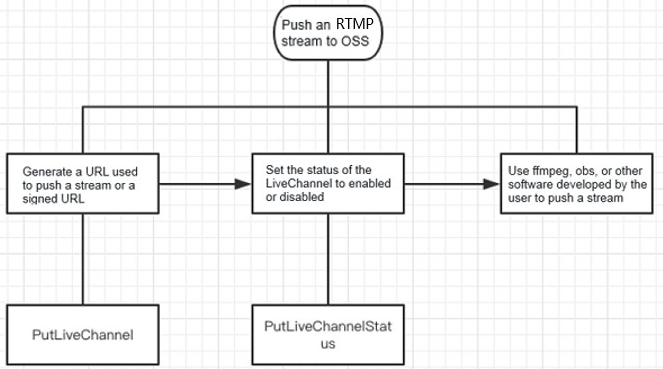
For more information, see PutLiveChannel and PutLiveChannelStatus.
What do I do if the generated M3U8 object does not contain all data that is ingested to the LiveChannel?
Cause: Based on the default rules of the HTTP Live Streaming (HLS) protocol, the generated M3U8 object contains only the last three TS objects.
Solution: Call the PostVodPlaylist operation to converge the TS objects generated within the specified time range into the M3U8 object.
-
The
EndTimemust be later than theStartTime, and the time span cannot exceed one day. -
OSS queries all ts files generated by the stream ingest of the specified LiveChannel within the specified time range and assembles them into a playlist.
What do I do if the M3U8 object failed to be generated?
Cause: Data in the stream is not completely ingested to Object Storage Service (OSS).
Solution: Capture packets on the client to check whether the "publish success" message is returned. This message indicates that the data in the stream is completely uploaded to OSS. If the message is returned but the M3U8 object is not generated, analyze the packets sent from the client to locate the cause.
What do I do if the client cannot ingest a stream to OSS?
For example, you fail to ingest a stream by using FFmpeg with the following command:
ffmpeg -re -i 0_20180525105430445.aac -acodec aac -strict -2 -f flv rtmp://xxx.oss-cn-beijing.aliyuncs.com/live/test_1000?Expires=1540458859&OSSAccessKeyId=LTAlujianb****&Signature=qwh31xQsanmao6ygCFJgo****%3D&playlistName=playlist.m3u8Solution:
-
If you cannot ingest a stream by using FFmpeg, try using a basic command without complex parameters.
-
If the stream ingest URL contains an ampersand (&), enclose the entire URL in double quotation marks (""). For example:
ffmpeg -re -i 0_20180525105430445.aac -acodec aac -strict -2 -f flv "rtmp://xxx.oss-cn-beijing.aliyuncs.com/live/test_1000?Expires=1540458859&OSSAccessKeyId=LTAlujianb****&Signature=qwh31xQsanmao6ygCFJgo****%3D&playlistName=playlist.m3u8". -
Try using OBS Studio for stream ingest to determine if the issue is specific to FFmpeg.
To reduce high latency after stream ingest starts, adjust the FragDuration and FragCount parameters of the PutLiveChannel operation.
What do I do if lag occurs when I playback the generated M3U8 object?
When the storage format is HLS, after the duration of the audio and video data written to the current .ts file reaches the duration specified by FragDuration, OSS switches to the next .ts file when it receives the next key frame. If the next key frame is not received within max(2*FragDuration, 60s), OSS forces a file switch, which may cause playback stuttering.
What do I do if no audio or video data is included in the generated M3U8 object?
Cause:
-
The
AVC headerorAAC headeris missing. Capture packets to verify. -
The
RTMP messagelength is less than 2, or thesequence headeris too small. -
The audio
Messagesize exceeds the buffer capacity. -
The
codec_ ctxparameter contains the decoding context. If its audio or video data is abnormal, recording may fail.
What do I do if the video uploaded to OSS by using FFMpeg does not contain audio data?
Solution:
-
Check the FFmpeg logs to confirm if the client sent the
aac_header. -
Capture RTMP packets on the client to see if the
aac_headerwas sent.
The FFmpeg logs show the audio stream is encoded as aac (LC) with an identifier of 0x000A, which confirms the client sent the aac_header:
Stream #0:0, 0, 1/1000
: Video: h264 (High), 1 reference frame ([7][0][0][0] / 0x0007), yuv420p(progressive, left), 544x...
  18 fps, 18 tbr, 1k tbn,
  1k tbc
    Stream #0:1, 0, 1/1000: Audio: aac (LC) ([10][0][0][0] / 0x000A), 48000 Hz, mono, fltp
Stream mapping:
  (copy)
cur_dts is invalid (this is harmless if it occurs once at the start per stream)
    Last message repeated 2 times