Lifecycle rules based on last modification time automatically transition objects to colder storage classes or delete them, reducing storage costs.
Use cases
A healthcare provider uploads medical records to OSS. Records are occasionally accessed in the first six months, then rarely. A lifecycle rule transitions them to Archive after 180 days.
A company uploads hotline recordings to OSS. Recordings are actively used for 2 months, occasionally accessed until 6 months, and unneeded after 2 years. A lifecycle rule transitions them to Infrequent Access after 60 days, Archive after 180 days, and deletes them after 730 days.
To delete all objects in a bucket, configure a lifecycle rule that applies to the entire bucket and deletes objects after one day.
These transitions use OSS storage classes.
Limitations
Matching conditions
Lifecycle rules support matching only based on prefixes and tags. Wildcard matching, suffix matching, and regular expression matching are not supported.
Part expiration limitations
You cannot configure two or more lifecycle rules that contain a part lifecycle policy for objects whose names have overlapping prefixes. Examples:
Example 1
If you configure a lifecycle rule that contains a part policy for a bucket, you cannot configure another lifecycle rule that contains a part policy for any objects in the bucket.
Example 2
If you configure a lifecycle rule that contains a part policy for objects whose names contain the dir1 prefix in a bucket, you cannot configure another lifecycle rule that contains a part policy for objects whose names contain overlapping prefixes, such as dir1/dir2.
Storage class transition limitations
Considerations
Rule limit
A bucket supports up to 1,000 lifecycle rules. A single rule can include policies based on both last modification time and last access time.
Overwrite semantics
The PutBucketLifecycle operation overwrites the existing configurations of a lifecycle rule of a bucket. For example, if a lifecycle rule named Rule1 is configured for a bucket and you want to configure another lifecycle rule named Rule2 for the bucket, perform the following operations:
Retrieve Rule1.
Combine Rule1 and Rule2.
Update the configuration with the combined rules (Rule1+Rule2).
Effective time
After a lifecycle rule is created, the status in the console rule list shows Starting. This is normal and the status does not change to Enabled. The execution of lifecycle rules does not provide deletion counts, logs, or notifications. You can check whether the target objects still exist to confirm whether a rule has been executed.
OSS loads a lifecycle rule within 24 hours after the rule is created. After the lifecycle rule is loaded, OSS runs the rule every day at 08:00:00 (UTC+8).
For day-based rules, ensure at least 24 hours between the object's last modification time and the rule's execution start time (08:00 UTC+8). For example, if a rule deletes objects one day after upload, OSS processes an object uploaded on July 20, 2020 as follows:
Objects uploaded before 08:00:00 (UTC+8) on July 20, 2020 are deleted from 08:00:00 (UTC+8) on July 21, 2020 to 08:00:00 (UTC+8) on July 22, 2020.
Objects uploaded after 08:00:00 (UTC+8) on July 20, 2020 are deleted from 08:00:00 (UTC+8) on July 22, 2020 to 08:00:00 (UTC+8) on July 23, 2020.
Updating a lifecycle rule may interrupt the current day's lifecycle task. Avoid frequent updates.
Verify before applying to production
Before you apply a lifecycle rule to a production bucket, configure and verify the rule in a test bucket. After you confirm that the rule works as expected, apply it to your production bucket. Configuring a lifecycle rule directly in a production bucket without verification may result in unintended data deletion.
Back up data before configuration
Before you configure a lifecycle rule, back up important data. You can use same-region replication (SRR) or cross-region replication (CRR) to back up your data.
Execution completion time
After a rule takes effect, lifecycle operations such as object deletion, storage class transition, and expiration of multipart upload parts are typically completed within 24 hours for up to 1 billion objects in the China (Hangzhou), China (Shanghai), China (Beijing), China (Zhangjiakou), China (Ulanqab), China (Shenzhen), and Singapore regions. In other regions, these operations are typically completed within 24 hours for up to 100 million objects.
Execution may take longer than 24 hours, and in some cases several days or weeks, if there are many objects to scan, many objects to which the lifecycle rule applies, many tags, many versions for a single object, or a high volume of new objects being written while the lifecycle task is running.
NoteIf versioning is enabled for the bucket, an operation on each version of an object is counted as a separate operation.
Billing
Storage class transitions and deletions incur storage and request fees. Lifecycle Fees.
Scenario-specific considerations
Delete source data after replication: Data replication and lifecycle operations are asynchronous. Replication can take minutes, hours, or even days, depending on the amount of data to replicate and the available bandwidth. Before you configure a lifecycle rule to delete replicated data from the source bucket, verify that the data has been replicated to the destination bucket. Set an appropriate expiration period. Otherwise, the lifecycle rule may delete source data before replication completes, causing data loss.
OSS-HDFS buckets:
Lifecycle rules for OSS files
To configure or modify a lifecycle rule based on the last modified time to match all objects in a bucket for which OSS-HDFS is enabled, use the NOT element to exclude the objects that are stored in the
.dlsdata/directory. This prevents lifecycle rule-triggered object deletion or storage class conversion actions from applying to OSS-HDFS data and consequently affecting read and write operations on OSS-HDFS data.Lifecycle rules for HDFS files
To tier frequently accessed data in Standard and less frequently accessed data in Infrequent Access, Archive, or Deep Archive, use the Use tiered storage feature, which is based on lifecycle rules.
Lifecycle rules with versioning: Lifecycle storage class transitions do not create previous versions.
Components
Filter conditions
Match by prefix: Matches objects and parts with a specified prefix. You can create multiple rules with different, non-overlapping prefixes. Prefix naming follows Object naming rules.
Match by tag: Matches objects by specified key-value tags. A single rule can have multiple tags; the rule applies only to objects that contain all specified tags.
Lifecycle rule tags
Object tags
Matched
a:1,b:2
a:1
No
a:1,b:3
No
a:1,b:2
Yes
a:1,b:2,c:3
Yes
NoteTag-based rules do not apply to parts.
Match by prefix and tags: Matches objects with the specified prefix and tag filters.
Apply to entire bucket: Matches all objects and parts in the bucket.
NOT element: Excludes specific objects from a lifecycle rule that would otherwise match a prefix and tags. Specify the prefixes and tags to exclude. NOT element examples.
ImportantLifecycle rules can include multiple NOT elements. This feature is in invitation-only preview. Contact technical support to request access.
A single bucket supports up to 1,000 NOT elements. A single rule supports up to 100 NOT elements. The total Prefix elements across all rules is limited to 2,000.
After you configure multiple NOT elements, use the console to manage your lifecycle rules.
If the multiple NOT elements feature is not enabled, do not create multiple rules that each exclude a different subdirectory. NOT elements in different rules operate independently. For example, if rule1 excludes only dir/p1/, dir/p2/ is still matched and deleted by rule1. If rule2 excludes only dir/p2/, dir/p1/ is still matched and deleted by rule2. This results in deleting all files under the dir/ prefix.
Object expiration and actions
Expiration in days: The specified action executes N days after the object's last modification time. Applies to all objects in a non-versioned bucket and to current versions in a versioned bucket.
Expiration on a date: All objects last modified before the specified date expire and the action executes. Applies to all objects in a non-versioned bucket and to current versions in a versioned bucket.
Days since becoming noncurrent: A noncurrent version expires N days after becoming noncurrent, and the action executes.
Transition or delete expired objects as specified in Lifecycle configuration elements.
Part expiration and actions
Expiration in days: A part is deleted a specified number of days (N) after its last modification time.
Expiration on a date: All parts last modified before a specified date are deleted.
How rules work
Different prefixes
For example, a bucket contains the following objects:
logs/programl/log1.txt
logs/program2/log2.txt
logs/program3/log3.txt
doc/readme.txt
If a lifecycle rule specifies the prefix logs/, it applies only to objects that start with logs/. If the prefix is doc/readme.txt, the rule applies only to the object doc/readme.txt.
You can specify a prefix containing Chinese characters for a lifecycle rule.
When you perform a GET or HEAD operation on an object that matches an expiration policy, OSS adds the x-oss-expiration response header. expiry-date indicates the object's expiration date, and rule-id indicates the ID of the matching rule.
Same prefix and tags
When multiple rules with the same prefix and tags apply to an object, deletion takes precedence over storage class transition. For example, if rule1 deletes objects with prefix abc and tag a=1 after 20 days, rule2's storage class transition does not take effect.
Rule | Prefix | Tag | Action |
rule1 | abc | a=1 | Delete after 20 days |
rule2 | abc | a=1 | Transition to Archive Storage after 20 days |
Overlapping prefixes
rule1 transitions all objects with the tag a=1 to Infrequent Access (IA) after 10 days. rule2 deletes objects with the prefix abc and the tag a=1 after 120 days.
Rule | Prefix | Tag | Action |
rule1 | - | a=1 | Transition to IA after 10 days |
rule2 | abc | a=1 | Delete after 120 days |
rule3 transitions all objects with tag a=1 to Archive after 20 days. Because objects in Archive cannot be transitioned to Infrequent Access (IA), rule4, which transitions objects with prefix abc and tag a=1 to IA after 30 days, does not take effect.
Rule | Prefix | Tag | Action |
rule3 | - | a=1 | Transition to Archive Storage after 20 days |
rule4 | abc | a=1 | Transition to IA after 30 days |
NOT element
If you configure multiple lifecycle rules for the same bucket and one includes a NOT element, the NOT logic applies only within that specific rule. Examples:
Example 1
Lifecycle rule 1 deletes objects with the prefix dir/ in examplebucket after 100 days.
Lifecycle rule 2 uses a NOT element to delete all objects in examplebucket except those with the prefix dir/ after 50 days.
Once these lifecycle rules are active, objects in examplebucket are deleted as follows:
Object
Deletion behavior
Objects with the prefix dir/
Delete after 100 days
Objects without the prefix dir/
Delete after 50 days
Example 2
Lifecycle rule 1 uses a NOT element to delete all objects in examplebucket except those with the tag (key1:value1) after 30 days.
Lifecycle rule 2 deletes all objects in examplebucket with the tag (key2:value2) after 50 days.
Once these lifecycle rules are active, objects in examplebucket are deleted as follows:
Object
Deletion behavior
Objects without the tags key1:value1 or key2:value2
Delete after 30 days
Objects with only the tag key1:value1
Not deleted
Objects with only the tag key2:value2
Delete after 30 days
Objects with both the key1:value1 and key2:value2 tags
Delete after 50 days
Procedure
OSS console
-
Log on to the OSS console.
-
In the left-side navigation pane, click Buckets. On the page that appears, click the name of the target bucket.
In the left-side navigation pane, choose .
On the Lifecycle page, click Create Rule.
NoteThe Enable Access Tracking switch on the Lifecycle page is not required for rules based only on last modification time. It applies only to Lifecycle rules based on the last access time and incurs additional fees.
In the Create Lifecycle Rule panel, configure the rule using the following tables.
If versioning is disabled for the bucket:
Section
Parameter
Description
Basic Settings
Status
The rule's status. Valid values: Start and Disable.
If enabled, OSS transitions or deletes objects based on the rule.
If disabled, the lifecycle task is suspended.
Applied To
The rule scope. Select Object Prefix or Whole Bucket.
NoteIf you select By Prefix, you must enter the full prefix. For example, to apply the rule to all objects in the
src/dir1/directory, set the prefix tosrc/dir1/. A prefix ofdir1would not match these objects as intended. The prefix cannot start with a forward slash (/) or a backslash (\). For example,/prodand/prod/are invalid prefixes. Useprod/orprodinstead.Allow Overlapped Prefixes
By default, OSS checks whether the prefixes of lifecycle rules overlap. For example, you configure the following two rules with overlapping prefixes:
Rule 1
Deletes all objects with the prefix dir1/ 180 days after their last modification time.
Rule 2
Transitions all objects with the prefix dir1/dir2/ to the Infrequent Access storage class 30 days after their last modification time, and deletes them 60 days after their last modification time.
If you do not select this option when you configure Rule 2, OSS detects that objects in the dir1/dir2/ directory match two deletion rules. As a result, OSS rejects Rule 2 and reports an Overlap for same action type Expiration. error.
If you select this option when you configure Rule 2, objects in the dir1/dir2/ directory are transitioned to the Infrequent Access storage class 30 days after their last modification time and are deleted 60 days after their last modification time. Other objects in the dir1/ directory are deleted 180 days after their last modification time.
NoteIf you configure multiple rules and one of them applies to the entire bucket, it is considered a case of overlapping prefixes.
Prefix
The object prefix that the rule applies to.
If you set the prefix to img, the rule applies to all objects whose names start with
img, such asimgtest.pngandimg/example.jpg.If you set the prefix to img/, the rule applies to all objects whose names start with
img/, such asimg/example.jpgandimg/test.jpg.
The prefix supports only exact string matching and does not support dynamic variables; see Longest prefix match and Prefixes do not support dynamic variables in the description of the Allow Overlapped Prefixes option for details.
Tag
Applies the rule only to objects with the specified tag.
If you do not set a prefix but specify a tag with key=a and value=1, the rule applies to all objects in the bucket with the tag a=1.
If you set the prefix to
imgand specify a tag with key=a and value=1, the rule applies to all objects in the bucket whose names start withimgand have the tag a=1.
NOT
The NOT option excludes objects with a specific prefix and tag from the lifecycle rule.
ImportantWhen you enable the NOT option, you must specify at least a prefix or a tag.
The key of a tag specified in the NOT condition cannot be the same as a key defined in the Tag condition.
You cannot configure a part expiration policy when the NOT option is enabled.
Object Size
Applies the rule to objects within a specified size range.
Minimum Size: The lifecycle rule applies to objects larger than this value. The value must be greater than 0 B and less than 5 TB.
Maximum Size: The lifecycle rule applies to objects smaller than this value. The value must be greater than 0 B and less than or equal to 5 TB.
ImportantIf you specify both a minimum and maximum object size in the same lifecycle rule:
Make sure that the maximum size is greater than the minimum size.
A part expiration policy cannot be configured.
You cannot configure a policy to clean up delete markers.
Policy for Objects
Object Lifecycle
Select an expiration policy for objects. Choose By Days, By Date, or Disabled. If you select Disabled, the object expiration policy does not take effect.
Lifecycle-based Rules
Configure rules to transition the storage class of objects or delete expired objects. Select Infrequent Access, Archive, Cold Archive, Deep Cold Archive, or Data Deletion.
For example, if you set Object Lifecycle to By Date and specify September 24, 2023, objects last modified before this date are automatically deleted and cannot be recovered.
Policy for Parts
Part Lifecycle
Configure an expiration policy for parts. This option is unavailable if you have selected Tag. Set the part expiration policy to By Days or By Date, or select Disabled. If you select Disabled, the part expiration policy does not take effect.
ImportantA lifecycle rule must include at least an object expiration policy or a part expiration policy.
Rules for Parts
Specifies when parts expire based on the number of days or the date selected in the part expiration policy. Expired parts are automatically deleted and cannot be recovered.
If versioning is enabled for the bucket:
The parameters in the Basic Settings and Policy for Parts sections are configured the same as for buckets without versioning. The following table describes only the parameters that are different.
ImportantBefore you configure a lifecycle rule, note that if versioning is enabled on a bucket that serves as the destination for cross-region replication, delete markers synchronized from the source bucket change the current versions of objects with the same name in the destination bucket into non-current versions. Therefore, carefully configure cleanup rules for non-current versions to prevent unintended data deletion.
Section
Parameter
Description
Policy for Current Versions
Clean up expired object delete marker
If versioning is enabled, the Clean Up Expired Object Delete Marker option is added to the expiration policy. Other options are the same as those for buckets for which versioning is disabled.
If you select this option, OSS deletes the delete marker of an expired object if it is the only version of the object. If the object has multiple versions and the latest version is a delete marker, OSS retains the delete marker. Delete markers.
ImportantThis rule does not clean up delete markers if non-current versions exist. We recommend that you promptly clean up delete markers and unnecessary non-current versions. Otherwise, an excessive number of delete markers can degrade list performance.
Policy for Previous Versions
Object Lifecycle
Set the expiration policy for non-current versions. Select By Days or Disabled. If you select Disabled, the expiration policy does not take effect.
Lifecycle-based Rules
Specify a number of days (N). A non-current version expires N days after it becomes non-current, and the specified action is performed on the day after expiration. For example, if you set the value to 30, an object that becomes a non-current version on September 1, 2023, is transitioned to the specified storage class or deleted on October 1, 2023.
ImportantYou can determine when an object became a non-current version by checking the last modification time of the subsequent version of the object.
Click OK.
After the lifecycle rule is saved, you can view it in the rule list.
SDK
The following samples configure lifecycle rules using common SDKs. For all supported SDKs, see the SDK overview.
Java
import com.aliyun.oss.*;
import com.aliyun.oss.common.auth.*;
import com.aliyun.oss.common.comm.SignVersion;
import com.aliyun.oss.common.utils.DateUtil;
import com.aliyun.oss.model.LifecycleRule;
import com.aliyun.oss.model.SetBucketLifecycleRequest;
import com.aliyun.oss.model.StorageClass;
import java.util.ArrayList;
import java.util.HashMap;
import java.util.List;
import java.util.Map;

public class Demo {

    public static void main(String[] args) throws Exception {
        // In this example, the endpoint of the China (Hangzhou) region is used. Specify your actual endpoint.
        String endpoint = "https://oss-cn-hangzhou.aliyuncs.com";
        // Obtain access credentials from environment variables. Before you run the sample code, make sure that the OSS_ACCESS_KEY_ID and OSS_ACCESS_KEY_SECRET environment variables are configured.
        EnvironmentVariableCredentialsProvider credentialsProvider = CredentialsProviderFactory.newEnvironmentVariableCredentialsProvider();
        // Specify the name of the bucket. Example: examplebucket.
        String bucketName = "examplebucket";
        // Specify the region in which the bucket is located. For example, if the bucket is located in the China (Hangzhou) region, set the region to cn-hangzhou.
        String region = "cn-hangzhou";

        // Create an OSSClient instance.
        // Call the shutdown method to release resources when the OSSClient is no longer in use.
        ClientBuilderConfiguration clientBuilderConfiguration = new ClientBuilderConfiguration();
        clientBuilderConfiguration.setSignatureVersion(SignVersion.V4);
        OSS ossClient = OSSClientBuilder.create()
        .endpoint(endpoint)
        .credentialsProvider(credentialsProvider)
        .clientConfiguration(clientBuilderConfiguration)
        .region(region)
        .build();

        try {
            // Create a request by using SetBucketLifecycleRequest.
            SetBucketLifecycleRequest request = new SetBucketLifecycleRequest(bucketName);

            // Specify the ID of the lifecycle rule.
            String ruleId0 = "rule0";
            // Specify the prefix that you want the lifecycle rule to match.
            String matchPrefix0 = "A0/";
            // Specify the tag that you want the lifecycle rule to match.
            Map<String, String> matchTags0 = new HashMap<String, String>();
            // Specify the key and value of the tag. In the example, the key is set to owner and the value is set to John.
            matchTags0.put("owner", "John");


            String ruleId1 = "rule1";
            String matchPrefix1 = "A1/";
            Map<String, String> matchTags1 = new HashMap<String, String>();
            matchTags1.put("type", "document");

            String ruleId2 = "rule2";
            String matchPrefix2 = "A2/";

            String ruleId3 = "rule3";
            String matchPrefix3 = "A3/";

            String ruleId4 = "rule4";
            String matchPrefix4 = "A4/";

            String ruleId5 = "rule5";
            String matchPrefix5 = "A5/";

            String ruleId6 = "rule6";
            String matchPrefix6 = "A6/";

            // Set the expiration time to three days after the last modified time.
            LifecycleRule rule = new LifecycleRule(ruleId0, matchPrefix0, LifecycleRule.RuleStatus.Enabled, 3);
            rule.setTags(matchTags0);
            request.AddLifecycleRule(rule);

            // Specify that objects that are created before the specified date expire.
            rule = new LifecycleRule(ruleId1, matchPrefix1, LifecycleRule.RuleStatus.Enabled);
            rule.setCreatedBeforeDate(DateUtil.parseIso8601Date("2022-10-12T00:00:00.000Z"));
            rule.setTags(matchTags1);
            request.AddLifecycleRule(rule);

            // Specify that parts expire three days after they are last modified.
            rule = new LifecycleRule(ruleId2, matchPrefix2, LifecycleRule.RuleStatus.Enabled);
            LifecycleRule.AbortMultipartUpload abortMultipartUpload = new LifecycleRule.AbortMultipartUpload();
            abortMultipartUpload.setExpirationDays(3);
            rule.setAbortMultipartUpload(abortMultipartUpload);
            request.AddLifecycleRule(rule);

            // Specify that parts that are created before the specific date expire.
            rule = new LifecycleRule(ruleId3, matchPrefix3, LifecycleRule.RuleStatus.Enabled);
            abortMultipartUpload = new LifecycleRule.AbortMultipartUpload();
            abortMultipartUpload.setCreatedBeforeDate(DateUtil.parseIso8601Date("2022-10-12T00:00:00.000Z"));
            rule.setAbortMultipartUpload(abortMultipartUpload);
            request.AddLifecycleRule(rule);

            // Specify that the storage classes of objects are changed to IA 10 days after they are last modified, and to Archive 30 days after they are last modified.
            rule = new LifecycleRule(ruleId4, matchPrefix4, LifecycleRule.RuleStatus.Enabled);
            List<LifecycleRule.StorageTransition> storageTransitions = new ArrayList<LifecycleRule.StorageTransition>();
            LifecycleRule.StorageTransition storageTransition = new LifecycleRule.StorageTransition();
            storageTransition.setStorageClass(StorageClass.IA);
            storageTransition.setExpirationDays(10);
            storageTransitions.add(storageTransition);
            storageTransition = new LifecycleRule.StorageTransition();
            storageTransition.setStorageClass(StorageClass.Archive);
            storageTransition.setExpirationDays(30);
            storageTransitions.add(storageTransition);
            rule.setStorageTransition(storageTransitions);
            request.AddLifecycleRule(rule);

            // Specify that the storage classes of objects that are last modified before October 12, 2022 are changed to Archive.
            rule = new LifecycleRule(ruleId5, matchPrefix5, LifecycleRule.RuleStatus.Enabled);
            storageTransitions = new ArrayList<LifecycleRule.StorageTransition>();
            storageTransition = new LifecycleRule.StorageTransition();

            storageTransition.setCreatedBeforeDate(DateUtil.parseIso8601Date("2022-10-12T00:00:00.000Z"));

            storageTransition.setStorageClass(StorageClass.Archive);
            storageTransitions.add(storageTransition);
            rule.setStorageTransition(storageTransitions);
            request.AddLifecycleRule(rule);

            // Specify that rule6 is configured for versioning-enabled buckets.
            rule = new LifecycleRule(ruleId6, matchPrefix6, LifecycleRule.RuleStatus.Enabled);
            // Specify that the storage classes of objects are changed to Archive 365 days after the objects are last modified.
            storageTransitions = new ArrayList<LifecycleRule.StorageTransition>();
            storageTransition = new LifecycleRule.StorageTransition();
            storageTransition.setStorageClass(StorageClass.Archive);
            storageTransition.setExpirationDays(365);
            storageTransitions.add(storageTransition);
            rule.setStorageTransition(storageTransitions);
            // Configure the lifecycle rule to automatically delete expired delete markers.
            rule.setExpiredDeleteMarker(true);
            // Specify that the storage classes of the previous versions of objects are changed to IA 10 days after the objects are last modified.
            LifecycleRule.NoncurrentVersionStorageTransition noncurrentVersionStorageTransition =
                    new LifecycleRule.NoncurrentVersionStorageTransition().withNoncurrentDays(10).withStrorageClass(StorageClass.IA);
            // Specify that the storage classes of the previous versions of objects are changed to Archive 20 days after the objects are last modified.
            LifecycleRule.NoncurrentVersionStorageTransition noncurrentVersionStorageTransition2 =
                    new LifecycleRule.NoncurrentVersionStorageTransition().withNoncurrentDays(20).withStrorageClass(StorageClass.Archive);
            // Specify that the previous versions of objects are deleted 30 days after the objects are last modified.
            LifecycleRule.NoncurrentVersionExpiration noncurrentVersionExpiration = new LifecycleRule.NoncurrentVersionExpiration().withNoncurrentDays(30);
            List<LifecycleRule.NoncurrentVersionStorageTransition> noncurrentVersionStorageTransitions = new ArrayList<LifecycleRule.NoncurrentVersionStorageTransition>();
            noncurrentVersionStorageTransitions.add(noncurrentVersionStorageTransition2);
            rule.setStorageTransition(storageTransitions);
            rule.setNoncurrentVersionExpiration(noncurrentVersionExpiration);
            rule.setNoncurrentVersionStorageTransitions(noncurrentVersionStorageTransitions);
            request.AddLifecycleRule(rule);

            // Initiate a request to configure lifecycle rules.
            ossClient.setBucketLifecycle(request);

            // Query the lifecycle rules that are configured for the bucket.
            List<LifecycleRule> listRules = ossClient.getBucketLifecycle(bucketName);
            for(LifecycleRule rules : listRules){
                System.out.println("ruleId="+rules.getId()+", matchPrefix="+rules.getPrefix());
            }
        } catch (OSSException oe) {
            System.out.println("Caught an OSSException, which means your request made it to OSS, "
                    + "but was rejected with an error response for some reason.");
            System.out.println("Error Message:" + oe.getErrorMessage());
            System.out.println("Error Code:" + oe.getErrorCode());
            System.out.println("Request ID:" + oe.getRequestId());
            System.out.println("Host ID:" + oe.getHostId());
        } catch (ClientException ce) {
            System.out.println("Caught an ClientException, which means the client encountered "
                    + "a serious internal problem while trying to communicate with OSS, "
                    + "such as not being able to access the network.");
            System.out.println("Error Message:" + ce.getMessage());
        } finally {
            if (ossClient != null) {
                ossClient.shutdown();
            }
        }
    }
}
PHP
<?php

// Include the autoload file to load dependencies.
require_once __DIR__ . '/../vendor/autoload.php';

use AlibabaCloud\Oss\V2 as Oss;
use AlibabaCloud\Oss\V2\Models\LifecycleConfiguration;

// Describe command-line parameters.
$optsdesc = [
    "region" => ['help' => 'The region in which the bucket is located', 'required' => True], // (Required) Specify the region in which the bucket is located.
    "endpoint" => ['help' => 'The domain names that other services can use to access OSS', 'required' => False], // (Optional) Specify the OSS endpoint.
    "bucket" => ['help' => 'The name of the bucket', 'required' => True], // (Required) Specify the name of the bucket.
];

// Generate a long options list to parse the command-line parameters.
$longopts = \array_map(function ($key) {
    return "$key:"; // Add a colon (:) to the end of each parameter to indicate that a value is required.
}, array_keys($optsdesc));

// Parse the command-line parameters.
$options = getopt("", $longopts);

// Check whether the required parameters are missing.
foreach ($optsdesc as $key => $value) {
    if ($value['required'] === True && empty($options[$key])) {
        $help = $value['help'];
        echo "Error: the following arguments are required: --$key, $help"; // Display the required but missing parameters.
        exit(1);
    }
}

// Obtain the values of the command-line parameters and assign the values to variables.
$region = $options["region"]; // The region in which the bucket is located.
$bucket = $options["bucket"]; // The name of the bucket.

// Load the AccessKey ID and AccessKey secret from environment variables.
$credentialsProvider = new Oss\Credentials\EnvironmentVariableCredentialsProvider();

// Use the default configuration of the SDK.
$cfg = Oss\Config::loadDefault();

// Specify the credential provider.
$cfg->setCredentialsProvider($credentialsProvider);

// Specify the region.
$cfg->setRegion($region);

// If an endpoint is provided, specify the endpoint.
if (isset($options["endpoint"])) {
    $cfg->setEndpoint($options["endpoint"]);
}

// Create an OSS client instance.
$client = new Oss\Client($cfg);

// Define a lifecycle rule that moves objects whose names are prefixed with "log/" to IA 30 days after they were last modified.
$lifecycleRule = new Oss\Models\LifecycleRule(
    prefix: 'log/', // The prefix of object names.
    transitions: array(
        new Oss\Models\LifecycleRuleTransition(
            days: 30, // Specify the days.
            storageClass: 'IA' // Change to IA.
        )
    ),
    id: 'rule', // The rule ID.
    status: 'Enabled' // Enable the rule.
);

// Create a lifecycle configuration and add lifecycle rules to the configuration.
$lifecycleConfiguration = new LifecycleConfiguration(
    rules: array($lifecycleRule)
);

// Create a request to set a lifecycle configuration and pass the lifecycle configuration.
$request = new Oss\Models\PutBucketLifecycleRequest(
    bucket: $bucket,
    lifecycleConfiguration: $lifecycleConfiguration
);

// Call the putBucketLifecycle method to configure the lifecycle rules.
$result = $client->putBucketLifecycle($request);

// Display the result.
printf(
    'status code:' . $result->statusCode . PHP_EOL . // The HTTP response status code.
    'request id:' . $result->requestId . PHP_EOL // The request ID.
);
Node.js
const OSS = require('ali-oss')

const client = new OSS({
  // Specify the region in which the bucket is located. For example, if the bucket is located in the China (Hangzhou) region, set the region to oss-cn-hangzhou.
  region: 'yourregion',
  // Obtain access credentials from environment variables. Before you run the sample code, make sure that the OSS_ACCESS_KEY_ID and OSS_ACCESS_KEY_SECRET environment variables are configured.
  accessKeyId: process.env.OSS_ACCESS_KEY_ID,
  accessKeySecret: process.env.OSS_ACCESS_KEY_SECRET,
  authorizationV4: true,
  // Specify the name of the bucket.
  bucket: 'yourbucketname'
});

async function putBucketLifecycle(lifecycle) {
  try {
    const result = await client.putBucketLifecycle('yourbucketname', [
    lifecycle
  ]);
    console.log(result);
  } catch (e) {
    console.log(e);
  }
}

const lifecycle1 = {
  id: 'rule1',
  status: 'Enabled',
  prefix: 'foo/',
  expiration: {
    // Specify that the current versions of objects expire three days after the objects are last modified.
    days: 3
  }
}
putBucketLifecycle(lifecycle1)

const lifecycle2 = {
  id: 'rule2',
  status: 'Enabled',
  prefix: 'foo/',
  expiration: {
    // Specify that the objects that are created before the specified date expire.
    createdBeforeDate: '2020-02-18T00:00:00.000Z'
  },
}
putBucketLifecycle(lifecycle2)

const lifecycle3 = {
  id: 'rule3',
  status: 'Enabled',
  prefix: 'foo/',
  abortMultipartUpload: {
    // Specify that parts expire in three days.
    days: 3
  },
}
putBucketLifecycle(lifecycle3)

const lifecycle4 = {
  id: 'rule4',
  status: 'Enabled',
  prefix: 'foo/',
  abortMultipartUpload: {
    // Specify that parts created before the specified date expire.
    createdBeforeDate: '2020-02-18T00:00:00.000Z'
  },
}
putBucketLifecycle(lifecycle4)

const lifecycle5 = {
  id: 'rule5',
  status: 'Enabled',
  prefix: 'foo/',
  transition: {
    // Specify that the storage classes of the current versions of objects are changed to Archive 20 days after the objects are last modified.
    days: 20,
    storageClass: 'Archive'
  },
  expiration: {
    // Specify that the current versions of objects expire 21 days after the objects are last modified.
    days: 21
  },
}
putBucketLifecycle(lifecycle5)

const lifecycle6 = {
  id: 'rule6',
  status: 'Enabled',
  prefix: 'foo/',
  transition: {
    //Specify that the storage classes of the objects that are created before the specified date are changed to Archive.
    createdBeforeDate: '2023-02-19T00:00:00.000Z',
    storageClass: 'Archive'
  },
  expiration: {
    // Specify that objects created before the specified date are deleted.
    createdBeforeDate: '2023-01-18T00:00:00.000Z'
  },
}
putBucketLifecycle(lifecycle6)

const lifecycle7 = {
  id: 'rule7',
  status: 'Enabled',
  prefix: 'foo/',
  expiration: {
    // Specify that delete markers are automatically removed when they expire.
    expiredObjectDeleteMarker: true
  }
}
putBucketLifecycle(lifecycle7)

const lifecycle8 = {
  id: 'rule8',
  status: 'Enabled',
  prefix: 'foo/',
  // Specify that the storage classes of the previous versions of objects are changed to IA 10 days after the objects are last modified.
  noncurrentVersionTransition: {
    noncurrentDays: '10',
    storageClass: 'IA'
  }
}
putBucketLifecycle(lifecycle8)

const lifecycle9 = {
  id: 'rule9',
  status: 'Enabled',
  prefix: 'foo/',
  // Specify that the storage classes of the previous versions of objects are changed to IA 10 days after the objects are last modified.
  noncurrentVersionTransition: {
    noncurrentDays: '10',
    storageClass: 'IA'
  },
  // Specify the tags for objects that you want to match the rules.
  tag: [{
    key: 'key1',
    value: 'value1'
  },
   {
     key: 'key2',
     value: 'value2'
   }]
}
putBucketLifecycle(lifecycle9)
Python
import argparse
import alibabacloud_oss_v2 as oss

# Create a command-line argument parser to receive user-entered parameters.
parser = argparse.ArgumentParser(description="put bucket lifecycle sample")

# Add the --region command-line argument, which specifies the region where the bucket is located. This argument is required.
parser.add_argument('--region', help='The region in which the bucket is located.', required=True)

# Add the --bucket command-line argument, which specifies the name of the bucket. This argument is required.
parser.add_argument('--bucket', help='The name of the bucket.', required=True)

# Add the --endpoint command-line argument, which specifies the domain name that other services can use to access OSS. This argument is optional.
parser.add_argument('--endpoint', help='The domain names that other services can use to access OSS')

def main():
  # Parse command-line arguments.
  args = parser.parse_args()

  # Load credentials (AccessKey ID and AccessKey secret) from environment variables.
  credentials_provider = oss.credentials.EnvironmentVariableCredentialsProvider()

  # Load the default configurations of the SDK.
  cfg = oss.config.load_default()

  # Set the credentials provider.
  cfg.credentials_provider = credentials_provider

  # Set the region where the bucket is located.
  cfg.region = args.region

  # If a custom endpoint is provided by the user, set it in the configuration.
  if args.endpoint is not None:
    cfg.endpoint = args.endpoint

    # Initialize the OSS client using the configuration object.
  client = oss.Client(cfg)

  result = client.put_bucket_lifecycle(oss.PutBucketLifecycleRequest(
    bucket=args.bucket,
    lifecycle_configuration=oss.LifecycleConfiguration(
      rules=[oss.LifecycleRule(
        # Specify lifecycle rule rule1. In this rule, objects that have the prefix foo/ and the tag k1:v1 are converted to the Infrequent Access (IA) storage class 30 days after they are last modified.
        id='rule1',
        status='Enabled',
        prefix='foo/',
        transitions=[oss.LifecycleRuleTransition(
          days=30,
          storage_class=oss.StorageClassType.IA,
          is_access_time=False, # Set to false, which indicates that the policy is based on the last modified time.
        )],
        tags=[oss.Tag(
          key='k1',
          value='v1',
        )],
      ), oss.LifecycleRule(
        # Specify lifecycle rule rule2. In this rule, for objects that have the prefix dir/, delete markers are automatically deleted if the objects are in a versioning-enabled bucket and have only delete markers. Non-current versions of objects expire and are deleted after 30 days. Non-current versions of objects are converted to the IA storage class after 10 days.
        id='rule2',
        status='Enabled',
        prefix='dir/',
        expiration=oss.LifecycleRuleExpiration(
          expired_object_delete_marker=True
        ),
        noncurrent_version_expiration=oss.NoncurrentVersionExpiration(
          noncurrent_days=30,
        ),
        noncurrent_version_transitions=[oss.NoncurrentVersionTransition(
          noncurrent_days=10,
          storage_class=oss.StorageClassType.IA,
          is_access_time=False,
        )],
      )]
    ),
  ))

  # Print the status code and request ID of the operation.
  print(f'status code: {result.status_code}, '  # The HTTP status code, which indicates whether the request is successful.
        f'request id: {result.request_id}')    # The request ID, which is used to track request logs and for debugging.


if __name__ == "__main__":
  # The program entry point that calls the main function to execute the logic.
  main()
C#
using Aliyun.OSS;
using Aliyun.OSS.Common;
// Specify the endpoint of the region in which the bucket is located. For example, if the bucket is located in the China (Hangzhou) region, set the endpoint to https://oss-cn-hangzhou.aliyuncs.com.
var endpoint = "https://oss-cn-hangzhou.aliyuncs.com";
// Obtain access credentials from environment variables. Before you run the sample code, make sure that the OSS_ACCESS_KEY_ID and OSS_ACCESS_KEY_SECRET environment variables are configured.
var accessKeyId = Environment.GetEnvironmentVariable("OSS_ACCESS_KEY_ID");
var accessKeySecret = Environment.GetEnvironmentVariable("OSS_ACCESS_KEY_SECRET");
// Specify the bucket name. Example: examplebucket.
var bucketName = "examplebucket";
// Specify the region in which the bucket is located. For example, if the bucket is located in the China (Hangzhou) region, set the region to cn-hangzhou.
const string region = "cn-hangzhou";

// Create a ClientConfiguration instance and modify the default parameters based on your requirements.
var conf = new ClientConfiguration();

// Use the signature algorithm V4.
conf.SignatureVersion = SignatureVersion.V4;

// Create an OSSClient instance.
var client = new OssClient(endpoint, accessKeyId, accessKeySecret, conf);
client.SetRegion(region);
try
{
    var setBucketLifecycleRequest = new SetBucketLifecycleRequest(bucketName);
    // Create the first lifecycle rule.
    LifecycleRule lcr1 = new LifecycleRule()
    {
        ID = "delete obsoleted files",
        Prefix = "obsoleted/",
        Status = RuleStatus.Enabled,
        ExpriationDays = 3,
        Tags = new Tag[1]
    };
    // Specify a tag for the rule.
    var tag1 = new Tag
    {
        Key = "project",
        Value = "projectone"
    };

    lcr1.Tags[0] = tag1;

    // Create the second lifecycle rule.
    LifecycleRule lcr2 = new LifecycleRule()
    {
        ID = "delete temporary files",
        Prefix = "temporary/",
        Status = RuleStatus.Enabled,
        ExpriationDays = 20,
        Tags = new Tag[1]
    };
    // Specify a tag for the rule.
    var tag2 = new Tag
    {
        Key = "user",
        Value = "jsmith"
    };
    lcr2.Tags[0] = tag2;

    // Specify that parts expire 30 days after they are last modified.
    lcr2.AbortMultipartUpload = new LifecycleRule.LifeCycleExpiration()
    {
        Days = 30
    };

    LifecycleRule lcr3 = new LifecycleRule();
    lcr3.ID = "only NoncurrentVersionTransition";
    lcr3.Prefix = "test1";
    lcr3.Status = RuleStatus.Enabled;
    lcr3.NoncurrentVersionTransitions = new LifecycleRule.LifeCycleNoncurrentVersionTransition[2]
    {
        // Specify that the storage classes of the previous versions of objects are converted to IA 90 days after they are last modified.
        new LifecycleRule.LifeCycleNoncurrentVersionTransition(){
            StorageClass = StorageClass.IA,
            NoncurrentDays = 90
        },
        // Specify that the storage classes of the previous versions of objects are converted to Archive 180 days after they are last modified.
        new LifecycleRule.LifeCycleNoncurrentVersionTransition(){
            StorageClass = StorageClass.Archive,
            NoncurrentDays = 180
        }
    };
    setBucketLifecycleRequest.AddLifecycleRule(lcr1);
    setBucketLifecycleRequest.AddLifecycleRule(lcr2);
    setBucketLifecycleRequest.AddLifecycleRule(lcr3);

    // Configure lifecycle rules.
    client.SetBucketLifecycle(setBucketLifecycleRequest);
    Console.WriteLine("Set bucket:{0} Lifecycle succeeded ", bucketName);
}
catch (OssException ex)
{
    Console.WriteLine("Failed with error code: {0}; Error info: {1}. \nRequestID:{2}\tHostID:{3}",
        ex.ErrorCode, ex.Message, ex.RequestId, ex.HostId);
}
catch (Exception ex)
{
    Console.WriteLine("Failed with error info: {0}", ex.Message);
}
Android
PutBucketLifecycleRequest request = new PutBucketLifecycleRequest();
request.setBucketName("examplebucket");

BucketLifecycleRule rule1 = new BucketLifecycleRule();
// Set the rule ID and file prefix.
rule1.setIdentifier("1");
rule1.setPrefix("A");
// Specify whether to execute the lifecycle rule. If the value is true, OSS periodically executes the rule. If the value is false, OSS ignores the rule.
rule1.setStatus(true);
// Expire objects 200 days after the last modified time.
rule1.setDays("200");
// Transition objects to the Archive storage class after 30 days.
rule1.setArchiveDays("30");
// Expire incomplete multipart uploads after 3 days.
rule1.setMultipartDays("3");
// Transition objects to the Infrequent Access (IA) storage class after 15 days.
rule1.setIADays("15");

BucketLifecycleRule rule2 = new BucketLifecycleRule();
rule2.setIdentifier("2");
rule2.setPrefix("B");
rule2.setStatus(true);
rule2.setDays("300");
rule2.setArchiveDays("30");
rule2.setMultipartDays("3");
rule2.setIADays("15");

ArrayList<BucketLifecycleRule> lifecycleRules = new ArrayList<BucketLifecycleRule>();
lifecycleRules.add(rule1);
lifecycleRules.add(rule2);
request.setLifecycleRules(lifecycleRules);
OSSAsyncTask task = oss.asyncPutBucketLifecycle(request, new OSSCompletedCallback<PutBucketLifecycleRequest, PutBucketLifecycleResult>() {
    @Override
    public void onSuccess(PutBucketLifecycleRequest request, PutBucketLifecycleResult result) {
        OSSLog.logInfo("code::"+result.getStatusCode());

    }

    @Override
    public void onFailure(PutBucketLifecycleRequest request, ClientException clientException, ServiceException serviceException) {
        OSSLog.logError("error: "+serviceException.getRawMessage());

    }
});

task.waitUntilFinished();
C++
#include <alibabacloud/oss/OssClient.h>
using namespace AlibabaCloud::OSS;

int main(void)
{
    /* Initialize the OSS account information. */

    /* Set yourEndpoint to the Endpoint of the region where the bucket is located. For example, if the bucket is in the China (Hangzhou) region, set the Endpoint to https://oss-cn-hangzhou.aliyuncs.com. */
    std::string Endpoint = "yourEndpoint";
    /* Set yourRegion to the region where the bucket is located. For example, if the bucket is in the China (Hangzhou) region, set the Region to cn-hangzhou. */
    std::string Region = "yourRegion";
    /* Specify the bucket name. For example, examplebucket. */
    std::string BucketName = "examplebucket";

    /* Initialize network resources. */
    InitializeSdk();

    ClientConfiguration conf;
    conf.signatureVersion = SignatureVersionType::V4;
    /* Obtain access credentials from environment variables. Before you run this code, make sure that the OSS_ACCESS_KEY_ID and OSS_ACCESS_KEY_SECRET environment variables are set. */
    auto credentialsProvider = std::make_shared<EnvironmentVariableCredentialsProvider>();
    OssClient client(Endpoint, credentialsProvider, conf);
    client.SetRegion(Region);

    SetBucketLifecycleRequest request(BucketName);
    std::string date("2022-10-12T00:00:00.000Z");

    /* Set tags. */
    Tagging tagging;
    tagging.addTag(Tag("key1", "value1"));
    tagging.addTag(Tag("key2", "value2"));

    /* Specify a lifecycle rule. */
    auto rule1 = LifecycleRule();
    rule1.setID("rule1");
    rule1.setPrefix("test1/");
    rule1.setStatus(RuleStatus::Enabled);
    rule1.setExpiration(3);
    rule1.setTags(tagging.Tags());

    /* Specify the expiration time. */
    auto rule2 = LifecycleRule();
    rule2.setID("rule2");
    rule2.setPrefix("test2/");
    rule2.setStatus(RuleStatus::Disabled);
    rule2.setExpiration(date);

    /* rule3 is a lifecycle rule for a bucket with versioning enabled. */
    auto rule3 = LifecycleRule();
    rule3.setID("rule3");
    rule3.setPrefix("test3/");
    rule3.setStatus(RuleStatus::Disabled);

    /* Transition objects to the Archive storage class 365 days after they are last modified. */
    auto transition = LifeCycleTransition();
    transition.Expiration().setDays(365);
    transition.setStorageClass(StorageClass::Archive);
    rule3.addTransition(transition);

    /* Automatically remove expired delete markers. */
    rule3.setExpiredObjectDeleteMarker(true);

    /* Transition noncurrent versions of objects to the Infrequent Access storage class 10 days after they become noncurrent. */
    auto transition1 = LifeCycleTransition();
    transition1.Expiration().setDays(10);
    transition1.setStorageClass(StorageClass::IA);

    /* Transition noncurrent versions of objects to the Archive storage class 20 days after they become noncurrent. */
    auto transition2 = LifeCycleTransition();
    transition2.Expiration().setDays(20);
    transition2.setStorageClass(StorageClass::Archive);

    /* Delete objects 30 days after they become noncurrent versions. */
    auto expiration  = LifeCycleExpiration(30);
    rule3.setNoncurrentVersionExpiration(expiration);

    LifeCycleTransitionList noncurrentVersionStorageTransitions{transition1, transition2};
    rule3.setNoncurrentVersionTransitionList(noncurrentVersionStorageTransitions);

    /* Set the lifecycle rules. */
    LifecycleRuleList list{rule1, rule2, rule3};
    request.setLifecycleRules(list);
    auto outcome = client.SetBucketLifecycle(request);

    if (!outcome.isSuccess()) {
        /* Handle exceptions. */
        std::cout << "SetBucketLifecycle fail" <<
        ",code:" << outcome.error().Code() <<
        ",message:" << outcome.error().Message() <<
        ",requestId:" << outcome.error().RequestId() << std::endl;
        return -1;
    }

    /* Release network resources. */
    ShutdownSdk();
    return 0;
}
C
#include "oss_api.h"
#include "aos_http_io.h"
/* Replace yourEndpoint with the Endpoint of the region where your bucket is located. For example, for the China (Hangzhou) region, the Endpoint is https://oss-cn-hangzhou.aliyuncs.com. */
const char *endpoint = "yourEndpoint";
/* Replace with your bucket name. For example, examplebucket. */
const char *bucket_name = "examplebucket";
/* Replace yourRegion with the ID of the region where your bucket is located. For example, for the China (Hangzhou) region, the region ID is cn-hangzhou. */
const char *region = "yourRegion";
void init_options(oss_request_options_t *options)
{
    options->config = oss_config_create(options->pool);
    /* Initialize an aos_string_t variable with a char* string. */
    aos_str_set(&options->config->endpoint, endpoint);
    /* Obtain access credentials from environment variables. Before you run this sample code, make sure the OSS_ACCESS_KEY_ID and OSS_ACCESS_KEY_SECRET environment variables are set. */
    aos_str_set(&options->config->access_key_id, getenv("OSS_ACCESS_KEY_ID"));
    aos_str_set(&options->config->access_key_secret, getenv("OSS_ACCESS_KEY_SECRET"));
    // You must also configure the following two parameters.
    aos_str_set(&options->config->region, region);
    options->config->signature_version = 4;
    /* Specify whether to use a CNAME to access OSS. A value of 0 means that a CNAME is not used. */
    options->config->is_cname = 0;
    /* Set network parameters, such as the timeout period. */
    options->ctl = aos_http_controller_create(options->pool, 0);
}
int main(int argc, char *argv[])
{
    /* Call the aos_http_io_initialize method at the program entry point to initialize global resources, such as the network and memory. */
    if (aos_http_io_initialize(NULL, 0) != AOSE_OK) {
        exit(1);
    }
    /* The memory pool (pool) for memory management is equivalent to apr_pool_t. The implementation is in the apr library. */
    aos_pool_t *pool;
    /* Create a memory pool. The second parameter is NULL, which indicates that the new memory pool does not inherit from another memory pool. */
    aos_pool_create(&pool, NULL);
    /* Create and initialize options. This parameter includes global configurations, such as endpoint, access_key_id, access_key_secret, is_cname, and curl. */
    oss_request_options_t *oss_client_options;
    /* Allocate memory for options in the memory pool. */
    oss_client_options = oss_request_options_create(pool);
    /* Initialize the client options, oss_client_options. */
    init_options(oss_client_options);
    /* Initialize parameters. */
    aos_string_t bucket;
    aos_table_t *resp_headers = NULL;
    aos_status_t *resp_status = NULL;
    aos_str_set(&bucket, bucket_name);
    aos_list_t lifecycle_rule_list;
    aos_str_set(&bucket, bucket_name);
    aos_list_init(&lifecycle_rule_list);
    /* Specify the expiration in days. */
    oss_lifecycle_rule_content_t *rule_content_days = oss_create_lifecycle_rule_content(pool);
    aos_str_set(&rule_content_days->id, "rule-1");
    /* Set the object prefix. */
    aos_str_set(&rule_content_days->prefix, "dir1");
    aos_str_set(&rule_content_days->status, "Enabled");
    rule_content_days->days = 3;
    aos_list_add_tail(&rule_content_days->node, &lifecycle_rule_list);
    /* Specify the expiration date. */
    oss_lifecycle_rule_content_t *rule_content_date = oss_create_lifecycle_rule_content(pool);
    aos_str_set(&rule_content_date->id, "rule-2");
    aos_str_set(&rule_content_date->prefix, "dir2");
    aos_str_set(&rule_content_date->status, "Enabled");
    /* The expiration date must be in UTC format.
    aos_str_set(&rule_content_date->date, "2023-10-11T00:00:00.000Z");
    aos_list_add_tail(&rule_content_date->node, &lifecycle_rule_list);
    /* Set the lifecycle rule. */
    resp_status = oss_put_bucket_lifecycle(oss_client_options, &bucket, &lifecycle_rule_list, &resp_headers);
    if (aos_status_is_ok(resp_status)) {
        printf("put bucket lifecycle succeeded\n");
    } else {
        printf("put bucket lifecycle failed, code:%d, error_code:%s, error_msg:%s, request_id:%s\n",
            resp_status->code, resp_status->error_code, resp_status->error_msg, resp_status->req_id);
    }
    /* Release the memory pool. This releases the memory allocated to resources during the request. */
    aos_pool_destroy(pool);
    /* Release the previously allocated global resources. */
    aos_http_io_deinitialize();
    return 0;
}
Ruby
require 'aliyun/oss'

client = Aliyun::OSS::Client.new(
  # The China (Hangzhou) Endpoint is used as an example. Replace it with the actual Endpoint.
  endpoint: 'https://oss-cn-hangzhou.aliyuncs.com',
  # Obtain access credentials from environment variables. Before you run the sample code, make sure that the OSS_ACCESS_KEY_ID and OSS_ACCESS_KEY_SECRET environment variables are set.
  access_key_id: ENV['OSS_ACCESS_KEY_ID'],
  access_key_secret: ENV['OSS_ACCESS_KEY_SECRET']
)
# Specify the bucket name.
bucket = client.get_bucket('examplebucket')
# Set the lifecycle rules.
bucket.lifecycle = [
  Aliyun::OSS::LifeCycleRule.new(
    :id => 'rule1', :enable => true, :prefix => 'foo/', :expiry => 3),
  Aliyun::OSS::LifeCycleRule.new(
    :id => 'rule2', :enable => false, :prefix => 'bar/', :expiry => Date.new(2016, 1, 1))
]
Go
package main
import (
"context"
"flag"
"log"
"github.com/aliyun/alibabacloud-oss-go-sdk-v2/oss"
"github.com/aliyun/alibabacloud-oss-go-sdk-v2/oss/credentials"
)
// Define global variables.
var (
region string // The region where the bucket is located.
bucketName string // The name of the bucket.
)
// The init function initializes command-line arguments.
func init() {
flag.StringVar(®ion, "region", "", "The region in which the bucket is located.")
flag.StringVar(&bucketName, "bucket", "", "The name of the bucket.")
}
func main() {
// Parse command-line arguments.
flag.Parse()
// Check if the bucket name is provided.
if len(bucketName) == 0 {
flag.PrintDefaults()
log.Fatalf("invalid parameters, bucket name required")
}
// Check if the region is provided.
if len(region) == 0 {
flag.PrintDefaults()
log.Fatalf("invalid parameters, region required")
}
// Load the default configuration, and set the credentials provider and region.
cfg := oss.LoadDefaultConfig().
WithCredentialsProvider(credentials.NewEnvironmentVariableCredentialsProvider()).
WithRegion(region)
// Create an OSS client.
client := oss.NewClient(cfg)
// Create a request to set lifecycle rules for the bucket.
request := &oss.PutBucketLifecycleRequest{
Bucket: oss.Ptr(bucketName), // The name of the bucket.
LifecycleConfiguration: &oss.LifecycleConfiguration{
Rules: []oss.LifecycleRule{
{
// Specify lifecycle rule "rule1".
// This rule transitions objects with the prefix "foo/" and the tag {k1: v1}
// to the Infrequent Access (IA) storage class 30 days after they are last modified.
Status: oss.Ptr("Enabled"),
ID: oss.Ptr("rule1"),
Prefix: oss.Ptr("foo/"),
Transitions: []oss.LifecycleRuleTransition{
{
Days: oss.Ptr(int32(30)),
StorageClass: oss.StorageClassIA,
IsAccessTime: oss.Ptr(false), // Set to false for a rule based on last modified time.
},
},
Tags: []oss.Tag{
{
Key: oss.Ptr("k1"),
Value: oss.Ptr("v1"),
},
},
},
{
// Specify lifecycle rule "rule2". This rule applies to objects with the prefix "dir/".
// It automatically removes expired object delete markers, deletes non-current versions after 30 days,
// and transitions non-current versions to the IA storage class 10 days after they become non-current.
ID: oss.Ptr("rule2"),
Prefix: oss.Ptr("dir/"),
Status: oss.Ptr("Enabled"),
Expiration: &oss.LifecycleRuleExpiration{
Days: oss.Ptr(int32(10)),
ExpiredObjectDeleteMarker: oss.Ptr(true),
},
NoncurrentVersionExpiration: &oss.NoncurrentVersionExpiration{
NoncurrentDays: oss.Ptr(int32(30)),
},
NoncurrentVersionTransitions: []oss.NoncurrentVersionTransition{{
NoncurrentDays: oss.Ptr(int32(10)),
StorageClass: oss.StorageClassIA,
IsAccessTime: oss.Ptr(false), // Set to false for a rule based on last modified time.
}},
},
},
},
}
// Set the lifecycle rules for the bucket.
result, err := client.PutBucketLifecycle(context.TODO(), request)
if err != nil {
log.Fatalf("failed to put bucket lifecycle %v", err)
}
// Print the result of setting the lifecycle rules.
log.Printf("put bucket lifecycle result:%#v\n", result)
}
ossutil
Configure lifecycle rules with ossutil (Install ossutil).
The following example sets a lifecycle rule for the examplebucket bucket.
ossutil api put-bucket-lifecycle --bucket examplebucket --lifecycle-configuration "{\"Rule\":{\"ID\":\"rule1\",\"Prefix\":\"tmp/\",\"Status\":\"Enabled\",\"Expiration\":{\"Days\":\"10\"},\"Transition\":{\"Days\":\"5\",\"StorageClass\":\"IA\"},\"AbortMultipartUpload\":{\"Days\":\"10\"}}}"Related API
To configure lifecycle rules via REST API (requires signature calculation), use PutBucketLifecycle.
FAQ
How to quickly delete all objects in a bucket using lifecycle policies
Non-versioned buckets
Go to the Bucketspage in the OSS console and click the bucket name.
In the left-side navigation tree, choose and check whether versioning is enabled.
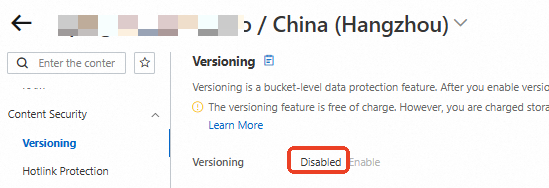
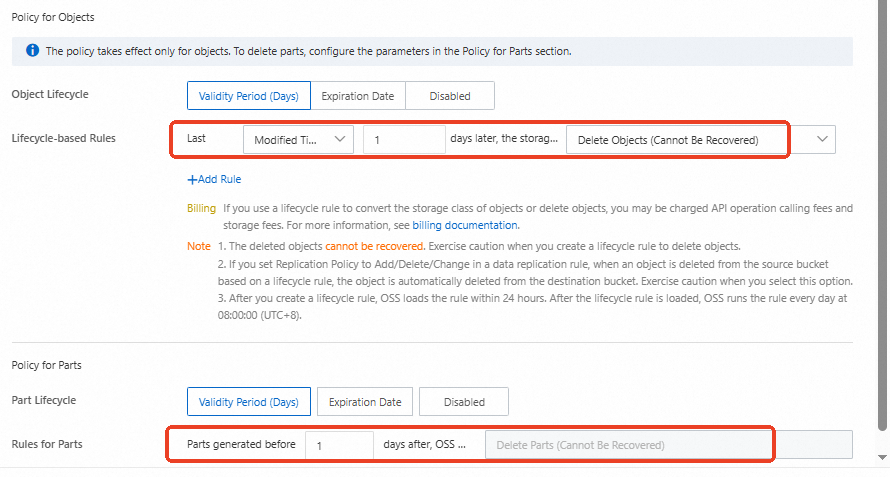
In the left-side navigation tree, choose . Configure a lifecycle rule to automatically delete all objects in the bucket one day after their last modification, and to delete parts generated more than one day ago.
Versioned buckets
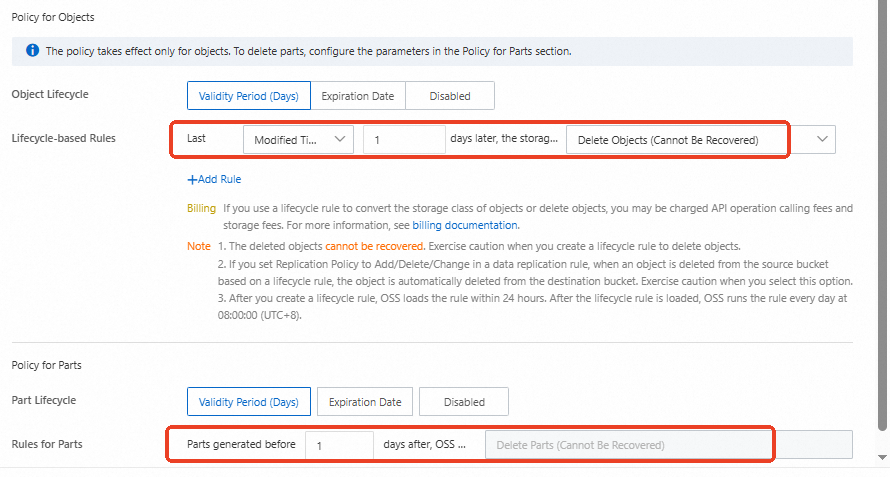
You can configure a lifecycle rule to automatically delete all objects and parts from incomplete multipart upload tasks in non-versioned buckets.
Go to the Bucketspage in the OSS console and click the bucket name.
In the left-side navigation tree, choose and check whether versioning is enabled.
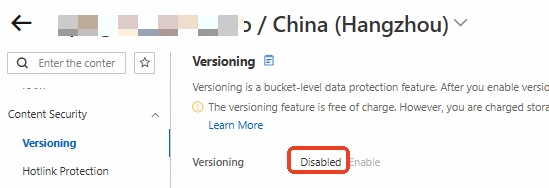
In the left-side navigation tree, choose . Configure a lifecycle rule to automatically delete all objects in the bucket one day after their last modification, and to delete parts generated more than one day ago.
Error: Set bucket lifecycle error, InvalidArgument, Days in the Transition action for StorageClass Archive must be more than the Transition action for StorageClass IA
Transition periods are ordered incorrectly. They must follow: Infrequent Access < Archive < Cold Archive < Deep Cold Archive.
Lifecycle rules and existing objects
Lifecycle rules apply to both existing and newly uploaded objects. For example, if you configure a rule on October 7 to delete objects after 30 days, an object uploaded on October 5 is deleted on November 5, and one uploaded on October 8 is deleted on November 8.
Modify lifecycle rules
To modify a specific lifecycle rule (e.g., Rule1) when multiple rules exist:
Call the GetBucketLifecycle operation to retrieve all current lifecycle rules for the bucket.
Modify the settings of Rule1.
Call the PutBucketLifecycle operation to replace the existing configuration by submitting both the modified Rule1 and the original Rule2.
Delete lifecycle rules
DeleteBucketLifecycle deletes all lifecycle rules from a bucket. To delete a single rule (e.g., Rule1) while keeping others (e.g., Rule2), replace the entire configuration:
Call the GetBucketLifecycle operation to retrieve all current lifecycle rules for the bucket.
Delete Rule1.
Call the PutBucketLifecycle operation to replace the existing configuration by submitting only Rule2.
Logging for lifecycle operations
Yes. All successful transitions and expirations triggered by lifecycle rules are logged. Relevant log fields:
Operation
CommitTransition: Indicates a storage class transition.
ExpireObject: Indicates the deletion of an expired object.
Sync Request
lifecycle: The transition or deletion was triggered by a lifecycle rule.
Log fields describes the full schema. Billing rules covers log query costs.
Clean up delete markers and current versions
Yes. A single lifecycle rule can expire current object versions and clean up expired delete markers.
Transition from Infrequent Access to Standard
No. Use one of the following methods to transition objects from Infrequent Access to Standard:
Using the CopyObject operation
Call CopyObject to transition an object from Infrequent Access to Standard.
Using the ossutil tool
Use the ossutil set-meta command with the X-Oss-Storage-Class option to transition objects from Infrequent Access to Standard. Set or update metadata.
Does OSS store uploaded objects as Standard, or does the lifecycle rule transition them directly to a lower-cost storage class?
Objects are stored in the Standard storage class by default when they are uploaded, regardless of whether a lifecycle rule is configured. The lifecycle rule runs asynchronously in the background and transitions objects that meet the specified conditions to the target storage class every day at 08:00:00 (UTC+8). The rule does not take effect at upload time.
To specify a storage class at upload time instead, set the x-oss-storage-class request header. For example, to upload an object directly as Infrequent Access (IA) storage by using ossutil:
ossutil cp test.txt oss://bucket/ --meta x-oss-storage-class:IARelated documents
By default, OSS uses an object's upload time as its
LastModifiedtime. Lifecycle transitions do not updateLastModified. What are the operations that affect the LastModified attribute of OSS objects?If you transition or delete an
Infrequent Access,Archive,Cold Archive, orDeep Cold Archiveobject before its minimum storage duration, an early deletion fee applies. How am I charged for objects whose storage duration is less than the minimum storage duration?Lifecycle rules support batch transitions or deletions only for an entire bucket or objects matching a prefix. To batch delete objects with a specific suffix, use the ossutil rm command.
To have OSS automatically monitor access patterns and transition cold objects, configure Lifecycle rules based on the last access time.
To view the storage class of all objects in a bucket, use List objects.