Use the real-time log query feature of Simple Log Service (SLS) to analyze OSS access logs and hourly metering logs — monitor usage patterns, trace specific operations, and diagnose access issues.
Analyze outbound traffic over the Internet for files in a folder
OSS usage statistics cover an entire bucket. To calculate outbound traffic for a specific folder, query the OSS access logs directly: filter by public endpoint using the host field, exclude CDN origin requests using the sync_request field, and match objects by folder prefix using the object field. Sum the response_body_length values to get the total traffic.
Query: Total outbound traffic over the Internet for all objects in the exampledir folder of the examplebucket bucket.
* and __topic__ : oss_access_log and bucket: examplebucket and host : "examplebucket.oss-cn-hangzhou.aliyuncs.com" not sync_request : cdn | select
  SUM(response_body_length) AS total_traffic_out_byte
WHERE
  url_decode(object) LIKE 'exampledir/%'
Query breakdown:
| Clause | Purpose |
|---|---|
__topic__ : oss_access_log | Filters for OSS access log entries |
bucket: examplebucket | Scopes the query to examplebucket |
host : "examplebucket.oss-cn-hangzhou.aliyuncs.com" | Matches requests via the public endpoint |
not sync_request : cdn | Excludes CDN origin requests (counts only direct Internet requests) |
url_decode(object) LIKE 'exampledir/%' | Matches all objects under the exampledir folder |
SUM(response_body_length) | Sums the response body size in bytes |
Result: The total outbound traffic for all objects in the exampledir folder of examplebucket is 11749 bytes.

The host field in a request can be forged, so the query results are only estimates. Refer to your bill for the actual costs of outbound traffic over the Internet from OSS.
Analyze file size changes in a folder
OSS usage statistics show size changes for an entire bucket, not for individual folders. To track size changes in a specific folder, match the object prefix in OSS access logs and sum the delta_data_size field values.
Query: File size changes in the exampledir folder of the examplebucket bucket.
* and __topic__ : oss_access_log and bucket: examplebucket | select
  SUM(delta_data_size) AS total_delta_data_size
WHERE
  url_decode(object) LIKE 'exampledir/%'
Query breakdown:
| Clause | Purpose |
|---|---|
__topic__ : oss_access_log | Filters for OSS access log entries |
bucket: examplebucket | Scopes the query to examplebucket |
url_decode(object) LIKE 'exampledir/%' | Matches all objects under the exampledir folder |
SUM(delta_data_size) | Sums the net size change in bytes (positive = growth, negative = shrinkage) |
Result: The file size in the exampledir folder of examplebucket increased by 941 bytes.

Identify OSS Internet requests bypassing CDN
After enabling CDN acceleration, direct OSS Internet requests may still occur if your application still references OSS endpoints instead of CDN-accelerated domain names. To find these requests, filter for public endpoint traffic using the host field and exclude CDN origin requests using the sync_request field. Use the Referer field to identify which pages or applications are sending the requests.
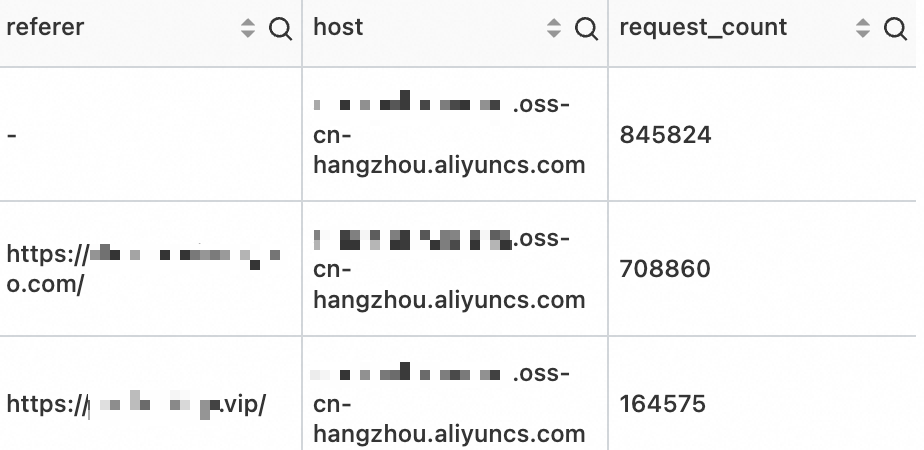
Query: OSS Internet requests for examplebucket that bypass CDN, grouped by source.
* and __topic__: oss_access_log and bucket: examplebucket and host : "examplebucket.oss-cn-hangzhou.aliyuncs.com" not sync_request: cdn | select
  referer,
  host,
  count(*) as request_count
group by
  referer,
  host
order by request_count desc
Query breakdown:
| Clause | Purpose |
|---|---|
host : "examplebucket.oss-cn-hangzhou.aliyuncs.com" | Targets the public OSS endpoint (not CDN) |
not sync_request: cdn | Excludes CDN origin requests |
count(*) as request_count | Counts non-accelerated requests per source |
group by referer, host | Groups results by referring page and host |
order by request_count desc | Ranks sources by request volume, highest first |
Result: The top three non-accelerated request sources for examplebucket are: requests with an empty Referer (direct URL access, such as typing the URL in a browser), and requests from websites with domain names ending in .com and .vip.
The host field in a request can be forged, so the query results are only estimates. Refer to your bill for the actual costs of outbound traffic over the Internet from OSS.
Retrieve batch delete records
When objects are deleted in bulk using DeleteObjects, the details of each deleted object are stored in the HTTP request body. The OSS batch delete log (oss_batch_delete_log) records these operations. Use the Request ID to retrieve the full list of deleted objects.
Method 1: Query by Request ID
Use this method when you have the Request ID of the batch delete operation.
Replace bucketname and request_id with your actual values:
* and __topic__: oss_batch_delete_log and operation : DeleteObjects and bucket: bucketname | select from_unixtime( __time__) as Time,url_decode(object) as objectname,user_agent where request_id = '68xxxxxxxxxxxxxxxxxxxxxx'
Method 2: Find the Request ID first, then query
Use this method when you don't have the Request ID. Locate it using a known object name or the approximate time of the deletion, then use that Request ID to retrieve the full batch delete records.
Find the Request ID using a known object name. Replace
bucketnameand the object name with your actual values:* and __topic__: oss_batch_delete_log and bucket: bucketname | select request_id where url_decode(object) = 'test/001.bin'
Use the Request ID from the result to run the query in Method 1 and retrieve the complete batch delete records.